
WFS1.1.0协议(增删改查)+openlayers4.3.1前端构建+geoserver2.15.1安装部署+shpfile数据源配置
- WFS简介
1.WFS即,Web要素服务,全称WebFeatureService。GIS下,支持对地理要素的插入,更新,删除,检索和发现服务。
2.属于OGC标准下的通信协议。OGC标准下的GIS服务还有:WMS、WMTS、WCS等。
3.服务根据HTTP客户请求返回GML(Geography Markup Language、地理标识语言)数据。 WFS对应于常见桌面程序中的条件查询功能,WFS通过OGC Filter构造查询条件,支持基于空间几何关系的查询,基于属性域的查询,当然还包括基于空间关系和属性域的共同查询。
- 自言自语
网上已经有关于wfs使用方法的文章,零零散散,有的关于insert,有关于delete,不是特别完整。这几天工作上有需求,尽快搭好了geoserver,完整地开发并测试了增删改查。其中查询使用了get请求,其他使用了post。有此文章以自备,提供较为完整的方案,如能帮助他人,再好不过。
- GeoServer安装、部署
1.安装依赖
由于依赖于JDK,所以先按照此依赖。我安装的是1.8版本,具体版本是8u73。安装后,可以不用配置环境变量。

2.安装
安装geoserver2.15.1。注意默认端口号是8080,建议修改为其他,防止冲突。账号和密码可以使用默认的。

3.启动
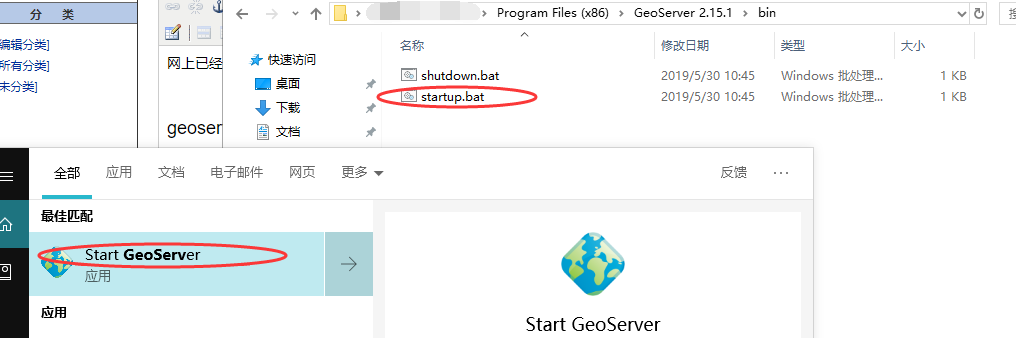
安装完之后,启动服务器。可以使用开始菜单栏的快捷方式,也可以使用文件目录下的脚本。
4.登陆
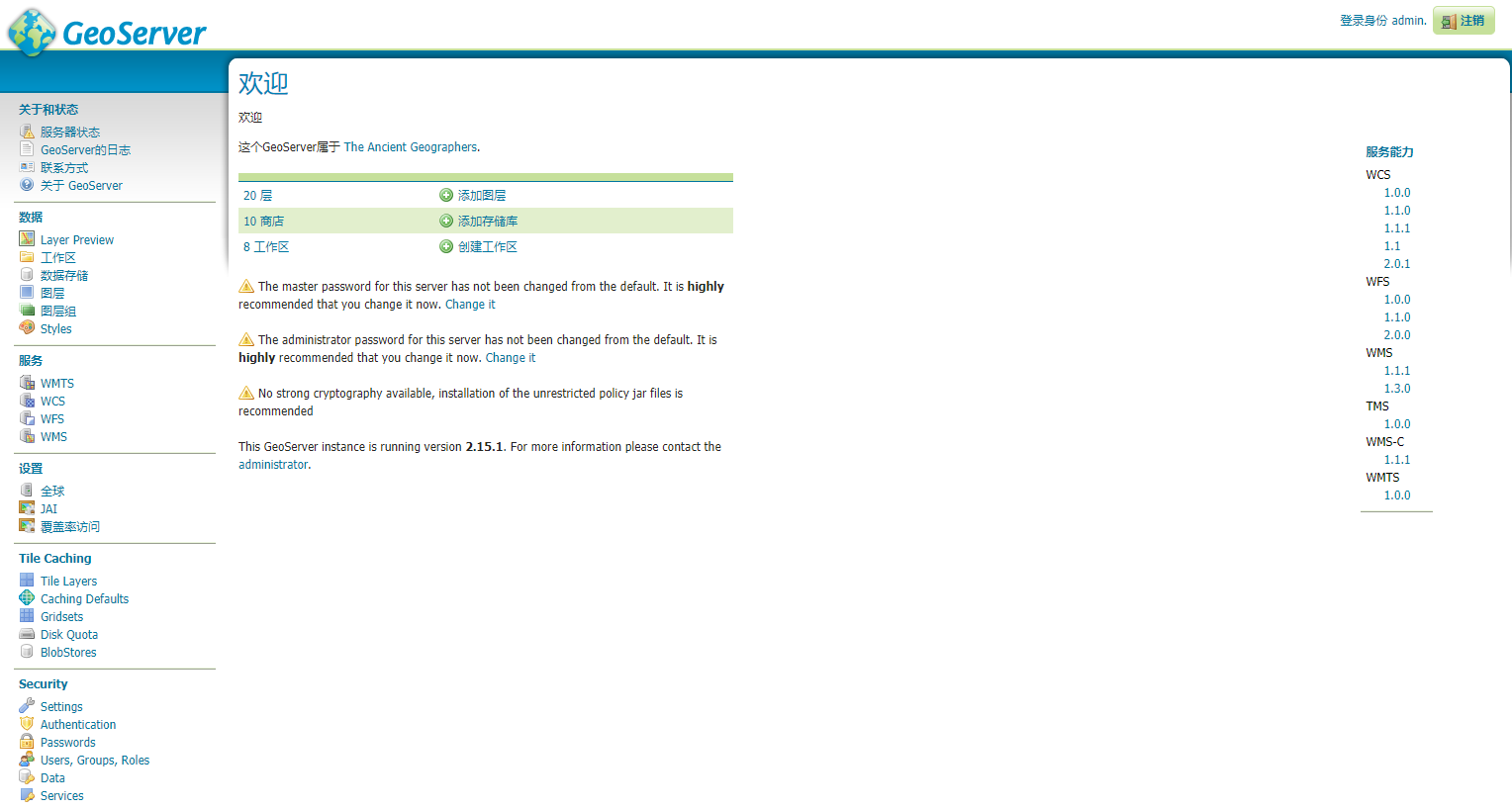
登陆url→localhost:端口号。登陆后的界面:
5.新建工作区
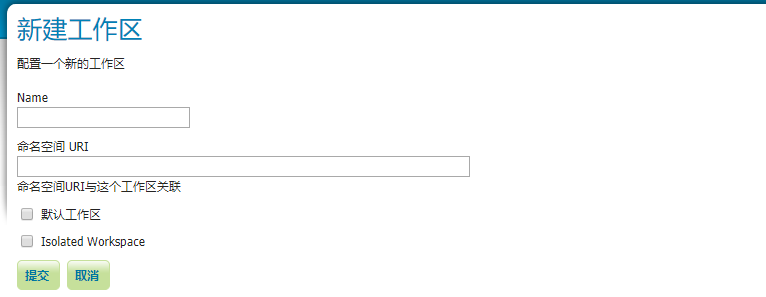
点击左侧“工作区”,添加新的工作区。name和命名空间url,都非常重要,不要随意填写。
6.新建数据源
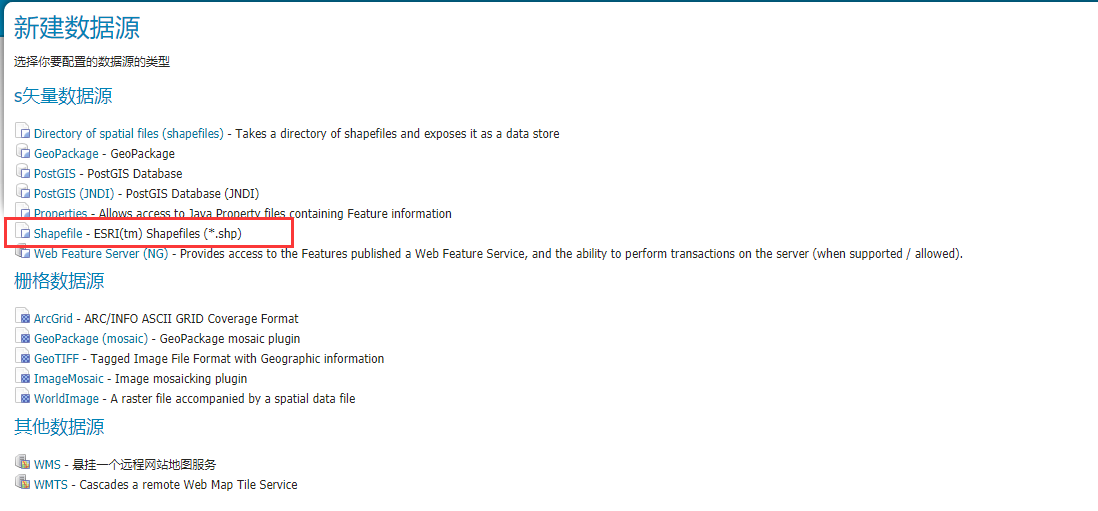
点击左侧“数据存储”,添加新的数据源,选择shpfile类型。指向你的shp文件。工作区选择刚刚自己新建的那个,数据源名称不是很重要。因为最终的数据源名称使用的是你的shp的文件名。
7.预览
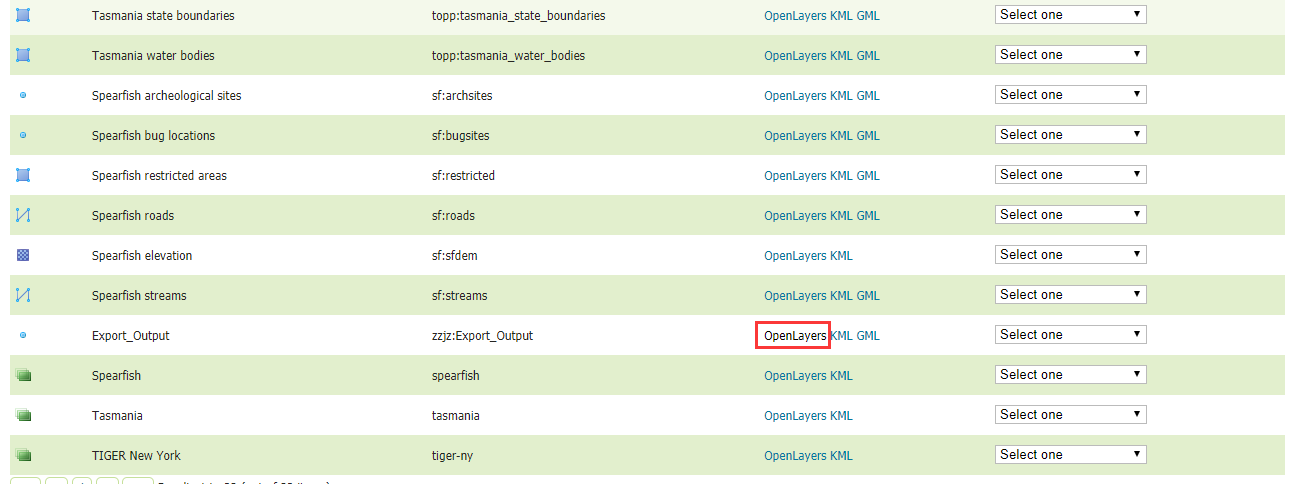
创建完毕后,点击左侧的"Layer Preview",在列表中可以看到自己创建的数据源。点击openlayers,可以预览。
8.开启跨域权限
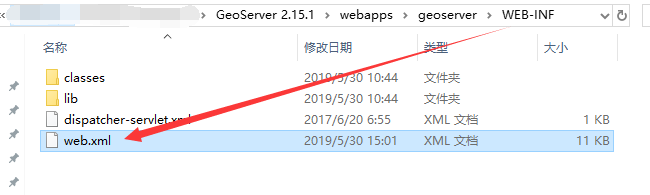
由于GIS应用基本上都构建于其他的服务器,这里必须开启跨域才能访问。打开如下路径的web.xml
需要Uncomment如下代码。可以直接在文本编辑器中搜索Uncomment。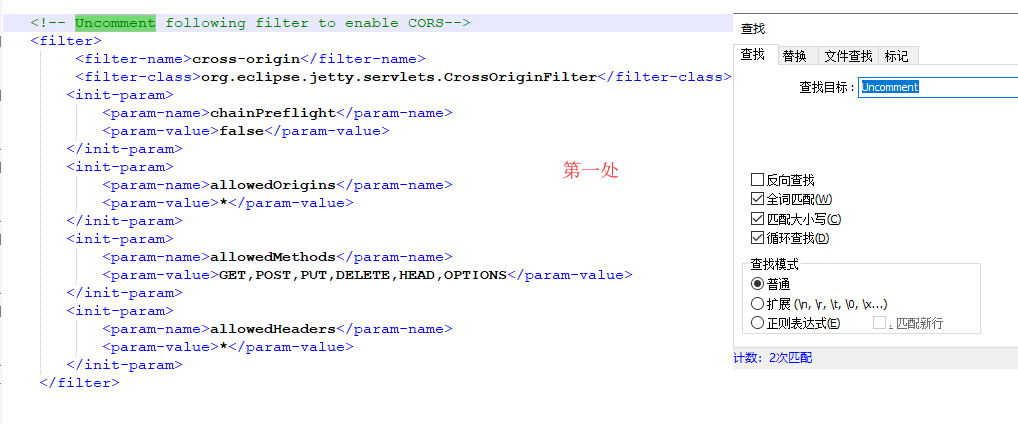
-------------------------------------------------------------------分割线---------------------------------------------------------------------

9.开启读写权限
回到geoserver配置页,左侧Security→Data,在rule path中,找到*.*.W,然后勾选Grant access to any role。至此全部配置完毕

- WFS请求
下面以点要素为例,介绍相关协议。
1.查询
1     var xhr = new XMLHttpRequest();

     xhr.open("GET", "http://localhost:9000/geoserver/zzjz/ows?service=WFS&version=1.0.0&request=GetFeature&typeName=zzjz%3AExport_Output&maxFeatures=50&outputFormat=application%2Fjson", true);

     xhr.onreadystatechange = function () {

      //请求后的处理

     };

     xhr.send();
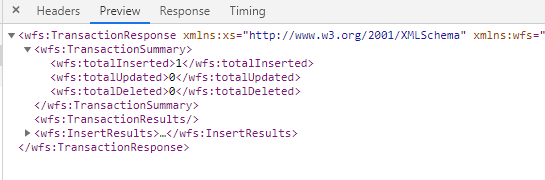
这里的zzjz是工作区名称,typeName是工作区和数据源名称, 以冒号相连,outputFormat是要求服务器返回JSON格式的结果。
实际请求内容:
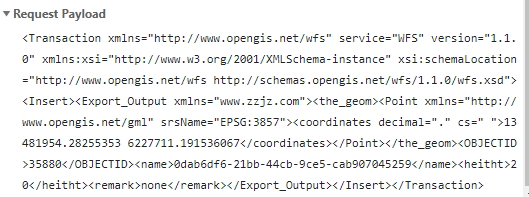
请求成功会见到如下返回response:
2.新增
     var format = new ol.format.WFS();

     var xml = format.writeTransaction([feature], null, null, {

         featureNS: "www.zzjz.com",

         featurePrefix: "ZZJZ",

         featureType: "Export_Output",

         srsName: "EPSG:3857"

     });

     var serializer = new XMLSerializer();

     var featString = serializer.serializeToString(xml);

     featString = featString.replace("geometry", "the_geom");

     featString = featString.replace("geometry", "the_geom");

     featString = featString.replace("pos", 'coordinates decimal="." cs=" "');

     featString = featString.replace("pos", 'coordinates');

     featString = featString.replace(" undefined", '');

     var xhrInsert = new XMLHttpRequest();

     xhrInsert.open("POST", "http://localhost:9000/geoserver/zzjz/ows?service=WFS", true);

     xhrInsert.setRequestHeader('Content-Type', 'text/xml');

     xhrInsert.send(featString);

     xhrInsert.onreadystatechange = function () {

       //请求后的处理

     }
这里使用了ol的方法,将feature要素序列化。需要注意的是,需要将geometry标签替换为the_geom标签,将pos标签替换为coordinates标签,同时将高程数据删除。
3.删除
     var xml = '<Transaction xmlns="http://www.opengis.net/wfs" service="WFS" version="1.1.0" xmlns:xsi="http://www.w3.org/2001/XMLSchema-instance" xsi:schemaLocation="http://www.opengis.net/wfs http://schemas.opengis.net/wfs/1.1.0/wfs.xsd">';

     xml += '<Delete typeName="ZZJZ:Export_Output" xmlns:ZZJZ="www.zzjz.com">';

     xml += '<Filter xmlns="http://www.opengis.net/ogc">'//www.zzjz.com

     xml += '<PropertyIsEqualTo>'

     xml += '<PropertyName>' + propertySTR + '</PropertyName>'

     xml += '<Literal>' + feature.getProperties()[propertySTR] + '</Literal>'

     xml += '</PropertyIsEqualTo>'

     xml += '</Filter>'

     xml += '</Delete>'

     xml += '</Transaction>'

     var xhrDelete = new XMLHttpRequest();

     xhrDelete.open("POST", "http://localhost:9000/geoserver/zzjz/ows?service=WFS", t

     xhrDelete.setRequestHeader('Content-Type', 'text/xml');

     xhrDelete.send(xml);

     xhrDelete.onreadystatechange = function () {

     }
这里使用了自己构建的GML文本,Filter指向删除条件,PropertyName指向属性名称,Literal指向属性值
4.更新(位置信息)
     var xml = '<Transaction xmlns="http://www.opengis.net/wfs" service="WFS" version="1.1.0" xmlns:xsi="http://www.w3.org/2001/XMLSchema-instance" xsi:schemaLocation="http://www.opengis.net/wfs http://schemas.opengis.net/wfs/1.1.0/wfs.xsd">';

     xml += '<Update typeName="ZZJZ:Export_Output" xmlns:ZZJZ="www.zzjz.com">';

     xml += '<Property>'

     xml += '<Name>the_geom</Name>';

     xml += '<Value>'

     xml += '<Point xmlns="http://www.opengis.net/gml" srsName="EPSG:3857">';

     xml += '<coordinates decimal="." cs=",">'

     xml += feature.getGeometry().getCoordinates().toString();

     xml += '</coordinates>'

     xml += '</Point>'

     xml += '</Value>'

     xml += '</Property>'

     xml += '<Filter xmlns="http://www.opengis.net/ogc">'//www.zzjz.com

     xml += '<PropertyIsEqualTo>'

     xml += '<PropertyName>' + propertySTR + '</PropertyName>'

     xml += '<Literal>' + feature.getProperties()[propertySTR] + '</Literal>'

     xml += '</PropertyIsEqualTo>'

     xml += '</Filter>'

     xml += '</Update>'

     xml += '</Transaction>'

     var xhrUpdate = new XMLHttpRequest();

     xhrUpdate.open("POST", "http://localhost:9000/geoserver/zzjz/ows?service=WFS", true);

     xhrUpdate.setRequestHeader('Content-Type', 'text/xml');

     xhrUpdate.send(xml);

     xhrUpdate.onreadystatechange = function () {

     }
更新位置信息,需要在Update标签下设置两个属性:Property、Filter。一个用于更新属性,一个用于设置条件。Property中的Name固定为“the_geom”,Value为要素信息。
5.更新(属性信息)
     var xml = '<Transaction xmlns="http://www.opengis.net/wfs" service="WFS" version="1.1.0" xmlns:xsi="http://www.w3.org/2001/XMLSchema-instance" xsi:schemaLocation="http://www.opengis.net/wfs http://schemas.opengis.net/wfs/1.1.0/wfs.xsd">';

     xml += '<Update typeName="ZZJZ:Export_Output" xmlns:ZZJZ="www.zzjz.com">';

     xml += '<Property>'

     xml += '<Name>OBJECTID</Name>';

     xml += '<Value>'

     xml += feature.getProperties()["OBJECTID"]

     xml += '</Value>'

     xml += '</Property>'

     xml += '<Property>'

     xml += '<Name>heitht</Name>';

     xml += '<Value>'

     xml += feature.getProperties()["heitht"]

     xml += '</Value>'

     xml += '</Property>'

     xml += '<Property>'

     xml += '<Name>remark</Name>';

     xml += '<Value>'

     xml += feature.getProperties()["remark"]

     xml += '</Value>'

     xml += '</Property>'

     xml += '<Filter xmlns="http://www.opengis.net/ogc">'//www.zzjz.com

     xml += '<PropertyIsEqualTo>'

     xml += '<PropertyName>' + propertySTR + '</PropertyName>'

     xml += '<Literal>' + feature.getProperties()[propertySTR] + '</Literal>'

     xml += '</PropertyIsEqualTo>'

     xml += '</Filter>'

     xml += '</Update>'

     xml += '</Transaction>'

     var xhrUpdate = new XMLHttpRequest();

     xhrUpdate.open("POST", "http://localhost:9000/geoserver/zzjz/ows?service=WFS", true);

     xhrUpdate.setRequestHeader('Content-Type', 'text/xml');

     xhrUpdate.send(xml);

     // xhrUpdate.send(featString);

     xhrUpdate.onreadystatechange = function () {

     }
更新属性信息,需要在Update标签下设置两个属性:Property、Filter。一个用于更新属性,一个用于设置条件。Property中的Name为属性名称,Value为属性值。
- 关于Openlayers
Openlayers4.3.1的版本由于工作需要不能更换,所以构建出的文本信息与当前geoserver默认的协议格式有些不同,所以目前只在insert操作时可以使用ol的接口,直接生成文本。其他操作都必须修改大量请求内容。
个人觉得,不依赖接口反而更容易理解协议规范。
WFS1.1.0协议(增删改查)+openlayers4.3.1前端构建+geoserver2.15.1安装部署+shpfile数据源配置的更多相关文章
- 使用iBATIS3.0完成增删改查
使用iBATIS3.0完成增删改查 iBATIS3.0和以前的版本有一些改变,不过学过以前版本的再学习3.0应该不是太难,3.0要求JDK1.5支持,因为其中增加了注解和泛型,这些都是JDK1.5才有 ...
- MVC3.0 EF增删改查的封装类
本人亲身使用EF CodeFirst,因为增删改查都是使用EF内置的一些方法,我想把它封装到一个类调用就行了.结合网上的资料和自己的整理,若有不对的地方望斧正,感激不尽.直接上代码吧.我就用新闻的增删 ...
- YII2.0 数据库增删改查
/*==================== dkhBaseModel 数据库增删改查方法 start ================================*/ //新增一条数据 publ ...
- hbase 2.0.2 增删改查
package cn.hbase.demo; import java.io.IOException; import java.util.Iterator; import org.apache.hado ...
- 用AngularJS实现对表格的增删改查(仅限前端)
<!DOCTYPE html> <html> <head lang="en"> <meta charset="UTF-8&quo ...
- HBase1.2.0增删改查Scala代码实现
增删改查工具类 class HbaseUtils { /** * 获取管理员对象 * * @param conf 对hbase client配置一些参数 * @return 返回hbase的HBase ...
- MyBatis学习 之 二、SQL语句映射文件(2)增删改查、参数、缓存
目录(?)[-] 二SQL语句映射文件2增删改查参数缓存 select insert updatedelete sql parameters 基本类型参数 Java实体类型参数 Map参数 多参数的实 ...
- vue.js+element ui Table+spring boot增删改查
小白初学,不懂的还是太多了,找了好多资料才做出来的先记录一下 1.先用Spring boot创建一个包含了增删改查的项目 2.创建vue.js项目 3.安装Element UI (1)进入项目文件夹下 ...
- MongoDB 3.0.6 安装 增删改查
下载 安装包MSI http://yunpan.cn/cmhHdTPkXZRM2 访问密码 9b6c 上边提供的是 MongoDB 3.0.6 64Bit 的安装包 安装 如果不想直接安装在C盘.. ...
随机推荐
- [Bzoj4832][Lydsy2017年4月月赛]抵制克苏恩 (期望dp)
4832: [Lydsy2017年4月月赛]抵制克苏恩 Time Limit: 1 Sec Memory Limit: 128 MBSubmit: 673 Solved: 261[Submit][ ...
- Spring中使用构造函数实现Beans自动装配
以下内容引用自http://wiki.jikexueyuan.com/project/spring/beans-auto-wiring/spring-autowiring-by-Constructor ...
- ArcGIS Engine 10.2 如何发布服务
http://blog.csdn.net/arcgis_all/article/details/17376397 1 ArcGIS Engine 10.2 如何发布服务 ArcGIS Engine的代 ...
- 使用vscode 编译 sass
由于我在工作中用的编辑器是 vscode ,所以记录一下vscode 编译sass 的配置 vs code 编译saass 1.在扩展里搜索“easy sass”,直接进行安装即可 2.安装后默认已经 ...
- Windows server 2003 + IIS6 搭建Asp.net MVC执行环境
安装.Net Framework4.0. 下载地址: http://www.microsoft.com/zh-cn/download/details.aspx?id=17718 安装WindowsS ...
- java集群优化——多线程下的单例模式
在最初学习设计模式时,我为绝佳的设计思想激动不已,在以后的project中.多次融合设计模式,而在当下的设计中.我们已经觉察出了当初设计模式的高瞻远瞩.可是也有一些不足,须要我们去改进.有人说过.世界 ...
- 初步认识Tensorflow
不多说,直接上干货! TensorFlow 是一个开源软件库,用于使用数据流图进行数值计算.换句话说,即是构建深度学习模型的最佳方式. Tensorflow的官网 https://www.tensor ...
- 安装mint的问题集锦
1.修改DNS解析配置 刚刚安装完mint可能现无法连接源的问题,总是说dns解析错误,这个可能是dns配置文件造成的,因为官网下的mint很可能是配置了国外的dns解析,比如我刚安上时,就是默认配置 ...
- Koa2学习(四)POST请求
Koa2学习(四)POST请求 接受请求 POST请求的数据实体,会根据数据量的大小进行分包传送. 当node.js后台收到post请求时,会以buffer的形式将数据缓存起来.Koa2中通过ctx. ...
- lineage 世系 血缘 容错机制 DAG
当某个RDD的部分数据丢失时候,Saprk会根据记录的世系关系找到该RDD的父RDD以及更上级的RDD.只需要将该RDD依赖的上级RDD重新计算就可以将该RDD进行恢复. Directed Acycl ...