
Flask【第6篇】:Flask中的信号
补充的flask实例化参数以及信号
一、实例化补充
instance_path和instance_relative_config是配合来用的、
这两个参数是用来找配置文件的,当用app.config.from_pyfile('settings.py')这种方式导入配置文件的时候会用到

from flask import Flask,request

app = Flask(__name__,instance_path=None, instance_relative_config=True)

app.config.from_pyfile('settings.py') # C:\Users\Administrator\PycharmProjects\s6day120\1.实例化补充

# instsnce_path:#如果配置了instance_path,就会去找instance里面的文件

# instance_relative_config: #如果设置为True,配置文件就找不到了,就会去找instance里面的settings.py

app.open_session

print(app.config.get("NNN"))

@app.route('/index') # app.route('/index')  f(index)

def index():

    print(request)

    return "xx"

if __name__ == '__main__':

    app.__call__

    app.run()
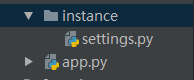
如果设置了instance——releative_config = True,就找不着settings.py文件了,解决办法:就手动创建一个instance的文件夹
二、信号(blinker)
1、flask的内置信号
Flask框架中的信号基于blinker,其主要就是让开发者可是在flask请求过程中定制一些用户行为。说白了也就是flask在列表里面
预留了几个空列表,在里面存东西。信号通过发送通知来帮助你解耦应用。简言之,信号允许某个发送者通知接收者有事情发生了;、

10个信号:

 2. request_started = _signals.signal('request-started')                # 请求到来前执行

 5. request_finished = _signals.signal('request-finished')              # 请求结束后执行

 3. before_render_template = _signals.signal('before-render-template')  # 模板渲染前执行

 4. template_rendered = _signals.signal('template-rendered')            # 模板渲染后执行

 执行2/3/4/5或不执行时出现异常 got_request_exception = _signals.signal('got-request-exception')    # 请求执行出现异常时执行

 6. request_tearing_down = _signals.signal('request-tearing-down')      # 请求执行完毕后自动执行(无论成功与否)

 7. appcontext_tearing_down = _signals.signal('appcontext-tearing-down')# 请求上下文执行完毕后自动执行(无论成功与否)

 1. appcontext_pushed = _signals.signal('appcontext-pushed')            # 请求app上下文push时执行

 8. appcontext_popped = _signals.signal('appcontext-popped')            # 请求上下文pop时执行

 message_flashed = _signals.signal('message-flashed')        # 调用flask在其中添加数据时,自动触发
问题1:特殊的装饰器(@app.before_first_request ;@app.before_request ; @app.after_request)和信号有什么区别?
- 触发信号是没有返回值的,写不写返回值都无所谓
- 特殊的装饰器对返回值是有意义的,当before_request有返回值时就不会执行后续视图函数了,没有返回值的时候才会执行后续函数,而after_request必须有返回值
所以特殊装饰器的功能比信号的功能强大
问题2:通过信号可以做权限吗?
- 本身是做不了的,要想做得用其他的机制配合着来使用,这样做的话会闲的很麻烦,所以我们选择中间件来做
问题3:信号用于做什么呢?
- 只做一些自定义的操作,而且没有返回值
- 降低代码之间的耦合
flask内置信号源码详细
。。。
appcontext_pushed和 appcontext_popped
 1  def full_dispatch_request(self):

 2         # 3、特殊的装饰器:执行被@before_first_request装饰的所有函数

 3         self.try_trigger_before_first_request_functions()

 4         try:

 5             request_started.send(self)   #请求到来前执行信号

 6             #执行@before_request装饰的所有函数

 7             rv = self.preprocess_request()

 8             if rv is None:

 9                 #如果return None就去执行后续视图函数

10                 rv = self.dispatch_request()

11         except Exception as e:

12             rv = self.handle_user_exception(e)

13         #4、执行@after_request装饰的所有的函数,session保存

14         return self.finalize_request(rv)
request_started
1 def _render(template, context, app):

2     """Renders the template and fires the signal"""

3

4     before_render_template.send(app, template=template, context=context) #模板渲染前执行

5     rv = template.render(context)

6     template_rendered.send(app, template=template, context=context)  #模板渲染后执行

7     return rv
before_render_template和template_rendered
1    def finalize_request(self, rv, from_error_handler=False):

 2         response = self.make_response(rv)

 3         try:

 4             response = self.process_response(response)

 5             request_finished.send(self, response=response)

 6         except Exception:

 7             if not from_error_handler:

 8                 raise

 9             self.logger.exception('Request finalizing failed with an '

10                                   'error while handling an error')

11         return response
request_finished
1  def handle_exception(self, e):

 2         exc_type, exc_value, tb = sys.exc_info()

 3

 4         got_request_exception.send(self, exception=e)   #出现异常时触发的信号

 5         handler = self._find_error_handler(InternalServerError())

 6

 7         if self.propagate_exceptions:

 8             if exc_value is e:

 9                 reraise(exc_type, exc_value, tb)

10             else:

11                 raise e

12

13         self.log_exception((exc_type, exc_value, tb))

14         if handler is None:

15             return InternalServerError()

16         return self.finalize_request(handler(e), from_error_handler=True)
got_request_exception
1  def do_teardown_appcontext(self, exc=_sentinel):

2

3         if exc is _sentinel:

4             exc = sys.exc_info()[1]

5         for func in reversed(self.teardown_appcontext_funcs):

6             func(exc)

7         appcontext_tearing_down.send(self, exc=exc)  #请求上下文执行完毕后自动执行(无论成功与否)
appcontext_tearing_down
2、自定义信号(Blinker的使用)
第一步:创建信号
第二步:将函数注册到信号中: 添加到这个列表
第三步: 发送信号
第四步:运行
具体实现:可参考flask源码,写一个自定义信号
from flask import Flask,flash

from flask.signals import _signals

app = Flask(__name__)

xinhao = _signals.signal("xinhao")#创建信号

#定义函数

def wahaha(*args,**kwargs):

    print("娃哈哈",args,kwargs)

def sww(*args,**kwargs):

    print("爽歪歪",args,kwargs)

# 将函数注册到信号中,添加到这个列表

xinhao.connect(wahaha)

xinhao.connect(sww)

@app.route("/zzz")

def zzz():

    xinhao.send(sender='xxx',a1=123,a2=456)  #触发这个信号,执行注册到列表中的所有函数,这里的参数个上面函数的参数一致

    return "发送信号成功"

if __name__ == '__main__':

    app.run(debug=True)

#打印结果

# 娃哈哈 (None,) {'sender': 'xxx', 'a1': 123, 'a2': 456}

# 爽歪歪 (None,) {'sender': 'xxx', 'a1': 123, 'a2': 456}
三、chain模块简单的测试
v1 = [11,22,33,44]

v2 = [1,4,7,5]

from itertools import chain

ff = []

for i in chain(v1,v2):   #chain会把两个列表连接在一块

    ff.append(i)

print(ff)     #[11, 22, 33, 44, 1, 4, 7, 5]
Flask【第6篇】:Flask中的信号的更多相关文章
- Flask最强攻略 - 跟DragonFire学Flask - 第六篇 Flask 中内置的 Session
Flask中的Session非常的奇怪,他会将你的SessionID存放在客户端的Cookie中,使用起来也非常的奇怪 1. Flask 中 session 是需要 secret_key 的 from ...
- Flask最强攻略 - 跟DragonFire学Flask - 第四篇 Flask 中的模板语言 Jinja2 及 render_template 的深度用法
是时候开始写个前端了,Flask中默认的模板语言是Jinja2 现在我们来一步一步的学习一下 Jinja2 捎带手把 render_template 中留下的疑问解决一下 首先我们要在后端定义几个字符 ...
- flask 第六篇 flask内置的session
Flask中的Session非常的奇怪,他会将你的SessionID存放在客户端的Cookie中,使用起来也非常的奇怪 1. Flask 中 session 是需要 secret_key 的 from ...
- Flask最强攻略 - 跟DragonFire学Flask - 第三篇 Flask 中的 request 之 先知道有这么个东西
每个框架中都有处理请求的机制(request),但是每个框架的处理方式和机制是不同的 为了了解Flask的request中都有什么东西,首先我们要写一个前后端的交互 基于HTML + Flask 写一 ...
- Flask最强攻略 - 跟DragonFire学Flask - 第七篇 Flask 中路由系统
Flask中的路由系统其实我们并不陌生了,从一开始到现在都一直在应用 @app.route("/",methods=["GET","POST" ...
- Flask学习【第6篇】:Flask中的信号
实例化补充 instance_path和instance_relative_config是配合来用的.这两个参数是用来找配置文件的,当用app.config.from_pyfile('settings ...
- 第三篇 Flask 中的 request
第三篇 Flask 中的 request 每个框架中都有处理请求的机制(request),但是每个框架的处理方式和机制是不同的 为了了解Flask的request中都有什么东西,首先我们要写一个前 ...
- 第二篇 Flask 中的 Render Redirect HttpResponse
第二篇 Flask 中的 Render Redirect HttpResponse 1.Flask中的HTTPResponse 在Flask 中的HttpResponse 在我们看来其实就是直接返 ...
- 第九篇 Flask 中的蓝图(BluePrint)
第九篇 Flask 中的蓝图(BluePrint) 蓝图,听起来就是一个很宏伟的东西 在Flask中的蓝图 blueprint 也是非常宏伟的 它的作用就是将 功能 与 主服务 分开怎么理解呢? ...
随机推荐
- Spring 缓存注解解析过程
Spring 缓存注解解析过程 通过 SpringCacheAnnotationParser 的 parseCacheAnnotations 方法解析指定方法或类上的缓存注解, @Cacheable ...
- leetcode 27. 移除元素(python)
1. 题目描述 给定一个数组 nums 和一个值 val,你需要原地移除所有数值等于 val 的元素,返回移除后数组的新长度. 不要使用额外的数组空间,你必须在原地修改输入数组并在使用 O(1) 额外 ...
- Spring MVC静态资源处理——<mvc:resources /> ||<mvc:default-servlet-handler />
优雅REST风格的资源URL不希望带 .html 或 .do 等后缀.由于早期的Spring MVC不能很好地处理静态资源,所以在web.xml中配置DispatcherServlet的请求映射,往往 ...
- Quaternions 四元数
四元数是一个乱七八糟得到东西还没搞懂搞懂后再补 先添加unity API transform.rotation 是Quaternionlei类并非Vector3向量 不能进行直接转化 那如何将Vect ...
- LeetCode算法题-Peak Index in a Mountain Array(Java实现)
这是悦乐书的第329次更新,第352篇原创 01 看题和准备 今天介绍的是LeetCode算法题中Easy级别的第199题(顺位题号是852).如果以下属性成立,我们将数组A称为山: A.length ...
- 【Qt开发】QT样式表单 qss的样式优化
QT样式表单 QT的样式表单允许我们在对程序不做任何代码上的更改的情况下轻松改变应用程序的外观. 其思想来源于网页设计中的CSS,即可以将功能设计和美学设计分开. 它的语法和概念和HTML CSS也是 ...
- Go语言入门篇-复合数据类型
复合数据类型 主要讨论四种类型——数组.slice.map和结构体 数组和结构体聚合类型 --数组和结构体都是有固定内存大小的数据结构 --数组:由同构的元素组成——每个数组元素都是完全相同的类型 ...
- mangde 的服务启动
启动命令如下
- vue使用笔记一
1.vue-cli安装 sudo npm install -g @vue/cli 2.查看是否安装成功 vue --version 3.创建项目 vue create hello-world 4.启动 ...
- stringstream istringstream ostringstream 三者的区别
stringstream istringstream ostringstream 三者的区别 说明 ostringstream : 用于执行C风格字符串的输出操作. istringstream : 用 ...