
python-Django框架
常用命令
- 生成应用
python manage.py start app(app_name)
2. 开启服务器
python manage.py runserver 0.0.0.0:8001
3. 声称以及修改数据模型
python manage.py makemigrations app(app_name)
4. 数据库模型移植
python manage.py migrate
5. 使用管理界面之前建立管理员用户(必须在cmd下运行)
python manage.py createsuperuser
ERROR
ERROR:在使用python虚环境(安装了django)的情况下运行manage.py出错
I:\code\python\web\django\django0510>I:\code\python\web\django\djangoenv\Scripts\python manage.py 8001

Traceback (most recent call last):

  File "manage.py", line 10, in <module>

    execute_from_command_line(sys.argv)

  File "I:\code\python\web\django\djangoenv\lib\site-packages\django\core\management\__init__.py", line 350, in execute_from_command_line

    utility.execute()

  File "I:\code\python\web\django\djangoenv\lib\site-packages\django\core\management\__init__.py", line 324, in execute

    django.setup()

  File "I:\code\python\web\django\djangoenv\lib\site-packages\django\__init__.py", line 18, in setup

    apps.populate(settings.INSTALLED_APPS)

  File "I:\code\python\web\django\djangoenv\lib\site-packages\django\apps\registry.py", line 108, in populate

    app_config.import_models(all_models)

  File "I:\code\python\web\django\djangoenv\lib\site-packages\django\apps\config.py", line 202, in import_models

    self.models_module = import_module(models_module_name)

  File "h:\64soft\python27\Lib\importlib\__init__.py", line 37, in import_module

    __import__(name)

  File "I:\code\python\web\django\djangoenv\lib\site-packages\django\contrib\auth\models.py", line 297, in <module>

    class AbstractUser(AbstractBaseUser, PermissionsMixin):

  File "I:\code\python\web\django\djangoenv\lib\site-packages\django\db\models\base.py", line 251, in __new__

    new_class.add_to_class(field.name, new_field)

  File "I:\code\python\web\django\djangoenv\lib\site-packages\django\db\models\base.py", line 299, in add_to_class

    value.contribute_to_class(cls, name)

  File "I:\code\python\web\django\djangoenv\lib\site-packages\django\db\models\fields\__init__.py", line 672, in contribute_to_class

    cls._meta.add_field(self)

  File "I:\code\python\web\django\djangoenv\lib\site-packages\django\db\models\options.py", line 312, in add_field

    self.local_fields.insert(bisect(self.local_fields, field), field)

  File "h:\64soft\python27\Lib\functools.py", line 56, in <lambda>

    '__lt__': [('__gt__', lambda self, other: other < self),

  ......

  File "h:\64soft\python27\Lib\functools.py", line 56, in <lambda>

    '__lt__': [('__gt__', lambda self, other: other < self),

RuntimeError: maximum recursion depth exceeded while calling a Python object
SOLUTION: 修改h:\64soft\python27\Lib\functools.py里的convert,如下
convert = {

        '__lt__': [('__gt__', lambda self, other: not (self < other or self == other)),

                   ('__le__', lambda self, other: self < other or self == other),

                   ('__ge__', lambda self, other: not self < other)],

        '__le__': [('__ge__', lambda self, other: not self <= other or self == other),

                   ('__lt__', lambda self, other: self <= other and not self == other),

                   ('__gt__', lambda self, other: not self <= other)],

        '__gt__': [('__lt__', lambda self, other: not (self > other or self == other)),

                   ('__ge__', lambda self, other: self > other or self == other),

                   ('__le__', lambda self, other: not self > other)],

        '__ge__ ': [('__le__', lambda self, other: (not self >= other) or self == other),

                   ('__gt__', lambda self, other: self >= other and not self == other),

                   ('__lt__', lambda self, other: not self >= other)]

    }
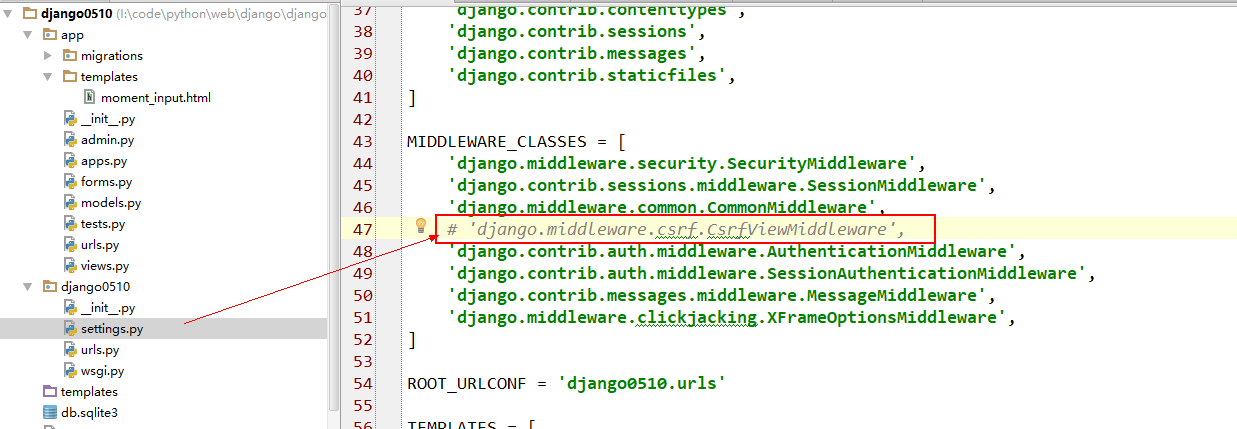
ERROR: 访问url报错Forbidden (CSRF cookie not set.): xxx
SOLUTION: 注释掉setting.py里的下列语句
python-Django框架的更多相关文章
- [Python] Django框架入门
说明:Django框架入门 当前项目环境:python3.5.django-1.11 项目名:test1 应用名:booktest 命令可简写为:python manager.py xxx => ...
- 利用 Python django 框架 输入汉字,数字,字符,等。。转成二维码!
利用 Python django 框架 输入汉字,数字,字符,等..转成二维码! 模块必备:Python环境 + pillow + qrcode 模块 核心代码import qrcode qr = ...
- Python Django框架笔记(五):模型
#前言部分来自Django Book (一) 前言 大多数web应用本质上: 1. 每个页面都是将数据库的数据以HTML格式进行展现. 2. 向用户提供修改数据库数据的方法.(例如:注册.发表评 ...
- Python Django框架笔记(三):django工作方式简单说明和创建用户界面
(一) 说明 简单说明下django的工作方式,并举2个例子. (二) Django工作方式 假定我们有下面这些文件 ,这里在前2篇的基础上增加了 templates目录(存放html文件) 和s ...
- Python Django框架笔记(一):安装及创建项目
#推荐一本书<Python核心编程>(适合有一定基础的),美国人Wesley Chun编写的,京东.淘宝应该都有.我是觉得写的很好,详细.简洁.满满的干货,不像有的书整本看完也没什么用. ...
- python django框架(一)
s4day63内容回顾: 1. 安装 2. 创建用户 + 授权 3. 连接 - 数据库 终端创建数据库(字符编码) - 数据表 终端 ORM pymysql create ...)engine=inn ...
- [Python] Django框架入门5——静态文件、中间件、上传图片和分页
说明: 本文主要描述Django其他的内容,涉及静态文件处理.中间件.上传文件.分页等. 开发环境:win10.Python3.5.Django1.10. 一.静态文件处理 在Django项目的静态文 ...
- python Django框架正式准备工作
之前由于不太了解数据库方面的知识,但经过一段时间的web应用的开发学习,成功的用其他框架连接了数据库,并完成了相关操作,数据爬取也初识了,更了解了python这门语言的语法,但路还很长,因此现在才能正 ...
- python django框架+vue.js前后端分离
本文用于学习django+vue.js实现web前后端分离协作开发.以一个添加和删除数据库书籍应用为实例. django框架官方地址:https://www.djangoproject.com/ vu ...
- Python Django框架笔记(六):模板
(一){%%}和{{ }} {% for post in posts %} <a href=""><h2>{{ post.title }}</h2&g ...
随机推荐
- python的Email提醒
目的意义 使用Email自动发送,有利于实时获取爬取信息,更方便的掌握要闻. 导入相关库 MINEText库定义了发送信息, Header定义了发送的主题 formate定义了收件人和发件人的格式信息 ...
- 网络信息统计netstat|ss|ip
1:netstate[弃用] netstat的作用: 需求 原命令 新命令 1:网络连接 netstat -a ss 2:路由表 netstat -r ip route 3:统计接口 netstat ...
- 树莓派USB存储设备自动挂载并通过脚本实现自动拷贝,自动播放视频,脚本自动升级等功能
需求:首先需要树莓派自动挂载USB设备,然后扫描USB指定目录下文件,将相关文件拷贝至树莓派指定目录,然后通过omxplayer循环播放新拷贝文件视频 1. 树莓派实现USB存储设备自动挂载 树莓派U ...
- Redis 高可用之哨兵模式(二)
上一篇实际操作过程中遇到两个问题 问题一:虽然运行了3个sentinel容器,实际上只有一个sentinel运行 问题出现的原因很简单,三个sentinel用的是同一个挂载配置文件,容器内部的更改直接 ...
- sql server case when
case具有两种格式:简单Case函数和Case搜索函数 简单case函数 实例:CASE sex when '1' then '男' when '2' then'女' els ...
- @RequestMapping-@PathVariable小误区
去掉勾选就可以演示出错误了,一般勾选是为了方便我们Debug调试 会出现500错误: 正确的写法:
- SpringBoot + Vue + nginx项目部署(零基础带你部署)
一.环境.工具 jdk1.8 maven spring-boot idea VSVode vue 百度网盘(vue+springboot+nginx源码): 链接:https://pan.baidu. ...
- vue中添加与删除,关键字搜索
<!DOCTYPE html> <html lang="en"> <head> <meta charset="UTF-8&quo ...
- 框架之一:mybatis
同时加载驱动包 mysql+mybatis 创建bean对应的mapper接口bookMapper package com.imu.mzw.mapper; import java.util.List; ...
- Red Hat Enterprise Linux 6安装好,开启网卡到搭建tftp服务器和安装dnw驱动,安装samba服务器
今天一顿误操作,只能把Red Hat Enterprise Linux 6重新安装,一些必备工作只能重做,重做之后立马把Linux的文件备份,以备不时只需! 开启Linux以太网卡:vim /etc/ ...