
Handsontable 筛选事件
有时候我们需要知道在使用Handsontable时筛选掉了哪些数据,并对这些数据进行处理,可以使用afterFilter事件来进行相关操作。
Handsontable筛选掉的数据没有真的被删除,而是被隐藏了起来,我们需要知道这些被隐藏起来的行号,然后获得相关数据。
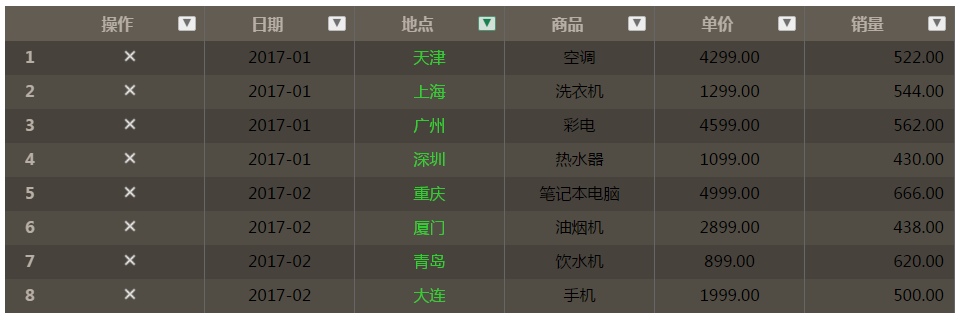
原始数据:

相关代码如下:
<!DOCTYPE html>

<html>

<head>

    <title>handsontable demo</title>

    <meta charset="utf-8">

    <link rel="stylesheet" href="handsontable/htstyle.css">

    <link rel="stylesheet" href="handsontable/htstyle-custom.css">

    <script src="handsontable/jquery-1.12.1.js"></script>

    <script src="handsontable/handsontable.min.js"></script>

</head>

<body>

    <div id="example"></div>

    <script>

        var data = [

            { riqi: '2017-01', address: '北京', goods: '冰箱', price: '3399', sales: 530, del: '' },

            { riqi: '2017-01', address: '天津', goods: '空调', price: '4299', sales: 522, del: '' },

            { riqi: '2017-01', address: '上海', goods: '洗衣机', price: '1299', sales: 544, del: '' },

            { riqi: '2017-01', address: '广州', goods: '彩电', price: '4599', sales: 562, del: '' },

            { riqi: '2017-01', address: '深圳', goods: '热水器', price: '1099', sales: 430, del: '' },

            { riqi: '2017-02', address: '重庆', goods: '笔记本电脑', price: '4999', sales: 666, del: '' },

            { riqi: '2017-02', address: '厦门', goods: '油烟机', price: '2899', sales: 438, del: '' },

            { riqi: '2017-02', address: '青岛', goods: '饮水机', price: '899', sales: 620, del: '' },

            { riqi: '2017-02', address: '大连', goods: '手机', price: '1999', sales: 500, del: '' }

        ];

        function negativeValueRenderer(instance, td, row, col, prop, value, cellProperties) {

            Handsontable.renderers.TextRenderer.apply(this, arguments);

            if (prop == 'address') {

                td.style.color = '#32CD32';

            }

            else if (prop == 'price') {

                //格式化价格数据

                td.innerText = value != null ? numbro(value).format('0.00') : "";

            }

            else if (prop == 'sales') {

                //右对齐

                td.style.textAlign = 'right';

                td.innerText = value != null ? numbro(value).format('0,0.00') : "";

            }

            else if (prop == 'del') {

                //添加自定义的图片,并给图片的chick添加事件

                var escaped = Handsontable.helper.stringify(value),

                  imgdel;

                imgdel = document.createElement('IMG');

                imgdel.src = "handsontable/remove.png";

                imgdel.width = 20;

                imgdel.name = escaped;

                imgdel.style = 'cursor:pointer;';//鼠标移上去变手型

                Handsontable.dom.addEvent(imgdel, 'click', function (event) {

                    hot.alter("remove_row", row);//删除当前行

                });

                Handsontable.dom.empty(td);

                td.appendChild(imgdel);

                td.style.textAlign = 'center';

                return td;

            }

        }

        Handsontable.renderers.registerRenderer('negativeValueRenderer', negativeValueRenderer);

        var hot = new Handsontable(document.getElementById('example'), {

            data: data,

            colHeaders: ['操作', '日期', '地点', '商品', '单价', '销量'], // 使用自定义列头

            rowHeaders: true,

            colWidths: 150, // 设置所有列宽为150像素

            filters: true,

            columnSorting: true,

            sortIndicator: true,

            autoColumnSize: true,

            manualColumnResize: true,

            undo: true,

            redo: true,

            wordWrap: true,

            copyable: true,

            mergeCells: false,

            manualRowResize: true,

            manualRowMove: true,

            manualColumnMove: false,

            renderAllRows: true,

            allowInsertRow: true,

            allowInsertColumn: false,

            fixedColumnsLeft: 1,

            columns: [{

                data: 'del',

                type: 'text'

            }, {

                data: 'riqi',

                type: 'date',

                dateFormat: 'YYYY-MM-DD'

            }, {

                data: 'address',

                type: 'text'

            }, {

                data: 'goods',

                type: 'text'

            }, {

                data: 'price',

                type: 'numeric'

            }, {

                data: 'sales',

                type: 'numeric'

            }],

            contextMenu: ['row_above', 'row_below', '---------', 'remove_row', '---------', 'undo', 'redo', '---------', 'make_read_only', '---------', 'alignment'],

            dropdownMenu: ['filter_by_condition', 'filter_by_value', 'filter_action_bar'],

            cells: function (row, col, prop) {

                var cellProperties = {};

                cellProperties.renderer = "negativeValueRenderer";

                return cellProperties;

            },

        });

        //添加筛选成功后的触发事件

        hot.addHook('afterFilter', function () {

            var plugin = hot.getPlugin('trimRows').trimmedRows;//获取被筛选掉的行号

            if (plugin.length <= 0) {

                return;

            }

            console.log(plugin);

            var DataArray = new Array();

            for (var i = 0; i < plugin.length; i++) {

                //通过行号获取数据

                DataArray.push(hot.getSourceDataAtRow(plugin[i]));

            }

            console.log(DataArray);

        });

    </script>

</body>

</html>
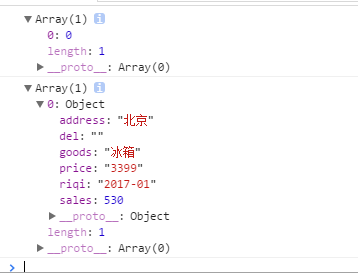
在操作中,我筛选掉了地点为北京的那一行,可以发现浏览器日志如下:
By QJL
Handsontable 筛选事件的更多相关文章
- handsontable插件事件
Hook插件 afterChange (changes: Array, source: String):1个或多个单元格的值被改变后调用 changes:是一个2维数组包含row,prop,o ...
- handsontable前端excel学习笔记
暂时没有好的中文资料,大概找了三遍随便看看,之后重点研究其github 1.Handsontable 学习笔记-Methods 2. Handsontable通用方法 3.handsontable的核 ...
- jquery+easy ui 实现表格列头筛选
示例代码 1.筛选的下拉 <a href="javascript:void(0)" id="filterStatus" class="easyu ...
- SQL Server 扩展事件
SQL Server 扩展事件(Extended Event)是用于服务器的常规事件处理系统,是追踪SQL Server系统运行状态的神器,同时也是一个日志记录工具,扩展事件完全可以取代SQL追踪(S ...
- jQuery 实战读书笔记之第六章:事件本质
理解浏览器事件模型 understandEventModel.html 代码: <!DOCTYPE HTML> <html> <head> <title> ...
- Django多条件筛选查询
转自:https://www.jianshu.com/p/a86281df530e Django多条件筛选查询 主模型只存在外键一对多关系 模型设计 # 快捷筛选状态 class Status(mod ...
- 前端组件:支持多选,支持选项筛选的下拉框选择器(基于Jquery和Bootstrap)
效果图一:多选 效果图二:选项筛选 最后奉献源码,复制出来直接可用 <!DOCTYPE html> <html> <head> <meta charset=& ...
- windows7查看最近使用记录
1.看计算机在哪天运行过~运行了多久! C:\Windows\SchedLgU.txt 2.看你最近运行过什么程序: C:\Windows\Prefetch 3.看你最近打开过什么文件(非程序)和文件 ...
- SQL Server安全(11/11):审核(Auditing)
在保密你的服务器和数据,防备当前复杂的攻击,SQL Server有你需要的一切.但在你能有效使用这些安全功能前,你需要理解你面对的威胁和一些基本的安全概念.这篇文章提供了基础,因此你可以对SQL Se ...
随机推荐
- [记录]Zabbix3.4配置监控Oracle12c的存活状态和表空间使用率
Zabbix3.4配置监控Oracle的存活状态和表空间使用率 1.安装zabbix3.4 agent: # rpm -ivh http://repo.zabbix.com/zabbix/3.4/rh ...
- 本地Git搭建并与Github连接
本地Git搭建并与Github连接 git 小结 1.ubuntu下安装git环境 ubuntu 16.04已经自带git ,可以通过下列命令进行安装与检测是否成功安装 sudo apt-get in ...
- 注册表命令 regedit32
转自 https://zhidao.baidu.com/question/1958216489744783460.html Regedt32.exe 不支持注册表项文件 (.reg) 的导入和导出. ...
- maven 在pom文件下配置默认的jdk版本
在pom.xml中加入这段代码就可以了 <!-- 设置默认的jdk --> <profiles> <profile> <id>jdk1.7</id ...
- Maven项目热部署,修改代码后不用重启tomcat服务器
只需要在pom.xml文件中添加 <build> <finalName>MySSM</finalName> <!-- 指定部署的服务器类型 --> &l ...
- 《android开发艺术探索》读书笔记(十一)--Android的线程和线程池
接上篇<android开发艺术探索>读书笔记(十)--Android的消息机制 No1: 在Android中可以扮演线程角色的有很多,比如AsyncTask.IntentService.H ...
- hdu1242 Rescue bfs+优先队列
直接把Angle的位置作为起点,广度优先搜索即可,这题不是步数最少,而是time最少,就把以time作为衡量标准,加入优先队列,队首就是当前time最少的.遇到Angle的朋友就退出.只需15ms A ...
- ARC068E - Snuke Line
原题链接 题意简述 给出个区间和.求对于任意,有多少个区间包含的倍数. 题解 考虑怎样的区间不包含的倍数. 对于的倍数和,满足的区间不包含任何的倍数. 于是转化为二维数点问题,可以用可持久化线段树解决 ...
- 在SpringBoot中使用FluentValidator验证插件
前言 在我们编写项目的时候,在controller中往往离不开对一些数据的校验.这里并不是说对于这些数据业务上面的校验,而是对这些数据进行空校验或者是长度校验等. 有些时候校验可以省略,根据业务的需要 ...
- RequireJS中的require返回模块
requirejs中定义AMD模块规则如下: define(function(){ var ProductManager={ Create:function(){ console.log(" ...