
【代码笔记】Web-CSS-CSS Align
一,效果图。
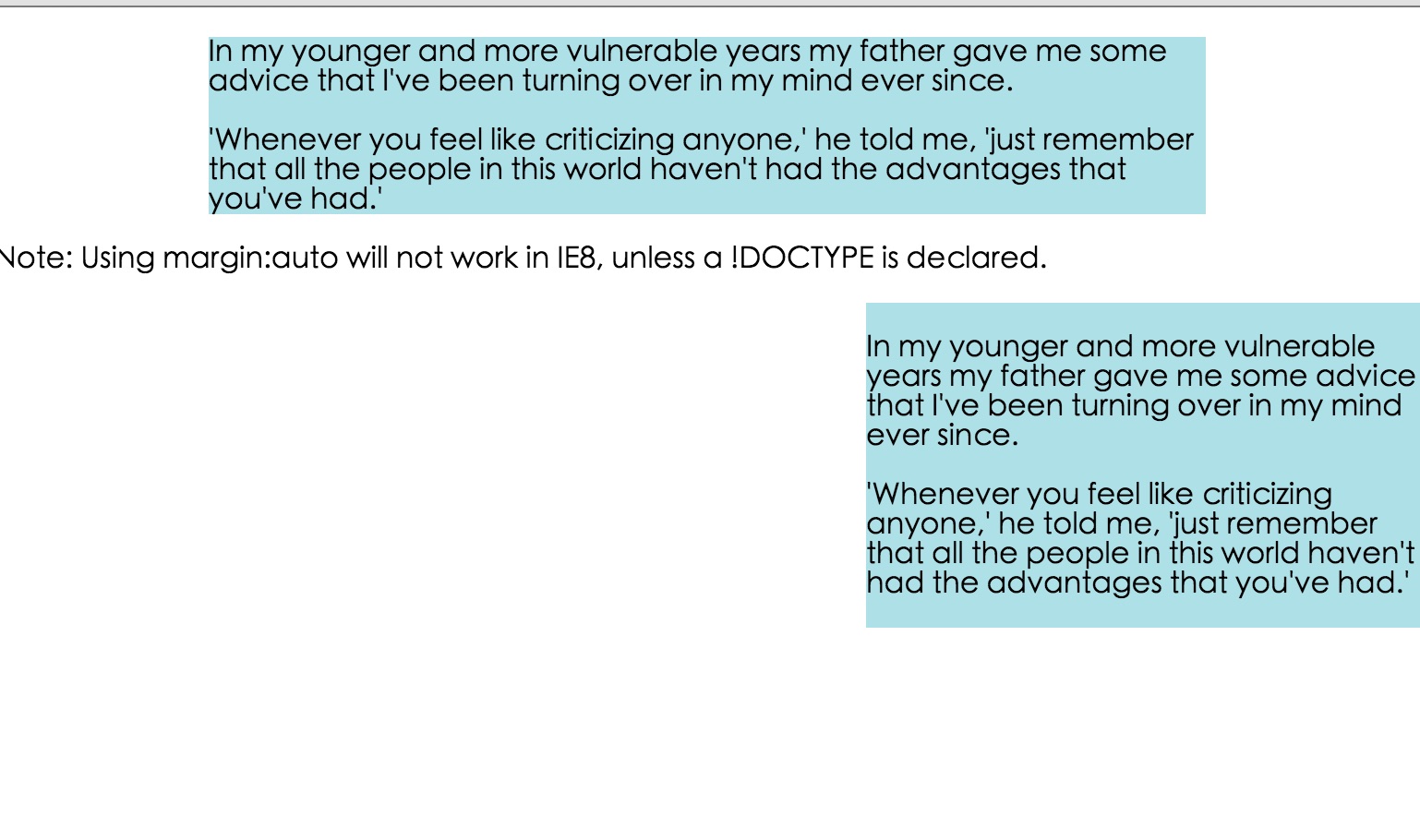
二,代码。

<!DOCTYPE html>

<html>

<head>

    <meta charset="utf-8">

    <title>CSS Align</title>

    <style>

    body {

        margin: 0;

        padding: 0;

    }

    .container {

        position: relative;

        width: 100%;

    }

    .center {

        margin: auto;

        width: 70%;

        background-color: #b0e0e6;

    }

    .right {

        position: absolute;

        right: 0px;

        width: 300px;

        background-color: #b0e0e6;

    }

    .right {

        float: right;

        width: 300px;

        background-color: #b0e0e6;

    }

    </style>

</head>

<body>

    <div class="center">

        <p>In my younger and more vulnerable years my father gave me some advice that I've been turning over in my mind ever since.</p>

        <p>'Whenever you feel like criticizing anyone,' he told me, 'just remember that all the people in this world haven't had the advantages that you've had.'</p>

    </div>

    <p><b>Note: </b>Using margin:auto will not work in IE8, unless a !DOCTYPE is declared.</p>

    <div class="right">

        <p>In my younger and more vulnerable years my father gave me some advice that I've been turning over in my mind ever since.</p>

        <p>'Whenever you feel like criticizing anyone,' he told me, 'just remember that all the people in this world haven't had the advantages that you've had.'</p>

    </div>

    <div class="container">

        <div class="right">

            <p><b>Note: </b>When aligning using the position property, always include the !DOCTYPE declaration! If missing, it can produce strange results in IE browsers.</p>

        </div>

    </div>

    <div class="right">

        <p>In my younger and more vulnerable years my father gave me some advice that I've been turning over in my mind ever since.</p>

        <p>'Whenever you feel like criticizing anyone,' he told me, 'just remember that all the people in this world haven't had the advantages that you've had.'</p>

    </div>

</body>

</html>
参考资料:《菜鸟教程》
【代码笔记】Web-CSS-CSS Align的更多相关文章
- Python学习笔记整理总结【web基础】【web/HTML/CSS/JavaScript/DOM/jQuery】
一.HTML HTML是英文Hyper Text Mark-up Language(超文本标记语言)的缩写,他是一种制作万维网页面标准语言(标记).相当于定义统一的一套规则,大家都来遵守他,这样就可以 ...
- WEB前端 CSS(非布局)
目录 WEB前端 CSS CSS引入方式 CSS结构 CSS选择器 直接选择器 组合选择器 分组选择器 也叫并集选择器 属性选择器 伪类选择器 伪元素选择器 CSS选择器是一个查找的过程,高效的查找影 ...
- 《编写高质量代码:Web 前端开发修炼之道》 笔记与读后感
编写高质量代码:Web 前端开发修炼之道/曹刘阳著. —北京:机械工业出版社,2010.5 第一版 涉及到的知识点: 1. CSS Sprites 在国内很多人叫css精灵,是一种网页图片应用处理方式 ...
- CSS3基础——笔记+实战案例(CSS基本用法、CSS层叠性、CSS继承性)
CSS3基础——笔记 CSS是Cascading Style Sheet的缩写,翻译为"层叠样式表" 或 "级联样式表".CSS定义如何显示HTML的标签央视, ...
- Tridiv:基于 Web 的 CSS 编辑器,创建炫丽 3D 图形
Tridiv 是一个基于 Web 的编辑器,使用 CSS 创建 3D 形状.它提供了一个传统的四个面板的操作界面,给出了从每个平面的视图,以及一个预览窗格中示出的最终的效果.使用 Tridiv 可以创 ...
- @import————————css代码内部链接另外css
在css代码里这样可以链接另外的css @import url("style.css"); @import语法结构 @import + 空格+ url(CSS文件路径地址); ...
- Web云笔记--CSS
CSS CSS CSS Web自学第二阶段之CSS 参考资料:<Head First HTML&CSS>(中文第二版)(美国)弗里昂ISBN:9787508356464 中国电力出 ...
- 写给自己的web总结——css篇(1)
上一篇写了关于html的知识,算是小试牛刀,这次来尝试写一下css. 初步了解css css的全称为cascading style sheet-- 层叠样式表,通过编入代码来对html里的标签做出各种 ...
- Web前端-CSS必备知识点
Web前端-CSS必备知识点 css基本内容,类选择符,id选择符,伪类,伪元素,结构,继承,特殊性,层叠,元素分类,颜色,长度,url,文本,字体,边框,块级元素,浮动元素,内联元素,定位. 链接: ...
- 前端笔记 (2.CSS)
知识点借鉴于慕课网,菜鸟教程和w3shool CSS方面: CSS全称为“层叠样式表”,它主要是用于定义HTML内容在浏览器内的显示样式,如文字大小.颜色.字体加粗等. 使用CSS样式的一个好处是通过 ...
随机推荐
- SpringCloud学习系列之五-----配置中心(Config)和消息总线(Bus)完美使用版
前言 在上篇中介绍了SpringCloud Config的使用,本篇则介绍基于SpringCloud(基于SpringBoot2.x,.SpringCloud Finchley版)中的分布式配置中心( ...
- Windows代码,添加一个节,以及RVA跟FOA互相转化,以及内存文件对齐代码.
/ 1.修改文件头节个数 +1 2.修改ImageBase 3.遍历节表,拷贝最后一个节表到下面 4.修改节的虚拟大小(节表.virtualSize) 5.修改节的虚拟地址(RVA 节表.virtua ...
- 企业移动应用和Smobiler
www.smobiler.com 什么是企业移动应用? 能够通过一种方式来为客户.合作伙伴和员工交付信息和服务,从而帮助其增加收入,提高业务敏捷性和生产力的移动端产品,我们称之为企业移 ...
- ACM入门之OJ~
所谓OJ,顾名思义Online Judge,一个用户提交的程序在Online Judge系统下执行时将受到比较严格的限制,包括运行时间限制,内存使用限制和安全限制等.用户程序执行的结果将被Online ...
- vue3+typescript引入外部文件
vue3+typescript中引入外部文件有几种方法 (eg:引入echarts) 第一种方法: 1 indext.html中用script引入 <div id="app" ...
- Redis- 简单操作命令
1.进入. 退出 redis-cli exit 2.五种类型: 字符串: 字符串基本操作: 设置: SET key value 获取: GET key 多重赋值: MSET k1 v1 k2 v2 . ...
- Windows Server 2016-图形化新建域用户(一)
上章节我们介绍了有关OU组织单位的日常管理,本章我们将对域用户的创建进行简单介绍,常规的操作方法是通过管理控制台图形化手工创建,具体操作方法如下: 1.常规管理控制台 Active Directory ...
- Storm入门(十四)Trident API Overview
The core data model in Trident is the "Stream", processed as a series of batches. A stream ...
- Activity 关于生命周期一些问题的实践验证
Activity 关于生命周期一些问题的实践验证 本文内容 1. 如何验证问题 2. 正常情况下的生命周期 3. 由活动 A 启动活动 B 时,活动 A 的 onpause() 和 B 的 onRes ...
- 线性回归预测PM2.5----台大李宏毅机器学习作业1(HW1)
一.作业说明 给定训练集train.csv,要求根据前9个小时的空气监测情况预测第10个小时的PM2.5含量. 训练集介绍: (1)CSV文件,包含台湾丰原地区240天的气象观测资料(取每个月前20天 ...