
Ueditor百度编辑器插件的安装
[TOC]
插件下载地址:
百度ueditor(海马网盘):https://pan.baidu.com/s/1yik8haZNH46SkIEZNcSIvQ 密码:appt
百度ueditor含使用方法(童攀网盘):链接: https://pan.baidu.com/s/1jI88b90 密码: c9in
1. 引入
ueditor.config.js
ueditor.all.min.js
lang/zh-cn/zh-cn.js
<script src="__plus__/ueditor/ueditor.config.js"></script>

<script src="__plus__/ueditor/ueditor.all.min.js"></script>

<script src="__plus__/ueditor/lang/zh-cn/zh-cn.js"></script>
2. 编辑器显示处 id="content"
<textarea id="content" name="content"></textarea>
3.底部
<script type="text/javascript">

    //实例化编辑器

    //建议使用工厂方法getEditor创建和引用编辑器实例,如果在某个闭包下引用该编辑器,直接调用UE.getEditor('editor')就能拿到相关的实例

    UE.getEditor('content',{initialFrameWidth:1500,initialFrameHeight:400,});

</script>
效果:

4.ueditor编辑器按钮配置方法
定制工具栏图标
UEditor 工具栏上的按钮列表可以自定义配置,只需要通过修改配置项就可以实现需求
配置项修改说明
修改配置项的方法:
- 方法一:修改 ueditor.config.js 里面的 toolbars
js方法
<script type="text/javascript">

//实例化编辑器

//建议使用工厂方法getEditor创建和引用编辑器实例,如果在某个闭包下引用该编辑器,直接调用UE.getEditor(‘editor’)就能拿到相关的实例

UE.getEditor(‘content’,{initialFrameWidth:700,initialFrameHeight:400, toolbars: [[‘bold’, ‘italic’, ‘underline’, ‘fontborder’, ‘strikethrough’, ‘superscript’, ‘subscript’,

‘removeformat’, ‘formatmatch’, ‘autotypeset’, ‘blockquote’, ‘pasteplain’, ‘|’, ‘forecolor’, ‘backcolor’, ‘insertorderedlist’, ‘insertunorderedlist’,

‘selectall’, ‘cleardoc’]]});

</script>

>```

2. 方法二:实例化编辑器的时候传入 toolbars 参数(写在script代码块里)

>`var ue = UE.getEditor(‘container’);`

简单列表-注意toolbars数组里面只有一个数组时,编辑器上只有会有一行按钮,没有换行

toolbars: [[‘fullscreen’, ‘source’, ‘undo’, ‘redo’, ‘bold’]]

若想有多行列表-toolbars数组里面要有多个数组,每个数组占一行

例子:

把下面的代码放入高度后面:

```html

toolbars: [['fullscreen', 'source', 'undo', 'redo','bold', 'italic', 'underline', 'fontborder', 'strikethrough', 'superscript', 'subscript','removeformat', 'formatmatch', 'autotypeset', 'blockquote', 'pasteplain', '|', 'forecolor', 'backcolor', 'insertorderedlist', 'insertunorderedlist','selectall', 'cleardoc']]
<script type="text/javascript">

//实例化编辑器

//建议使用工厂方法getEditor创建和引用编辑器实例,如果在某个闭包下引用该编辑器,直接调用UE.getEditor('editor')就能拿到相关的实例

UE.getEditor('content',{initialFrameWidth:800,initialFrameHeight:400,toolbars: [['fullscreen', 'source', 'undo', 'redo','bold', 'italic', 'underline', 'fontborder', 'strikethrough', 'superscript', 'subscript','removeformat', 'formatmatch', 'autotypeset', 'blockquote', 'pasteplain', '|', 'forecolor', 'backcolor', 'insertorderedlist', 'insertunorderedlist','selectall', 'cleardoc']]});

</script>
效果:
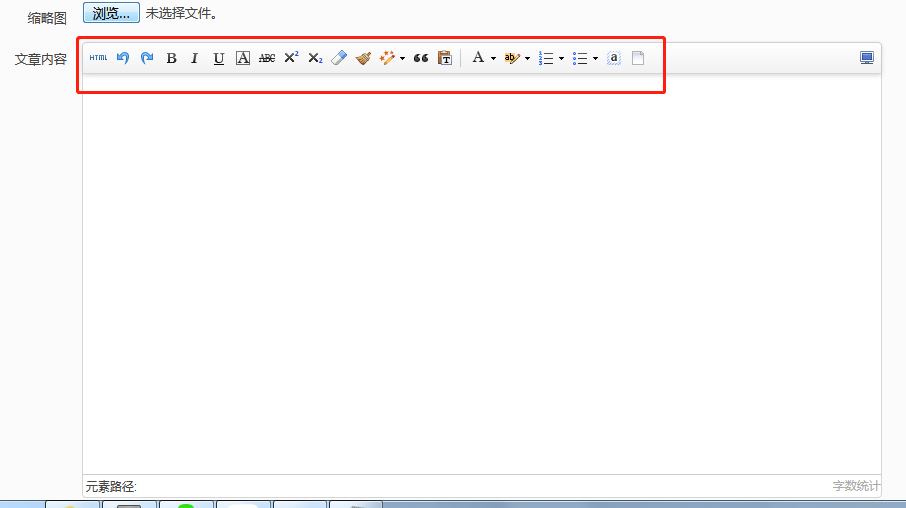
更多配置参考
https://www.cnblogs.com/52lnamp/p/9232919.html
按钮说明:
工具栏按钮分割线
配置项里用竖线 ‘|’ 代表分割线
完整的按钮列表
toolbars: [[‘anchor’, //锚点’undo’, //撤销’redo’, //重做’bold’, //加粗’indent’, //首行缩进’snapscreen’, //截图’italic’, //斜体’underline’, //下划线’strikethrough’,
//删除线’subscript’, //下标’fontborder’, //字符边框’superscript’, //上标’formatmatch’, //格式刷’source’, //源代码’blockquote’, //引用’pasteplain’, //纯文本粘贴模式’selectall’,
//全选’print’, //打印’preview’, //预览’horizontal’, //分隔线’removeformat’, //清除格式’time’, //时间’date’, //日期’unlink’, //取消链接’insertrow’, //前插入行’insertcol’,
//前插入列’mergeright’, //右合并单元格’mergedown’, //下合并单元格’deleterow’, //删除行’deletecol’, //删除列’splittorows’, //拆分成行’splittocols’, //拆分成列’splittocells’,
//完全拆分单元格’deletecaption’, //删除表格标题’inserttitle’, //插入标题’mergecells’, //合并多个单元格’deletetable’, //删除表格’cleardoc’, //清空文档’insertparagraphbeforetable’,
//”表格前插入行”‘insertcode’, //代码语言’fontfamily’, //字体’fontsize’, //字号’paragraph’, //段落格式’simpleupload’, //单图上传’insertimage’, //多图上传’edittable’, //表格属性’edittd’,
//单元格属性’link’, //超链接’emotion’, //表情’spechars’, //特殊字符’searchreplace’, //查询替换’map’, //Baidu地图’gmap’, //Google地图’insertvideo’, //视频’help’, //帮助’justifyleft’,
//居左对齐’justifyright’, //居右对齐’justifycenter’, //居中对齐’justifyjustify’, //两端对齐’forecolor’, //字体颜色’backcolor’, //背景色’insertorderedlist’, //有序列表’insertunorderedlist’,
//无序列表’fullscreen’, //全屏’directionalityltr’, //从左向右输入’directionalityrtl’, //从右向左输入’rowspacingtop’, //段前距’rowspacingbottom’, //段后距’pagebreak’, //分页’insertframe’,
//插入Iframe’imagenone’, //默认’imageleft’, //左浮动’imageright’, //右浮动’attachment’, //附件’imagecenter’, //居中’wordimage’, //图片转存’lineheight’, //行间距’edittip ‘, //编辑提示’customstyle’,
//自定义标题’autotypeset’, //自动排版’webapp’, //百度应用’touppercase’, //字母大写’tolowercase’, //字母小写’background’, //背景’template’, //模板’scrawl’, //涂鸦’music’, //音乐’inserttable’,
//插入表格’drafts’, // 从草稿箱加载’charts’, // 图表]]
百度编辑器ueditor上传图片顺序乱掉修改方法
https://blog.csdn.net/love545242884/article/details/76121303
public/rap/admin/lib/ueditor/1.4.3/dialogs/attachment/attachment.js里
_this.fileList.push(json);
改为
_this.fileList[$file.index()] = json;
public/rap/admin/lib/ueditor/1.4.3/dialogs/image/image.js里
_this.imageList.push(json);
改为
_this.imageList[$file.index()] = json;
百度ueditor使图片在编辑器中自适应大小
https://blog.csdn.net/sunny327/article/details/86580097
public/rap/admin/lib/ueditor/1.4.3/themes/iframe.css里添加代码
img {

    max-width:100%;/*图片自适应宽度*/

}

body {

    overflow-y:scroll !important;

}

.view {

    word-break: break-all;

}

.vote_area {

    display: block;

}

.vote_iframe {

    background-color: transparent;

    border: 0 none;

    height: 100%;

}

#edui1_imagescale{display:none !important;} /*去除点击图片后出现的拉伸边框*/
Ueditor百度编辑器插件的安装的更多相关文章
- 织梦替换ueditor百度编辑器,支持图片水印 教程
1下载ueditor百度编辑器 2 把下载的zip解压得到ueditor文件夹,把解压到的ueditor文件夹扔进你网站的include文件夹去 3 打开 /include/inc/inc_fun_f ...
- UEditor百度编辑器,工具栏上自定义添加一个普通按钮
添加一个名叫“hougelou”的普通按钮在工具栏上: 第一步:找到ueditor.config.js文件中的toolbars数组,增加一个“hougelou”字符串,然后找到labelMap数组,对 ...
- [UEditor]百度编辑器配置总结
前端配置文件ueditor.config.js 前端有两个重要的配置属性: UEDITOR_HOME_URL: 配置百度编辑器的资源目录路径,你可以手动指定此路径,默认是有URL变量指定,而URL变量 ...
- ueditor 百度编辑器图片上传 接 node.js 及一些前端自定义
百度编辑器 用node.js 做服务端 demo 大神已整理的 记录一下 以作参考 https://github.com/netpi/ueditor 1. 前端图片工具栏上传input file在这里 ...
- UEditor百度编辑器,工具栏自定义添加一个普通按钮
根据网上前辈提供的,还真的不错,下面也整理一下 添加一个名叫“macros”的普通按钮在工具栏上: 第一步:找到ueditor.config.js文件中的toolbars数组,增加一个“macros” ...
- Ueditor百度编辑器中的 setContent()方法的使用
百度编辑器Ueditor所提供的setContent()方法作用是:设置或者改变编辑器里面的文字内容或html内容 函数说明:setContent(string,boolean); 参数string ...
- ThinkPHP3.1.3 整合 UEditor百度编辑器 图片上传
第一步.前端模板实例化百度编辑器 <js file='__ROOT__/Data/UEditor/ueditor.config.js' /> <js file='__ROOT__/D ...
- Ueditor百度编辑器中 setContent()方法的使用
百度编辑器Ueditor所提供的setContent()方法作用是:设置或者改变编辑器里面的文字内容或html内容 函数说明:setContent(string,boolean); 参数string ...
- DEDECMS:DEDE整合(UEditor)百度编辑器以后,栏目内容、单页无法保存内容的bug处理方法
已经整合过百度编辑器的站长们或许会发现,在编辑单页文档和栏目内容的时候,百度编辑器不能够保存新增或已修改数据,经过排查后发现问题出现在catalog_edit.htm.catalog_add.htm这 ...
随机推荐
- 2019年我的nodejs项目选型
选型项目比较激进.发现基于 go 语言的工具变多了.
- Docker for mac 安装 kong
首先安装一个 PostgreSQL,选的版本是 9.5 $ docker run -d --name kong-database \ -p : \ -e "POSTGRES_USER=kon ...
- JavaSE_3_面向对象
1.wait方法底层原理 wait是object中的方法,可以暂停线程,会释放对象锁,不像sleep方法,线程休眠期依然持有锁,通过调用notify或notifyAll方法唤醒线程. lock.wai ...
- 阐述简称PO,VO,TO,BO,DAO,POJO
PO(persistant object) 持久对象 在o/r映射的时候出现的概念,如果没有o/r映射,没有这个概念存在了.通常对应数据模型(数据库),本身还有部分业务逻辑的处理.可以看成是与数据库中 ...
- 谷歌插件 JSON-Handle
JSON-Handle http://jsonhandle.sinaapp.com/ 点击下载 插件下载后,在浏览器输入:chrome://extensions/ 将下载后的文件拖入 chrome浏览 ...
- IOS微信6.7.4输入框失去焦点,软键盘关闭后,被撑起的页面无法回退到原来正常的位置
近期在开发微信H5页面时碰到这个问题,如图,软键盘弹起后,若原输入框被遮挡,页面整体将会上移,然而当输入框失焦,软键盘收起后,页面未恢复,这也是ios的微信版本更新6.7.4之后才遇到的bug. 目前 ...
- 改善WPF应用程序性能的10大方法 (转发)
WPF(Windows Presentation Foundation)应用程序在没有图形加速设备的机器上运行速度很慢是个公开的秘密,给用户的感觉是它太吃资源了,WPF程序的性能和硬件确实有很大的关系 ...
- React 官网列子学习
一个有状态的组件 除了接受输入数据(通过 this.props ),组件还可以保持内部状态数据(通过this.state ).当一个组件的状态数据的变化,展现的标记将被重新调用render() 更新. ...
- LeetCode Word Ladder 找单词变换梯
题意:给出两个单词,以及一个set集合,当中是很多的单词.unordered_set是无序的集合,也就是说找的序列也是无序的了,是C++11的标准,可能得升级你的编译器版本了.要求找出一个从start ...
- hdu-3371 Connect the Cities---kruskal
题目链接: http://acm.hdu.edu.cn/showproblem.php?pid=3371 题目大意: 给n个城市,m条路,k组已知路,求最小费用联通所有城市: 解题思路: kruska ...