
Spring MVC Flash Attribute 的讲解与使用示例
转自:https://www.oschina.net/translate/spring-mvc-flash-attribute-example
Spring MVC 3.1版本加了一个很有用的特性,Flash属性,它能解决一个长久以来缺少解决的问题,一个POST/Redirect/GET模式问题。
正常的MVC Web应用程序在每次提交都会POST数据到服务器。一个正常的Controller (被注解 @Controller标记)从请求获取数据和处理它 (保存或更新数据库)。一旦操作成功,用户就会被带到(forward)一个操作成功的页面。传统上来说,这样的POST/Forward/GET模式,有时候会导致多次提交问题. 例如用户按F5刷新页面,这时同样的数据会再提交一次。
为了解决这问题, POST/Redirect/GET 模式被用在MVC应用程序上. 一旦用户表单被提交成功, 我们重定向(Redirect)请求到另一个成功页面。这样能够令浏览器创建新的GET请求和加载新页面。这样用户按下F5,是直接GET请求而不是再提交一次表单。

Image credit: Wikipedia

Idiot_s_Sky
|
|
虽然这一方法看起来很完美,并且解决了表单多次提交的问题,但是它又引入了一个获取请求参数和属性的难题. 通常当我们生成一次http重定向请求的时候,被存储到请求数据会丢失,使得下一次GET请求不可能访问到这次请求中的一些有用的信息. Flash attributes
为了这样做, Flash 特性使用了两个集合. FlashMap 被用来管理 flash attributes 而 FlashMapManager 则被用来存储,获取和管理 FlashMap 实体. 对于每一次请求一个 “input” flash map 会被创建,来存储来自任何之前请求的 flash attribute 还有一个 “output” flash map 会被创建,来存储任何我们存储在这个请求中的,之后的请求参数. |

leoxu
|

使用要想在你的 Spring MVC 应用中使用 Flash attribute,要用 3.1 版本或以上。并且要在 spring-servlet.xml 文件中加入 mvc:annotation-driven。
这些都完成之后,Flash attribute 就会自动设为“开启”,以供使用了。只需在你的 Spring controller 方法中加入RedirectAttributes redirectAttributes。
addFlashAttribute 方法会自动向 output flash map 中添加给定的参数,并将它传递给后续的请求。 我们来看看一个使用 Flash attribute 来完成 POST/Redirect/GET 并传递一些信息的完整实例吧。 Flash Attribute 实例下面的应用向用户显示一个表单。当用户填完数据,并提交表单之后,页面会重定向到另一个显示成功信息的页面。在这个重定向的新页面中,会显示用户刚才输入的信息。 |

戴仓薯
|
第1步: 需要的 JAR 和项目结构如果你用 Maven 来做依赖管理,用下面的 dependencies 来添加 Spring 3.1 MVC 的支持。
或者,你可以下载以下 JAR 文件,然后把它们放在 /WEB-INF/lib 文件夹下。
第2步: Spring 配置要为 web 项目添加 Spring 支持,需要在 web.xml 中添加 DispatcherServlet 。
然后,spring-servlet 使用 mvc:annotation-driven 来支持 mvc ,并且会扫描项目中的 context:component-scan 标签。 spring-servlet.xml
第3步: Spring Controller – RedirectAttributesController 的代码使用 Customer.java 对象作为 bean 来保存客户信息。 Customer.java
CustomerController 类有3个方法。showForm 方法对应 URL /form ,用来显示 Add New Customer 表单。addCustomer 方法对应 URL /addcustomer ,用来处理 POST 请求。 CustomerController.java
注意我们在 addCustomer 方法中是如何使用 redirectAttributes 参数来添加 flash attribute 的。并且,我们是用 addFlashAttribute 方法来设置新的参数为 flash attribute。 |
戴仓薯
|
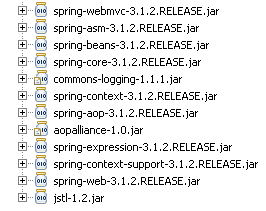
第4步: View 层
add customer.JSP 文件显示一个 Add New Customer(添加新客户)表单。
add_customer.jsp
|
1
2
3
4
5
6
7
8
9
10
11
12
13
14
15
16
17
18
19
20
21
22
23
24
25
26
27
28
29
30
|
<%@taglib uri="http://www.springframework.org/tags/form" prefix="form"%><html><body> <h1>Add New Customer</h1> <form:form action="addcustomer.html" method="post" commandName="customer"> <table> <tr> <td><form:label path="firstname">Firstname</form:label></td> <td><form:input path="firstname" /> </td> </tr> <tr> <td><form:label path="lastname">Lastname</form:label></td> <td><form:input path="lastname" /> </td> </tr> <tr> <td><form:label path="age">Age</form:label></td> <td><form:input path="age" /> </td> </tr> <tr> <td><form:label path="email">Email</form:label> <td><form:input path="email" /> </td> </tr> <tr> <td colspan="2"><input type="submit" value="Add Customer" /> </td> </tr> </table> </form:form></body></html> |
show_customer.jsp 简单地显示客户的名和姓,以及用 flash attributes 设置的成功信息。
show_customer.jsp
|
1
2
3
4
5
6
7
|
<%@taglib uri="http://www.springframework.org/tags/form" prefix="form"%><html><body><h1>${message}</h1> ${customer.lastname}, ${customer.firstname} added successfully..</body></html> |
Demo:
执行这个 web 项目即可。
URL: http://localhost:8080/SpringMVC_Flash_Attribute_Maven_example/form.html


下载源代码
Spring MVC Flash Attribute 的讲解与使用示例的更多相关文章
- Spring MVC Flash Attribute
转自:Spring MVC Flash Attribute 的讲解与使用示例 Spring MVC 3.1版本加了一个很有用的特性,Flash属性,它能解决一个长久以来缺少解决的问题,一个POST/R ...
- 理解Spring MVC Model Attribute和Session Attribute
作为一名 Java Web 应用开发者,你已经快速学习了 request(HttpServletRequest)和 session(HttpSession)作用域.在设计和构建 Java Web 应用 ...
- 【译】理解Spring MVC Model Attribute 和 Session Attribute
作为一名 Java Web 应用开发者,你已经快速学习了 request(HttpServletRequest)和 session(HttpSession)作用域.在设计和构建 Java Web 应用 ...
- 0052 Spring MVC入门--环境搭建--第一个入门示例
Spring MVC是什么 Spring是一个框架,包括了MVC.IoC.AOP等等组件 MVC是一种思想,并非Spring框架独有,全称是Model.View.Controller,即模型.视图.控 ...
- Spring MVC中自定义拦截器的简单示例
1. 引言 拦截器(Interceptor)实现对每一个请求处理前后进行相关的业务处理,类似于Servlet的Filter. 我们可以让普通的Bean实现HandlerIntercpetor接口或继承 ...
- Spring MVC Cookie example
In this post we will see how to access and modify http cookies of a webpage in Spring MVC framework. ...
- [Spring MVC]学习笔记--form表单标签的使用
github例子地址: https://github.com/lemonbar/spring-mvc-jsp 效果图 关于spring mvc的标签的讲解, 有一篇blog已经讲的很细了. http: ...
- 从一个简单案例上手Spring MVC,同时分析Spring MVC面试问题
很多公司都会用Spring MVC,而且初级程序员在面试时,一定会被问到这方面的问题,所以这里我们来通过一个简单的案例来分析Spring MVC,事实上,我们在培训中就用这个举例,很多零基础的程序员能 ...
- Spring MVC全局异常处理与拦截器校检
在使用Spring MVC进行开发时,总是要对系统异常和用户的异常行为进行处理,以提供给用户友好的提示,也可以提高系统的安全性. 拦截系统响应错误 首先是拦截系统响应错误,这个可以在web.xml中配 ...
随机推荐
- 从springmvc启动日志学习
javaee标准中,tomcat等web容器启动时走web.xml 先将各种contex-param 放到servletcontxt中变成parameter,然后开始启动容器,容器对外提供了liste ...
- 33_为应用添加多个Activity与参数传递
1\ 2\ 3\ 4\ 2 3
- 改善程序与设计的55个具体做法 day4
今天晚上回到小区门口,买了点冬枣,要结账的时候想起来,钥匙没带,落公司了! TNND,没办法再回趟公司,拿了钥匙,来回一个小时,汗~ 条款10:令operator=返回一个reference to * ...
- 模仿jquery框架源码 -成熟---选择器
<!DOCTYPE HTML> <html lang="en-US"> <head> <meta charset="UTF-8& ...
- 3.25课·········JavaScript的DOM操作
1.DOM的基本概念 DOM是文档对象模型,这种模型为树模型:文档是指标签文档:对象是指文档中每个元素:模型是指抽象化的东西. 2.Window对象操作 一.属性和方法: 属性(值或者子对象): op ...
- PHP-内嵌式语言(转)(未看)
PHP,一个嵌套的缩写名称,是英文超级文本预处理语言(PHP:Hypertext Preprocessor)的缩写.PHP 是一种内嵌式的语言,PHP与微软的ASP颇有几分相似,都是一种在服务器端执行 ...
- STM32大文件分块校验CRC
一.CRC校验的使用 STM32内置CRC计算单元,节约了软件计算的时间.在软件开发中,可以为firm追加4字节的CRC校验码到生成的BIN文件最后位置,这个CRC码就是全部代码区域数据的CRC ...
- python编写脚本应用实例
这里主要记录工作中应用python编写脚本的实例.由于shell脚本操作数据库(增.删.改.查)并不是十分直观方便,故这里采用python监控mysql状态,然后将状态保存到数据库中,供前台页面进行调 ...
- Docker 架构篇
Docker 的核心组件包括: Docker 客户端 - Client Docker 服务器 - Docker daemon Docker 镜像 - Image Registry Docker 容器 ...
- 使用ksar解析sar监控日志
sar 是属于sysstat包中的一个工具 安装sysstat包后,默认创建一个/etc/cron.d/sysstat文件,其默认内容为: # run system activity accounti ...