
自定义view(14)使用Path绘制复杂图形
灵活使用 Path ,可以画出复杂图形,就像美术生在画板上画复杂图形一样。程序员也可以用代码实现。
1.样板图片

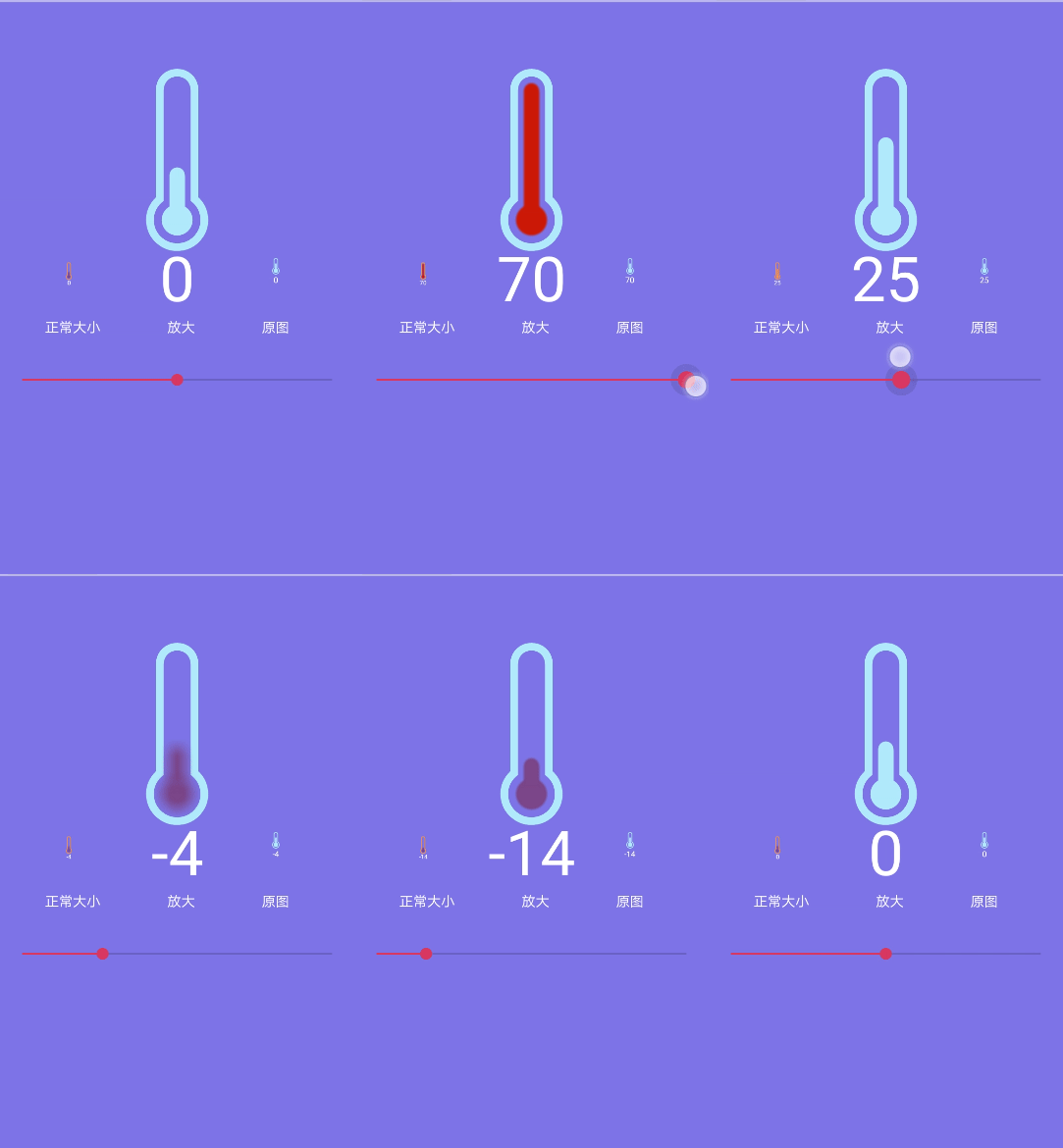
这个是个温度计,它是静态的,温度值是动态变化的,所以要自定义个view.动态显示值,温度过高、过低时有警示功能。
2.代码
https://github.com/f9q/tempView
3.Path类的关键api
3.1 绝对绘制系列
- void moveTo(float x, float y)
将画笔移动到x,y
- void lineTo(float x, float y)
连接当前点到目标点dp(x,y),画一条线。
- void arcTo(RectF oval, float startAngle, float sweepAngle)
从当前点开始画弧,startAngle是順时针起始角度,sweepAngle是扫过角度(按360求模)。如果oval的起点不是当前path的最后一个点,则连接最后一个点到oval的起点。
- void quadTo(float x1, float y1, float x2, float y2)
假设最后个点是op(10,20),如果没有用MoveTo指定,默认点是(0,0),画一条经过 op、控制点cp(x1,y1)、终点ep(x2,y2)的贝塞尔曲线.
- void cubicTo(float x1, float y1, float x2, float y2,float x3, float y3)
与quadTo相似,只不过多个控制点cp2(x2,y2)
3.2 相对绘制系列
- void rMoveTo(float dx, float dy)
假设前个点是op(10,20),将画笔移动到目标点dp(dx,dy), 其中dx是相对10的偏移量,dy是相对20的偏移量。
- void rLineTo(float dx, float dy)
假设前个点是op(10,20), 连接当前点到目标点dp(dx,dy),画一条线。其中dx是相对10的偏移量,dy是相对20的偏移量
- void rQuadTo(float dx1, float dy1, float dx2, float dy2)
假设前个点是op(10,20),默认点是(0,0),画一条经过op、控制点cp(dx1,dy1)、终点ep(dx2,dy2)的贝塞尔曲线。dx1,dx2是相对前个点10的x偏移量,可为负。
dy1,dy2是相对前个点20的y偏移量,可为负。
- void rCubicTo(float x1, float y1, float x2, float y2, float x3, float y3)
与rQuadTo相似。也是多个了个控制点cp2(x2,y2)
3.3 添加图形系列
- void addRect(RectF rect, Direction dir)
在路径上添加一个矩形、第2个参数是添加矩形的绘制方向,
- Direction.CW 顺时针
- Direction.CCW 逆时针
- void addRoundRect(RectF rect, float rx, float ry, Direction dir)
与上一个相似,添加的是圆角矩形。dir是纵向方向,如上。
- void addOval(RectF oval, Direction dir)
添加一个椭圆,dir是纵向方向,如上。
- void addCircle(float x, float y, float radius, Direction dir)
添加一个圆圈,radius半径,dir是纵向方向。如上。
- void addArc(RectF oval, float startAngle, float sweepAngle)
添加一个弧线,startAngle是順时针起始角度,sweepAngle是扫过角度(按360求模)。
- void addPath(Path src, float dx, float dy)
在当前路径上添加一个新的路径,dx,dy是相对最后一个点的x,y偏移量。
3.4 路径设置系列
- void transform(Matrix matrix, Path dst)
把当前路径按matrix变形,如果dst不空,复制一分到dst中。
- void reset()
清空path对象数据和轨迹。保留FillType。
- void rewind()
清空所绘制的轨迹,但保留对象内部数据。方便下次快速复用。 不保留FillType。
- void setFillType(FillType ft)
这个比较复杂,见5.path.setFillType(FillType ft)
void close()
闭合路径,如果执行闭合操作时当前点不和第1个点重合,则会画出一条线。
- void offset(float dx, float dy)
当前路径整体(所有图形)平移。
4.Path特效
可以给path添加各种特效,如虚线,离散等等。
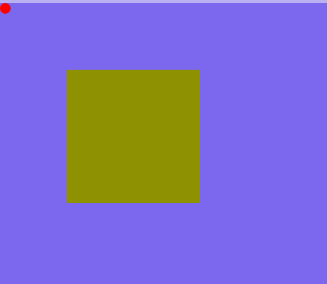
4.1 未指定特效的样子
4.2 CornerPathEffect
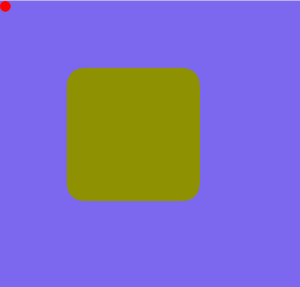
效果:将路径的转角变成圆角。
代码:
paint.setPathEffect(new CornerPathEffect());
参数:
圆角的半径。
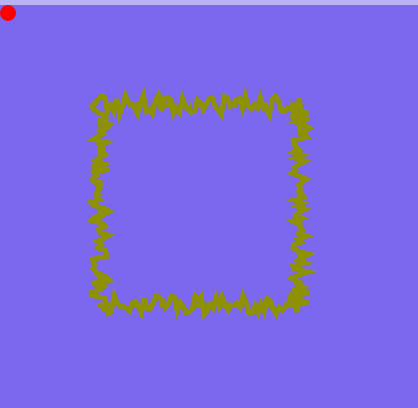
4.3 DiscretePathEffect
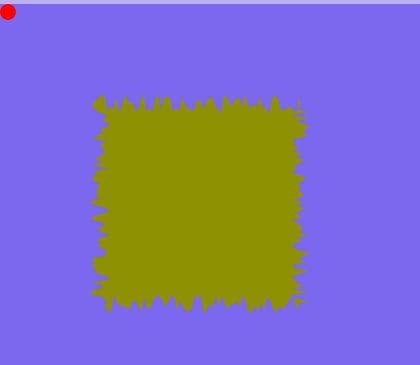
效果:离散路径。
代码:
paint.setPathEffect(new DiscretePathEffect(3.0f, 10.0f));
参数:
    /**

     * Chop the path into lines of segmentLength, randomly deviating from the

     * original path by deviation.

     */
- 第1个参数是横向两个离散点的间距。
- 第2个参数是纵向随机离散的最大距离。
4.4 DashPathEffect
效果:虚线效果。

代码:
     float intervals[] = {,,,};

     paint.setStrokeWidth();

     paint.setStyle(Paint.Style.STROKE);

     paint.setPathEffect(new DashPathEffect(intervals, ));
DashPathEffect参数的含义:
     /**

     * The intervals array must contain an even number of entries (>=2), with

     * the even indices specifying the "on" intervals, and the odd indices

     * specifying the "off" intervals. phase is an offset into the intervals

     * array (mod the sum of all of the intervals). The intervals array

     * controls the length of the dashes. The paint's strokeWidth controls the

     * thickness of the dashes.

     * Note: this patheffect only affects drawing with the paint's style is set

     * to STROKE or FILL_AND_STROKE. It is ignored if the drawing is done with

     * style == FILL.

     * @param intervals array of ON and OFF distances

     * @param phase offset into the intervals array

     */
- 第1个参数
控制虚线的长度与间隙,数组长度不能小于2个,偶数位表示实线线段的长度(上面数组中的1、10),奇数位表示间隙的长度(上面数组中的5、15)。
- 第2个参数
控制虚线第1段是线段还是间隙,按第1个参数的长度求模。
注意:这个特效只有在 paint的风格是 STROKE 和 FILL_AND_STROKE 时有效。
4.5 PathDashPathEffect
效果:指定虚线上的每个线段的图形为另一个路径。

代码:
     Path rectDash = new Path();

     rectDash.addRect(, , ,, Path.Direction.CW);

     paint.setPathEffect(new PathDashPathEffect(rectDash,,, PathDashPathEffect.Style.MORPH));
参数:
- 第1个参数是虚线段的图形。
- 第2个参数是间隙的距离。
- 第3个参数指定路径的下标。
- 第4个参数是图形路径的绘制样式。有
MORPH、ROTATE、TRANSLATE 3种。
4.6 ComposePathEffect
效果:组合效果

代码:
         float intervals[] = {,,,};

         DiscretePathEffect discrete = new DiscretePathEffect(3.0f, 10.0f);

         DashPathEffect dash = new DashPathEffect(intervals, ) ;

         ComposePathEffect compose = new ComposePathEffect(discrete,dash);

         paint.setPathEffect(compose);
参数:
    /**

     * Construct a PathEffect whose effect is to apply first the inner effect

     * and the the outer pathEffect (e.g. outer(inner(path))).

     */

    public ComposePathEffect(PathEffect outerpe, PathEffect innerpe) {

        native_instance = nativeCreate(outerpe.native_instance,

                                       innerpe.native_instance);

    }
第1个路径和第2个路径。先画出innerpe的效果,接着在innerpe的基础上增加outerpe效果!
4.7 SumPathEffect
效果:叠加效果
代码:
         float intervals[] = {,,,};

         DiscretePathEffect discrete = new DiscretePathEffect(3.0f, 10.0f);

         DashPathEffect dash = new DashPathEffect(intervals, ) ;

         SumPathEffect sum = new SumPathEffect(discrete,dash);

         paint.setPathEffect(sum);
参数:
    /**

     * Construct a PathEffect whose effect is to apply two effects, in sequence.

     * (e.g. first(path) + second(path))

     */

    public SumPathEffect(PathEffect first, PathEffect second) {

        native_instance = nativeCreate(first.native_instance,

                                       second.native_instance);

    }
先画出first的效果,接着绘制second效果!将两个效果简单的重叠在一起显示出来!
5.path.setFillType(FillType ft)
5.1 作用
它指定计算路径内部区域的算法。如何判断点在图形内外,一般有两种:奇偶算法和非零环绕数算法。
5.2 相关源码
 /**

      * Set the path's fill type. This defines how "inside" is computed.

      *

      * @param ft The new fill type for this path

      */

     public void setFillType(FillType ft) {

         nSetFillType(mNativePath, ft.nativeInt);

     }

     /**

      * Enum for the ways a path may be filled.

      */

     public enum FillType {

         // these must match the values in SkPath.h

         /**

          * Specifies that "inside" is computed by a non-zero sum of signed

          * edge crossings.

          */

         WINDING         (),

         /**

          * Specifies that "inside" is computed by an odd number of edge

          * crossings.

          */

         EVEN_ODD        (),

         /**

          * Same as {@link #WINDING}, but draws outside of the path, rather than inside.

          */

         INVERSE_WINDING (),

         /**

          * Same as {@link #EVEN_ODD}, but draws outside of the path, rather than inside.

          */

         INVERSE_EVEN_ODD();

         FillType(int ni) {

             nativeInt = ni;

         }

         final int nativeInt;

     }
5.3 FillType含义表
| EVEN_ODD | 奇偶算法 |
| INVERSE_EVEN_ODD | 反奇偶算法 |
| WINDING | 非零环绕数算法 |
| INVERSE_WINDING | 反非零环绕数算法 |
5.4 奇偶算法
算法:
从p点向任意方向作一条射线, 若该射线与图形相交的边数为奇数,则p是图形内部点,否则是外部点。
示例:
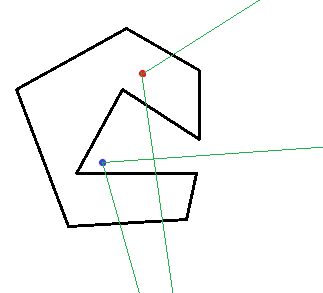
红色的点在多边形内部。从它出发作任意射线(图中画出了两种可能),它与多边形的边必定相交奇数次(图中两条射线分别相交1次和3次)。
蓝色的点在多边形外部。从它出发作任意射线(图中画出了两种可能),它与多边形的边必定相交偶数次(图中两条射线分别相交0次和2次)。
5.5 非零环绕数
算法:该方法常用与判断点是否在多边形或曲线上。
示例:
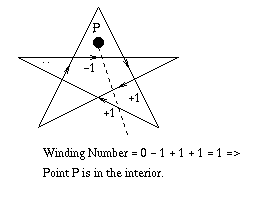
- 5角星上的箭头表示边的方向
- 从p点向右下作一条射线
- 环绕数WindingNumber,初始值为0,
- 从上到下,这里有3条边与射线相交。
- 第1条边方向是 -->,WindingNumber -= 1
- 第2条边方向是 <--,WindingNumber += 1
- 第3条边方向是 <--,WindingNumber += 1
- 最终WindingNumber = 1,值非0,则在图形内。
6.路径之间的运算(求交集、并集等)
6.1 Path.op(xxx)
源码:与其它path进行运算。它还有一个重载版本。
     /**

      * Set this path to the result of applying the Op to the two specified paths.

      * The resulting path will be constructed from non-overlapping contours.

      * The curve order is reduced where possible so that cubics may be turned

      * into quadratics, and quadratics maybe turned into lines.

      *

      * @param path1 The first operand (for difference, the minuend)

      * @param path2 The second operand (for difference, the subtrahend)

      *

      * @return True if operation succeeded, false otherwise and this path remains unmodified.

      *

      * @see Op

      * @see #op(Path, android.graphics.Path.Op)

      */

     public boolean op(Path path1, Path path2, Op op) {

         if (nOp(path1.mNativePath, path2.mNativePath, op.ordinal(), this.mNativePath)) {

             isSimplePath = false;

             rects = null;

             return true;

         }

         return false;

     }

     /**

      * The logical operations that can be performed when combining two paths.

      *

      * @see #op(Path, android.graphics.Path.Op)

      * @see #op(Path, Path, android.graphics.Path.Op)

      */

     public enum Op {

         /**

          * Subtract the second path from the first path.

          */

         DIFFERENCE,

         /**

          * Intersect the two paths.

          */

         INTERSECT,

         /**

          * Union (inclusive-or) the two paths.

          */

         UNION,

         /**

          * Exclusive-or the two paths.

          */

         XOR,

         /**

          * Subtract the first path from the second path.

          */

         REVERSE_DIFFERENCE

     }
参数:前两个参数是参与运算的path,第3个参数是路径运算符。
6.2 路径运算符
| 运算符 | 类比集合运算 | 说明 | 示意图 |
|---|---|---|---|
| XOR | 异或 | 求非交集。 |  |
| INTERSECT | 交集 | Path1与Path2相交的部分 |  |
| UNION | 并集 | 包含全部Path1和Path2 |  |
| DIFFERENCE | 差集 | Path1中减去Path2后剩下的部分 |  |
| REVERSE_DIFFERENCE | 差集 | Path2中减去Path1后剩下的部分 |  |
自定义view(14)使用Path绘制复杂图形的更多相关文章
- Android -- 自定义View小Demo,绘制钟表时间(一)
1,昨天刚看了hongyang大神推荐的自定义时钟效果(传动门:http://www.jianshu.com/users/a45d19d680af/),效果还是不错的,自己又在github上找了找,发 ...
- Android -- 自定义View小Demo,绘制四位数随机码(一)
1,现在有这样一个需求,实现显示随机随机数可能在代码中直接很简单的就实现了,但是现在我们直接自定义View来实现这个效果,那么我们来分析一波吧,我们允许开发者自己设置这个textview的大小,颜色, ...
- 自定义View实现图片的绘制、旋转、缩放
1.图片 把一张JPG图片改名为image.jpg,然后拷贝到项目的res-drawable中. 2.activity_main.xml <LinearLayout xmlns:android= ...
- 自定义View中的Path
我们用Path可以画返回图标,可以画搜索图标,也可以画一个圆,DIDI
- Android自定义View学习笔记(一)
绘制基础 参考:HenCoder Android 开发进阶: 自定义 View 1-1 绘制基础 Paint详解 参考:HenCoder Android 开发进阶: 自定义 View 1-2 Pain ...
- Android 自定义 View 圆形进度条总结
Android 自定义圆形进度条总结 版权声明:本文为博主原创文章,未经博主允许不得转载. 微博:厉圣杰 微信公众号:牙锅子 源码:CircleProgress 文中如有纰漏,欢迎大家留言指出. 最近 ...
- 安卓自定义View教程目录
基础篇 安卓自定义View基础 - 坐标系 安卓自定义View基础 - 角度弧度 安卓自定义View基础 - 颜色 进阶篇 安卓自定义View进阶 - 分类和流程 安卓自定义View进阶 - Canv ...
- 自定义View—绘制基本图形
一.Canvas能够绘制哪些图形 二.
- Android -- 自定义View小Demo,关于Path类的使用(一)
1,在我们知道自定义view中onDraw()方法是用于绘制图形的,而Path类则是其中的一个重要的类,如下图效果: 代码也没有什么难度,直接贴出来吧 @Override protected void ...
随机推荐
- openfire build(2)
InterceptorManager PluginManager openfire 插件的中servlet 在web-custom.xml 中的配置 url 一定要小写,访问时不区别大写小 否则404 ...
- leetcode 229. Majority Element II(多数投票算法)
就是简单的应用多数投票算法(Boyer–Moore majority vote algorithm),参见这道题的题解. class Solution { public: vector<int& ...
- kettle 设置变量
以下只是本人在使用过程中一些经验,可能有误解不对的地方,希望大家指正. 这个控件可以在job中调用,也可以在transformation中使用.下面将分别说明在两个不同任务中调用时的使用方法和需要注意 ...
- <opengl>使用glu绘制二次曲面
绘制二次曲面通常要以下四步: 1.首先我们创建一个二次方程状态对象 GLUquadricObj *m_pObj; //保存绘图模式.法线模式.法线朝向.纹理等信息 //创建二次方程状态对象 ...
- POJ2186(有向图缩点)
Popular Cows Time Limit: 2000MS Memory Limit: 65536K Total Submissions: 28379 Accepted: 11488 De ...
- 【转】Pro Android学习笔记(二):开发环境:基础概念、连接真实设备、生命周期
在Android学习笔记(二):安装环境中已经有相应的内容.看看何为新.这是在source网站上的Android架构图,和标准图没有区别,只是这张图颜色好看多了,录之.本笔记主要讲述Android开发 ...
- poco时间操作
Poco::DateTime Poco::Timespan Poco::Timestamp 时间操作 Poco::DateTime dt; //c++ 20才有 Calendar dt = dt + ...
- 小程序[邮箱提取器-EmailSplider]总结
1.背景情况 学东西做快的是付诸实践,写这个小程序的目的就是为了综合运用各个知识点,从而提升学习的效果. 2.涉及知识 A.Swing 的布局 B.Swing中,线程访问U ...
- Javascript实现页面左边的菜单选中项高亮显示
在项目开发过程中,遇到一个问题 在一个模板页面中,Layout.cshtml,页面左边放了一个菜单项menu,每一项都是一个链接到一个新的页面.但所有页面都是用这个模板Layout.cshtml.需要 ...
- 世界虽大,但没有破不了的wifi
附加知识: 无线网卡的几种常见工作模式(mode)有: master managed monitor ad-hoc ... 1. [master] 这种模式是常见的AP模式,无线模块本身作为wifi ...