
播放MP3
播放背景音乐
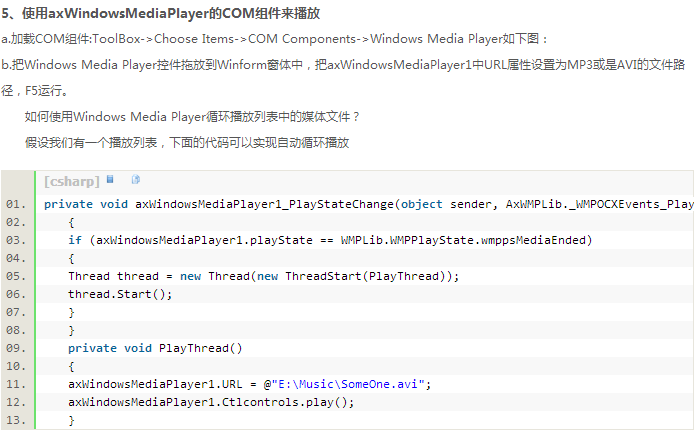
上文来自:http://blog.csdn.net/henulwj/article/details/8977738
using System;

using System.Collections.Generic;

using System.ComponentModel;

using System.Data;

using System.Drawing;

using System.Linq;

using System.Text;

using System.Threading.Tasks;

using System.Windows.Forms;

using System.IO;

using System.Media;

namespace ListBox

{

    public partial class Form1 : Form

    {

        public Form1()

        {

            InitializeComponent();

        }

        //为了在两个方法中都能访问到

        List<string> list = new List<string>();

        string[] pathMusic = Directory.GetFiles("E:\\00", "*.mp3");

        private void Form1_Load(object sender, EventArgs e)

        {

            String[] path = Directory.GetFiles("E:\\00", "*.jpg");

             for ( int i = 0; i < path.Length; i++)

            {

                 //根据路径名获取文件名称

                 string fileName = Path.GetFileName(path[i]);

                 listBox1.Items.Add(fileName);

                 //将图片全路径添加到List泛型中;

                 list.Add(path[i]);

            }

            for(int i = 0; i < pathMusic.Length; i++)

            {

                string fileName = Path.GetFileName(pathMusic[i]);

                listBox1.Items.Add(fileName);

                list.Add(pathMusic[i]);

            }

        }

        private void listBox1_DoubleClick(object sender, EventArgs e)

        {

            //添加图片文件,需要添加全路径

            if (listBox1.SelectedItem.ToString().Contains(".jpg"))

            {

                pictureBox1.Image = Image.FromFile(list[listBox1.SelectedIndex]);

            }

            else if (listBox1.SelectedItem.ToString().Contains(".mp3"))

            {

                //SoundPlayer sp = new SoundPlayer();

                //sp.SoundLocation = list[listBox1.SelectedIndex];

                //sp.Play();

                axWindowsMediaPlayer1.URL = list[listBox1.SelectedIndex];

                axWindowsMediaPlayer1.Ctlcontrols.play();

            }

        }

        private void listBox1_Click(object sender, EventArgs e)

        {

            if(listBox1.SelectedItem.ToString().Contains(".jpg"))

            {

                pictureBox1.Image = Image.FromFile(list[listBox1.SelectedIndex]);

            }

            else if (listBox1.SelectedItem.ToString().Contains(".mp3"))

            {

                //SoundPlayer sp = new SoundPlayer();

                //sp.SoundLocation = list[listBox1.SelectedIndex];

                //sp.Play();
                //只能播放wmv格式


                //可播放MP3

                axWindowsMediaPlayer1.URL = list[listBox1.SelectedIndex];

                axWindowsMediaPlayer1.Ctlcontrols.play();

            }

        }

    }

}
下面示例提供播放音乐的两种方法
using System;

using System.Collections.Generic;

using System.ComponentModel;

using System.Data;

using System.Drawing;

using System.Linq;

using System.Text;

using System.Threading.Tasks;

using System.Windows.Forms;

using System.IO;//使用Path

using System.Diagnostics;//使用进程

namespace 播放音乐

{

    public partial class Form1 : Form

    {

        public Form1()

        {

            InitializeComponent();

        }

        private void button1_Click(object sender, EventArgs e)

        {

            OpenFileDialog ofd = new OpenFileDialog();

            ofd.Title = "请打开音乐";

            ofd.InitialDirectory = @"E:\00";

            ofd.Multiselect = true;

            ofd.Filter = "音乐文件|*.mp3|所有文件|*.*";

            ofd.ShowDialog();

            //获得在文件夹中所有文件的全路径

            string[] path = ofd.FileNames;

            for(int i = 0; i < path.Length; i++)

            {

                listBox1.Items.Add(Path.GetFileName(path[i]));

                musicPath.Add(path[i]);

            }

        }

        List<string> musicPath = new List<string>();

        private void listBox1_DoubleClick(object sender, EventArgs e)

        {

            //使用Window Media Player播放音乐

            axWindowsMediaPlayer2.URL = musicPath[listBox1.SelectedIndex];

            axWindowsMediaPlayer2.Ctlcontrols.play();

        }

        private void button2_Click(object sender, EventArgs e)

        {

            if (listBox1.SelectedIndex == listBox1.Items.Count - 1)

            {

                listBox1.SelectedIndex = 0;

            }

            else

            {

                listBox1.SelectedIndex += 1;

                axWindowsMediaPlayer2.URL = musicPath[listBox1.SelectedIndex];

                axWindowsMediaPlayer2.Ctlcontrols.play();

            }

        }

        private void button3_Click(object sender, EventArgs e)

        {

            if (listBox1.SelectedIndex == 0)

            {

                listBox1.SelectedIndex = listBox1.Items.Count -1;

            }

            else

            {

                listBox1.SelectedIndex -= 1;

                axWindowsMediaPlayer2.URL = musicPath[listBox1.SelectedIndex];

                axWindowsMediaPlayer2.Ctlcontrols.play();

            }

        }

        private void listBox1_Click(object sender, EventArgs e)

        {

            //播放音乐的另一种方法

            //直接使用默认播放器打开音乐文件

            ProcessStartInfo psi = new ProcessStartInfo(musicPath[listBox1.SelectedIndex]);

            Process ps = new Process();

            ps.StartInfo = psi;

            ps.Start();

        }

    }

}
播放MP3的更多相关文章
- 读取SD卡文件夹下的MP3文件和播放MP3文件
首先获取SD卡path路径下的所有的MP3文件,并将文件名和文件大小存入List数组(此代码定义在FileUtils类中): /** * 读取目录中的Mp3文件的名字和大小 */ public Lis ...
- 遭遇flash播放mp3诡异问题
在部分ie10+flash player 播放mp3,播放第二句话时,中断无法正常播放,(客户的机器上),自己公司的机器测试了几个,都没发现这个问题.其它浏览器(chrome,firefox)也没发现 ...
- Android命令行播放MP3音乐
/*************************************************************************** * Android命令行播放MP3音乐 * 说 ...
- ios开发——实用技术篇Swift篇&播放MP3
播放MP3 // MARK: - 播放MP3 /*----- mp3 ------*/ //定时器- func updateTime() { //获取音频播放器播放的进度,单位秒 var cuTime ...
- 在C语言控制台程序中播放MP3音乐
游戏没有声音多单调. 这里做一个简单的范例,用 mciSendString 函数播放 MP3 格式的音乐,先看看代码吧: // 编译该范例前,请把 background.mp3 放在项目文件夹中 // ...
- ubuntu 13.10 Rhythmbox不能播放mp3 和中文乱码的问题
1.ubuntu 13.10 Rhythmbox不能播放mp3的解决方法 软件中心搜索(ubuntu额外的版权受限软件)不带括号 2.中文乱码问题解决方法: 终端顺序操作 : 1. sudo ged ...
- Ionic2 播放mp3功能实现
在开发app的过程中有需要播放mp3的功能,一直想实现,但苦于具体的困难一直未能实现,经过一段时间的资料查询和测试,最终摸索出来,现记录如下: 1.最重要的是安装第三方插件ionic-audio,开源 ...
- VC播放mp3的方法
1.使用msi库 #include <mmsystem.h> #pragma comment(lib,"winmm.lib") ....... //打开文件 MCI_O ...
- IOS使用AVAudioPlayer播放mp3歌曲文件并监听来电打断
本实例实现了AVAudioPlayer播放mp3歌曲文件,实现了播放.暂停.继续操作,音乐音量控制.播放进度显示,同时监听来电打断事件 一.控件初始化 - (void)viewDidLoad { [s ...
- 使用openal与mpg123播放MP3,附带工程文件(转)
使用openal与mpg123播放MP3,附带工程文件 使用openal和mpg123播放MP3文件 使用静态编译,相关文件都在附件里 相关工程文件:openal_mpg123_player.7z 使 ...
随机推荐
- python学习笔记~INI、REG文件读取函数(自动修复)
引入configparser,直接read整个INI文件,再调用get即可.但需要注意的是,如果INI文件本身不太规范,就会报各种错,而这又常常不可避免的.本文自定义函数通过try...except. ...
- 链表--数据结构与算法JavaScript描述(6)
链表 概念 链表是由一组节点组成的集合. 每个节点都使用一个对象的引用指向它的后继. 指向另一个节点的引用叫做 链. 许多链表的实现都在链表最前面有一个特殊节点,叫做头节点. 链表的尾元素指向一个nu ...
- 安装cuda9.0+cudnn v7+python3.5.3+tensorflow
本机设备 windows10 gtx1060 安装软件及下载地址 python-3.5.3-amd64 链接:https://pan.baidu.com/s/1I3oIDatMgvDLEtaPtvu ...
- Hibernate学习笔记三
1.1.1 Hibernate的关联关系映射:(多对多) 1.1.1.1 多对多的配置: 步骤一创建实体和映射: Student: public class Student { private Int ...
- 成都Uber优步司机奖励政策(3月19日)
滴快车单单2.5倍,注册地址:http://www.udache.com/ 如何注册Uber司机(全国版最新最详细注册流程)/月入2万/不用抢单:http://www.cnblogs.com/mfry ...
- MyBatis-MBG(MyBatis Generator)
1.添加jar包 <dependency> <groupId>org.mybatis.generator</groupId> <artifactId>m ...
- Elastic stack ——X-Pack安装
X-Pack是一个Elastic Stack的扩展,将安全,警报,监视,报告和图形功能包含在一个易于安装的软件包中.在Elasticsearch 5.0.0之前,您必须安装单独的Shield,Watc ...
- Linux命令应用大词典-第2章 获取帮助
2.1 help:查看内部Shell命令帮助信息 2.2 man:显示在线手册页 2.3 manpath:查看和设置man手册页的查询路径 2.4 info:阅读info格式的文件 2.5 pinfo ...
- GameplayKit的GKStateMachine用法与实例
GKStateMachine 玩家进入GameScene场景中 -> 通过GKStateMachine进入到指定的游戏状态GKState 在GameScene场景中 -> 根据不同的逻辑调 ...
- 前端开发工程师 - 03.DOM编程艺术 - 第1章.基础篇(下)
第1章.基础篇(下) Abstract: 数据通信.数据存储.动画.音频与视频.canvas.BOM.表单操作.列表操作 数据通信(HTTP协议) HTTP事务: 客户端向服务器端发送HTTP请求报文 ...