
js原生带缩略图的图片切换效果
js原生带缩略图的图片切换效果
本例中用到的 moveElement(elementID,final_x,final_y,interval)是来自《JavaScript DOM编程艺术(中文第二版)》一书第10章中有一段代码。(可以直接baidu)
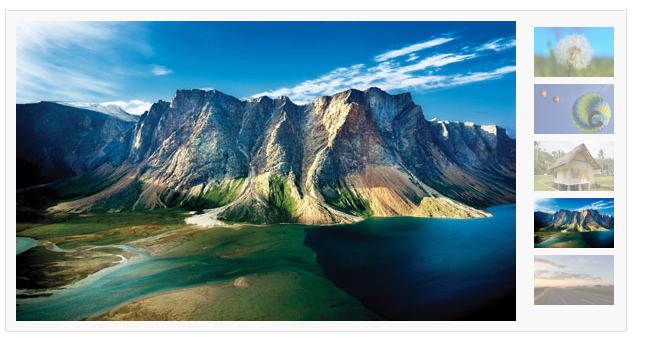
左边是banner图,右边是缩略图,当鼠标滑入缩略图时,也会切换图片。
一、这段是html代码,可以直接拷贝,需要自己准备相同大小的banner图,例中图片都是500x300
<!DOCTYPE html>

<html lang="en">

<head>

    <meta charset="UTF-8">

    <meta name="viewport" content="width=device-width, initial-scale=1.0">

    <meta http-equiv="X-UA-Compatible" content="ie=edge">

    <title>图片轮播</title>

    <script src="./js.js"></script>

    <style>

        * {

            margin: 0;

            padding: 0;

            word-break: break-all;

        }

        body {

            background: #FFF;

            color: #333;

            font: 12px/1.6em Helvetica, Arial, sans-serif;

        }

        a {

            color: #0287CA;

            text-decoration: none;

        }

        a:hover {

            text-decoration: underline;

        }

        ul,

        li {

            list-style: none;

        }

        fieldset,

        img {

            border: none;

        }

        legend {

            display: none;

        }

        em,

        strong,

        cite,

        th {

            font-style: normal;

            font-weight: normal;

        }

        input,

        textarea,

        select,

        button {

            font: 12px Helvetica, Arial, sans-serif;

        }

        table {

            border-collapse: collapse;

        }

        html {

            overflow: -moz-scrollbars-vertical;

        }

        #ifocus {

            width: 620px;

            height: 320px;

            margin: 20px;

            border: 1px solid #DEDEDE;

            background: #F8F8F8;

        }

        #ifocus_pic {

            display: inline;

            position: relative;

            float: left;

            width: 500px;

            height: 300px;

            overflow: hidden;

            margin: 10px 0 0 10px;

        }

        #ifocus_piclist {

            position: absolute;

        }

        #ifocus_piclist li {

            width: 500px;

            height: 300px;

            overflow: hidden;

        }

        #ifocus_piclist img {

            width: 500px;

            height: 300px;

        }

        #ifocus_btn {

            display: inline;

            float: right;

            width: 94px;

            margin: 9px 9px 0 0;

        }

        #ifocus_btn li {

            width: 94px;

            height: 57px;

            cursor: pointer;

            opacity: 0.5;

            -moz-opacity: 0.5;

            filter: alpha(opacity=50);

        }

        #ifocus_btn img {

            width: 80px;

            height: 50px;

            margin: 7px 0 0 11px;

        }

        #ifocus_btn .current {

            /* background: url(i/ifocus_btn_bg.gif) no-repeat; */

            opacity: 1;

            -moz-opacity: 1;

            filter: alpha(opacity=100);

        }

    </style>

</head>

<body>

    <div id="ifocus">

        <div id="ifocus_pic">

            <div id="ifocus_piclist" style="left:0; top:0;">

                <ul>

                    <li><a href="#"><img src="./images/1.jpg" alt="" /></a></li>

                    <li><a href="#"><img src="./images/2.jpg" alt="" /></a></li>

                    <li><a href="#"><img src="./images/3.jpg" alt="" /></a></li>

                    <li><a href="#"><img src="./images/4.jpg" alt="" /></a></li>

                    <li><a href="#"><img src="./images/5.jpg" alt="" /></a></li>

                </ul>

            </div>

        </div>

        <div id="ifocus_btn">

            <ul>

                <li class="current"><img src="./images/1.jpg" alt="" /></li>

                <li><img src="./images/2.jpg" alt="" /></li>

                <li><img src="./images/3.jpg" alt="" /></li>

                <li><img src="./images/4.jpg" alt="" /></li>

                <li><img src="./images/5.jpg" alt="" /></li>

            </ul>

        </div>

    </div>

</body>

</html>
二、这段是js代码,其中用到了几个经典的js代码。在js中需要修改对应的id名字、图片移动的尺寸等。
function $(id) {

    return document.getElementById(id);

}

function addLoadEvent(func) {

    var oldonload = window.onload;

    if (typeof window.onload != 'function') {

        window.onload = func;

    } else {

        window.onload = function () {

            oldonload();

            func();

        }

    }

}

function moveElement(elementID, final_x, final_y, interval) {

    if (!document.getElementById) return false;

    if (!document.getElementById(elementID)) return false;

    var elem = document.getElementById(elementID);

    if (elem.movement) {

        clearTimeout(elem.movement);

    }

    if (!elem.style.left) {

        elem.style.left = "0px";

    }

    if (!elem.style.top) {

        elem.style.top = "0px";

    }

    var xpos = parseInt(elem.style.left);

    var ypos = parseInt(elem.style.top);

    if (xpos == final_x && ypos == final_y) {

        return true;

    }

    if (xpos < final_x) {

        var dist = Math.ceil((final_x - xpos) / 10);

        xpos = xpos + dist;

    }

    if (xpos > final_x) {

        var dist = Math.ceil((xpos - final_x) / 10);

        xpos = xpos - dist;

    }

    if (ypos < final_y) {

        var dist = Math.ceil((final_y - ypos) / 10);

        ypos = ypos + dist;

    }

    if (ypos > final_y) {

        var dist = Math.ceil((ypos - final_y) / 10);

        ypos = ypos - dist;

    }

    elem.style.left = xpos + "px";

    elem.style.top = ypos + "px";

    var repeat = "moveElement('" + elementID + "'," + final_x + "," + final_y + "," + interval + ")";

    elem.movement = setTimeout(repeat, interval);

}

function classNormal(iFocusBtnID) {

    var iFocusBtns = $(iFocusBtnID).getElementsByTagName('li');

    for (var i = 0; i < iFocusBtns.length; i++) {

        iFocusBtns[i].className = 'normal';

    }

}

function classCurrent(iFocusBtnID, n) {

    var iFocusBtns = $(iFocusBtnID).getElementsByTagName('li');

    iFocusBtns[n].className = 'current';

}

function iFocusChange() {

    if (!$('ifocus')) return false;

    $('ifocus').onmouseover = function () {

        atuokey = true

    };

    $('ifocus').onmouseout = function () {

        atuokey = false

    };

    var iFocusBtns = $('ifocus_btn').getElementsByTagName('li');

    var listLength = iFocusBtns.length;

    iFocusBtns[0].onmouseover = function () {

        moveElement('ifocus_piclist', 0, 0, 5);

        classNormal('ifocus_btn');

        classCurrent('ifocus_btn', 0);

    }

    if (listLength >= 2) {

        iFocusBtns[1].onmouseover = function () {

            moveElement('ifocus_piclist', 0, -300, 5);

            classNormal('ifocus_btn');

            classCurrent('ifocus_btn', 1);

        }

    }

    if (listLength >= 3) {

        iFocusBtns[2].onmouseover = function () {

            moveElement('ifocus_piclist', 0, -600, 5);

            classNormal('ifocus_btn');

            classCurrent('ifocus_btn', 2);

        }

    }

    if (listLength >= 4) {

        iFocusBtns[3].onmouseover = function () {

            moveElement('ifocus_piclist', 0, -900, 5);

            classNormal('ifocus_btn');

            classCurrent('ifocus_btn', 3);

        }

    }

    if (listLength >= 5) {

        iFocusBtns[4].onmouseover = function () {

            moveElement('ifocus_piclist', 0, -1200, 5);

            classNormal('ifocus_btn');

            classCurrent('ifocus_btn', 4);

        }

    }

}

setInterval('autoiFocus()', 3000);

var atuokey = false;

function autoiFocus() {

    if (!$('ifocus')) return false;

    if (atuokey) return false;

    var focusBtnList = $('ifocus_btn').getElementsByTagName('li');

    var listLength = focusBtnList.length;

    for (var i = 0; i < listLength; i++) {

        if (focusBtnList[i].className == 'current') var currentNum = i;

    }

    if (currentNum == 0 && listLength != 1) {

        moveElement('ifocus_piclist', 0, -300, 5);

        classNormal('ifocus_btn');

        classCurrent('ifocus_btn', 1);

    }

    if (currentNum == 1 && listLength != 2) {

        moveElement('ifocus_piclist', 0, -600, 5);

        classNormal('ifocus_btn');

        classCurrent('ifocus_btn',2);

    }

    if (currentNum == 2 && listLength != 3) {

        moveElement('ifocus_piclist', 0, -900, 5);

        classNormal('ifocus_btn');

        classCurrent('ifocus_btn',3);

    }

    if (currentNum == 3) {

        moveElement('ifocus_piclist', 0, -1200, 5);

        classNormal('ifocus_btn');

        classCurrent('ifocus_btn', 4);

    }

    if (currentNum == 4) {

        moveElement('ifocus_piclist', 0, 0, 5);

        classNormal('ifocus_btn');

        classCurrent('ifocus_btn',0);

    }

}

addLoadEvent(iFocusChange);
效果如下图
js原生带缩略图的图片切换效果的更多相关文章
- js带缩略图的图片切换效果
<!DOCTYPE html PUBLIC "-//W3C//DTD XHTML 1.0 Transitional//EN" "http://www.w3.org/ ...
- js鼠标滚轮滚动图片切换效果
效果体验网址:http://keleyi.com/keleyi/phtml/image/12.htm HTML文件代码: <!DOCTYPE html PUBLIC "-//W3C// ...
- javascript马赛克遮罩图片切换效果:XMosaic.js(转)
新鲜出炉的javascript图片切换特效,实现的是马赛克遮罩切换.在flash里,好实现遮罩动画很简单,不过JS实现起来就有些困难了. XMosaic.js,与XScroll.js和XScroll2 ...
- Midnight.js – 实现奇妙的固定头部切换效果
Midnight.js 是一款 jQuery 插件,在页面滚动的时候实现多个头设计之间的切换,所以你总是有一个头与它下面的内容层叠,看起来效果很不错. Midnight.js 可以让你轻松实现这种切换 ...
- jquery简单的图片切换效果,支持pc端、移动端的banner图片切换开发
详细内容请点击 无意中看见了两年前写的一个图片切换,那会儿刚刚学习网页制作,可以说是我的第一个处女座的jquery图片切换效果.无聊之余对它的宽度稍稍做了一下修改,变成了支持pc端.手机端全屏的ban ...
- 10款好用的 jQuery 图片切换效果插件
jQuery 是一个非常优秀的 Javascript 框架,使用简单灵活,同时还有许多成熟的插件可供选择.其中,最令人印象深刻的应用之一就是对图片的处理,它可以让帮助你在你的项目中加入一些让人惊叹的效 ...
- jquery带按钮的图片切换效果
<!doctype html> <html> <head> <meta charset="gb2312"> <title> ...
- 精致3D图片切换效果,最适合企业产品展示
这是一个精致的立体图片切换效果,特别适合企业产品展示,可立即用于实际项目中.支持导航和自动播放功能, 基于 CSS3 实现,推荐使用最新的 Chrome,Firefox 和 Safari 浏览器浏览效 ...
- 100种不同图片切换效果插件pageSwitch
分享100种不同图片切换效果插件pageSwitch.这是一款适用于全屏切换场景,即一切一屏,并且实现了超过一百种切换效果,支持自定义切页动画.效果图如下: 在线预览 源码下载 实现的代码. ht ...
随机推荐
- 安装php,nginx 带debug
gdb安装包 在CentOS6.4下使用gdb进行调试的时候, 使用bt(breaktrace)命令时,会弹出如下的提示: 头一天提示: Missing separate debuginfos, ...
- python高级(五)—— python函数(一等对象)
本文主要内容 一等对象 普通函数 & 高阶函数 可调用对象 & 自定义可调用类型 函数内省 函数注释 python高级——目录 文中代码均放在github上:https://githu ...
- selenium 多窗口(windows)及ITargetLocator使用总结
1. selenium能实现窗口切换的原理 2. 常见命令 2.1 WindowHandle 2.2 WindowHandles 2.3 SwitchTo 3. 使用JavaScript新建窗口 4. ...
- php添加mysql.so扩展
1.软件包安装 yum install php-mysql 安装的是mariadb的扩展 yum install php-mysqlnd 安装的是mysql的扩展
- VS2013诡异问题,虚方法、泛型,通通躺枪
最近在调代码,发现一个很诡异的问题,简单复原一下 创建4.0控制台项目 以下代码 class Program { static void Main(string[] args) { var item ...
- 常用linux网络工具
iftop netstat nethogs可以查看进程占用网络的情况 nc -u -z -w2 192.168.0.1 1-1000 //扫描192.168.0.3 的端口 范围是 1-1000
- python中函数参数传递的几种方法
转自 http://www.douban.com/note/13413855/ Python中函数参数的传递是通过“赋值”来传递的.但这条规则只回答了函数参数传递的“战略问题”,并没有回答“战术问题 ...
- VS2008默认的字体居然是 新宋体
本人还是觉得 C#就是要这样看着舒服
- html的img标签
html显示图片 1.最简单: <img src="图片路径"/> 2.如果要改变图片显示的尺寸 <img src="图片路径" width= ...
- Swift编程权威指南第2版 读后收获
自从参加工作一直在用OC做iOS开发.在2015年的时候苹果刚推出swift1.0不久,当时毕竟是新推出的语言,大家也都很有激情的学习.不过在学完后发现很难在实际项目中使用,再加上当时公司项目都是基于 ...