
路由器port触发与转发---Port Forwarding & Port Triggering
What is Port Triggering?
If you have not read my explanation of port forwarding do so now. You can find it
here.
Port triggering is pretty simple once you know what port forwarding is. Port Triggering is port forwarding with an on/off switch for the ports that have been forwarded. This on/off switch is turned on or off by data flowing out of a trigger port.
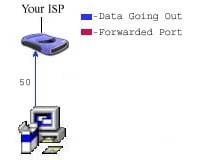
Let's say that there is a port triggering rule configured in the router. This port triggering rule says when data flows out on port 50 forward port 80. In the picture above you see data flowing from a computer to the internet on port 50.
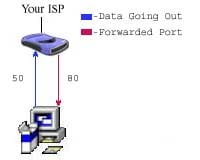
The router see's the traffic coming out of the router on port 50, and evaluates it's triggering rules. The router then forwards port 80 to the computer that sent out the data on port 50. It's important to realize that port 80 can only be forwarded to one
computer at a time. If two computers were trying to send data out on port 50, there would be a conflict. What happened after that really depends upon which router you are running. One thing is for sure, port 80 would not be forwarded to both computers.
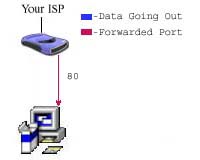
The picture above shows that the data has quit being sent out of port 50. Programs do not send data if there is nothing to be sent, so data being sent out of port 50 is not guaranteed. The router keeps port 80 forwarded for a certain amount of time. How
much time really depends upon the router.
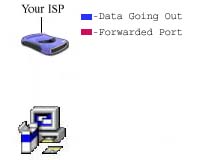
Once the router is done waiting, it quits forwarding port 80 to the computer that sent data out on port 50. This makes a port triggering configuration a tricky thing. The software that requires ports to be forwarded must first send data out of a port at
a somewhat constant rate. If the software has a port that is constantly sending data out, then port triggering is possible. The length of time that the router keeps those ports open still needs to be taken into account. If the router times out between the
gaps of outgoing data, the port forwarding connection will be severed. That is why so few programs support port triggering. What happens when you are trying todownload a very large file? Well the software you have setup port triggering for may not keep sending
data out of the trigger port.If it doesn't your router closes the incoming ports, and your download is interrupted.
Port Triggering is a little more secure than port forwarding, because the incoming ports are not open all the time. They are only open when a program is actively using the trigger port. Another thing to note, is that most port triggering setups do not require
you to enter an internal ip address to forward the incoming ports to. This means that any computer on the network can use your port triggering setup. If two computers try to use the port triggering setup at the same time you will run into problems.
路由器port触发与转发---Port Forwarding & Port Triggering的更多相关文章
- NAT&Port Forwarding&Port Triggering
NAT Nat,网络地址转换协议.主要功能是实现局域网内的本地主机与外网通信. 在连接外网时,内部Ip地址须要转换为网关(一般为路由器Ip地址)(port号也须要对应的转换) ...
- Why was 80 Chosen as the Default HTTP Port and 443 as the Default HTTPS Port?
https://www.howtogeek.com/233383/why-was-80-chosen-as-the-default-http-port-and-443-as-the-default-h ...
- shell脚本检查是否存在tun0虚拟网卡,若不不存在服务器更改port,并重启服务器,客户端修改port,并重新启动客户端
openvp 客户端 /home 目录下各脚本文件名 [root@jira home]# ls openvpn_server_restart.sh openvpn_tunnel_monitor.sh ...
- TCP的三次握手和四次挥手与路由器(三层)转发原理
传输层是国际标准化组织提出的开放系统互连(OSI)参考模型中的第四层.该层协议为网络端点主机上的进程之间提供了可靠.有效的报文传送服务.其功能紧密地依赖于网络层的虚拟电路或数据报服务.传输层定义了主机 ...
- Hbase启动的时候出现:[RpcServer.handler=28,port=60000] ipc.RpcServer: RpcServer.handler=28,port=60000: exiting,master.HMasterCommandLine: Master exiting
hadoop 版本:CDH5.02 Hbase 版本:hbase-0.96.1.1-cdh5.0.2 配置文件:hbase-site.xml <configuration> <pro ...
- H3C 路由器单播IP包转发
- NAT&Port Forwarding&Port Triggering
NAT Nat,网络地址转换协议.主要功能是实现局域网内的本地主机与外网通信. 在连接外网时,内部Ip地址需要转换为网关(一般为路由器Ip地址)(端口号也需要相应的转换) 如: ...
- Port Forwarding in Windows
转自:http://woshub.com/port-forwarding-in-windows/ Since Windows XP there is a built-in ability in Mic ...
- Port forwarding with xinetd Ask
https://stackoverflow.com/questions/21716673/port-forwarding-with-xinetd --------------------------- ...
随机推荐
- Linux下好用的命令
split -l 10000 articles.json 将文件按行分成多个文件
- 【转】iBatis简单入门教程
1. iBatis 简介: iBatis 是apache 的一个开源项目,一个O/R Mapping 解决方案,iBatis 最大的特点就是小巧,上手很快.如果不需要太多复杂的功能,iBatis 是能 ...
- Introducing MVC
PS:这本书感觉不怎么样,这么多低频词就倒人胃口... Suppose you'v recently launched a new web site, only to find that it's s ...
- Ubuntu 11.04 安装后要做的20件事情
转自:http://www.cnbeta.com/articles/141137.htm #1 不喜欢Unity? 切换到Ubuntu gnome 经典桌面 注销unity桌面环境,然后选择登录环境为 ...
- 【Spring实战】—— 6 内部Bean
本篇文章讲解了Spring的通过内部Bean设置Bean的属性. 类似内部类,内部Bean与普通的Bean关联不同的是: 1 普通的Bean,在其他的Bean实例引用时,都引用同一个实例. 2 内部B ...
- Visual studio之C#的一些常见问题
背景 要写一个APP,APP通过串口控制下位机,在此记录C#的一些常用控件的使用办法. 正文 单击button控件,执行对应操作. 选择要操作的button控件,在属性栏内点击类似闪电标志一样的事件, ...
- 弹出键盘windowsoftinputmode属性设置值
windowSoftInputMode属性设置值 2012-08-30 16:49 1592人阅读 评论(0) 收藏 举报 androidattributes活动 (1).AndroidManifes ...
- LNMP架构
LNMP架构介绍 lnmp里的php会启动一个服务,nginx把用户请求的php交给php-fpm处理,比如登录网站php要和mysql做交互,查用户的账号和密码,处理完之后,php-fpm会告诉ng ...
- php.ini配置与中国间隔12小时间设置方法
打开php.ini 配置文件找到date.timezone把=号后面的参数改成这个date.timezone = Etc/GMT+4即可,这样与中国的时间误差即能达到12小时
- mysql general log 查看mysql 运行历史
我们有时候须要查看mysql的运行历史,比方我们做sql优化的时候,起码要知道运行的sql是什么.框架通常会帮我们拼装sql,所以在程序中不一定能够打印出sql,这个时候就须要mysql的genera ...