
【Android】设置 LinearLayout 的样式
前言
LinearLayout是最常用的控件之一,主要是用来进行排版布局,本人介绍如何给LinearLayout 增加边框样式,在增加样式之前的效果如下:
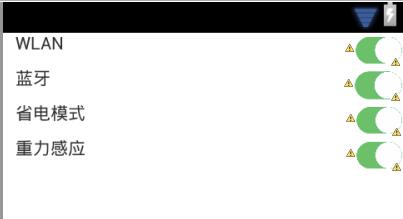
可以看得出来,每个LinearLayout几乎都连接在一起,视觉效果较差,下面我们为此编写一个样式,如同CSS样式表:
解决方法
1.在res文件夹中新建一个 android 的 xml 文件,命名为“linearlayout_boder”,代码如下:
<?xml version="1.0" encoding="utf-8"?>

<shape xmlns:android="http://schemas.android.com/apk/res/android" >

    <solid android:color="#FFFFFF" />

    <stroke

        android:width="0.1dp"

        android:color="#DDDDDD" />

    <padding

        android:bottom="1dp"

        android:left="0.5dp"

        android:right="0.5dp"

        android:top="0dp" />

</shape>
2.在需要用到此样式的地方增加如下代码:
android:background="@drawable/linearlayout_boder"
3.完整代码如下:
<?xml version="1.0" encoding="utf-8"?>

<LinearLayout xmlns:android="http://schemas.android.com/apk/res/android"

    android:layout_width="match_parent"

    android:layout_height="match_parent"

    android:orientation="vertical"

   >

    <LinearLayout

        android:layout_width="match_parent"

        android:layout_height="28dp"

         android:background="@drawable/linearlayout_boder"

         >

        <TextView

            android:id="@+id/TextView04"

            android:layout_width="wrap_content"

            android:layout_height="wrap_content"

            android:layout_weight="9"

            android:text="   WLAN" />

        <ImageView

            android:id="@+id/ImageView04"

            android:layout_width="28dp"

            android:layout_height="match_parent"

            android:layout_weight="0.38"

            android:src="@drawable/onblack" />

    </LinearLayout>

    <LinearLayout

        android:layout_width="match_parent"

        android:layout_height="28dp"

         android:background="@drawable/linearlayout_boder">

        <TextView

            android:id="@+id/TextView03"

            android:layout_width="wrap_content"

            android:layout_height="wrap_content"

            android:layout_weight="9"

            android:text="   蓝牙" />

        <ImageView

            android:id="@+id/ImageView03"

            android:layout_width="28dp"

            android:layout_height="match_parent"

            android:layout_weight="0.38"

            android:src="@drawable/onblack" />

    </LinearLayout>

    <LinearLayout

        android:layout_width="match_parent"

        android:layout_height="28dp"

         android:background="@drawable/linearlayout_boder">

        <TextView

            android:id="@+id/TextView02"

            android:layout_width="wrap_content"

            android:layout_height="wrap_content"

            android:layout_weight="9"

            android:text="   省电模式" />

        <ImageView

            android:id="@+id/ImageView02"

            android:layout_width="28dp"

            android:layout_height="match_parent"

            android:layout_weight="0.38"

            android:src="@drawable/onblack" />

    </LinearLayout>

    <LinearLayout

        android:layout_width="match_parent"

        android:layout_height="28dp"

         android:background="@drawable/linearlayout_boder">

        <TextView

            android:id="@+id/textView1"

            android:layout_width="wrap_content"

            android:layout_height="wrap_content"

            android:layout_weight="9"

            android:text="   重力感应" />

        <ImageView

            android:id="@+id/imageView1"

            android:layout_width="28dp"

            android:layout_height="match_parent"

            android:layout_weight="0.38"

            android:src="@drawable/onblack" />

    </LinearLayout>

</LinearLayout>
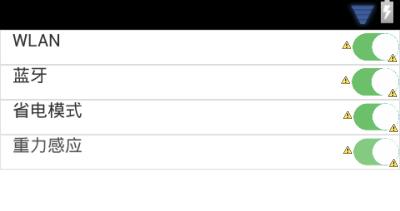
最终效果
【Android】设置 LinearLayout 的样式的更多相关文章
- android自定义控件,动态设置Button的样式
原文 http://www.cnblogs.com/landptf/p/4562203.html 今天来看一个通过重写Button来动态实现一些效果,如圆角矩形.圆形.按下改变字体,改变背景色,改变 ...
- Android按钮的各个样式设置
安卓开发学习之014 Button应用详解(样式.背景.按钮单击.长按.双击.多击事件) 一.Button简介 按钮也是继承自TextView 二.XML定义方法 <Button android ...
- Android下用程序的方法为ListView设置分割线Divider样式
使用XML的时候可以使用android:divider属性为ListView设置分割线的样式(颜色或者资源文件),而在Java代码中默认提供的方法 listView.setDivider() 却只支持 ...
- 巧用android:divider属性设置LinearLayout中元素之间的间隔
如上图,要想实现3个button线性排列并且使它们的大小相同.间隔相等.而且整体填充满整个linearlayout,我们一般的做法是在每两个button之间放一个固定宽度的view,然后设置butto ...
- Android 自定义RadioButton的样式
Android 自定义RadioButton的样式 我们知道Android控件里的button,listview可以用xml的样式自定义成自己希望的漂亮样式. 最近用到RadioButton,利用xm ...
- Android中实现全屏、无标题栏的两种办法(另附Android系统自带样式的解释)
在进行UI设计时,我们经常需要将屏幕设置成无标题栏或者全屏.要实现起来也非常简单,主要有两种方法:配置xml文件和编写代码设置. 1.在xml文件中进行配置 在项目的清单文件AndroidManife ...
- android.widget.FrameLayout$LayoutParams cannot be cast to android.widget.LinearLayout$LayoutParams
http://blog.csdn.net/lilu_leo/article/details/11952717 有时候需要在在代码中设置LayoutParams,自己为一个FrameLayout设置 ...
- 通过Spannable对象设置textview的样式
通过Spannable对象我们可以设置textview的各种样式,其功能十分强大.通过SpannableString和它的setSpan(Object what, int start, int end ...
- Android中无标题样式和全屏样式学习
在进行UI设计时,我们经常需要将屏幕设置成无标题栏或者全屏.要实现起来也非常简单,主要有两种方法:配置xml文件和编写代码设置. 1.在xml文件中进行配置 在项目的清单文件AndroidManife ...
随机推荐
- php课程---数组
数组: 一:定义 1.赋值定义 $arr[0] = 5; $arr[1] = "aa"; print_r ($arr); 2.定义索引数组 $ ...
- Objective-C基础语法快速入门
Objective-C基础语法快速入门 2010-11-04 16:32 折酷吧 zheku8 字号:T | T 假如我们对面向对象的思维已经C语言都很熟悉的话,对于我们学习Objective-C将会 ...
- 淘宝天猫网站停止支持IE6、IE7浏览器,你还在用xp吗?
2016年4月14日,是科比正式告别篮球的最后一场球赛.大家都在忙着各种纪念和怀念着看科比打球的青葱岁月.不过已经完美谢幕.而我们今天要说的是微软的IE6.IE7浏览器.淘宝网和天猫商城正式停止支持I ...
- buffer pool
https://dev.mysql.com/doc/refman/5.5/en/glossary.html#glos_buffer_pool buffer pool The memory area t ...
- Android中<meta-data>的使用
[转] 原文 在AndroidManifest.xml中,<meta-data>元素可以作为子元素,被包含在<activity>.<application> .& ...
- 关于ios8模拟器不能输入中文问题以及软键盘不弹出问题
在Xcode菜单栏中 Product->scheme->Edit Scheme->Options->Application Region改为中国,就可以输入中文了, 如果软 ...
- lodash的源码(1)
数组篇 1.compact,就是将数组中的false值去掉 function compact(array) { var index = -1, length = array ? array.lengt ...
- ASP.NET 5
docs.asp.net installing on windows Choosing the Right .NET For You on the Server DotNetCore: DotNetC ...
- Web3D编程入门总结——WebGL与Three.js基础介绍
/*在这里对这段时间学习的3D编程知识做个总结,以备再次出发.计划分成“webgl与three.js基础介绍”.“面向对象的基础3D场景框架编写”.“模型导入与简单3D游戏编写”三个部分,其他零散知识 ...
- How to use PEM of PPAS
-bash-4.1$ pwd/opt/PostgresPlus/9.3AS/client-v4/scripts -bash-4.1$ lsclient launchPEMClient.sh -bash ...