
.net core MVC 通过 Filters 过滤器拦截请求及响应内容
前提:
需要nuget Microsoft.Extensions.Logging.Log4Net.AspNetCore 2.2.6;
Swashbuckle.AspNetCore 我暂时用的是 4.01;
描述:通过 Filters 拦截器获取 Api 请求内容及响应内容,并记录到日志文件;
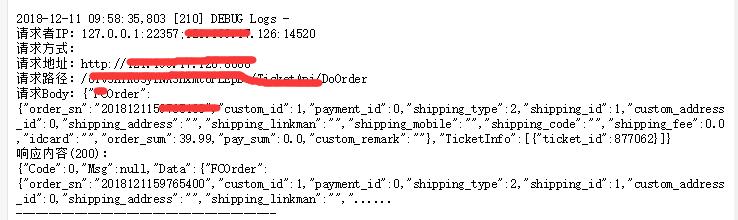
有文中代码记录接口每次请求及响应情况如下图:
解决办法:
步骤1 配置 Swagger 接口文档
对startup.cs 进行修改代码如下:
ConfigureServices 中增加Swagger 配置
services.AddSwaggerGen(c =>

{

    c.SwaggerDoc("v1", new Info

    {

        Version = "v1",

        Title = "Filters 过滤器测试Api",

        Description = @"通过 IActionFilter, IAsyncResourceFilter 拦截器拦截请求及响应上下文并记录到log4日志"

    });

    c.IncludeXmlComments(this.GetType().Assembly.Location.Replace(".dll", ".xml"), true);  //是需要设置 XML 注释文件的完整路径

});
对 Configure Http管道增加 SwaggerUi
public void Configure(IApplicationBuilder app, IHostingEnvironment env)

{if (env.IsDevelopment())

    {

        app.UseDeveloperExceptionPage();

    }

    app.UseMvc();

    app.UseSwagger();

    app.UseSwaggerUI(o =>

    {

        o.SwaggerEndpoint("/swagger/v1/swagger.json", "Filters 过滤器测试Api");

    });

}
步骤2 创建Log4net 日志帮助类 LogHelper.cs
    /// <summary>

    /// 日志帮助类

    /// </summary>

    public static class LogHelper

    {

        /// <summary>

        /// 日志提供者

        /// </summary>

        private static ILogger logger;

        /// <summary>

        /// 静太方法构造函数

        /// </summary>

        static LogHelper()

        {

            logger = new LoggerFactory().AddConsole().AddDebug().AddLog4Net().CreateLogger("Logs");

        }

        /// <summary>

        /// 打印提示

        /// </summary>

        /// <param name="message">日志内容</param>

        public static void Info(object message)

        {

            logger.LogInformation(message?.ToString());

        }

        /// <summary>

        /// 打印错误

        /// </summary>

        /// <param name="message">日志内容</param>

        public static void Error(object message)

        {

            logger.LogError(message?.ToString());

        }

        /// <summary>

        /// 打印错误

        /// </summary>

        /// <param name="ex">异常信息</param>

        /// <param name="message">日志内容</param>

        public static void Error(Exception ex, string message)

        {

            logger.LogError(ex, message);

        }

        /// <summary>

        /// 调试信息打印

        /// </summary>

        /// <param name="message"></param>

        public static void Debug(object message)

        {

            logger.LogDebug(message?.ToString());

        }

    }
LogHelper
步骤3 定义可读写的Http 上下文流接口 IReadableBody.cs 及 http 请求上下文中间件 HttpContextMiddleware.cs
    /// <summary>

    /// 定义可读Body的接口

    /// </summary>

    public interface IReadableBody

    {

        /// <summary>

        /// 获取或设置是否可读

        /// </summary>

        bool IsRead { get; set; }

        /// <summary>

        /// 读取文本内容

        /// </summary>

        /// <returns></returns>

        Task<string> ReadAsStringAsync();

    }
IReadableBody
/// <summary>

    /// Http 请求中间件

    /// </summary>

    public class HttpContextMiddleware

    {

        /// <summary>

        /// 处理HTTP请求

        /// </summary>

        private readonly RequestDelegate next;

        /// <summary>

        /// 构造 Http 请求中间件

        /// </summary>

        /// <param name="next"></param>

        public HttpContextMiddleware(RequestDelegate next)

        {

            this.next = next;

        }

        /// <summary>

        /// 执行响应流指向新对象

        /// </summary>

        /// <param name="context"></param>

        /// <returns></returns>

        public Task Invoke(HttpContext context)

        {

            context.Response.Body = new ReadableResponseBody(context.Response.Body);

            return this.next.Invoke(context);

        }

        /// <summary>

        /// 可读的Response Body

        /// </summary>

        private class ReadableResponseBody : MemoryStream, IReadableBody

        {

            /// <summary>

            /// 流内容

            /// </summary>

            private readonly Stream body;

            /// <summary>

            /// 获取或设置是否可读

            /// </summary>

            public bool IsRead { get; set; }

            /// <summary>

            /// 构造自定义流

            /// </summary>

            /// <param name="body"></param>

            public ReadableResponseBody(Stream body)

            {

                this.body = body;

            }

            /// <summary>

            /// 写入响应流

            /// </summary>

            /// <param name="buffer"></param>

            /// <param name="offset"></param>

            /// <param name="count"></param>

            public override void Write(byte[] buffer, int offset, int count)

            {

                this.body.Write(buffer, offset, count);

                if (this.IsRead)

                {

                    base.Write(buffer, offset, count);

                }

            }

            /// <summary>

            /// 写入响应流

            /// </summary>

            /// <param name="source"></param>

            public override void Write(ReadOnlySpan<byte> source)

            {

                this.body.Write(source);

                if (this.IsRead)

                {

                    base.Write(source);

                }

            }

            /// <summary>

            /// 刷新响应流

            /// </summary>

            public override void Flush()

            {

                this.body.Flush();

                if (this.IsRead)

                {

                    base.Flush();

                }

            }

            /// <summary>

            /// 读取响应内容

            /// </summary>

            /// <returns></returns>

            public Task<string> ReadAsStringAsync()

            {

                if (this.IsRead == false)

                {

                    throw new NotSupportedException();

                }

                this.Seek(, SeekOrigin.Begin);

                using (var reader = new StreamReader(this))

                {

                    return reader.ReadToEndAsync();

                }

            }

            protected override void Dispose(bool disposing)

            {

                this.body.Dispose();

                base.Dispose(disposing);

            }

        }

    }
HttpContextMiddleware
步骤4 配置Http管通增加 Http请求上下文中件间
打开 Startup.cs ,对管通 Configure 增加如下中间件代码:
app.UseMiddleware<HttpContextMiddleware>();
步骤5 增加Api 过滤器 ApiFilterAttribute
    /// <summary>

    /// Api 过滤器,记录请求上下文及响应上下文

    /// </summary>

    public class ApiFilterAttribute : Attribute, IActionFilter, IAsyncResourceFilter

    {

        /// <summary>

        /// 请求Api 资源时

        /// </summary>

        /// <param name="context"></param>

        /// <param name="next"></param>

        /// <returns></returns>

        public async Task OnResourceExecutionAsync(ResourceExecutingContext context, ResourceExecutionDelegate next)

        {

            // 执行前

            try

            {

                await next.Invoke();

            }

            catch

            {

            }

            // 执行后

            await OnResourceExecutedAsync(context);

        }

        /// <summary>

        /// 记录Http请求上下文

        /// </summary>

        /// <param name="context"></param>

        /// <returns></returns>

        public async Task OnResourceExecutedAsync(ResourceExecutingContext context)

        {

            var log = new HttpContextMessage

            {

                RequestMethod = context.HttpContext.Request.Method,

                ResponseStatusCode = context.HttpContext.Response.StatusCode,

                RequestQurey = context.HttpContext.Request.QueryString.ToString(),

                RequestContextType = context.HttpContext.Request.ContentType,

                RequestHost = context.HttpContext.Request.Host.ToString(),

                RequestPath = context.HttpContext.Request.Path,

                RequestScheme = context.HttpContext.Request.Scheme,

                RequestLocalIp = (context.HttpContext.Request.HttpContext.Connection.LocalIpAddress.MapToIPv4().ToString() + ":" + context.HttpContext.Request.HttpContext.Connection.LocalPort),

                RequestRemoteIp = (context.HttpContext.Request.HttpContext.Connection.RemoteIpAddress.MapToIPv4().ToString() + ":" + context.HttpContext.Request.HttpContext.Connection.RemotePort)

            };

            //获取请求的Body

            //数据流倒带 context.HttpContext.Request.EnableRewind();

            if (context.HttpContext.Request.Body.CanSeek)

            {

                using (var requestSm = context.HttpContext.Request.Body)

                {

                    requestSm.Position = ;

                    var reader = new StreamReader(requestSm, Encoding.UTF8);

                    log.RequestBody = reader.ReadToEnd();

                }

            }

            //将当前 http 响应Body 转换为 IReadableBody

            if (context.HttpContext.Response.Body is IReadableBody body)

            {

                if (body.IsRead)

                {

                    log.ResponseBody = await body.ReadAsStringAsync();

                }

            }

            if (string.IsNullOrEmpty(log.ResponseBody) == false && log.ResponseBody.Length > )

            {

                log.ResponseBody = log.ResponseBody.Substring(, ) + "......";

            }

            LogHelper.Debug(log);

        }

        /// <summary>

        /// Action 执行前

        /// </summary>

        /// <param name="context"></param>

        public void OnActionExecuting(ActionExecutingContext context)

        {

            //设置 Http请求响应内容设为可读

            if (context.HttpContext.Response.Body is IReadableBody responseBody)

            {

                responseBody.IsRead = true;

            }

        }

        /// <summary>

        /// Action 执行后

        /// </summary>

        /// <param name="context"></param>

        public void OnActionExecuted(ActionExecutedContext context)

        {

        }

    }
ApiFilterAttribute
步骤6 对需要记录请求上下文日志的接口加上特性 [ApiFilter]
[ApiFilter]

[Route("api/[controller]/[Action]")]

[ApiController]

public class DemoController : ControllerBase

{

.......

}
Demo 地址:https://github.com/intotf/netCore/tree/master/WebFilters
.net core MVC 通过 Filters 过滤器拦截请求及响应内容的更多相关文章
- 在ASP.NET Core MVC中子类Controller拦截器要先于父类Controller拦截器执行
我们知道在ASP.NET Core MVC中Controller上的Filter拦截器是有执行顺序的,那么如果我们在有继承关系的两个Controller类上,声明同一种类型的Filter拦截器,那么是 ...
- MVC中的过滤器/拦截器怎么写
创建一个AuthenticateFilterAttribute(即过滤器/拦截器) 引用System.Web.Mvc; public class AuthenticateFilterAttribute ...
- .NET MVC中登录过滤器拦截的两种方法
今天给大家介绍两种ASP中过滤器拦截的两种方法. 一种是EF 的HtppModule,另一种则是灵活很多针对MVC的特性类 Attribute 具体什么是特性类可以参考着篇文章:https://www ...
- .net core 杂记:WebAPI的XML请求和响应
一般情况下,restfult api 进行数据返回或模型绑定,默认json格式会比较常见和方便,当然偶尔也会需要以XML格式的要求 对于返回XML,普通常见的方式就是在每个aciton方法进行诸如X ...
- .net core webapi通过中间件获取请求和响应内容
本文主要根据中间件来实现对.net core webapi中产生的请求和响应数据进行获取并存入日志文件中: 这里不详细介绍日志文件的使用.你可以自己接入NLog,log4net,Exceptionle ...
- openresty(完整版)Lua拦截请求与响应信息日志收集及基于cjson和redis动态路径以及Prometheus监控(转)
直接上文件 nginx.conf #运行用户和组,缺省为nobody,若改为别的用户和组,则需要先创建用户和组 #user wls81 wls; #开启进程数,一般与CPU核数等同 worker_pr ...
- 3-Fiddler修改请求或响应内容
1.修改请求内容 方法一:设置请求前断点,修改请求后发送 1)设置断点 2)选中请求,在inspectors下修改请求内容 3)修改请求后,点击Break on Response按钮,进行请求的发送 ...
- .net core mvc model填充过滤器
在程序开发中,我们可能经常遇到所有的数据库表有相同的属性和行为,比如需要记录数据的创建人员,创建时间,修改时间和修改人.如果在每个action中都加上这些信息,代码看着比较冗余,看着不那么优雅,于是考 ...
- MVC的Filters(拦截过滤)的Error页面,支持Ajax报错
报错拦截过滤到error页面 [AttributeUsage(AttributeTargets.Method | AttributeTargets.Class, Inherited = true, A ...
随机推荐
- iSCSI存储的3种连接方式
我们分析了iSCSI存储的系统结构,下面来看iSCSI是如何与服务器.工作站等主机设备来连接的,也就是我们如何建立一个iSCSI网络存储系统. iSCSI设备的主机接口一般默认都是IP接口,可以直接与 ...
- java中二维数组求最大值代码。。。。。。不懂呀
总结:二维数组理解不了,,,,求解析... package com.c2; public class Aaa { // 求数组元素中最大的 public static void main(String ...
- window.open()打开新窗口被拦截
window.open( url )是常用的打开新页面的方法,一般都没有问题,但是如果在ajax回调方法里面使用就会被浏览器拦截,因为在浏览器安全机制中,页面弹窗必须是由用户触发的才是安全弹窗,比如说 ...
- highcharts钻取例子
<!doctype html> <html lang="en"> <head> <script type="text/javas ...
- linux中zookeeper
linux中zookeeper 安装jdk tar -zxvf jdk-11.0.1_linux-x64_bin.tar.gz -C /usr/src sudo vim /etc/profile 输入 ...
- Python __getattribute__ vs __getattr__
# 例子在原来的基础上简化了一下,排除依赖和干扰,详细参见原项目 class UrlGenerator(object): def __init__(self, root_url): self.url ...
- delphi 天气预报
天气预报 var astream : tmemorystream; sStream : TStringStream; jv : TJSONValue; begin astream := tmemory ...
- ubuntu下编译ffmpeg并用eclipse调试
一.下载ffnpeg源码 下载地址:http://ffmpeg.org/download.html 二.解决版本问题 可能之前你编译过ffmpeg,或者装过相关的库,那都要先卸载掉,否则用的时候会报一 ...
- python的ftplib模块
Python中的ftplib模块 Python中默认安装的ftplib模块定义了FTP类,其中函数有限,可用来实现简单的ftp客户端,用于上传或下载文件 FTP的工作流程及基本操作可参考协议RFC95 ...
- Spring Cloud Eureka 4 (高可用服务注册中心)
在微服务这样的分布式环境中,我们需要充分考虑发生故障的情况,所以在生产环境中必须考虑对各个组件进行高可用部署,对于服务注册中心也是一样. Eureka Server 的高可用实际上就是讲自己作为服务向 ...