
PopupWindow弹出框
使用PopupWindow实现一个悬浮框,悬浮在Activity之上,显示位置可以指定
首先创建pop_window.xml:
<?xml version="1.0" encoding="utf-8"?>

<android.support.constraint.ConstraintLayout

    xmlns:android="http://schemas.android.com/apk/res/android"

    xmlns:app="http://schemas.android.com/apk/res-auto"

    android:background="#bbbbbb"

    android:layout_width="match_parent"

    android:layout_height="match_parent">

    <TextView

        android:id="@+id/tv_title"

        android:layout_width="wrap_content"

        android:layout_height="wrap_content"

        android:layout_marginStart="8dp"

        android:layout_marginLeft="8dp"

        android:layout_marginTop="8dp"

        android:layout_marginEnd="8dp"

        android:layout_marginRight="8dp"

        android:layout_marginBottom="8dp"

        app:layout_constraintBottom_toTopOf="@+id/tv_msg"

        app:layout_constraintEnd_toEndOf="parent"

        app:layout_constraintStart_toStartOf="parent"

        app:layout_constraintTop_toTopOf="parent" />

    <TextView

        android:id="@+id/tv_msg"

        android:layout_width="wrap_content"

        android:layout_height="wrap_content"

        android:layout_marginStart="8dp"

        android:layout_marginLeft="8dp"

        android:layout_marginTop="8dp"

        android:layout_marginEnd="8dp"

        android:layout_marginRight="8dp"

        android:layout_marginBottom="8dp"

        app:layout_constraintBottom_toTopOf="@+id/linearLayout"

        app:layout_constraintEnd_toEndOf="parent"

        app:layout_constraintStart_toStartOf="parent"

        app:layout_constraintTop_toTopOf="parent" />

    <LinearLayout

        android:id="@+id/linearLayout"

        android:layout_width="match_parent"

        android:layout_height="wrap_content"

        android:layout_marginStart="8dp"

        android:layout_marginLeft="8dp"

        android:layout_marginTop="8dp"

        android:layout_marginEnd="8dp"

        android:layout_marginRight="8dp"

        android:layout_marginBottom="8dp"

        android:orientation="horizontal"

        app:layout_constraintBottom_toBottomOf="parent"

        app:layout_constraintEnd_toEndOf="parent"

        app:layout_constraintHorizontal_bias="1.0"

        app:layout_constraintStart_toStartOf="parent"

        app:layout_constraintTop_toTopOf="parent"

        app:layout_constraintVertical_bias="0.625">

        <Button

            android:id="@+id/btn_cancel"

            android:layout_width="wrap_content"

            android:layout_height="wrap_content"

            android:text="取消" />

        <Button

            android:id="@+id/btn_ok"

            android:layout_width="wrap_content"

            android:layout_height="wrap_content"

            android:text="确定" />

    </LinearLayout>

</android.support.constraint.ConstraintLayout>
使用ConstraintLayout看起来比较麻烦,用拖拽还是很方便的。这里设置四个组件,两个TextView,两个Button
activity_main.xml:
<?xml version="1.0" encoding="utf-8"?>

<android.support.constraint.ConstraintLayout

	xmlns:android="http://schemas.android.com/apk/res/android"

    xmlns:app="http://schemas.android.com/apk/res-auto"

    xmlns:tools="http://schemas.android.com/tools"

    android:layout_width="match_parent"

    android:layout_height="match_parent"

    tools:context=".MainActivity">

    <Button

        android:id="@+id/btn_pop_window"

        android:layout_width="wrap_content"

        android:layout_height="wrap_content"

        android:layout_marginStart="8dp"

        android:layout_marginLeft="8dp"

        android:layout_marginTop="8dp"

        android:layout_marginEnd="8dp"

        android:layout_marginRight="8dp"

        android:layout_marginBottom="8dp"

        android:text="pop_window"

        app:layout_constraintBottom_toBottomOf="parent"

        app:layout_constraintEnd_toEndOf="parent"

        app:layout_constraintStart_toStartOf="parent"

        app:layout_constraintTop_toTopOf="parent" />

</android.support.constraint.ConstraintLayout>
主界面放置一个按钮。
MainActivity:
package com.fitsoft;

import android.os.Bundle;

import android.support.v7.app.AppCompatActivity;

import android.view.Gravity;

import android.view.LayoutInflater;

import android.view.View;

import android.view.WindowManager;

import android.widget.Button;

import android.widget.PopupWindow;

import android.widget.TextView;

import android.widget.Toast;

public class MainActivity extends AppCompatActivity {

    Button button;

    PopupWindow popupWindow;

    @Override

    protected void onCreate(Bundle savedInstanceState) {

        super.onCreate(savedInstanceState);

        setContentView(R.layout.activity_main);

        button = findViewById(R.id.btn_pop_window);

        button.setOnClickListener(new View.OnClickListener() {

            @Override

            public void onClick(View v) {

                popupWindow.showAsDropDown(v);

            }

        });

        //载入界面

        View view = LayoutInflater.from(this).inflate(R.layout.pop_window, null);

        {

            TextView textView = view.findViewById(R.id.tv_title);

            textView.setText("标题");

        }

        {

            TextView textView = view.findViewById(R.id.tv_msg);

            textView.setText("这里是popwindow的消息内容");

        }

        {

            Button button = view.findViewById(R.id.btn_ok);

            button.setOnClickListener(new View.OnClickListener() {

                @Override

                public void onClick(View v) {

                    Toast.makeText(v.getContext(), "您点击了确定按钮", Toast.LENGTH_SHORT).show();

                    popupWindow.dismiss();

                }

            });

        }

        {

            Button button = view.findViewById(R.id.btn_cancel);

            button.setOnClickListener(new View.OnClickListener() {

                @Override

                public void onClick(View v) {

                    Toast.makeText(v.getContext(), "您点击了取消按钮", Toast.LENGTH_SHORT).show();

                    popupWindow.dismiss();

                }

            });

        }

        //绑定

        popupWindow = new PopupWindow(view, WindowManager.LayoutParams.WRAP_CONTENT,

                WindowManager.LayoutParams.WRAP_CONTENT);

    }

}
这里调用了PopupWindow的构造方法:
/**

 * <p>Create a new non focusable popup window which can display the

 * <tt>contentView</tt>. The dimension of the window must be passed to

 * this constructor.</p>

 *

 * <p>The popup does not provide any background. This should be handled

 * by the content view.</p>

 *

 * @param contentView the popup's content

 * @param width the popup's width

 * @param height the popup's height

 */

public PopupWindow(View contentView, int width, int height) {

    this(contentView, width, height, false);

}
绑定视图,设置宽高...很好用...
最后用按钮的点击事件弹出窗口:
popupWindow.showAsDropDown(v);
效果图:
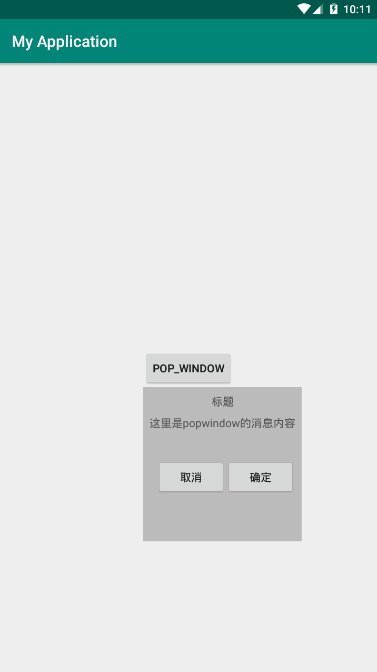
左对齐,显示在下方....调整一下弹出代码,将刚刚的弹出代码注释掉,用下面的代码替换:
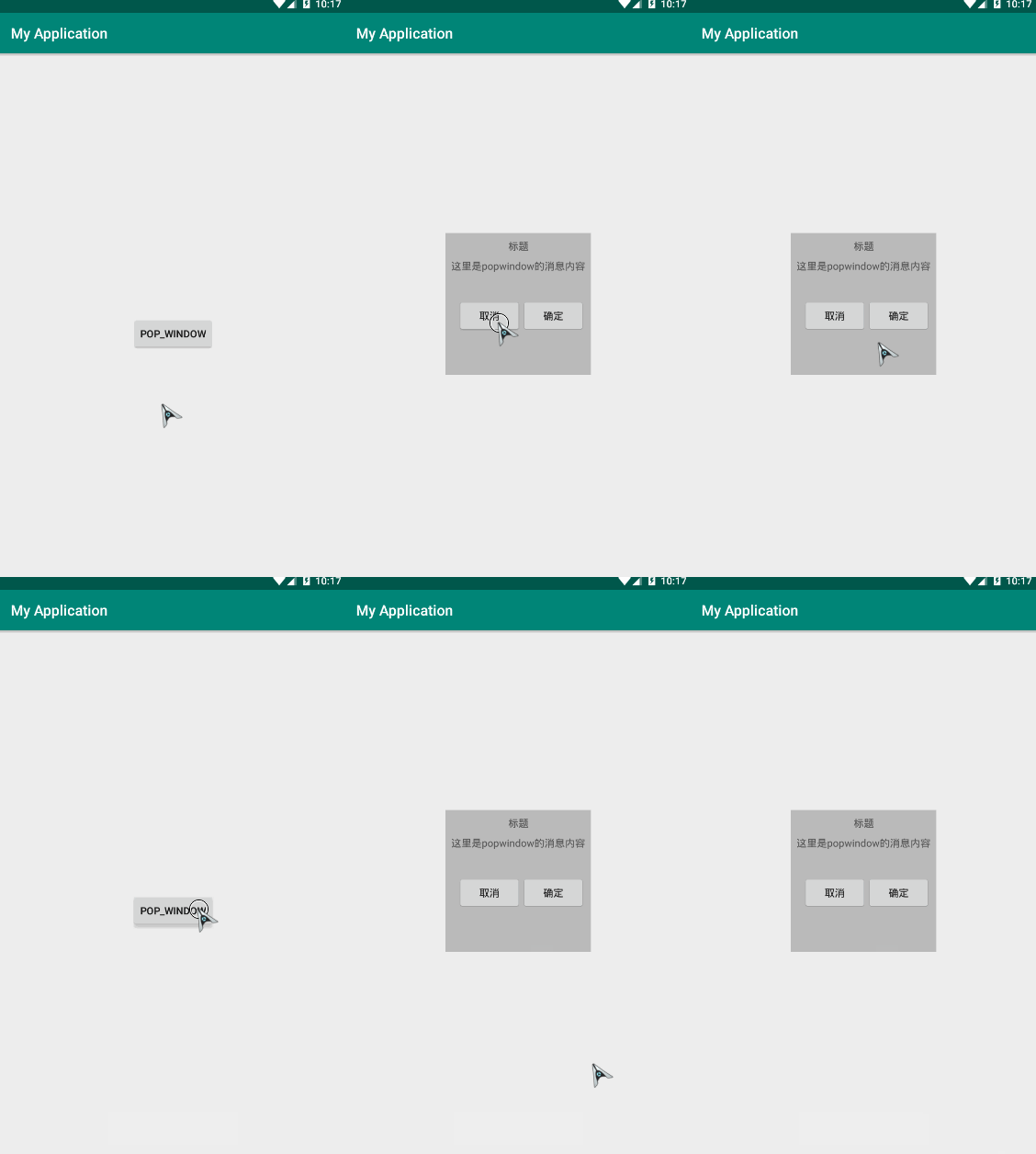
popupWindow.showAtLocation(MainActivity.this.getWindow().getDecorView(),

                    Gravity.CENTER, 0, 0);
获取顶级布局,设置居中显示,x、y不偏移。
效果图:
PopupWindow弹出框的更多相关文章
- 练习PopupWindow弹出框之实现界面加载的时候显示弹出框到指定的view下面--两种延迟方法
今天在练习PopupWindow弹出框的时候,打算在界面加载的时候将弹出框展现出来并显示在指定的view下面. 初步方法是直接在OnResume方法里面直接执行showPopupWindows方法. ...
- 自定义PopupWindow弹出框(带有动画)
使用PopupWindow来实现弹出框,并且带有动画效果 首先自定义PopupWindow public class LostPopupWindow extends PopupWindow { pub ...
- android 三种弹出框之一PopupWindow
PopupWindow 在android的弹出框我目前了解到的是有三种:AlertDialog,PopupWindow,Activity伪弹框, AlertDialog太熟悉了,这里就不介绍了 就先看 ...
- 通用的popupwindow底部弹出框
前段时间做项目的时候,有几个底部弹出框,当时因为忙着赶进度所有就单独写了好几个popupwindow.后来就想着怎么实现一个通用的PopupWindow工具类 就是在要用到的时候创建该工具类的对象,并 ...
- appium 定位弹出框时报错
今天在做APP自动化时,发现定位弹出框无法定位,无奈,百度去找.发现了一篇不错的博客,故转载过来,供大家参考.后续会验证这个方法的可行性. 本博客转自:http://blog.csdn.net/qq7 ...
- Android 自定义界面的弹出框(可输入数据)
上午写了一篇博文,介绍了如何定义从屏幕底部弹出PopupWindow,写完之后,突然想起之前写过自定义内容显示的弹出框,就随手写了两个实例,分享出来: 第一种实现方式:继承Dialog 1.1 线定义 ...
- 关于Layer弹出框初探
layer至今仍作为layui的代表作,她的受众广泛并非偶然,而是这五年多的坚持,不断完善和维护.不断建设和提升社区服务,使得猿们纷纷自发传播,乃至于成为今天的Layui最强劲的源动力.目前,laye ...
- angularjs 弹出框 $modal
angularjs 弹出框 $modal 标签: angularjs 2015-11-04 09:50 8664人阅读 评论(1) 收藏 举报 分类: Angularjs(3) $modal只有一 ...
- 【代码笔记】iOS-自定义弹出框
代码: - (void)viewDidLoad { [super viewDidLoad]; // Do any additional setup after loading the view. [s ...
随机推荐
- Java 调用http接口(基于OkHttp的Http工具类方法示例)
目录 Java 调用http接口(基于OkHttp的Http工具类方法示例) OkHttp3 MAVEN依赖 Http get操作示例 Http Post操作示例 Http 超时控制 工具类示例 Ja ...
- maven出现:Failed to execute goal on project ...: Could not resolve dependencies for project ...
项目结构是一个父项目,多个子项目目录: 例如: common --------------(父项目) fristDemo ------------(子项目) 如果在子项目中调用了父项目,而对(子 ...
- 【阿里云IoT+YF3300】3. Alink物模型之属性上传和下发
[名词解释]属性:设备的功能模型之一,一般用于描述设备运行时的状态,如环境监测设备所读取的当前环境温度等.属性支持 GET 和 SET 请求方式.应用系统可发起对属性的读取和设置请求. 在上一篇文章& ...
- Nginx总结(三)基于端口的虚拟主机配置
前面讲了如何配置基于IP的虚拟主机,大家可以去这里看看nginx系列文章:https://www.cnblogs.com/zhangweizhong/category/1529997.html 今天就 ...
- ubuntu安装后的基本配置及常用软件的安装
文章作者:foochane 原文链接:https://foochane.cn/article/2019061501.html 内容简介 当前Ubuntu版本:ubuntu 18.04,具体操作如下: ...
- linux的一些简单命令
简单学习了一些linux相关的知识,自己做一个简单的总结,可以在一般工作中命令行状态下装装B,哈哈 正则相关 grep grep xxx yyy.file 查找出yyy文件中存在xxx的行 通配符 * ...
- Egret白鹭开发小游戏中容易犯的错
在游戏开发过程中遇到问题,请首先查阅:http://developer.egret.com/cn/github/egret-docs/Engine2D/minigame/minigameFAQ/ind ...
- 安装Python及各种包/库——没有网络的电脑上
我们做项目时可能会遇到,一些电脑只能联内网或者无法联网,这种情况怎样在电脑上安装Python及各种第三方包/库呢? 1.首先,在有网络的电脑上在python官网下载好python安装包,地址:http ...
- C# winform语音提示
1.SpeechSynthesizer文字转音频 项目添加引用:System.Speech using(SpeechSynthesizer speech = new SpeechSynthesizer ...
- ResourceManager学习之Application,状态机管理
Application管理 YARN中,Application是指应用程序,他可能启动多个运行实例,每个运行实例由一个ApplicationMaster与一组该ApplicationMaster启动的 ...