
Java Web 笔记(4)
11、Filter (重点)
Filter:过滤器 ,用来过滤网站的数据;
- 处理中文乱码
- 登录验证….
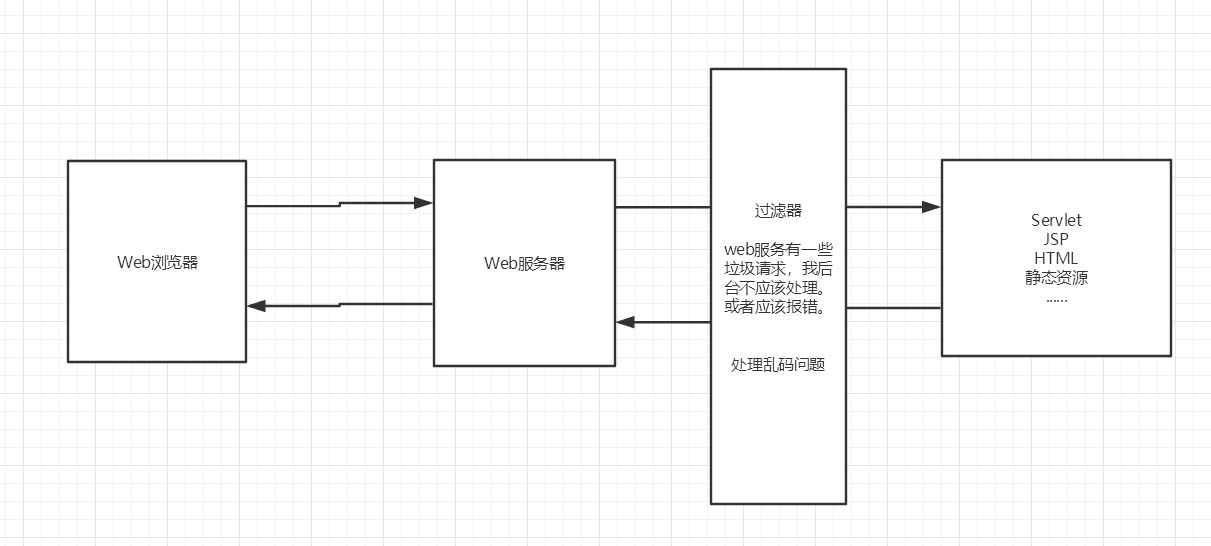
Filter开发步骤:
导包
编写过滤器
- 导包不要错
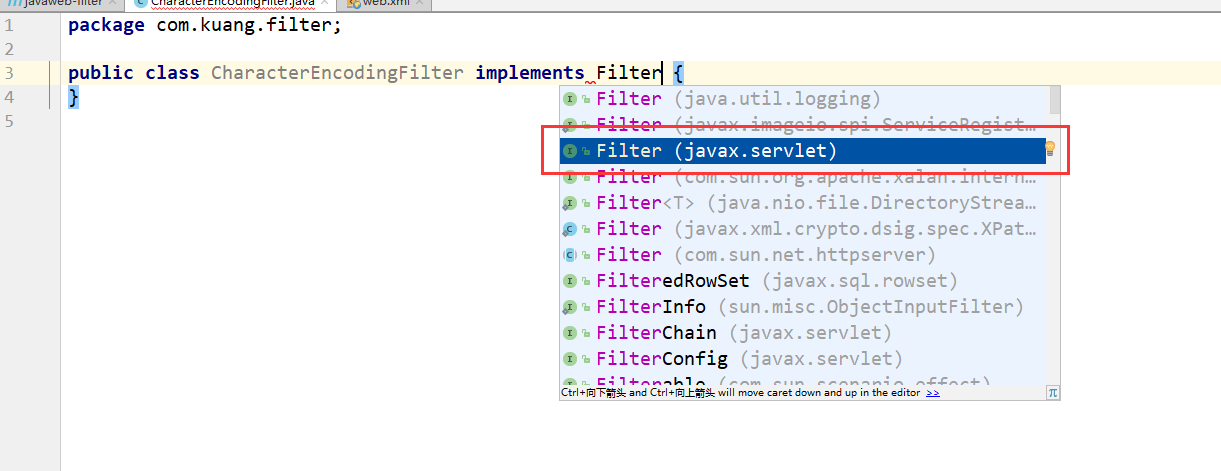
  实现Filter接口,重写对应的方法即可

  ```java

  public class CharacterEncodingFilter implements Filter {

      //初始化:web服务器启动,就以及初始化了,随时等待过滤对象出现!

      public void init(FilterConfig filterConfig) throws ServletException {

          System.out.println("CharacterEncodingFilter初始化");

      }

      //Chain : 链

      /*

      1. 过滤中的所有代码,在过滤特定请求的时候都会执行

      2. 必须要让过滤器继续同行

          chain.doFilter(request,response);

       */

      public void doFilter(ServletRequest request, ServletResponse response, FilterChain chain) throws IOException, ServletException {

          request.setCharacterEncoding("utf-8");

          response.setCharacterEncoding("utf-8");

          response.setContentType("text/html;charset=UTF-8");

          System.out.println("CharacterEncodingFilter执行前....");

          chain.doFilter(request,response); //让我们的请求继续走,如果不写,程序到这里就被拦截停止!

          System.out.println("CharacterEncodingFilter执行后....");

      }

      //销毁:web服务器关闭的时候,过滤会销毁

      public void destroy() {

          System.out.println("CharacterEncodingFilter销毁");

      }

  }

  ```
在web.xml中配置 Filter
<filter>

    <filter-name>CharacterEncodingFilter</filter-name>

    <filter-class>com.kuang.filter.CharacterEncodingFilter</filter-class>

</filter>

<filter-mapping>

    <filter-name>CharacterEncodingFilter</filter-name>

    <!--只要是 /servlet的任何请求,会经过这个过滤器-->

    <url-pattern>/servlet/*</url-pattern>

    <!--<url-pattern>/*</url-pattern>-->

</filter-mapping>
12、监听器
实现一个监听器的接口;(有N种)
编写一个监听器
实现监听器的接口…
//统计网站在线人数 : 统计session

public class OnlineCountListener implements HttpSessionListener {

    //创建session监听: 看你的一举一动

    //一旦创建Session就会触发一次这个事件!

    public void sessionCreated(HttpSessionEvent se) {

        ServletContext ctx = se.getSession().getServletContext();

        System.out.println(se.getSession().getId());

        Integer onlineCount = (Integer) ctx.getAttribute("OnlineCount");

        if (onlineCount==null){

            onlineCount = new Integer(1);

        }else {

            int count = onlineCount.intValue();

            onlineCount = new Integer(count+1);

        }

        ctx.setAttribute("OnlineCount",onlineCount);

    }

    //销毁session监听

    //一旦销毁Session就会触发一次这个事件!

    public void sessionDestroyed(HttpSessionEvent se) {

        ServletContext ctx = se.getSession().getServletContext();

        Integer onlineCount = (Integer) ctx.getAttribute("OnlineCount");

        if (onlineCount==null){

            onlineCount = new Integer(0);

        }else {

            int count = onlineCount.intValue();

            onlineCount = new Integer(count-1);

        }

        ctx.setAttribute("OnlineCount",onlineCount);

    }

    /*

    Session销毁:

    1. 手动销毁  getSession().invalidate();

    2. 自动销毁

     */

}
web.xml中注册监听器
<!--注册监听器-->

<listener>

    <listener-class>com.kuang.listener.OnlineCountListener</listener-class>

</listener>
看情况是否使用!
13、过滤器、监听器常见应用
监听器:GUI编程中经常使用;
public class TestPanel {

    public static void main(String[] args) {

        Frame frame = new Frame("中秋节快乐");  //新建一个窗体

        Panel panel = new Panel(null); //面板

        frame.setLayout(null); //设置窗体的布局

        frame.setBounds(300,300,500,500);

        frame.setBackground(new Color(0,0,255)); //设置背景颜色

        panel.setBounds(50,50,300,300);

        panel.setBackground(new Color(0,255,0)); //设置背景颜色

        frame.add(panel);

        frame.setVisible(true);

        //监听事件,监听关闭事件

        frame.addWindowListener(new WindowAdapter() {

            @Override

            public void windowClosing(WindowEvent e) {

                super.windowClosing(e);

            }

        });

    }

}
用户登录之后才能进入主页!用户注销后就不能进入主页了!
用户登录之后,向Sesison中放入用户的数据
进入主页的时候要判断用户是否已经登录;要求:在过滤器中实现!
HttpServletRequest request = (HttpServletRequest) req;

HttpServletResponse response = (HttpServletResponse) resp;

if (request.getSession().getAttribute(Constant.USER_SESSION)==null){

    response.sendRedirect("/error.jsp");

}

chain.doFilter(request,response);
14、JDBC
什么是JDBC : Java连接数据库!
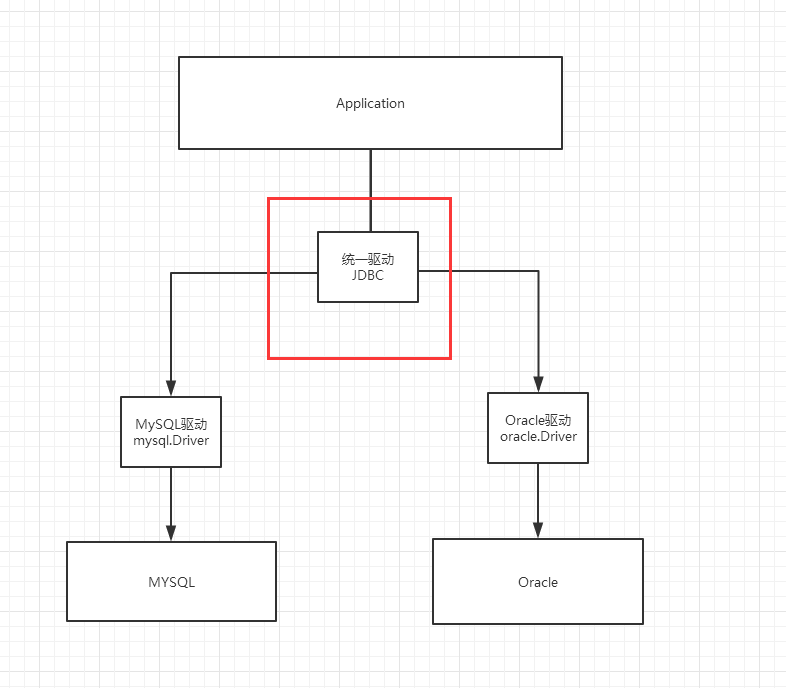
需要jar包的支持:
- java.sql
- javax.sql
- mysql-conneter-java… 连接驱动(必须要导入)
实验环境搭建
CREATE TABLE users(

    id INT PRIMARY KEY,

    `name` VARCHAR(40),

    `password` VARCHAR(40),

    email VARCHAR(60),

    birthday DATE

);

INSERT INTO users(id,`name`,`password`,email,birthday)

VALUES(1,'张三','123456','zs@qq.com','2000-01-01');

INSERT INTO users(id,`name`,`password`,email,birthday)

VALUES(2,'李四','123456','ls@qq.com','2000-01-01');

INSERT INTO users(id,`name`,`password`,email,birthday)

VALUES(3,'王五','123456','ww@qq.com','2000-01-01');

SELECT	* FROM users;
导入数据库依赖
<!--mysql的驱动-->

<dependency>

    <groupId>mysql</groupId>

    <artifactId>mysql-connector-java</artifactId>

    <version>5.1.47</version>

</dependency>
IDEA中连接数据库:

JDBC 固定步骤:
- 加载驱动
- 连接数据库,代表数据库
- 向数据库发送SQL的对象Statement : CRUD
- 编写SQL (根据业务,不同的SQL)
- 执行SQL
- 关闭连接
public class TestJdbc {

    public static void main(String[] args) throws ClassNotFoundException, SQLException {

        //配置信息

        //useUnicode=true&characterEncoding=utf-8 解决中文乱码

        String url="jdbc:mysql://localhost:3306/jdbc?useUnicode=true&characterEncoding=utf-8";

        String username = "root";

        String password = "123456";

        //1.加载驱动

        Class.forName("com.mysql.jdbc.Driver");

        //2.连接数据库,代表数据库

        Connection connection = DriverManager.getConnection(url, username, password);

        //3.向数据库发送SQL的对象Statement,PreparedStatement : CRUD

        Statement statement = connection.createStatement();

        //4.编写SQL

        String sql = "select * from users";

        //5.执行查询SQL,返回一个 ResultSet  : 结果集

        ResultSet rs = statement.executeQuery(sql);

        while (rs.next()){

            System.out.println("id="+rs.getObject("id"));

            System.out.println("name="+rs.getObject("name"));

            System.out.println("password="+rs.getObject("password"));

            System.out.println("email="+rs.getObject("email"));

            System.out.println("birthday="+rs.getObject("birthday"));

        }

        //6.关闭连接,释放资源(一定要做) 先开后关

        rs.close();

        statement.close();

        connection.close();

    }

}
预编译SQL
public class TestJDBC2 {

    public static void main(String[] args) throws Exception {

        //配置信息

        //useUnicode=true&characterEncoding=utf-8 解决中文乱码

        String url="jdbc:mysql://localhost:3306/jdbc?useUnicode=true&characterEncoding=utf-8";

        String username = "root";

        String password = "123456";

        //1.加载驱动

        Class.forName("com.mysql.jdbc.Driver");

        //2.连接数据库,代表数据库

        Connection connection = DriverManager.getConnection(url, username, password);

        //3.编写SQL

        String sql = "insert into  users(id, name, password, email, birthday) values (?,?,?,?,?);";

        //4.预编译

        PreparedStatement preparedStatement = connection.prepareStatement(sql);

        preparedStatement.setInt(1,2);//给第一个占位符? 的值赋值为1;

        preparedStatement.setString(2,"狂神说Java");//给第二个占位符? 的值赋值为狂神说Java;

        preparedStatement.setString(3,"123456");//给第三个占位符? 的值赋值为123456;

        preparedStatement.setString(4,"24736743@qq.com");//给第四个占位符? 的值赋值为1;

        preparedStatement.setDate(5,new Date(new java.util.Date().getTime()));//给第五个占位符? 的值赋值为new Date(new java.util.Date().getTime());

        //5.执行SQL

        int i = preparedStatement.executeUpdate();

        if (i>0){

            System.out.println("插入成功@");

        }

        //6.关闭连接,释放资源(一定要做) 先开后关

        preparedStatement.close();

        connection.close();

    }

}
事务
要么都成功,要么都失败!
ACID原则:保证数据的安全。
开启事务

事务提交  commit()

事务回滚  rollback()

关闭事务

转账:

A:1000

B:1000

A(900)   --100-->   B(1100)
Junit单元测试
依赖
<!--单元测试-->

<dependency>

    <groupId>junit</groupId>

    <artifactId>junit</artifactId>

    <version>4.12</version>

</dependency>
简单使用
@Test注解只有在方法上有效,只要加了这个注解的方法,就可以直接运行!
@Test

public void test(){

    System.out.println("Hello");

}

失败的时候是红色:

搭建一个环境
CREATE TABLE account(

   id INT PRIMARY KEY AUTO_INCREMENT,

   `name` VARCHAR(40),

   money FLOAT

);

INSERT INTO account(`name`,money) VALUES('A',1000);

INSERT INTO account(`name`,money) VALUES('B',1000);

INSERT INTO account(`name`,money) VALUES('C',1000);
    @Test

    public void test() {

        //配置信息

        //useUnicode=true&characterEncoding=utf-8 解决中文乱码

        String url="jdbc:mysql://localhost:3306/jdbc?useUnicode=true&characterEncoding=utf-8";

        String username = "root";

        String password = "123456";

        Connection connection = null;

        //1.加载驱动

        try {

            Class.forName("com.mysql.jdbc.Driver");

            //2.连接数据库,代表数据库

             connection = DriverManager.getConnection(url, username, password);

            //3.通知数据库开启事务,false 开启

            connection.setAutoCommit(false);

            String sql = "update account set money = money-100 where name = 'A'";

            connection.prepareStatement(sql).executeUpdate();

            //制造错误

            //int i = 1/0;

            String sql2 = "update account set money = money+100 where name = 'B'";

            connection.prepareStatement(sql2).executeUpdate();

            connection.commit();//以上两条SQL都执行成功了,就提交事务!

            System.out.println("success");

        } catch (Exception e) {

            try {

                //如果出现异常,就通知数据库回滚事务

                connection.rollback();

            } catch (SQLException e1) {

                e1.printStackTrace();

            }

            e.printStackTrace();

        }finally {

            try {

                connection.close();

            } catch (SQLException e) {

                e.printStackTrace();

            }

        }

    }
Java Web 笔记(4)的更多相关文章
- Java Web 笔记(1)
JavaWeb 学习笔记,狂神说java,链接:https://www.bilibili.com/video/av68833391 Java Web 1.基本概念 1.1.前言 web开发: web, ...
- 1.JAVA WEB 笔记中文乱码
JAVA WEB 乱码问题解析 乱码原因 在Java Web开发过程中,经常遇到乱码的问题,造成乱码的原因,概括起来就是对字符编码和解码的方式不匹配. 既然乱码的原因是字符编码与解码的方式不匹配,那么 ...
- [转]Java Web笔记:搭建环境和项目配置(MyEclipse 2014 + Maven + Tomcat)
来源:http://www.jianshu.com/p/56caa738506a 0. 绪言 Java Web开发中,除了基础知识外,开发环境搭建,也是一项基本功.开发环境包括了IDE.项目管理.项目 ...
- Java WEB 笔记
1. 部署并启动 tomcat 服务器 1). 解压 apache-tomcat-version 到一个非中文目录下 2). 配置一个环境变量,JAVA_HOME(指向 JDK 安装目录)或 JRE_ ...
- Java Web 笔记(杂)
Java Web 概述 什么是Java Web 在Sun的Java Servlet 规范中,对Java Web 应用做了这样的定义: "Java Web" 应用由一组Servlet ...
- Java Web笔记(2)
学习笔记,狂神说java,链接:https://www.bilibili.com/video/av68833391 5.Maven 我为什么要学习这个技术? 在Javaweb开发中,需要使用大量的ja ...
- java Web笔记
Get:标记在地址栏中 放在请求行中显示get?Username=...Password=... Post:使用的是二进制的上传下载 请求行不显示信息 数据传输量大数据隐蔽对文本没有 pst不能再浏览 ...
- Java Web 笔记(3)
8.JSP 8.1.什么是JSP Java Server Pages : Java服务器端页面,也和Servlet一样,用于动态Web技术! 最大的特点: 写JSP就像在写HTML 区别: HTML只 ...
- Java Web笔记之Servlet(1)
今天在学习Servlet时,使用浏览器显示的网页效果与预期的有差异,仔细查找发现实<!DOCTYPE>声明的问题,截图如下: 代码如下: package secondServlet; im ...
随机推荐
- 【译】Serilog 配置基础知识
Serilog 使用简单的C# API来配置日志记录.当外部配置需要时,可以使用Serilog.Settings.AppSettings包(.NET 框架)或Serilog.Settings.Conf ...
- Intellij idea智能提示设置
忽略大小写敏感: 打开设置(CTRL+ALT+S)搜索editor,找到"Code Completion"->点击Case sensitive completion后面的选择 ...
- C++零食:WTL中使用双缓冲避免闪烁
双缓冲的原理可以这样形象的理解:把电脑屏幕看作一块黑板.首先我们在内存环境中建立一个"虚拟"的黑板,然后在这块黑板上绘制复杂的图形,等图形全部绘制完毕的时候,再一次性的把内存中绘制 ...
- Java数据结构系列(1)——自平衡二叉树
1.基本概念 所谓自平衡二叉树,就是当我们插入或删除元素之后,二叉树的高度会自动调整到最小,这样我们就可以在对数时间内查找二叉树内的元素. 2.定义 TreeSet<Elemtype> s ...
- 使用IntelliJ IDEA创建Maven工程
1. 新建项目(点击“+ Create New Project”): 2. 选择Maven,不必选择项目骨架,直接点击Next 按钮即可: 3. 输入项目名称,选择项目位置,输入组织名称,模块名称,项 ...
- Codeforces Global Round 3(A-D)
我凉了..感觉自己啥都不会做,搞不好起床就绿了啊 代码和反思起床补,今天要反了个大思的 A. Another One Bites The Dust 把所有的ab排在一起然后两边叉a和b #includ ...
- 牛客练习赛34 D little w and Exchange(归纳)
题意: 给n个数,和m 问这组数是否可以构成[1, m]中的每一个数 思路: 先将a数组排序. 先算算构成前几个数需要什么,至少需要a[1]=1 需要a[2] = 1,2 在a[2] = 1的情况下a ...
- 【阿里云IoT+YF3300】14.阿里IoT Studio打造手机端APP
在上一篇<13.阿里云IoT Studio WEB监控界面构建>中,我们介绍了用阿里云IoT Studio(原Link Develop)可视化构建WEB界面程序.本篇文章将介绍用阿里云Io ...
- one-hot编码(pytorch实现)
n = 5 #类别数 indices = torch.randint(0, n, size=(15,15)) #生成数组元素0~5的二维数组(15*15) one_hot = torch.nn.fun ...
- 处理jquery 中 给disabled属性不传值的问题
问题:审核页面加入不可编辑的判断后,点击[审核]按钮,报错,form表单的数据没有传递过去. 下面是js中加入的代码,用来判断是否是审核页面的,去掉此代码,点击[审核]按钮能正常传递数据,加入的话,无 ...