
使用JDBC向Kudu表插入中文数据乱码(转载)
参考:https://cloud.tencent.com/developer/article/1077763
问题描述
使用Impala JDBC向Kudu表中插入中文字符,插入的中文字符串乱码,中文字符串被截断。
此文档描述使用jdbc的PreparedStatement方式插入中文字符串乱码问题。
1、使用ImpalaJDBC代码进行测试,测试代码
staticString JDBC_DRIVER ="com.cloudera.impala.jdbc41.Driver";

static String CONNECTION_URL ="jdbc:impala://ip-172-31-10-118:21050/default";

public static void main(String[] args) {

    Connection con = null;

 ResultSetrs = null;

 PreparedStatementps = null;

    try {

        Class.forName(JDBC_DRIVER);

 con =DriverManager.getConnection(CONNECTION_URL);

 Stringsql2 = "insert into my_first_table values(?, ?)";

 ps =con.prepareStatement(sql2);

 ps.setInt(1,81);

 ps.setString(2,"测试中文字符");

 ps.execute();

 ps.close();

 ps =con.prepareStatement("select * from my_first_table order byid asc");

 rs = ps.executeQuery();

        while (rs.next()){

            System.out.println(rs.getLong(1)+ "\t" +rs.getString(2));

 }

    } catch (Exceptione) {

        e.printStackTrace();

 } finally{

 try {// 关闭rs、ps和con

 rs.close();

 ps.close();

 con.close();

 } catch(SQLException e) {

 // TODOAuto-generated catch block

 e.printStackTrace();

 }

    }

}
2、向Kudu表中分别插入测试数据,如“测试”,“测试中文”,“测试中文字符”
String sql2 = "insert into my_first_table values(?, ?)";

ps = con.prepareStatement(sql2);

ps.setInt(1, 73);

ps.setString(2, "测试");

ps.execute();

ps.close();

ps = con.prepareStatement(sql2);

ps.setInt(1, 74);

ps.setString(2, "测试中文");

ps.execute();

ps.close();

ps = con.prepareStatement(sql2);

ps.setInt(1, 75);

ps.setString(2, "测试中文字符");

ps.execute();

ps.close();
通过查询kudu数据库如下:
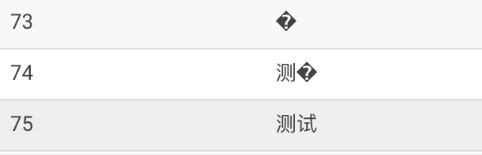
中文字符全部乱码,部分乱码,字符串被截断问题重现。
3、解决方法
修改程序中插入语句,将插入字符串列使用cast函数转成String类型
String sql2 = "insert into my_first_table values(?, cast(? as string))";

ps = con.prepareStatement(sql2);

ps.setInt(1, 60);

ps.setString(2, "测试中文字符");

ps.execute();

ps.close();

ps = con.prepareStatement(sql2);

ps.setInt(1, 61);

ps.setString(2, "测试中文");

ps.execute();

ps.close();

ps = con.prepareStatement(sql2);

ps.setInt(1, 62);

ps.setString(2, "测试");

ps.execute();

ps.close();
修改后重新向Kudu中插入测试数据:“测试中文字符”,“测试中文”,“测试”
使用Hue查询显示如下:
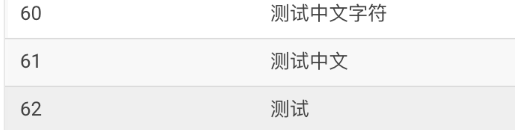
中文字符串插入Kudu显示正常。
另一种情况
1、向Kudu表中分别插入测试数据,如“测试”,“测试中文”,“测试中文字符”


2、解决办法
修改程序中插入语句,将插入字符串的单引号修改为双引号
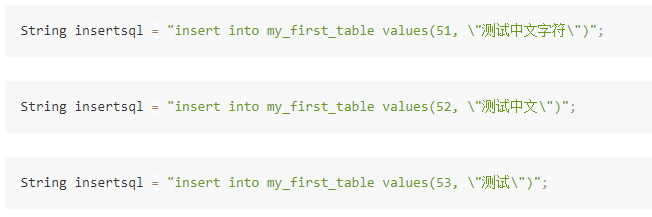
修改后重新向Kudu中插入测试数据:“测试中文字符”,“测试中文”,“测试”
使用Hue查询显示如下:

备注
1.使用Cloudera官网最新的JDBC驱动,插入中文字符时也有上述问题
下载地址:https://downloads.cloudera.com/connectors/impala_jdbc_2.5.38.1058.zip
2.通过Impala-shell插入中文字符串正常
    [172.31.10.118:21000] > insert into my_first_table values(66,'插入中文字符');

    Modified 1 row(s), 0 row error(s) in 0.11s

    [172.31.10.118:21000] > select * from my_first_table where id=66;

    +----+--------------+

    | id | name         |

    +----+--------------+

    | 66 | 插入中文字符 |

    +----+--------------+

    Fetched 1 row(s) in 0.21s

    [172.31.10.118:21000] >

    [172.31.10.118:21000] > insert into my_first_table values(77, "测试中文字符");

    Modified 1 row(s), 0 row error(s) in 0.11s

    [172.31.10.118:21000] > select * from my_first_table where id=77;

    +----+--------------+

    | id | name         |

    +----+--------------+

    | 77 | 测试中文字符 |

    +----+--------------+

    Fetched 1 row(s) in 0.18s

    [172.31.10.118:21000] >
使用JDBC向Kudu表插入中文数据乱码(转载)的更多相关文章
- mariadb插入中文数据乱码解决过程
基本情况: 系统:centos 7 mariadb安装方式:yum 乱码解决过程: 查看当前数据库编码(登录数据库后) # show variables like 'character%'; (上图为 ...
- MySQL 插入 中文数据乱码解决
问题描述: 1.在命令行中进行插入,没有问题.但是显示存在部分乱码 2.在JDBC中插入成功.中文是直接以“??”形式显示. 通过Navicat客户端查看 与在网页中看到的一一致,说明读取没有问题,问 ...
- java web 向数据库插入中文数据乱码问题
一.先检查下是 页面返回数据时已经乱码了,还是在插入数据库的时候乱的码. 二.页面返回乱码: 1. Web.XML 文件配置 <!-- 配置编码过滤器 --> <filter&g ...
- Hibernate向MySQL插入中文数据--乱码解决
<property name="hibernate.connection.url">jdbc:mysql://127.0.0.1:3306/exam?useUnicod ...
- Oracle插入中文数据乱码 设置服务器编码和客户端编码一致
- mysql不能插入中文数据
上次遇到的是向mysql插入中文数据,中文数据乱码了.这次直接就不能插入中文数据了!!!! 参考博文:http://blog.csdn.net/generalyy0/article/details/7 ...
- MySQL插入中文数据出现?号
原文转载自:https://blog.csdn.net/LynneZoe/article/details/79174119 运行环境:win10 mysql版本:Mysql5.6 做一个项目的时候,向 ...
- 解决Python向MySQL数据库插入中文数据时出现乱码
解决Python向MySQL数据库插入中文数据时出现乱码 先在MySQL命令行中输入如下语句查看结果: 只要character_set_client character_set_database ch ...
- mysql插入中文数据变成问号怎么处理
插入中文数据变成问号,一般都是因为字符集没有设置成utf8的原因 1.修改字符集: ALTER TABLE 表名 MODIFY 列名 类型(50) CHARACTER SET "utf8&q ...
随机推荐
- 【bfs】BZOJ1102- [POI2007]山峰和山谷Grz
最后刷个水,睡觉去.Bless All! [题目大意] 给定一个地图,为FGD想要旅行的区域,地图被分为n*n的网格,每个格子(i,j) 的高度w(i,j)是给定的.若两个格子有公共顶点,那么他们就是 ...
- 关于Android中传递数据的一些讨论
在Android中编写过程序的开发人员都知道.在Activity.Service等组件之间传递数据(尤其是复杂类型的数据)很不方便.一般可以使用Intent来传递可序列化或简单类型的数据.看下面的代码 ...
- Nginx担当WebSockets代理
Nginx担当WebSockets代理 英文原文:http://nginx.com/blog/websocket-nginx/ 作者:chszs,转载需注明. 博客主页:http://blog.csd ...
- STM32的CRC32 实现代码 -- Ether
uint32_t reverse_32( uint32_t data ) { asm("rbit r0,r0"); return data; } ; uint32_t crc32_ ...
- Golang Vendor 包管理工具 glide 使用教程
Glide 是 Golang 的 Vendor 包管理器,方便你管理 vendor 和 verdor 包.类似 Java 的 Maven,PHP 的 Composer. Github:https:// ...
- Xamarin.Forms.Xaml.XamlParseException: MarkupExtension not found for trans:Translate using a PCL in Release Mode
I'm pretty desperate finding the solution for the problem stated below. I have a cross platform solu ...
- 在ASP.NET MVC中使用typeahead.js支持预先输入,即智能提示
使用typeahead.js可以实现预先输入,即智能提示,本篇在ASP.NET MVC下实现.实现效果如下: 首先是有关城市的模型. public class City { public int Id ...
- VS Supercharger插件的破解
Supercharger我已经用了很多年了,感觉十分不错,最初使用的时候,是叫做CodeMap.不过要想很好的使用起来这个VS插件,需要对其进行细致的设置. 这里不再多说了,看下,这个软件怎么破解吧. ...
- MyBatis-Generator最佳实践
引用地址:http://arccode.net/2015/02/07/MyBatis-Generator%E6%9C%80%E4%BD%B3%E5%AE%9E%E8%B7%B5/ 最近使用MyBati ...
- arcgispro加字段,字段修改