
linux环境中安装ftp服务
需求说明:
今天项目中有一个新的需求,需要在linux环境中搭建一个ftp服务,在此记录下.
操作过程:
1.通过yum的方式安装ftp服务对应的软件包
[root@testvm01 ~]# yum install vsftpd

Loaded plugins: product-id, subscription-manager

This system is not registered to Red Hat Subscription Management. You can use subscription-manager to register.

Setting up Install Process

rhel-source                                                                                                                                                             | 4.1 kB     : ...

Resolving Dependencies

--> Running transaction check

---> Package vsftpd.x86_64 :2.2.-.el6_5. will be installed

--> Finished Dependency Resolution

Dependencies Resolved

===============================================================================================================================================================================================

 Package                                   Arch                                      Version                                              Repository                                      Size

===============================================================================================================================================================================================

Installing:

 vsftpd                                    x86_64                                    2.2.-.el6_5.                                     rhel-source                                     k

Transaction Summary

===============================================================================================================================================================================================

Install        Package(s)

Total download size:  k

Installed size:  k

Is this ok [y/N]: y

Downloading Packages:

Running rpm_check_debug

Running Transaction Test

Transaction Test Succeeded

Running Transaction

  Installing : vsftpd-2.2.-.el6_5..x86_64                                                                                                                                              /

  Verifying  : vsftpd-2.2.-.el6_5..x86_64                                                                                                                                              /

Installed:

  vsftpd.x86_64 :2.2.-.el6_5.

Complete!
备注:ftp对应的rpm包是:vsftpd.x86_64 0:2.2.2-12.el6_5.
2.启动ftp服务
[root@testvm01 ~]# ls /etc/init.d/vsftpd

/etc/init.d/vsftpd

[root@testvm01 ~]# service vsftpd start

Starting vsftpd for vsftpd:                                [  OK  ]

[root@testvm01 ~]# ps -ef | grep vsftpd

root              : ?        :: /usr/sbin/vsftpd /etc/vsftpd/vsftpd.conf

root           : pts/    :: grep vsftpd
备注:通过以上的信息知道ftp对应的后台命令是vsftpd,对应的配置文件vsftpd.conf
3.设置ftp服务为开机自动启动
[root@testvm01 ~]# chkconfig --level  vsftpd on

[root@testvm01 ~]# chkconfig --list | grep vsftp

vsftpd             :off    :off    :on    :on    :on    :on    :off
4.查看ftp服务监听的端口
[root@testvm01 ~]# netstat -ntlp | grep vsftpd

tcp               0.0.0.0:                  0.0.0.0:*                   LISTEN      /vsftpd
备注:ftp服务,默认监听的端口是21端口.
5.创建ftp用户,用于ftp登录
[root@testvm01 ~]# useradd ftpuser01

[root@testvm01 ~]# echo 'ftpuser01' | passwd --stdin ftpuser01

Changing password for user ftpuser01.

passwd: all authentication tokens updated successfully.

[root@testvm01 ~]# chage -M  ftpuser01
6.在本地通过浏览器连接到ftp服务

备注:能够访问,但是并没有提示输入用户名和密码的信息.
7.限定只有某些用户能够访问ftp服务器
修改配置文件vsftpd.conf,增加以下内容
userlist_deny=NO
意思是说,只有在user_list文件中的用户可以登录.
将ftp用户加入到user_list这个文件中
[root@testvm01 vsftpd]# cat user_list

# vsftpd userlist

# If userlist_deny=NO, only allow users in this file

# If userlist_deny=YES (default), never allow users in this file, and

# do not even prompt for a password.

# Note that the default vsftpd pam config also checks /etc/vsftpd/ftpusers

# for users that are denied.

ftpuser01
8.重新通过浏览器进行访问
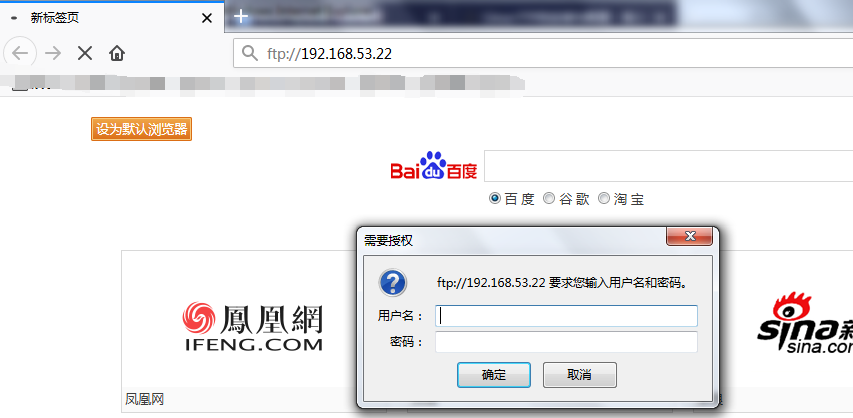
备注:此时,提示输入用户名和密码验证.
9.输入正确的用户名和密码之后,出现以下的错误
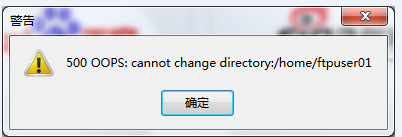
经过检查,系统打开了selinux,将其关闭.
10.查看selinux的状态
[root@testvm01 ~]# sestatus -b | grep ftp

allow_ftpd_anon_write                       off

allow_ftpd_full_access                      off

allow_ftpd_use_cifs                         off

allow_ftpd_use_nfs                          off

ftp_home_dir                                off

ftpd_connect_db                             off

ftpd_use_fusefs                             off

ftpd_use_passive_mode                       off

httpd_enable_ftp_server                     off

tftp_anon_write                             off

tftp_use_cifs                               off

tftp_use_nfs                                off
备注:也可以将selinux关闭掉.
11.将ftp_home_dir设置为on
[root@testvm01 ~]# setsebool -P ftp_home_dir on

[root@testvm01 ~]# sestatus -b | grep ftp_home_dir

ftp_home_dir                                on
12.重新进行ftp登录

备注:可以登录成功.至此ftp登录完成.
文档创建时间:2018年10月8日16:13:00
linux环境中安装ftp服务的更多相关文章
- (3)ElasticSearch在linux环境中安装与配置head插件
1.简介 ElasticSearch-Head跟Kibana一样也是一个针对ElasticSearch集群操作的API的可视化管理工具,它提供了集群管理.数据可视化.增删改查.查询语句等功能,最重要还 ...
- linux环境中安装iotop命令,解决-bash: iotop: command not found问题
需求描述: 今天在测试环境中,准备查看mysql各个线程占用的io的情况,准备使用iotop命令来查看,发现没有这个命令 [root@testvm Packages]# iotop -bash: io ...
- linux环境中安装NRPE插件执行远程"本地资源"检查?NRPE安装?
需求描述: 在安装完nagios之后,需要对本地资源进行监控,比如磁盘空间的使用,进程数,swap空间,等等.这些都不是通过网络提供出来的, 所以,都是本地资源,可以通过NRPE插件实现在客户端中采集 ...
- Centos6.5环境中安装vsftp服务
1.检查vsftp是否安装 命令:rpm -qa|grep vsftpd 若已经安装,则显示相关的版本信息,否则什么也没有. 也可以输入find -name "vsftpd" -p ...
- Linux环境下安装mysql服务
我使用的是阿里云的ECS服务,系统是CentOS7,安装mysql版本是5.7 第一步,通过 wget -i -c http://dev.mysql.com/get/mysql57-community ...
- Python在Linux环境中安装Thrift
1.文件下载:thrift-0.11.0.tar.gz 个人网盘下载:链接:https://pan.baidu.com/s/1MXgx8LuN4wk7ssVUD9Wzaw 提取码:xw85 2. ...
- 【事件中心 Azure Event Hub】在Linux环境中(Ubuntu)安装Logstash的简易步骤及配置连接到Event Hub
在文章([事件中心 Azure Event Hub]使用Logstash消费EventHub中的event时遇见的几种异常(TimeoutException, ReceiverDisconnected ...
- 在Mac OS环境下安装MySQL服务
在Mac OS环境下安装MySQL服务 作者:尹正杰 版权声明:原创作品,谢绝转载!否则将追究法律责任. 我之前介绍过window环境下安装mysql服务,以及在Linux环境下安装mysql服务,今 ...
- Linux 安装FTP服务
Linux 安装FTP服务,简单入门 环境: 虚拟机:Oracle VM VirtualBox. 系统:CentOS 7. (1)判断是否安装了ftp: rpm -qa | grep vsftpd 或 ...
随机推荐
- 依赖注入(Dependency Injection)
Spring的两个核心内容为控制反转(Ioc)和面向切面(AOP),依赖注入(DI)是控制反转(Ioc)的一种方式. 依赖注入这个词让人望而生畏,现在已经演变成一项复杂的编程技巧 或设计模式理念.但事 ...
- CAS (11) —— CAS TicketRegistry使用Ehcache的集群方案
CAS (11) -- CAS TicketRegistry使用Ehcache的集群方案 摘要 CAS TicketRegistry使用Ehcache的集群方案 版本 tomcat版本: tomcat ...
- hbase1.4.0安装和使用
jia下载地址: http://mirrors.shuosc.org/apache/hbase/1.4.0/ 解压 tar -zxvf hbase-1.4.0-bin.tar.gz 修改环境变量 [ ...
- [数据结构]图的DFS和BFS的两种实现方式
深度优先搜索 深度优先搜索,我们以无向图为例. 图的深度优先搜索(Depth First Search),和树的先序遍历比较类似. 它的思想:假设初始状态是图中所有顶点均未被访问,则从某个顶点v出发, ...
- 自然语言交流系统 phxnet团队 创新实训 个人博客 (六)
讯飞的语音sdk是需要申请的,地址是:http://dev.voicecloud.cn/developer.php?vt=1 .申请一个讯飞的开发者账号,然后申请一个appid,申请的时候需要填写开发 ...
- [Python学习]Iterator 和 Generator的学习心得
[Python学习]Iterator 和 Generator的学习心得 Iterator是迭代器的意思,它的作用是一次产生一个数据项,直到没有为止.这样在 for 循环中就可以对它进行循环处理了.那么 ...
- 深度学习笔记:优化方法总结(BGD,SGD,Momentum,AdaGrad,RMSProp,Adam)
深度学习笔记:优化方法总结(BGD,SGD,Momentum,AdaGrad,RMSProp,Adam) 深度学习笔记(一):logistic分类 深度学习笔记(二):简单神经网络,后向传播算法及实现 ...
- chromedriver与chrome版本映射表(更新至v2.30)
在 chrome://help/ 查看浏览器版本号 看到网上基本没有最新的chromedriver与chrome的对应关系表,便兴起整理了一份如下,希望对大家有用: chromedriver版本 支持 ...
- C艹复合类型(字符串)
在C艹中有两种字符串形式, 一种是C-风格, 另一种是C艹风格的 初始化: char str[10] = {'a', 'c', 'd', '\0'};char str[20]= “aaa”; stri ...
- (笔记)Linux下的解压、压缩命令集合
01-.tar格式解包:[*******]$ tar xvf FileName.tar打包:[*******]$ tar cvf FileName.tar DirName(注:tar是打包,不是压缩! ...