
【Genymotion】add a new virtual device 失败
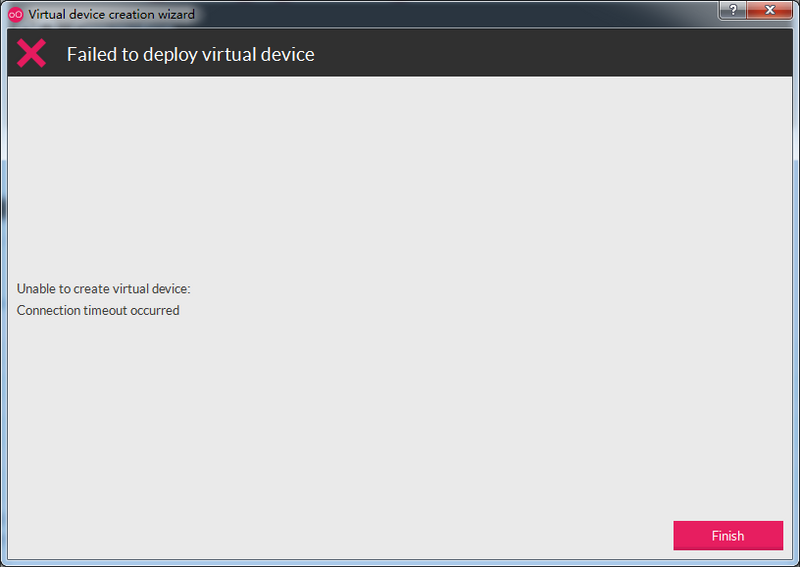
Genymotion 新增虚拟设备(模拟器)时,由于网络原因,总是下载失败,如图:
下载失败提示“Unable to create virtual device: Connection timeout occurred”;
【提高下载速度和成功率的方法】
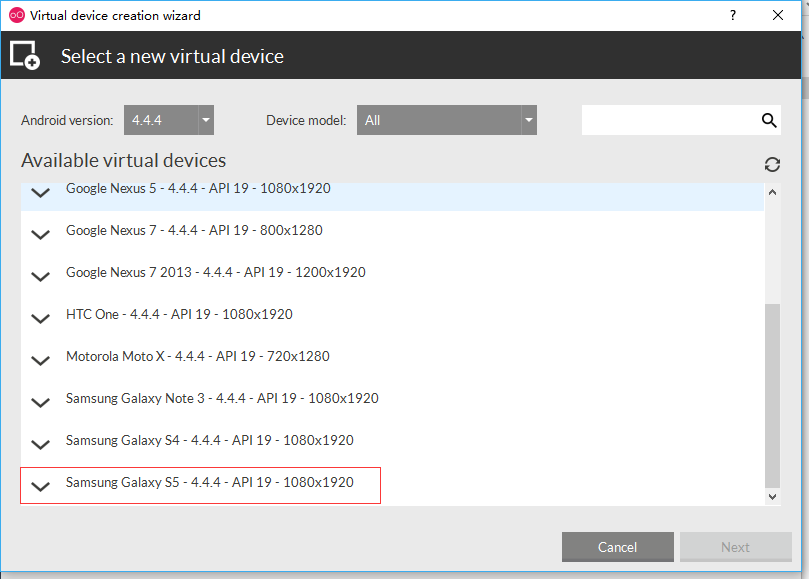
*如下图,我们选择“Samsung Galaxy S5 - 4.4.4 - API 19 - 1080x1920”进行下载;
*打开 C:\Users\用户名\AppData\Local\Genymobile目录
*打开genymotion.log文件,在里面最下面几行,找到如下日志
2月 8 17:04:14 [Genymotion] [Debug] Starting new download
2月 8 17:04:14 [Genymotion] [Debug] Downloading file "http://dl.genymotion.com/dists/5.1.0/ova/genymotion_vbox86p_5.1_160825_071239.ova"
2月 8 17:04:14 [Genymotion] [Debug] Start timer
2月 8 17:05:24 [Genymotion] [Error] Connection Timeout
*复制下载地址http://dl.genymotion.com/dists/5.1.0/ova/genymotion_vbox86p_5.1_160825_071239.ova至迅雷,下载完成后,把文件复制到C:\Users\用户名\AppData\Local\Genymobile\Genymotion\ova目录
*再次依照之前的选项“Samsung Galaxy S5 - 4.4.4 - API 19 - 1080x1920”进行新增,此时窗口显示“deploying virtual device...”

*点击“finish”完成新增。

【Genymotion】add a new virtual device 失败的更多相关文章
- No compatible targets were found Do you wish to a add new Android Virtual Device ?
运行一个Android小程序时提示: No compatible targets were found Do you wish to a add new Android Virtual Device ...
- Genymotion——VirtualBox cannot start virtual device
提示"VirtualBox cannot start virtual device" 打开VirtualBox,想要在里面直接启动Genymotion模拟器,又出现错误,提示“Un ...
- Genymotion Unable to create Virtual Device:Connection timeout
1.进入C:\Users\[UserName]\AppData\Local\Genymobile,打开genymotion.log,找到最后几句话: 九月 2 14:29:45 [Genymo ...
- Genymotion error:The virtual device got no IP address
控制面板,网络和intent,网络和共享中心,更改适配器设置,看下你的VirtualBox Host-Only Ethernet Adapter这个显卡 启动了没有, 没有就启动它!!!
- 获取VirtualBox COM对象失败,Unable to start the virtual device
一.问题 1.将Genymotion和VirtualBox安装好之后,并且已经下载完了virtual device: 2.但是在运行虚拟机的时候却弹出了错误提示:虚拟机电脑控制台——严重错误. 如图: ...
- The Genymotion Virtual device could not obtain an IP address解决办法
打开Genymotion运行虚拟机提示如下错误: The Genymotion Virtual device could not obtain an IP address.For an unknown ...
- (转)Genymotion安装virtual device的“unable to create virtual device, Server returned Http status code 0”的解决方法
网络原因无法下载virtual device,status 为0表示服务器没有响应.FQ下载吧,有VPN的小伙伴推荐这种. 或者直接手动下载ova虚拟机文件,然后将虚拟机文件导入到virtualbox ...
- Error Unable to start the Genymotion virtual device.解决
The Genymotion virtual device could not obtain an IP address.For an unknown reason.VirtualBox DHCP h ...
- eclipse无法连接genymotion+Unable to start the Genymotion virtual device
八月的开头,带着希望和期待,小编继续着实习之路,闭眼呼吸,阳光勾勒微笑,做Android项目,真心想吐槽一下eclipse中的虚拟机,那速度真叫一个慢啊,她肯定是属乌龟的,要不就是蜗牛,这个让小编很是 ...
随机推荐
- perl usage()和getopt
#!/usr/bin/perl#perl search.pl --infile Targets.Lung.Carcinoma.genelist.txt --homogene Homo_sapiens. ...
- Codeforces Beta Round #94 div 2 C Statues dfs或者bfs
C. Statues time limit per test 2 seconds memory limit per test 256 megabytes input standard input ou ...
- shell 字符串运算符
字符串运算符 下表列出了常用的字符串运算符,假定变量 a 为 "abc",变量 b 为 "efg": 运算符 说明 举例 = 检测两个字符串是否相等,相等返回 ...
- 使用uWSGI和nginx来设置Django和你的web服务器
本教程针对那些想要设置一个生产web服务器的Django用户.它介绍了设置Django以使得其与uWSGI和nginx工作良好的必要步骤.它涵盖了所有三个组成部分,提供了一个web应用和服务器软件的完 ...
- VS 常见快捷键有哪些
自动对齐点[编辑]-[高级]-[设置选定内容的格式]或者按Ctrl + K 然后再按Ctrl + F 就好了 你可以在常用快捷键自定义 窗口中进行查看1.进入工具-选项 对话框2.选择[环境]-[键盘 ...
- Myeclise下tomcat启动报错,启动超时
错误截图如下: 大概说的是tomcat7在本地不能在45秒内启动,如果项目需要更多的时间,试着去更改server配置 解决方法: 找到项目工作空间目录下 workspace\.metadata\.pl ...
- Codeforces 918C - The Monster
918C - The Monster 思路1: 右键在新窗口打开图片 代码: #include<bits/stdc++.h> using namespace std; #define ll ...
- 算法笔记--KMP算法 && EXKMP算法
1.KMP算法 这个博客写的不错:http://www.cnblogs.com/SYCstudio/p/7194315.html 模板: next数组的求解,那个循环本质就是如果相同前后缀不能加上该位 ...
- R—读取数据(导入csv,txt,excel文件)
导入CSV.TXT文件 read.table函数:read.table函数以数据框的格式读入数据,所以适合读取混合模式的数据,但是要求每列的数据数据类型相同. read.table读取数据非常方便,通 ...
- Error: [ng:areq] Argument 'LoginCtrl' is not a function, got undefined