
UITabBarController 、TabBar背景颜色设置,UITabBarItem的文字样式(颜色和大小)UITabBarItem的位置调整
改变UITabBarController的颜色
UIView*mView=[[UIView alloc]initWithFrame:CGRectMake(0,0,320,48)];//这是部分tabbar的颜色
[mView setBackgroundColor:[UIColor colorWithPatternImage:[UIImage imageNamed:@"ydy1.jpg"]]];
[self.tabBar insertSubview:mView atIndex:1];
mView.alpha=0.8;
效果如图:
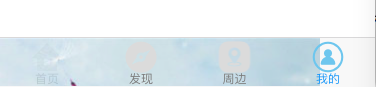
设置tabBar的背景色
第一种方式:
[[UITabBar appearance] setBackgroundColor:[UIColor redColor]];//测试时不起作用
[[UITabBar appearance] setBarTintColor:[UIColor redColor]];//这样写才能达到效果。
如果想要得到想要的颜色需要再另外添加一句:
[UITabBar appearance].translucent = NO;// 这句表示取消tabBar的透明效果。
第二种方式:在tabBar上添加一个有颜色的View
UIView *view= [[UIView alloc]init];
view.backgroundColor=[UIColor redColor];
view.frame=self.tabBar.bounds;
[[UITabBar appearance] insertSubview:view atIndex:0];
第三种方式:使用背景图片:
[[UITabBar appearance] setBackgroundImage:[UIImage imageNamed:@"tabBarBackgroundImage"]];
[UITabBar appearance].translucent = NO;
UITabBarItem的文字样式(颜色和大小)
#define WYColor(r, g, b) [UIColor colorWithRed:(r)/255.0 green:(g)/255.0 blue:(b)/255.0 alpha:1.0]
// 第一种写法
NSMutableDictionary *textAttrs = [NSMutableDictionary dictionary];
textAttrs[NSForegroundColorAttributeName] = WYColor(123, 123, 123);
textAttrs[NSFontAttributeName]=[UIFont fontWithName:@"Helvetica" size:12.0f];
NSMutableDictionary *selectTextAttrs = [NSMutableDictionary dictionary];
selectTextAttrs[NSForegroundColorAttributeName] = WYColor(50, 156, 245);
selectTextAttrs[NSFontAttributeName]=[UIFont fontWithName:@"Helvetica" size:18.0f];
[[UITabBarItem appearance] setTitleTextAttributes:textAttrs forState:UIControlStateNormal];
[[UITabBarItem appearance] setTitleTextAttributes:selectTextAttrs forState:UIControlStateSelected];
// 第二种写法
[[UITabBarItem appearance] setTitleTextAttributes:[NSDictionary dictionaryWithObjectsAndKeys:[UIColor blackColor], NSForegroundColorAttributeName, [UIFont fontWithName:@"Helvetica" size:12.0f],NSFontAttributeName,nil] forState:UIControlStateNormal];
[[UITabBarItem appearance] setTitleTextAttributes:[NSDictionary dictionaryWithObjectsAndKeys:[UIColor redColor], NSForegroundColorAttributeName, [UIFont fontWithName:@"Helvetica" size:19.0f],NSFontAttributeName,nil] forState:UIControlStateSelected];
注意:1、设置字体的时候要选择支持中文的字体,不然的话修改字号是无效的,比如字体设置成“ProximaNova-Semibold”。这种字体本身只支持英语,不支持中文,所以使用该字体并不能调整字体大小。
2、如果文字太大的话,会和图片靠的很近,这个时候我们可以让UI设计师给我们切图的时候多留一点边白就可以解决。
UITabBarItem的选中和非选中图片
UINavigationController *nav = [[UINavigationController alloc] initWithRootViewController:[[ViewController alloc] init]];
nav.tabBarItem.image =[[UIImage imageNamed:@"unselect"] imageWithRenderingMode:UIImageRenderingModeAlwaysOriginal];
nav.tabBarItem.selectedImage =[[UIImage imageNamed:@"select"] imageWithRenderingMode:UIImageRenderingModeAlwaysOriginal];
nav.tabBarItem.title = @"yoowei";
[self addChildViewController:nav];
调整各个ITEM的位置
//未选中的图片(上面的数组没有列出)
UIImage *unselectedImage = [UIImage imageNamed:nor_images[i]];
unselectedImage = [unselectedImage imageWithRenderingMode:UIImageRenderingModeAlwaysOriginal];
//选中的图片
UIImage *selectedImage = [UIImage imageNamed:select_images[i]];
selectedImage = [selectedImage imageWithRenderingMode:UIImageRenderingModeAlwaysOriginal];
UITabBarItem *tabBarItem = [[UITabBarItem alloc] initWithTitle:arrayName[i] image:unselectedImage selectedImage:selectedImage];
//设置背景图片的内凹变化,正值向内缩小,负值向外延伸
UIEdgeInsets insets;
insets.left = -5;
insets.right = -5;
tabBarItem.imageInsets = insets;
//设置item.title位置偏移
UIOffset offset;
offset.horizontal = 30;
offset.vertical = -10;
[tabBarItem setTitlePositionAdjustment:offset];
效果如下:(虽然很难看,但是效果达到了)。
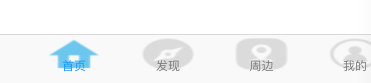
UITabBarController 、TabBar背景颜色设置,UITabBarItem的文字样式(颜色和大小)UITabBarItem的位置调整的更多相关文章
- iOS开发-- 设置UIButton的文字显示位置、字体的大小、字体的颜色
btn.frame = CGRectMake(x, y, width, height); [btn setTitle: @"search" forState: UIControlS ...
- 设置UIButton的文字显示位置、字体的大小、字体的颜色
btn.frame = CGRectMake(x, y, width, height); [btn setTitle: @"search" forState: UIControlS ...
- android textview改变部分文字的颜色和string.xml中文字的替换(转)
转 :http://blog.csdn.net/ljz2009y/article/details/23878669 一:TextView组件改变部分文字的颜色: TextView textView ...
- MAC 终端颜色设置
在bash中,可以通过更改PS1环境变量的值来设置提示行.通常的提示符颜色单调,用户可以通过在PS1中添加颜色代码序列来设置提示符中不同信息以不同颜色显示. 添加颜色相当容易:第一步是设计不带颜色的提 ...
- css单位分析、颜色设置与调色板
CSS单位分析 px:单位代表像素,1px代表一个像素点. %:设置子元素为父容器的占比. em:代表该元素中一个字体所占字符,常用在文字首行缩进.其具有继承性. rem:始终代表html中的字符所在 ...
- iOS开发UITableViewCell的选中时的颜色设置(转)
iOS开发UITableViewCell的选中时的颜色设置 1.系统默认的颜色设置 //无色 cell.selectionStyle = UITableViewCellSelectionStyle ...
- 梦想CAD控件COM接口文字样式
增加文字样式 用户可以增加文字样式到数据库,并设置其字体等属性,具体实现c#代码如下: private void CreateText() { MxDrawApplication app = new ...
- 梦想CAD控件网页版文字样式
增加文字样式 用户可以增加文字样式到数据库,并设置其字体等属性,具体实现js代码如下: function CreateText(){ //返回控件的数据库对象 var database =mxOcx. ...
- [BS-03] 统一设置UITabBarController管理的所有VC的tabBarItem图标文字的颜色大小等属性
1. 统一设置UITabBarController管理的所有VC的tabBarItem图标文字的颜色大小等属性 . 统一设置UITabBarController管理的所有VC的tabBarItem图标 ...
随机推荐
- gcc/g++中weak弱符号及alias别名
最近查看linux内核代码时,表现了一些编译器选项如__attribute_((weak)).__attribute__( (alias("target"))),一开始不了解,后来 ...
- 【Windows编程】系列第七篇:Menubar的创建和使用
上一篇我们学习了利用windows API创建工具栏和菜单栏,与上一篇紧密联系的就是菜单栏,菜单栏是一个大多数复杂一些的Windows应用程序不可或缺的部分.比如下图就是Windows自带的记事本的菜 ...
- Git的使用的简单介绍
节选自:http://www.liaoxuefeng.com/wiki/0013739516305929606dd18361248578c67b8067c8c017b000 git是一个分布式的引擎, ...
- [转]ASP.NET Core 之 Identity 入门(二)
本文转自:http://www.cnblogs.com/savorboard/p/aspnetcore-identity2.html 前言 在 上篇文章 中讲了关于 Identity 需要了解的单词以 ...
- 基于Zabbix IPMI监控服务器硬件状况
基于Zabbix IPMI监控服务器硬件状况 zabbix ipmi 公司有多个分部,且机房没有专业值班,机房等级不够.在这种情况下,又想实时监控机房环境,于是使用IPMI方式来达到目的.由于之前已经 ...
- h3c防火墙的设置过程
公司采购了一款h3c的防火墙,型号为F100-E-G,以前也设置过H3C的防火墙,不过这次还是设置还是有各种问题,所以把设置过程记录下来,方便以后查阅. 一.防火墙一般在0口都设置一个默认的IP地址1 ...
- java异常面试题
1.try{}里有一个return语句,那么紧跟在这个try后的finally {}里的code会不会被执行,什么时候被执行,在return前还是后? 也许你的答案是在return之前,但往更细地说, ...
- ReactNative新手学习之路04 组件化开发轮播图swiper支持安卓和IOS
react native 新手之路04 组件化开发轮播图swiper支持安卓和IOS npm install react-native-carousel --save git 地址Properties ...
- 汇编语言标志位 含义 NV UP EI NG NZ AC PE CY
缩写原意: Overflow of = OV NV [No Overflow] Direction df = DN (decrement) UP (increment) Interrupt if = ...
- Matlab2015入门学习01
1. 两个命令: clear: 清除内存中变量的值(在workspace中可以看到) clc: 清除Command Window中的输出 2. 脚本编辑器: matlab脚本扩展名为*.m 在Comm ...