
[转]iOS学习之UINavigationController详解与使用(三)ToolBar
转载地址:http://blog.csdn.net/totogo2010/article/details/7682641
iOS学习之UINavigationController详解与使用(二)页面切换和segmentedController 接上篇,我们接着讲Navigation 的Toolbar。
1、显示Toolbar
在RootViewController.m的- (void)viewDidLoad方法中添加代码,这样Toobar就显示出来了。
- [self.navigationController setToolbarHidden:NO animated:YES];

2、在ToolBar上添加UIBarButtonItem
新建几个UIBarButtonItem,然后以数组的形式添加到Toolbar中
- UIBarButtonItem *one = [[UIBarButtonItem alloc] initWithBarButtonSystemItem:UIBarButtonSystemItemAdd target:nil action:nil];
- UIBarButtonItem *two = [[UIBarButtonItem alloc] initWithBarButtonSystemItem:UIBarButtonSystemItemBookmarks target:nil action:nil];
- UIBarButtonItem *three = [[UIBarButtonItem alloc] initWithBarButtonSystemItem:UIBarButtonSystemItemAction target:nil action:nil];
- UIBarButtonItem *four = [[UIBarButtonItem alloc] initWithBarButtonSystemItem:UIBarButtonSystemItemEdit target:nil action:nil];
- UIBarButtonItem *flexItem = [[UIBarButtonItem alloc] initWithBarButtonSystemItem:UIBarButtonSystemItemFlexibleSpace target:nil action:nil];
- [self setToolbarItems:[NSArray arrayWithObjects:flexItem, one, flexItem, two, flexItem, three, flexItem, four, flexItem, nil]];
效果:
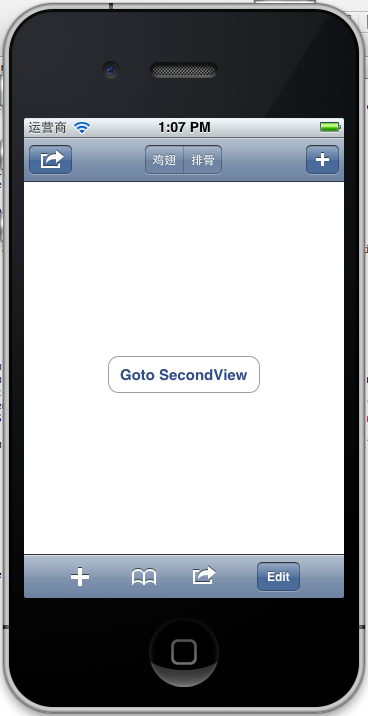
注意:用 [self.navigationController.toolbar setItems:(NSArray *) animated:<#(BOOL)#>]这个方法添加item是不起效果的。下面我动态自己添加Toolbar时,这个才起效果。
3、动态添加Toolbar
我们在SecondView添加动态的Toolbar。
在SecondViewController.h添加
- #import <UIKit/UIKit.h>
- @interface SecondViewController : UIViewController
- {
- UIToolbar *toolBar;
- }
- @end
在SecondViewController.m添加
- - (void)viewDidLoad
- {
- [super viewDidLoad];
- [self.navigationController setToolbarHidden:YES animated:YES];
- UIBarButtonItem *addButton = [[UIBarButtonItem alloc] initWithBarButtonSystemItem:UIBarButtonSystemItemSearch target:self action:@selector(gotoThridView:)];
- toolBar = [[UIToolbar alloc] initWithFrame:CGRectMake(0.0, self.view.frame.size.height - toolBar.frame.size.height - 44.0, self.view.frame.size.width, 44.0)];
- [toolBar setBarStyle:UIBarStyleDefault];
- toolBar.autoresizingMask = UIViewAutoresizingFlexibleTopMargin;
- [toolBar setItems:[NSArray arrayWithObject:addButton]];
- [self.view addSubview:toolBar];
- // Do any additional setup after loading the view from its nib.
- }
先把RootView时显示的Toobar隐藏
[self.navigationController setToolbarHidden:YESanimated:YES];然后把新建的Toolbar添加的SecondView中,并为Toobar设置了一个Item.
[toolBarsetItems:[NSArrayarrayWithObject:addButton]];
BarButtonItem用 的是UIBarButtonSystemItemSearch, 效果如下:
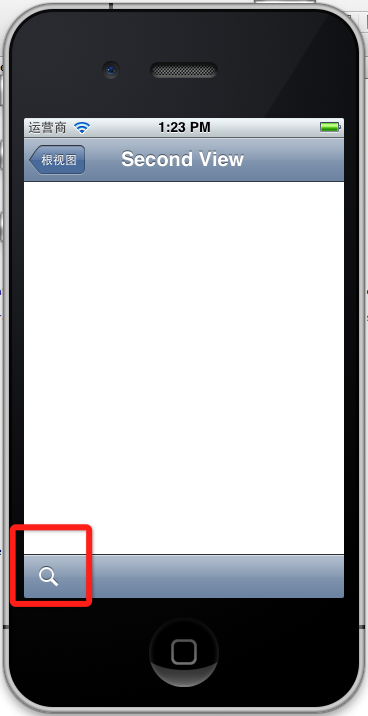
4、新建ThridView,从SecondView跳转到
Commad+N新建一个ThridViewController,
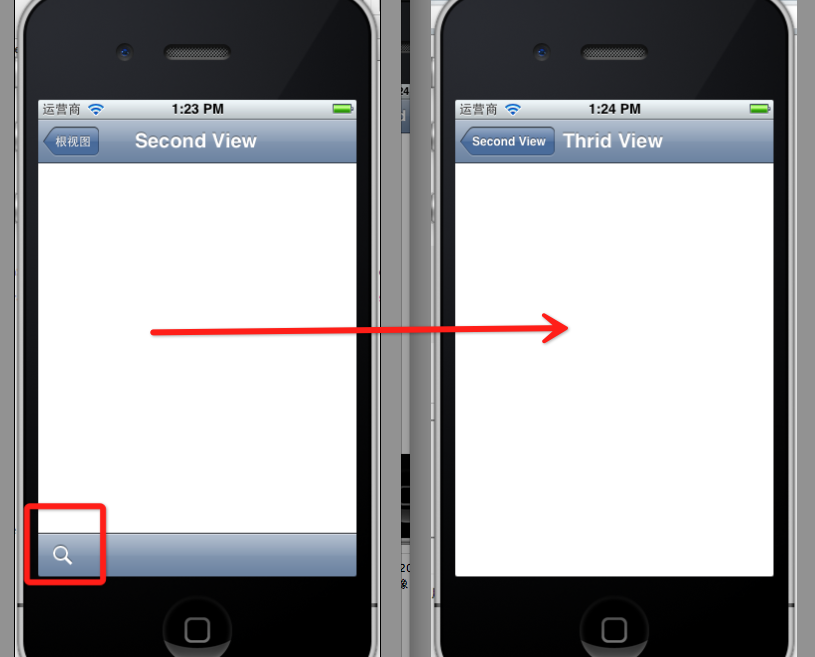
这个addButton跳转到ThridView
- -(void)gotoThridView:(id)sender
- {
- ThridViewController *thridView = [[ThridViewController alloc] init];
- [self.navigationController pushViewController:thridView animated:YES];
- thridView.title = @"Thrid View";
- }
跳转Second到Third效果:
到此UINavigationController练习的差不多了。
[转]iOS学习之UINavigationController详解与使用(三)ToolBar的更多相关文章
- [转]iOS学习之UINavigationController详解与使用(二)页面切换和segmentedController
转载地址:http://blog.csdn.net/totogo2010/article/details/7682433 iOS学习之UINavigationController详解与使用(一)添加U ...
- iOS学习之UINavigationController详解与使用(三)ToolBar
1.显示Toolbar 在RootViewController.m的- (void)viewDidLoad方法中添加代码,这样Toobar就显示出来了. [cpp] view plaincopy [ ...
- iOS学习之UINavigationController详解与使用(二)页面切换和segmentedController
iOS学习之UINavigationController详解与使用(一)添加UIBarButtonItem是上篇,我们接着讲UINavigationController的重要作用,页面的管理和切换. ...
- iOS学习之UINavigationController详解与使用(一)添加UIBarButtonItem
http://blog.csdn.net/totogo2010/article/details/7681879 1.UINavigationController导航控制器如何使用 UINavigati ...
- [转]iOS学习之UINavigationController详解与使用(一)添加UIBarButtonItem
转载地址:http://blog.csdn.net/totogo2010/article/details/7681879 1.UINavigationController导航控制器如何使用 UINav ...
- IOS开发之UINavigationController详解
UINavigationController是IOS编程中比较常用的一种容器view controller,很多系统的控件(如UIImagePickerViewController)以及很多有名的AP ...
- [转]iOS学习笔记(2)--Xcode6.1创建仅xib文件无storyboard的hello world应用
转载地址:http://www.mamicode.com/info-detail-514151.html 由于Xcode6之后,默认创建storyboard而非xib文件,而作为初学,了解xib的加载 ...
- UINavigationController详解一(转)UIBarButtonItem
本文出自:http://www.cnblogs.com/smileEvday/archive/2012/05/14/2495153.html 特别感谢. 1.UINavigationControlle ...
- IOS 友盟使用详解
IOS 友盟使用详解 这篇博客将会详细介绍友盟的使用,希望对博友们有所帮助. 首先我们在浏览器上搜索友盟. 在这里我们选择官网这个,进去友盟官网后我们按照下图进行选择. 接下来选择如下图 Next 这 ...
随机推荐
- UIDynamic(物理仿真)
简介 什么是UIDynamic UIDynamic是从iOS 7开始引入的一种新技术,隶属于UIKit框架 可以认为是一种物理引擎,能模拟和仿真现实生活中的物理现象 如: 重力.弹性碰撞等现象 物理引 ...
- java中类的继承
我们都知道java的四大特性:抽象.继承.封装.多态: 那么关于继承有哪些特性呢?下面看具体实例: (1) public class Person { public int a=2; public ...
- 通过 --py-files 可以在pyspark中可以顺利导入
文件import问题 问题: 在脚本中import了其他文件, pyspark中可以运行, 但是在spark-submit中总是失败 假定我们的任务脚本为 app.py , 大体代码像这样: from ...
- ListView的深入学习
ListView通常有两个职责: 将数据填充到布局 : 处理用户的点击选择操作 二.创建ListView需要3个元素 ListView的每一列的View View的数据或者图片 连接数据与ListVi ...
- Struts2基础学习总结
引用自:http://www.cnblogs.com/jbelial/archive/2012/05/10/2486886.html Struts 2是在WebWork2基础发展而来的. 注意:str ...
- 使用 JavaScript 实现基本队列、优先队列和循环队列
1.基本队列的实现 基本队列的方法中,包含了 ①向队列(尾部)中添加元素(enqueue).②(从队列头部)删除元素(dequeue).③查看队列头部的元素(front).④查看队列是否为空(isEm ...
- Java简单类——双向一对多映射
class Item { // 父栏目 private int iid ; private String name ; private String note ; private Subitem su ...
- 20145209&20145309信息安全系统设计基础实验报告 (4)
实验步骤 阅读和理解源代码 demo_read,demo_write 函数完成驱动的读写接口功能,do_write 函数实现将用户写入的数据逆序排列,通过读取函数读取转换后的数据.这里只是演示接口的实 ...
- ASP.NET Global Application_Error事件中访问Session报错 解决
报错信息:会话状态在此上下文中不可用 protected void Application_Error(object sender, EventArgs e) { //以此判断是否可用Session ...
- php应用路径变量问题总结
实际效果测试,不考虑原理! 本地服务器,域名http://d.com,根路径D:\phpnow\vhosts\d.com.yii,相对根目录拥有文件/x.php代码里requeir_once /a/a ...