
How to deploy JAVA Application on Azure Service Fabric
At this moment, Azure Service Fabric does not support JAVA application natively (but it's on the support roadmap). However, we can host the JAVA application as a Guest Executable for the time being.
In this article, I will walk you through how to deploy JAVA application on Azure Service Fabric in details.
- Prepare JAVA Application
I follow the Embedded Jetty Examplesto create a simple file server.
The source code is like below.package org.eclipse.jetty.embedded; import org.eclipse.jetty.server.Handler;
import org.eclipse.jetty.server.Server;
import org.eclipse.jetty.server.handler.DefaultHandler;
import org.eclipse.jetty.server.handler.HandlerList;
import org.eclipse.jetty.server.handler.ResourceHandler; public class FileServer { public static void main(String[] args) throws Exception{
// TODO Auto-generated method stub
// Create a basic Jetty server object that will listen on port 8080. Note that if you set this to port 0
// then a randomly available port will be assigned that you can either look in the logs for the port,
// or programmatically obtain it for use in test cases.
Server server = new Server(8080); // Create the ResourceHandler. It is the object that will actually handle the request for a given file. It is
// a Jetty Handler object so it is suitable for chaining with other handlers as you will see in other examples.
ResourceHandler resource_handler = new ResourceHandler(); // Configure the ResourceHandler. Setting the resource base indicates where the files should be served out of.
// In this example it is the current directory but it can be configured to anything that the jvm has access to.
resource_handler.setDirectoriesListed(true);
resource_handler.setWelcomeFiles(new String[]{ "index.html" });
resource_handler.setResourceBase("."); // Add the ResourceHandler to the server.
HandlerList handlers = new HandlerList();
handlers.setHandlers(new Handler[] { resource_handler, new DefaultHandler() });
server.setHandler(handlers); // Start things up! By using the server.join() the server thread will join with the current thread.
// See "http://docs.oracle.com/javase/1.5.0/docs/api/java/lang/Thread.html#join()" for more details.
server.start();
server.join();
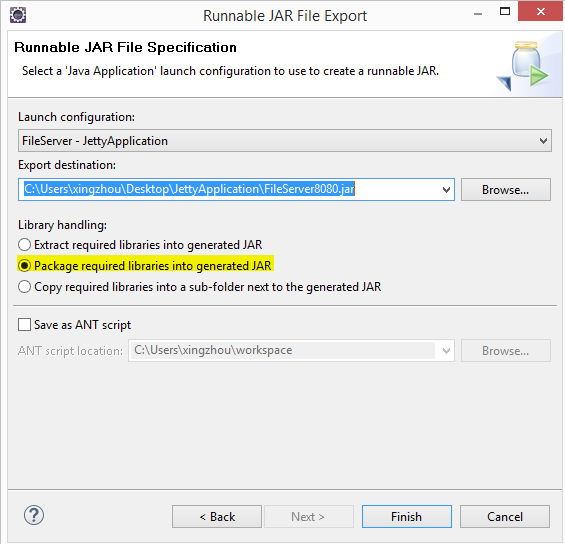
} }Then you need to Export this application to a runnable JAR file. (Note: Choose "Package required libraries into generated JAR" as the Library handing option. In my first environment, I choose the first option which runs into issue.)
- Set up Service Fabric project
- Create Service Fabric Application in Visual Studio
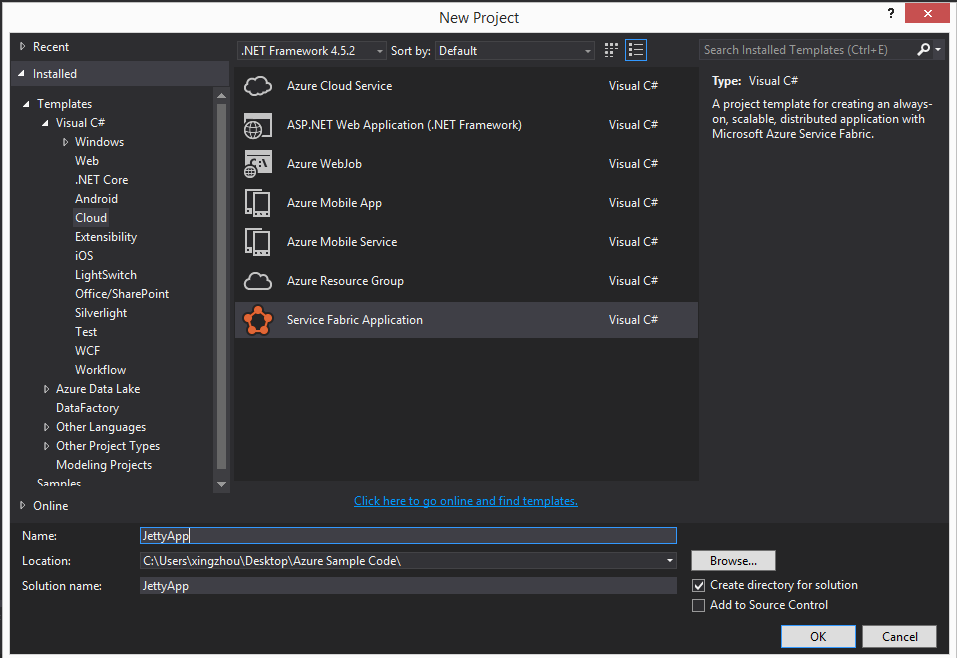
- Select Guest Executable as the Template;
Choose the folder where you exported JAR file as the Code Package Folder;
Choose "Copy folder contents to project" as Code Package Behavior
Choose CodeBase as Working Folder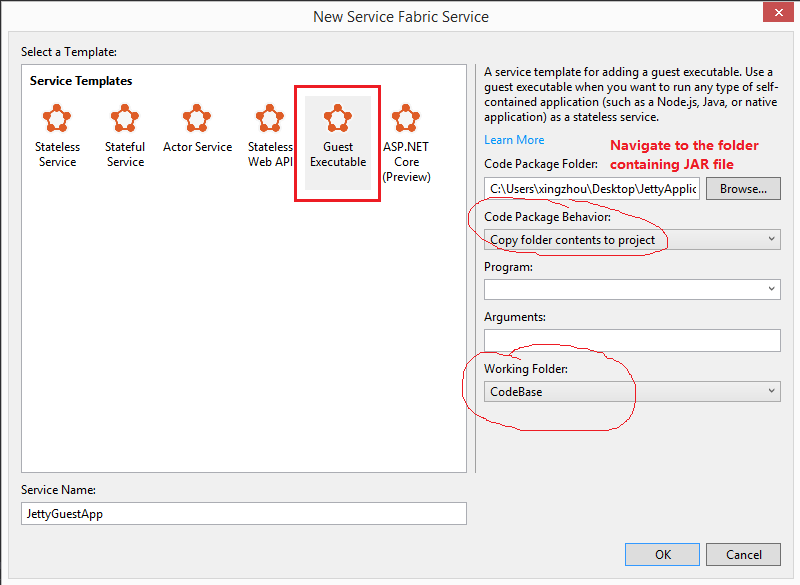
- The Application package file structure is shown as below.
|-- ApplicationPackageRoot

    |-- JettyGuestAppPkg

        |-- Code

            |-- FileServer8080.jar

        |-- Config

            |-- Settings.xml

        |-- Data

        |-- ServiceManifest.xml

|-- ApplicationManifest.xml - Copy JDK to the code base folder. The package file structure looks as below, where jre1.8.0_111 is JAVA runtime.

- Configure ServiceManifest.xml to set the program entry point and http listening port. (Note: Be careful about the JAR file path. It is relative to java.exe)
<EntryPoint>

      <ExeHost>

        <Program>jre1.8.0_111\bin\java.exe</Program>

        <Arguments>-jar ..\..\FileServer8080.jar</Arguments>

        <WorkingFolder>CodeBase</WorkingFolder>

        <!-- Uncomment to log console output (both stdout and stderr) to one of the

             service's working directories. -->

        <!-- <ConsoleRedirection FileRetentionCount="5" FileMaxSizeInKb="2048"/> -->

      </ExeHost>

    </EntryPoint>
<Endpoints>
<!-- This endpoint is used by the communication listener to obtain the port on which to
listen. Please note that if your service is partitioned, this port is shared with
replicas of different partitions that are placed in your code. -->
<Endpoint Name="JettyGuestAppTypeEndpoint" Protocol="http" Port="8080" Type="Input"/>
</Endpoints>
- Create Service Fabric Application in Visual Studio
- It's ready to deploy to Azure Service Farbic now. After deploy completed, you can check the application status via Service Fabric Explorer (http://localhost:19080/Explorer/index.html ).
- Verify JAVA application is running as expected by browsing to http://localhost:8080

Notes:
- How the JAVA Application is running on Local Service Fabric Cluster?
ServiceFabricLocalClusterManager.exe creates a new process called java.exe under its own process tree to hold the JAVA application. - During the process to export the JAVA application I choose "Extract required libraries into generated JAR" as the Library handing option, and the application does not run as expected. In this case, how can we tell the issue is with Service Fabric or with your own JAVA application?
- I use Process Monitor to check how the java.exe is launched.

The command line is:
"C:\SfDevCluster\Data\_App\_Node_0\JettyAppType_App1\JettyGuestAppPkg.Code.1.0.0\jre1.8.0_111\bin\java.exe" -jar ..\..\FileServer.jar
- Running the command above in Windows Command Window, and the issue happens there as well. Then I am pretty sure the issue is with JAVA code, and has nothing to do with Service Farbic.
- I use Process Monitor to check how the java.exe is launched.
How to deploy JAVA Application on Azure Service Fabric的更多相关文章
- Azure Service Fabric 开发环境搭建
微服务体系结构是一种将服务器应用程序构建为一组小型服务的方法,每个服务都按自己的进程运行,并通过 HTTP 和 WebSocket 等协议相互通信.每个微服务都在特定的界定上下文(每服务)中实现特定的 ...
- Azure Service Fabric 踩坑日志
近期项目上面用到了Azure Service Fabric这个服务,它是用来做微服务架构的,由于这套代码和架构都是以前同学留下来的,缺少文档,项目组在折腾时也曾遇到几个问题,这里整理如下,以供参考. ...
- 人人都可以开发高可用高伸缩应用——论Azure Service Fabric的意义
今天推荐的文章其实是微软的一篇官方公告,宣布其即将发布的一个支撑高可用高伸缩云服务的框架--Azure Service Fabric. 前两天,微软Azure平台的CTO Mark Russinovi ...
- 如何把遗留的Java应用托管在Service Fabric中
一.概述 众所周知,微服务化尤其对遗留系统进行微服务化一般采用"Lift and Shift"的模式进行. Service Fabric作为一个微服务托管平台,不仅仅可以在上面跑. ...
- Jenkins中使用Azure Powershell连接Service Fabric报错not recognized的原因与解决办法
一.使用背景 在涉及Azure service Fabric的自动化应用场景中,依赖于Service Fabric的Azure Powershell cmdlets,我们可以使用Jenkins能实现c ...
- Service Fabric基本概念: Node, Application, Service, Partition/Replicas
作者:张鼎松 (Dingsong Zhang) @ Microsoft 在上一节中,为大家简明扼要的介绍了微软针对现代分布式系统在Azure上实现的相关服务组件.紧接上文内容,本节将为大家介绍Azur ...
- 【Azure微服务 Service Fabric 】Service Fabric中应用开启外部访问端口及微服务之间通过反向代理端口访问问题
问题描述 1) 当成功的在Service Fabric集群中部署了应用后,如何来访问呢?如果是一个Web服务,它的URL又是什么呢? 2) 当Service Fabric集群中,服务之间如需要相互访问 ...
- 微服务框架之微软Service Fabric
常见的微服务架构用到的软件&组件: docker(成熟应用) spring boot % spring cloud(技术趋势) Service Fabric(属于后起之秀 背后是微软云的驱动) ...
- 转:微服务框架之微软Service Fabric
常见的微服务架构用到的软件&组件: docker(成熟应用) spring boot % spring cloud(技术趋势) Service Fabric(属于后起之秀 背后是微软云的驱动) ...
随机推荐
- docker配置环境
debian: curl -sSL https://get.docker.com/ | sh curl -sSL https://get.daocloud.io/docker | sh daoclou ...
- 黄聪:NaviCat通过Http方式连接服务器的MySQL数据库(转)
首先到NaviCat官网上去下载最新版本的NaviCat.安装完成后,打开NaviCat,如下图所示: 然后点击左上角的连接,弹出新键连接信息,如下图所示: 在主机名IP地址那里填写LocalHost ...
- 转码:unescape("%u7B80%u4F53%u4E2D%u6587")--->escape("简体中文")
unescape("%u7B80%u4F53%u4E2D%u6587")"简体中文"escape("简体中文") "%u7B80% ...
- PLSQL_性能优化系列10_Oracle Array数据组优化
2014-09-25 Created By BaoXinjian
- NeHe OpenGL教程 第六课:纹理映射
转自[翻译]NeHe OpenGL 教程 前言 声明,此 NeHe OpenGL教程系列文章由51博客yarin翻译(2010-08-19),本博客为转载并稍加整理与修改.对NeHe的OpenGL管线 ...
- Web Penetration Testing 渗透 通信信息安全
参考 http://download.csdn.net/detail/jason571/8146587 一.操作系统原理,JavaScript,http/https的运行原理,Ajax,SQL等技术基 ...
- Android系统onKeyDown监控/拦截/监听/屏蔽返回键、菜单键和Home键
在Android系统中用来显示界面的组件(Component)为Activity,也就是说只有重写Activity的onKeyDown方法来监控/拦截/屏蔽系统的返回键(back).菜单键(Menu) ...
- JAVA 数组排序
一.数组升序排序 实例: import java.util.Arrays; //导入数组处理 public class Test{ public static void main(String[] a ...
- Java8之默认方法和静态接口方法
前言 上一篇文章30分钟入门Java8之lambda表达式,我们学习了lambda表达式.现在继续Java8新语言特性的学习,今天,我们要学习的是默认方法和静态接口方法. 这一Java8的新语言特性, ...
- Restful API的设计与实践
Restful这个名称应该很多人都不陌生,但是我发现不少人对Restful存在或多或少的理解偏差,其中不泛比较厉害的程序员,所以有必要为Restful来“正名”. Restful是一种软件架构风格,设 ...