
[iOS微博项目 - 2.2] - 在app中获取授权
 //

 //  HVWOAuthViewController.m

 //  HVWWeibo

 //

 //  Created by hellovoidworld on 15/2/4.

 //  Copyright (c) 2015年 hellovoidworld. All rights reserved.

 //

 #import "HVWOAuthViewController.h"

 @interface HVWOAuthViewController ()

 @end

 @implementation HVWOAuthViewController

 - (void)viewDidLoad {

     [super viewDidLoad];

     // Do any additional setup after loading the view.

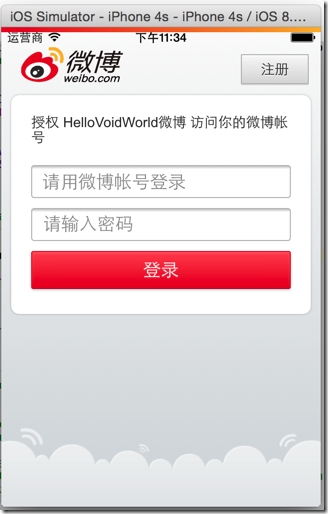
     // 创建UIWebView

     UIWebView *webView = [[UIWebView alloc] init];

     webView.frame = self.view.bounds;

     // 添加到主界面

     [self.view addSubview:webView];

     // 加载请求页面

     NSURL *url = [NSURL URLWithString:@"https://api.weibo.com/oauth2/authorize?client_id=3942775926&redirect_uri=http://www.cnblogs.com/hellovoidworld/"];

     NSURLRequest *request = [NSURLRequest requestWithURL:url];

     [webView loadRequest:request];

 }

 @end
 - (BOOL)application:(UIApplication *)application didFinishLaunchingWithOptions:(NSDictionary *)launchOptions {

     // Override point for customization after application launch.

     // 启动后显示状态栏

     UIApplication *app = [UIApplication sharedApplication];

     app.statusBarHidden = NO;

     // 设置window

     self.window = [[UIWindow alloc] init];

     self.window.frame = [UIScreen mainScreen].bounds;

     self.window.rootViewController = [[HVWOAuthViewController alloc] init];

     [self.window makeKeyAndVisible];

     return YES;

 }
 /** 截取web发送请求 */

 - (BOOL)webView:(UIWebView *)webView shouldStartLoadWithRequest:(NSURLRequest *)request navigationType:(UIWebViewNavigationType)navigationType {

     NSString *urlStr = request.URL.absoluteString;

     NSRange range = [urlStr rangeOfString:@"http://www.cnblogs.com/hellovoidworld/?code="];

     if (range.length > ) { // 如果是匹配的url,即发送的是带access_code的url

         // 截取access_code

         NSUInteger accessCodeLocation = range.length + range.location;

         NSString *accessCode = [urlStr substringFromIndex:accessCodeLocation];

         HVWLog(@"%@", accessCode);

         return NO; // 阻止发送,不需要跳转到重定向页面

     }

     return YES; // 其他情况照常发送

 }
 /** 根据access_code获取access_token */

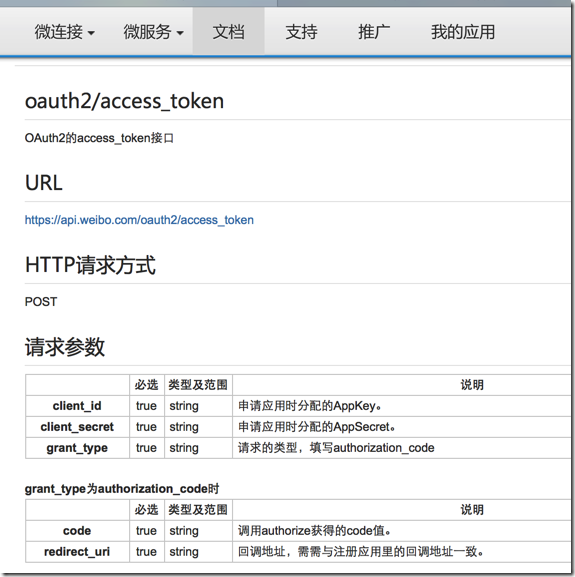
 - (void) accessTokenWithAccessCode:(NSString *) accessCode {

     // 创建AFN的http操作请求管理者

     AFHTTPRequestOperationManager *manager = [AFHTTPRequestOperationManager manager];

     // 参数设置

     NSMutableDictionary *param = [NSMutableDictionary dictionary];

     param[@"client_id"] = @"";

     param[@"client_secret"] = @"cc577953b2aa3aa8ea220fd15775ea35";

     param[@"grant_type"] = @"authorization_code";

     param[@"code"] = accessCode;

     param[@"redirect_uri"] = @"http://www.cnblogs.com/hellovoidworld/";

     // 发送请求

     [manager POST:@"https://api.weibo.com/oauth2/access_token" parameters:param success:^(AFHTTPRequestOperation *operation, NSDictionary *accountInfo) {

         [MBProgressHUD hideHUD];

         // 返回的是用户信息字典

         HVWLog(@"%@", accountInfo);

     } failure:^(AFHTTPRequestOperation *operation, NSError *error) {

         [MBProgressHUD hideHUD];

         HVWLog(@"请求access_token失败 ----> %@", error);

     }];

 }

 - (instancetype)init {

     self = [super init];

     if (!self) {

         return nil;

     }

     self.acceptableContentTypes = [NSSet setWithObjects:@"application/json", @"text/json", @"text/javascript", @"text/plain", nil];

     return self;

 }
"access_token" = "2.00A5GpAGGIUpSEff44478fe90yykBw";
"expires_in" = 181897;
"remind_in" = 181897;
uid = 5508976272;
// 存储用户信息,包括access_token到沙盒中
NSString *docPath = [NSSearchPathForDirectoriesInDomains(NSDocumentDirectory, NSUserDomainMask, YES) lastObject];
NSString *filePath = [docPath stringByAppendingPathComponent:@"accountInfo.plist"];
[iOS微博项目 - 2.2] - 在app中获取授权的更多相关文章
- iOS利用HealthKit框架从健康app中获取步数信息
微信和QQ的每日步数最近十分火爆,我就想为自己写的项目中添加一个显示每日步数的功能,上网一搜好像并有相关的详细资料,自己动手丰衣足食. 统计步数信息并不需要我们自己去实现,iOS自带的健康app已经为 ...
- iOS从健康app中获取步数信息
统计步数信息并不需要我们自己去实现,iOS自带的健康app已经为我们统计好了步数数据 我们只要使用HealthKit框架从健康app中获取这个数据信息就可以了 1.如下图所示 在Xcode中打开Hea ...
- [iOS微博项目 - 2.6] - 获取微博数据
github: https://github.com/hellovoidworld/HVWWeibo A.新浪获取微博API 1.读取微博API 2.“statuses/home_time ...
- [iOS微博项目 - 2.3] - 用户取消对app的授权
github: https://github.com/hellovoidworld/HVWWeibo A.用户取消对app的授权 用户可以在微博网站上取消对某个应用(app)的授权 1.打开& ...
- [iOS微博项目 - 2.0] - OAuth授权3步
A.概念 OAUTH协议为用户资源的授权提供了一个安全的.开放而又简易的标准.与以往的授权方式不同之处是OAUTH的授权不会使第三方触及到用户的帐号信息(如用户名与密码),即第三方无需使用用 ...
- 将unity3d项目嵌入到Android App中使用
创建一个新的AndroidStudio app项目. 1.添加库文件:拷贝unity安装目录下的库文件:Unity\Editor\Data\PlaybackEngines\AndroidPlayer\ ...
- [iOS微博项目 - 2.1] - 获得新浪授权接口
A.如何获得新浪的授权接口 登陆新浪的开放平台 注册新浪账号 创建应用 获得应用id和请求地址 查阅相关API 关联需要进行测试的账号 1.登陆开放平台 http://open.weibo.com ...
- app中获取应用名称,版本等信息的方法
在app中,我们有时候需要显示一些信息,例如名称,版本等等...如果用写死的方式可能不太好,我们可以动态的读取.应用的信息主要是在info.plist这个文件中,实际就是一个xml文件,以源文件的方式 ...
- [iOS微博项目 - 2.4] - 重新安排app启动步骤
github: https://github.com/hellovoidworld/HVWWeibo A.app启动步骤 1.加入了授权步骤之后,最先要判断app内是否已经登陆了账号 2.在程序启 ...
随机推荐
- Quickhit快速击键
一.项目分析 根据输入速率和正确率将玩家分为不同等级,级别越高,一次显示的字符数越多,玩家正确输入一次的得分也越高.如果玩家在规定时间内完成规定次数的输入,正确率达到规定要求,则玩家升级.玩家最高级别 ...
- C#发送手机验证码
C#发送手机验证码,平台有很多,我就说说其中的1个平台 测试环境:.net2.0 测试效果:速度还可以,10秒内接收短信 1.去http://www.yuntongxun.com注册,会送8元测试金额 ...
- HTML元素margin、padding的默认值
HTML元素margin.padding的默认值 element margin(单位像素) padding html 0 0 body 8 0 div 0 0 h1 21 0 h2 19 0 19 0 ...
- Linux管道的实现机制
7.1.1 Linux管道的实现机制 在Linux中,管道是一种使用非常频繁的通信机制.从本质上说,管道也是一种文件,但它又和一般的文件有所不同,管道可以克服使用文件进行通信的两个问题,具体表现为: ...
- 【转】搭建Python的Eclipse开发环境之安装PyDev插件--离线安装
原文网址:http://blog.csdn.net/wangpingfang/article/details/7181223 使用update site安装pydev插件 注意:该安装指南针对ecli ...
- 常用应用层协议HTTP、RTSP、RTMP比较
HTTP(超文本传输协议).RTSP(Real Time Streaming Protocol实时流传输协议).RTMP(Routing Table Maintenance Protocol路由选择表 ...
- Android SDK更新 Connection to http://dl-ssl.google.com refused 解决方法
问题描述 使用SDK Manager更新时出现问题Failed to fetch URL https://dl-ssl.google.com/android/repository/repository ...
- PHP QR CODE生成二维码
用法: <?php include "./phpqrcode/phpqrcode.php"; $value="http://www.xxx.com"; $ ...
- Solaris系统管理(二)资源管理与网络配置
上一篇主要总结了Solaris安装后需要进行的一些设置,如ssh,pkgutil管理依赖,vim安装. 这一篇将会对Solaris资源管理与网络配置进行总结. 四 Solaris 系统管理 1,查询总 ...
- ctype库试运行
from ctypes import * msvcrt=cdll.msvcrt message_string="Hello world!\n" msvcrt.wprintf(&qu ...