
Cocos2d-js和Android交互
说白了,就是JavaScript和Java之间的函数互相调用。
先看一下效果
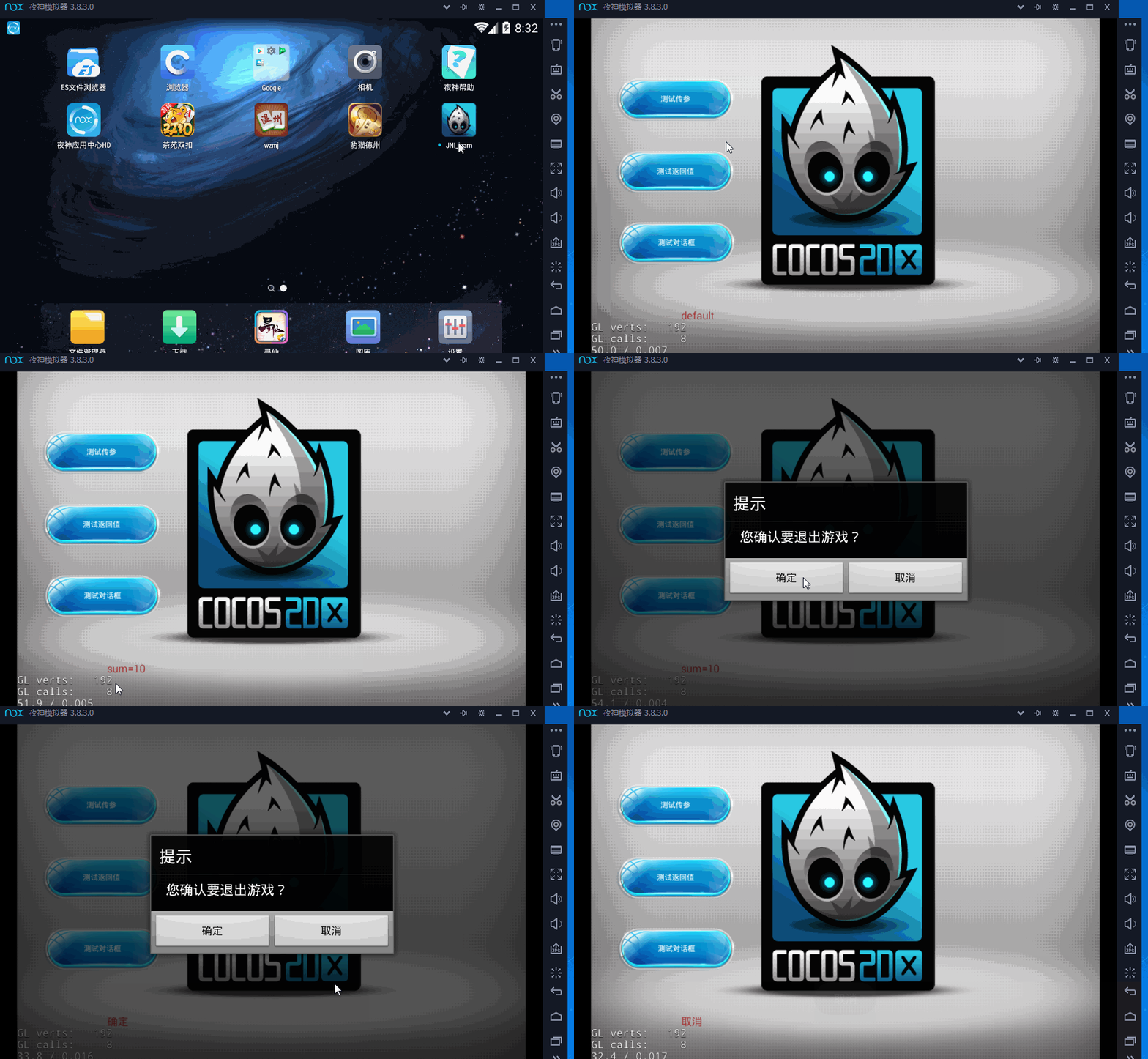
有了这个交互,为了以后接sdk做准备。
要点:
javascript调用java:
jsb.reflection.callStaticMethod("org/cocos2dx/javascript/AppActivity", "hello", "(Ljava/lang/String;)V", "this is a message from js");
java调用javaScript:
Cocos2dxJavascriptJavaBridge.evalString("Global.mlayer.exit_cancle();"); // java to js
在这里我把这cocos2d-js的app.js 和 Android工程的AppActivity.java 的代码贴上,代码也有注释,纯干货,拿走就能用!
app.js:
var HelloWorldLayer = cc.Layer.extend({

	txt_info:null,

	sprite:null,

	ctor:function ()

	{

        //////////////////////////////

        // 1. super init first

        this._super();

        /////////////////////////////

        // 2. add a menu item with "X" image, which is clicked to quit the program

        //    you may modify it.

        // ask the window size

        var size = cc.winSize;

        var mainscene = ccs.load(res.MainScene_json);

        this.addChild(mainscene.node);

        /* you can create scene with following comment code instead of using csb file.

        /////////////////////////////

        // 3. add your codes below...

        // add a label shows "Hello World"

        // create and initialize a label

        var helloLabel = new cc.LabelTTF("Hello World", "Arial", 38);

        // position the label on the center of the screen

        helloLabel.x = size.width / 2;

        helloLabel.y = size.height / 2 + 200;

        // add the label as a child to this layer

        this.addChild(helloLabel, 5);

        // add "HelloWorld" splash screen"

        this.sprite = new cc.Sprite(res.HelloWorld_png);

        this.sprite.attr({

            x: size.width / 2,

            y: size.height / 2

        });

        this.addChild(this.sprite, 0);

        */

		//“测试传参”按钮

		var btn_hello = ccui.helper.seekWidgetByName(mainscene.node, "Button_1");

		btn_hello.addTouchEventListener(this.btn_hello_clicked,this);

		//"测试返回值" 按钮

		var btn_testReturn = ccui.helper.seekWidgetByName(mainscene.node, "Button_2");

		btn_testReturn.addTouchEventListener(this.btn_testReturn_clicked,this);

		//“测试对话框” 按钮

		var btn_dialog = ccui.helper.seekWidgetByName(mainscene.node, "Button_3");

		btn_dialog.addTouchEventListener(this.btn_dialog_clicked,this);

		//文本提示

		this.txt_info = ccui.helper.seekWidgetByName(mainscene.node, "Text_1");

		this.txt_info.setString("default");

        return true;

    },

	//打开java层的对话框

	btn_dialog_clicked:function(sender,type)

	{

		if(type == ccui.Widget.TOUCH_ENDED)

		{

			//弹出提示框 ok

			jsb.reflection.callStaticMethod("org/cocos2dx/javascript/AppActivity", "showAlertDialog", "(Ljava/lang/String;Ljava/lang/String;)V", "提示","您确认要退出游戏?");

		}

	},

	//测试 java函数的返回值

	btn_testReturn_clicked:function(sender,type)

	{

		if(type == ccui.Widget.TOUCH_ENDED)

		{

			//测试返回值 ok

			var result = jsb.reflection.callStaticMethod("org/cocos2dx/javascript/AppActivity", "sum", "(II)I", 3, 7);

			cc.log("result"+result);

			this.txt_info.setString("sum="+result);

		}

	},

	btn_hello_clicked:function(sender,type){

        //根据触发事件的类型进行分情况处理

        switch (type)

		{

        case ccui.Widget.TOUCH_BEGAN:

            //cc.log("btn_hello Touch Began");

            break;

        case ccui.Widget.TOUCH_MOVED:

            //cc.log("btn_hello Touch Moved");

            break;

        case ccui.Widget.TOUCH_ENDED:

            //cc.log("btn_hello Touch Ended");

			cc.log("TODO call java");

			jsb.reflection.callStaticMethod("org/cocos2dx/javascript/AppActivity", "hello", "(Ljava/lang/String;)V", "this is a message from js");

            break;

        case ccui.Widget.TOUCH_CANCELED:

            //cc.log("btn_hello Touch Canceled");

            break;

        default:

            break;

        }

	},

	exit_sure:function()

	{

		this.txt_info.setString("确定");

	},

	exit_cancle:function()

	{

		this.txt_info.setString("取消");

	},

});

var HelloWorldScene = cc.Scene.extend({

    onEnter:function () {

        this._super();

        var layer = new HelloWorldLayer();

		Global.mlayer = layer;//保存到全局变量

        this.addChild(layer);

    }

});
AppActivity.java:
/****************************************************************************

Copyright (c) 2008-2010 Ricardo Quesada

Copyright (c) 2010-2012 cocos2d-x.org

Copyright (c) 2011      Zynga Inc.

Copyright (c) 2013-2014 Chukong Technologies Inc.

http://www.cocos2d-x.org

Permission is hereby granted, free of charge, to any person obtaining a copy

of this software and associated documentation files (the "Software"), to deal

in the Software without restriction, including without limitation the rights

to use, copy, modify, merge, publish, distribute, sublicense, and/or sell

copies of the Software, and to permit persons to whom the Software is

furnished to do so, subject to the following conditions:

The above copyright notice and this permission notice shall be included in

all copies or substantial portions of the Software.

THE SOFTWARE IS PROVIDED "AS IS", WITHOUT WARRANTY OF ANY KIND, EXPRESS OR

IMPLIED, INCLUDING BUT NOT LIMITED TO THE WARRANTIES OF MERCHANTABILITY,

FITNESS FOR A PARTICULAR PURPOSE AND NONINFRINGEMENT. IN NO EVENT SHALL THE

AUTHORS OR COPYRIGHT HOLDERS BE LIABLE FOR ANY CLAIM, DAMAGES OR OTHER

LIABILITY, WHETHER IN AN ACTION OF CONTRACT, TORT OR OTHERWISE, ARISING FROM,

OUT OF OR IN CONNECTION WITH THE SOFTWARE OR THE USE OR OTHER DEALINGS IN

THE SOFTWARE.

****************************************************************************/

package org.cocos2dx.javascript;

import org.cocos2dx.lib.Cocos2dxActivity;

import org.cocos2dx.lib.Cocos2dxGLSurfaceView;

import android.app.AlertDialog;

import android.content.Context;

import android.content.DialogInterface;

import android.content.pm.ActivityInfo;

import android.net.wifi.WifiInfo;

import android.net.wifi.WifiManager;

import android.os.Bundle;

import android.view.WindowManager;

import android.widget.Toast;

import org.cocos2dx.lib.Cocos2dxJavascriptJavaBridge;

// The name of .so is specified in AndroidMenifest.xml. NativityActivity will load it automatically for you.

// You can use "System.loadLibrary()" to load other .so files.

public class AppActivity extends Cocos2dxActivity{

    /*

     * by joe

     */

    private static AppActivity app = null;

    //private static Context mContent = null;

    static String hostIPAdress = "0.0.0.0";

    @Override

    protected void onCreate(Bundle savedInstanceState) {

        // TODO Auto-generated method stub

        super.onCreate(savedInstanceState);

        if(nativeIsLandScape()) {

            setRequestedOrientation(ActivityInfo.SCREEN_ORIENTATION_SENSOR_LANDSCAPE);

        } else {

            setRequestedOrientation(ActivityInfo.SCREEN_ORIENTATION_SENSOR_PORTRAIT);

        }

        if(nativeIsDebug()){

            getWindow().setFlags(WindowManager.LayoutParams.FLAG_KEEP_SCREEN_ON, WindowManager.LayoutParams.FLAG_KEEP_SCREEN_ON);

        }

        hostIPAdress = getHostIpAddress();

        /**

         * by joe

         */

        app  =  this;

        //mContent = this;

    }

    @Override

    public Cocos2dxGLSurfaceView onCreateView() {

        Cocos2dxGLSurfaceView glSurfaceView = new Cocos2dxGLSurfaceView(this);

        // TestCpp should create stencil buffer

        glSurfaceView.setEGLConfigChooser(5, 6, 5, 0, 16, 8);

        return glSurfaceView;

    }

    public String getHostIpAddress() {

        WifiManager wifiMgr = (WifiManager) getSystemService(WIFI_SERVICE);

        WifiInfo wifiInfo = wifiMgr.getConnectionInfo();

        int ip = wifiInfo.getIpAddress();

        return ((ip & 0xFF) + "." + ((ip >>>= 8) & 0xFF) + "." + ((ip >>>= 8) & 0xFF) + "." + ((ip >>>= 8) & 0xFF));

    }

    public static String getLocalIpAddress() {

        return hostIPAdress;

    }

    private static native boolean nativeIsLandScape();

    private static native boolean nativeIsDebug();

    //---------------以下是cocos2dx-js 与  java 交互--------------------------

    /*

     * 目前Cocos2d-js中支持的Java类型签名有下面4种

    Java类型     签名

    int         I

    float       F

    boolean     Z

    String      Ljava/lang/String;

    */

    /**

     *

     * jsb.reflection.callStaticMethod("org/cocos2dx/javascript/AppActivity", "hello", "(Ljava/lang/String;)V", "this is a message from js");

     * js->java

     * 测试无返回值的

     * @param msg

     */

    public static void hello(final String msg){

        System.out.println(msg);

        app.runOnUiThread(new Runnable() {

            @Override

            public void run() {

                Toast.makeText(app, msg, Toast.LENGTH_SHORT).show();

            }

        });

    }

    /**

     *

     * var result = jsb.reflection.callStaticMethod("org/cocos2dx/javascript/AppActivity", "sum", "(II)I", 3, 7);

     * js->java

     * 测试有返回值的

     * @param a

     * @param b

     * @return

     */

    public static int sum(int a, int b){

        return a + b;

    }

    /**

     * 弹出一个对话框

     * @param title

     * @param message

     */

    public static  void showAlertDialog(final String title,final String message) {

        //这里一定要使用runOnUiThread

        app.runOnUiThread(new Runnable() {

            @Override

            public void run() {

                // 创建构建器

                AlertDialog.Builder builder = new AlertDialog.Builder(app);

                builder.setTitle(title)//提示

                .setMessage(message)//您确认要退出游戏?

                .setIcon(null)//.setIcon(R.drawable.icon)

                .setPositiveButton("确定", new DialogInterface.OnClickListener(){

                    @Override

                    public void onClick(DialogInterface dialog, int which) {

                        //System.out.println("是 clicked");

                        Toast.makeText(app, "确定", Toast.LENGTH_SHORT).show();

                        //跳出一个提示。

                        //Toast.makeText(mContent, "确定", Toast.LENGTH_SHORT).show();

                        //call cocos 函数 exit_sure

                        app.runOnGLThread(new Runnable() {

                            @Override

                            public void run() {

                                Cocos2dxJavascriptJavaBridge.evalString("Global.mlayer.exit_sure();"); // java to js

                            }

                        });

                    }})

                .setNegativeButton("取消", new DialogInterface.OnClickListener(){

                    @Override

                    public void onClick(DialogInterface dialog, int which) {

                        //System.out.println("否 clicked");

                        Toast.makeText(app, "取消", Toast.LENGTH_SHORT).show();

                        //call cocos 函数 exit_cancle

                        app.runOnGLThread(new Runnable() {

                            @Override

                            public void run() {

                                Cocos2dxJavascriptJavaBridge.evalString("Global.mlayer.exit_cancle();"); // java to js

                            }

                        });

                    }});

                builder.create().show();

            }

        });

    }

    /**

     * java->js

     * @param a

     * @param b

     */

    public static void callcocos(int a){

         app.runOnGLThread(new Runnable() {

            @Override

            public void run() {

                //test

               // Cocos2dxJavascriptJavaBridge.evalString("SDKManage.javaToJSCall(\"a\", 5 , 7);"); // java to js

            }

        });

    }

}
Cocos2d-js和Android交互的更多相关文章
- JS和Android交互
//本地webview写法 webview = (WebView) findViewById(R.id.webview); webview.loadUrl("http://192.168.1 ...
- 135、JS和Android交互范例
很简单的直接上代码 <uses-permission android:name="android.permission.INTERNET" /> assets/web. ...
- JS与Android交互
一.Android调用JS 2种方法 1.通过WebView的loadUrl 2.通过WebView的evaluateJavascript
- WebView之javascript与android交互基础加强
一.什么是js与android交互? 通俗一点就是使用js代码调用java代码,或者使用java代码调用js代码. 二.为什么要使用js与java代码交互? 1.可以做一些js网页做本身处理不了的事情 ...
- js和android及ios交互
Android中Java和JavaScript交互 这种交互,Hybrid App 会用的比较多一点, 本文将介绍如何实现Java代码和Javascript代码的相互调用. Android提供了一个很 ...
- js 与 ios Android交互
一.android 交互 1.js调用webview 在android API Level 17及以上的版本中,就会出现js调用不了android的代码,这是版本兼容的问题,需要在调用的方法上面加一个 ...
- android 与JS之间的交互
在页面布局很复杂并且是动态的时候,android本身的控件就变得不是那么地灵活了,只有借助于网页的强大布局能力才能实现,但是在操作html页面的同时也需要与android其它的组件存在交互,比如说 在 ...
- [转]JS调用Android里面的方法,Android调用JS里面的方法
FROM : http://blog.csdn.net/hj563308597/article/details/45197709 Android WebView 在公司Android的开发过程中遇到一 ...
- WebView之js调用Android类的方法传递数据
1,具体的思路如下: 在android中写一个Activity,里面写一个webview,这个webview加载本地的一个html文件,显示这个网页,这个网页包括一个用户名和密码的输入框和两个按钮(只 ...
随机推荐
- Codeforces Round #552 (Div. 3) F. Shovels Shop(dp)
题目链接 大意:给你n个物品和m种优惠方式,让你买k种,问最少多少钱. 思路:考虑dpdpdp,dp[x]dp[x]dp[x]表示买xxx种物品的最少花费,然后遍历mmm种优惠方式就行转移就好了. # ...
- Java 实现TCP/IP协议的收发数据(服务端)
功能如下: 注: 只有服务端,没有客户端,测试时采用第三方软件作为客户端的. 收发数据目前能正常收发数据,只是中文的会变成乱码显示. 采用Thread类实现一个收发数据的线程. 服务端代码: impo ...
- ASP.NET MVC - Entity Framework
ASP.NET MVC - Entity Framework 实体关系 关系是某个实体(表)的一条记录对应于另一个实体(表)的一条或多条记录. 一对多关系 单方面的包含关系称为一对多,而一对多和一对一 ...
- insert主键返回 selectKey使用
有时候新增一条数据,知道新增成功即可,但是有时候,需要这条新增数据的主键,以便逻辑使用,再将其查询出来明显不符合要求,效率也变低了. 这时候,通过一些设置,mybatis可以将insert的数据的主键 ...
- SimpleDateFormat 常用用法
1.SimpleDateFormat函数语法: G 年代标志符 y 年 M 月 d 日 h ...
- Gitlab_ansible_jenkins三剑客④jenkins安装图解及freestyle的简单使用
java环境准备 # 安装jdk1.8 [root@node02 ~]# rpm -ivh jdk-8u181-linux-x64.rpm vim /etc/profile export JAVA_H ...
- Gitlab_ansible_jenkins三剑客①搭建gitlab的详细步骤
环境准备 1.关闭selinux和防火墙 [root@node1 lesson2]# vim /etc/sysconfig/selinux SELINUX=disabled # systemctl s ...
- 手把手详解持续集成之GitLab CI/CD
一.环境准备 首先需要有一台 GitLab 服务器,然后需要有个项目:这里示例项目以 Spring Boot 项目为例,然后最好有一台专门用来 Build 的机器,实际生产中如果 Build 任务不频 ...
- MapReduce流量统计
准备数据access.log 要用到的只有第二个手机号,倒数第三上行流量,倒数第二下行流量. 1363157985066 13726230503 00-FD-07-A4-72-B8:CMCC 120. ...
- 软件工程作业-(second)
一.选择开发工具 自己以前一直都用VS,又由于微软对Microsoft Visual Studio 更新,因此本次自己采用 Visual Studio 2019 来作为开发工具.如下图是安装后的界面: ...