
【springboot】之整合ActiveMQ
1、引入依赖的jar
<parent>

        <groupId>org.springframework.boot</groupId>

        <artifactId>spring-boot-starter-parent</artifactId>

        <version>1.5.9.RELEASE</version>

    </parent>
<dependencies>

        <dependency>

            <groupId>org.springframework.boot</groupId>

            <artifactId>spring-boot-starter</artifactId>

        </dependency>

        <dependency>

            <groupId>org.springframework.boot</groupId>

            <artifactId>spring-boot-starter-activemq</artifactId>

        </dependency>

        <dependency>

            <groupId>org.springframework.boot</groupId>

            <artifactId>spring-boot-starter-web</artifactId>

        </dependency>

        <dependency>

            <groupId>org.springframework.boot</groupId>

            <artifactId>spring-boot-starter-logging</artifactId>

        </dependency>

        <dependency>

            <groupId>org.springframework.boot</groupId>

            <artifactId>spring-boot-starter-test</artifactId>

        </dependency>

        <dependency>

            <groupId>org.apache.activemq</groupId>

            <artifactId>activemq-pool</artifactId>

        </dependency>

    </dependencies>
2、application配置
spring.activemq.broker-url=tcp://localhost:61616

spring.activemq.in-memory=true

spring.activemq.pool.enabled=true
3、单向发送消息
@RunWith(SpringJUnit4ClassRunner.class)

@SpringBootTest(classes = MqApplication.class)

public class MqTest {

    @Autowired

    JmsMessagingTemplate jmsMessagingTemplate;

    //发送String消息

    @Test

    public void testStr() {

        //往luna队列发送消息

        jmsMessagingTemplate.convertAndSend("luna","to luna queue");

    }

}
接收消息
@Component

@Slf4j

public class Consumer {

    @JmsListener(destination = "luna")

    public void receiveQueue(String text){

        log.info("receive:{}",text);

    }

}
查看ActiveMQ控制台
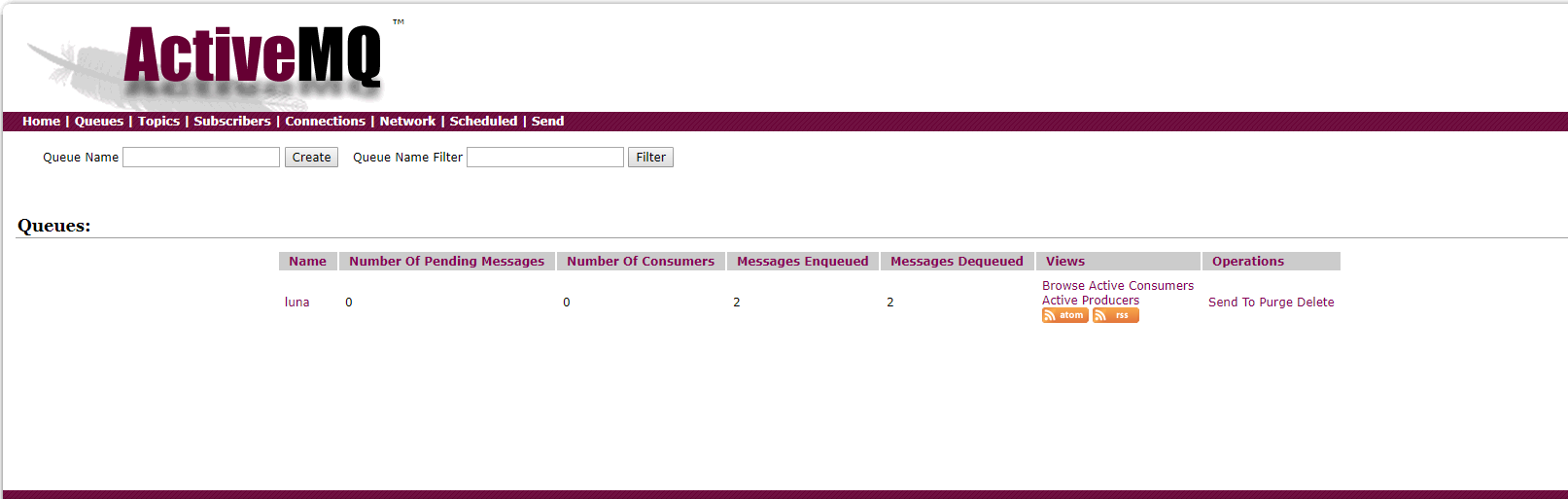
控制台打印

4、双向发送消息
例如 A发送B消费 B消费完毕将结果放在某一个队列中,A再去消费
我们将上面代码继续改造一下
@Component

@Slf4j

public class Consumer {

    @JmsListener(destination = "luna")

    @SendTo("luna_ret")//将消费结果返回

    public String receiveQueue(String text){

        log.info("receive:{}",text);

        return "SUCCESS--"+text;

    }

}
写一个消费luna_ret的queue
@Component

@Slf4j

public class ConsumerRet {

    @JmsListener(destination = "luna_ret")

    public void receiveQueue(String text){

        log.info("receive:{}",text);

    }

}
ok,我们再执行上面的发送queues代码
ActiveMQ控制台显示
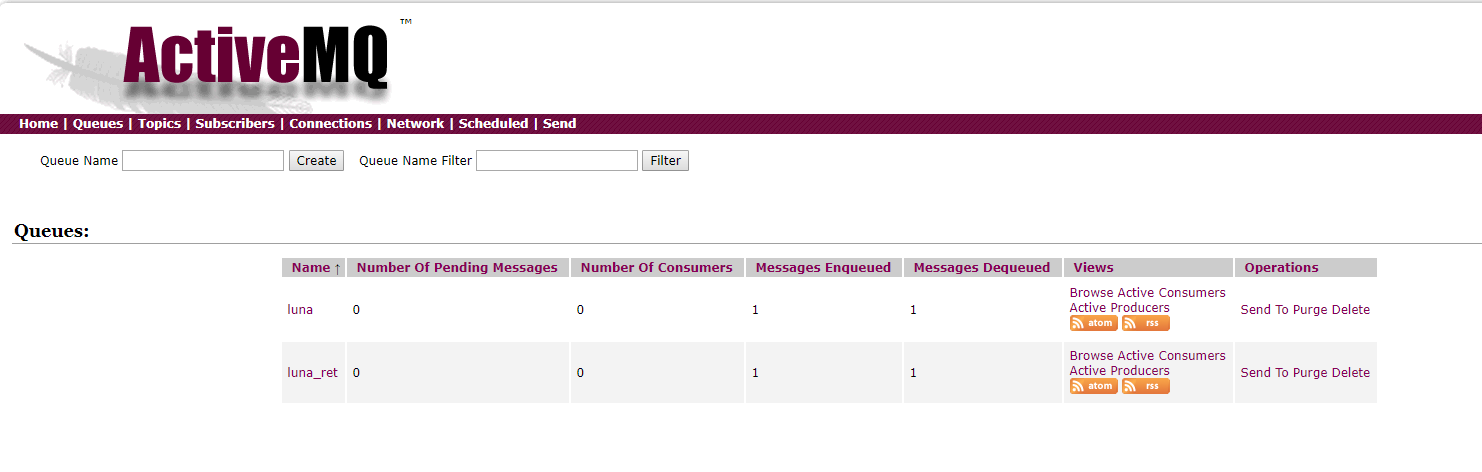
控制台日志显示

由上可知,
@SendTo 注解
可以将返回值发送到指定的queue
-----------------------------------------------
springboot整合ActiveMQ安全配置
【springboot】之整合ActiveMQ的更多相关文章
- springboot整合ActiveMQ,配置问题
1.ActiveMQ的安装和相关配置修改 去官网下载安装包解压至文件夹 双击打开 打开浏览器输入 http://127.0.0.1:8161 到此activeMQ就安装好了 2.springboot工 ...
- SpringBoot2.0源码分析(二):整合ActiveMQ分析
SpringBoot具体整合ActiveMQ可参考:SpringBoot2.0应用(二):SpringBoot2.0整合ActiveMQ ActiveMQ自动注入 当项目中存在javax.jms.Me ...
- Web项目容器集成ActiveMQ & SpringBoot整合ActiveMQ
集成tomcat就是随项目启动而启动tomcat,最简单的方法就是监听器监听容器创建之后以Broker的方式启动ActiveMQ. 1.web项目中Broker启动的方式进行集成 在这里采用Liste ...
- SpringBoot系列八:SpringBoot整合消息服务(SpringBoot 整合 ActiveMQ、SpringBoot 整合 RabbitMQ、SpringBoot 整合 Kafka)
声明:本文来源于MLDN培训视频的课堂笔记,写在这里只是为了方便查阅. 1.概念:SpringBoot 整合消息服务 2.具体内容 对于异步消息组件在实际的应用之中会有两类: · JMS:代表作就是 ...
- SpringBoot整合ActiveMQ快速入门
Spring Boot 具有如下特性: 为基于 Spring 的开发提供更快的入门体验 开箱即用,没有代码生成,也无需 XML 配置.同时也可以修改默认值来满足特定的需求. 提供了一些大型项目中常见的 ...
- SpringBoot 2.x (13):整合ActiveMQ
ActiveMQ5.x不多做介绍了,主要是SpringBoot的整合 特点: 1)支持来自Java,C,C ++,C#,Ruby,Perl,Python,PHP的各种跨语言客户端和协议 2)支持许多高 ...
- SpringBoot第二十一篇:整合ActiveMQ
作者:追梦1819 原文:https://www.cnblogs.com/yanfei1819/p/11190048.html 版权声明:本文为博主原创文章,转载请附上博文链接! 引言 前一章节中 ...
- 解决Springboot整合ActiveMQ发送和接收topic消息的问题
环境搭建 1.创建maven项目(jar) 2.pom.xml添加依赖 <parent> <groupId>org.springframework.boot</group ...
- SpringBoot整合ActiveMQ和开启持久化
一.点对点 1.提供者目录展示 2.导入依赖 <dependency> <groupId>org.springframework.boot</groupId> &l ...
随机推荐
- leetcode 772.Basic Calculator III
这道题就可以结合Basic Calculator中的两种做法了,分别是括号运算和四则运算的,则使用stack作为保持的结果,而使用递归来处理括号内的值的. class Solution { publi ...
- pc端复制方法
dom结构如下: <div id="btn">复制</div> <input id="content" type="te ...
- 给Linux服务器设置共享文件目录
通过samba软件 :yum install samba 修改配置文件:vi /etc/samba/smb.conf 添加 [WORKSPACE] comment = workspace ...
- java-接口的概述及其特点
1.接口概述: - 从狭义的角度讲就是指java中的interface - 从广义的角度讲对外提供规则的都是接口 2.接口特点: - 接口中定义的全都是抽象方法. - 接口用关键字interface表 ...
- YIT-CTF—隐写术
一:小心心 下载图片——>改后缀名为TXT——>打开发下最后一行有flag 二:双生 下载两张图片——>应为题目说的是双生——>想到可能是两张图片的叠加——>打开图片查看 ...
- 2017-2018-2 20165313实验三 《敏捷开发与XP实践》
实验报告封面 实验内容及步骤 实验一 1.试验要求: 参考http://www.cnblogs.com/rocedu/p/6371315.html#SECCODESTANDARD安装alibaba 插 ...
- 【MAC】常用方法-持续更新
1.Homebrew安装 删除brew ruby -e "$(curl -fsSL https://raw.githubusercontent.com/Homebrew/install/ma ...
- css与html 与js的基础语法
<%@ Page Language="C#" AutoEventWireup="true" CodeFile="Sample_2-23456.a ...
- 【vue】vue前端项目结构
[一]项目结构 [二]项目结构释意 目录/文件 说明 build 项目构建(webpack)相关代码 config 配置目录,包括端口号等.我们初学可以使用默认的. node_modules npm ...
- hibernate中带查询条件的分页
所谓分页,从数据库中分,则是封装一个分页类.利用分页对象进行分页. 但,分页往往带查询条件. 分页类的三个重要数据:[当前页码数],[数据库中的总记录数],[每页显示的数据的条数] 原理:select ...