
Python+Selenium学习笔记11 - python官网的tutorial - 定义函数
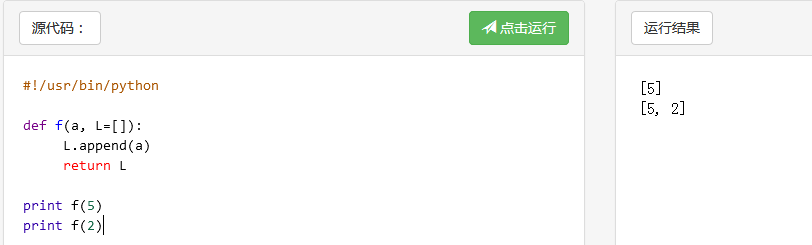
1 def f(a, L=[]):

2     L.append(a)

3     return L

4

5 print f(5)

6 print f(2)
输出
1 def f(a, L=None):

2     if L is None:

3         L = []

4     L.append(a)

5     return L

6

7 print f1(5)

8 print f1(2)
输出
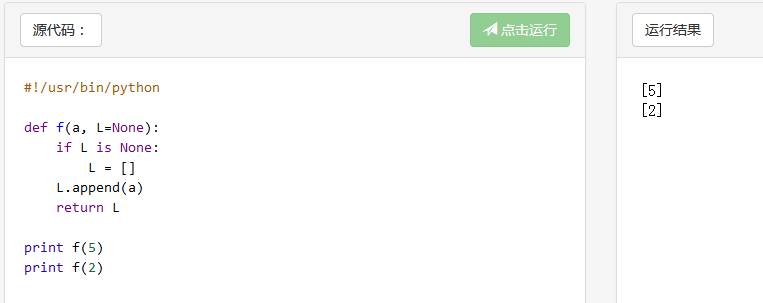
上面两个函数的区别,f()输出的结果是累加的,f1()输出的结果是独立的
If you don’t want the default to be shared between subsequent calls -> 用f1()
4.7.2. Keyword Arguments
def parrot(voltage, state='a stiff', action='voom', type='Norwegian Blue'):

    print("-- This parrot wouldn't", action, end=' ')

    print("if you put", voltage, "volts through it.")

    print("-- Lovely plumage, the", type)

    print("-- It's", state, "!")

parrot(1000)                                          # 1 positional argument

parrot(voltage=1000)                                  # 1 keyword argument

parrot(voltage=1000000, action='VOOOOOM')             # 2 keyword arguments

parrot(action='VOOOOOM', voltage=1000000)             # 2 keyword arguments

parrot('a million', 'bereft of life', 'jump')         # 3 positional arguments

parrot('a thousand', state='pushing up the daisies')  # 1 positional, 1 keyword

# 异常情况,下面几种情况运行都不成功
parrot()                     # required argument missing ,必须有个必填参数

parrot(voltage=5.0, 'dead')  # non-keyword argument after a keyword argument ,这个当我把第二个参数换成status='dead'时运行成功。我的理解是前面参数用了参数名,后面就必须得跟,要是前面没跟,那后面跟不跟都可以

parrot(110, voltage=220)     # duplicate value for the same argument,重复传参

parrot(actor='John Cleese')  # unknown keyword argument #参数typo
输出 
解析
传值时,带变量voltage=1000,运行时会自动匹配到对应的位置
不带变量parrot('a million', 'bereft of life', 'jump') ,则按顺序传参
定义函数有 *name和 **name时, *name 必须在 **name之前。
 1 def cheeseshop(kind, *arguments, **keywords):

 2     print("-- Do you have any", kind, "?")

 3     print("-- I'm sorry, we're all out of", kind)

 4     for arg in arguments:

 5         print(arg)

 6     print("-" * 40)

 7     for kw in keywords:

 8         print(kw, ":", keywords[kw])

 9

10 cheeseshop("Limburger", "It's very runny, sir.",

11            "It's really very, VERY runny, sir.",

12            shopkeeper="Michael Palin",

13            client="John Cleese",

14            sketch="Cheese Shop Sketch")

15

16 # 输出结果

17 -- Do you have any Limburger ?

18 -- I'm sorry, we're all out of Limburger

19 It's very runny, sir.

20 It's really very, VERY runny, sir.

21 ----------------------------------------

22 shopkeeper : Michael Palin

23 client : John Cleese

24 sketch : Cheese Shop Sketch
Python+Selenium学习笔记11 - python官网的tutorial - 定义函数的更多相关文章
- Python+Selenium学习笔记5 - python官网的tutorial - 交互模式下的操作
这篇笔记主要是从Python官网的Tutorial上截取下来,再加上个人理解 1. 在交互模式下,下划线'_'还可以表示上一步的计算结果 2.引号转义问题. 从下图总结的规律是,字符串里的引号如果和引 ...
- Python+Selenium学习笔记14 - python官网的tutorial - just() fill() format()
repr(x).rjust(n) 左侧空格填充,右侧列对齐,str()和repr()是一种输出,也可不用,直接x.rjust() repr(x).ljust(n) 右侧空格填充,左侧列对齐 rep ...
- Python+Selenium学习笔记15 - 读取txt和csv文件
读取txt的内容并用百度查找搜索 1 # coding = utf-8 2 3 from selenium import webdriver 4 import time 5 6 # 打开浏览器 7 d ...
- Python基础学习笔记(一)python发展史与优缺点,岗位与薪资
相信有好多朋友们都是第一次了解python吧,可能大家也听过或接触过这个编程语言.那么到底什么是python呢?它在什么机缘巧合下诞生的呢?又为什么在短短十几年时间内就流行开来呢?就请大家带着疑问,让 ...
- python + selenium 学习笔记 -摘要
一.浏览器操作相关 from selenium import webdriver driver = webdriver.Chrome() driver.maximize_window() # 窗口最大 ...
- Python+Selenium学习笔记17 - HTML测试报告
运行少量case时 1 # coding = utf-8 2 3 from selenium import webdriver 4 import unittest 5 import time 6 fr ...
- Python+Selenium学习笔记1 - pip命令
1.用pip命令安装模块 pip install 模块名 e.g. pip install qrcode 2.用pip卸载模块 pip uninstall 模块名 e.g. pip uninstall ...
- Python+Selenium学习笔记18 - 不开启浏览器测试
运行脚本时间比较长时可以不打开浏览器测试,这样在测试运行时,电脑还是可以用作其他操作的. 只需要在运行脚本上加上下面代码的678行即可 1 # coding = utf-8 2 3 from sele ...
- Python+Selenium学习笔记13 - 窗口截图及关闭
涉及方法 get_screenshot_as_file() 1 # coding = utf-8 2 3 from selenium import webdriver 4 from time impo ...
随机推荐
- [BUAA2021软工助教]案例分析作业总结
目录 一.作业链接 二.优秀作业推荐 A+作业推荐 A作业推荐 三.总结 所有案例分析总结 特色与优点 问题与建议 不同类产品案例分析Bug汇总 CSDN问答社区.Stack Overflow.Seg ...
- wordpress 自定义路由及展示页
wordpress 自定义路由及展示页 注册domain/test这个路由 wordpress 有重写url的方法,叫 add_rewrite_rule().在function.php中加入如下代码段 ...
- php7 连接 mysql 的两种方式
PHP 5 的使用者可以使用 MySQL extension,mysqli 和 PDO_MYSQL .php 7移除了mysql extension,只剩下后面两种选择.这份文档解释了每个API 的术 ...
- 【原创】Centos8使用ansible
目录 使用ansible发布公钥 ansible基本命令 ansbile配置文件详解 一.使用ansible发布公钥 1.0 生成秘钥对 1.生成命令 ssh-keygen -t rsa# 推送单个公 ...
- Android Linker 与 SO 加壳技术
1. 前言 Android 系统安全愈发重要,像传统pc安全的可执行文件加固一样,应用加固是Android系统安全中非常重要的一环.目前Android 应用加固可以分为dex加固和Native加固,N ...
- hdu4642博弈(矩阵)
题意: 给一个01矩阵,每次可以选择1的格子,选择之后以他为左上角的矩阵全都取反,两个人轮班取,不能取的人输. 思路: 博弈的题目,结论是右下角是0就输,1就赢,原因可以这么 ...
- Windows核心编程笔记之作业
创建作业,并加以限制 HANDLE WINAPI CreateJob() { BOOL IsInJob = FALSE; DWORD ErrorCode = NULL; // 不能将已经在作业中的进程 ...
- ElasticSearch第三弹之存储原理
我们上文中介绍的ES内部索引的写处理流程是在ES的内存中执行的,而数据被分配到特定的主.副分片上之后,最终是存储到磁盘上的,这样在断电的时候就不会丢失数据.具体的存储路径可在配置文件 ../confi ...
- C#读写内置类型的数据时是否原子操作
Reads and writes of the following data types are atomic: bool, char, byte, sbyte, short, ushort, uin ...
- SE_Work0_回顾与展望
项目 内容 课程:北航-2020-春-软件工程 博客园班级博客 要求:阅读推荐博客并回答问题 热身作业阅读部分要求 我在这个课程的目标是 提升团队管理及合作能力,开发一项满意的工程项目 这个作业在哪个 ...