
KINavigationController使用演示例子
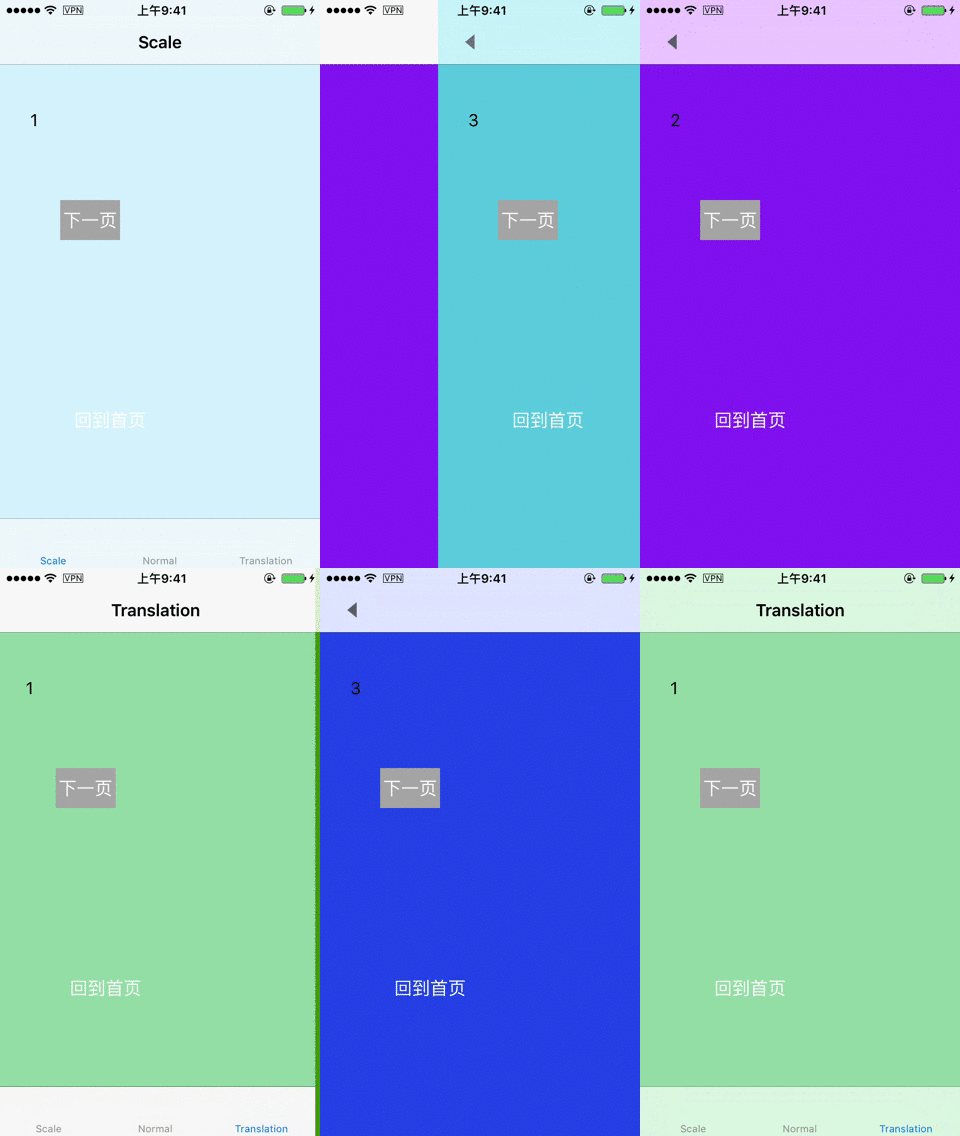
运行效果
实现思路
创建pan手势,添加到页面中,监听手势的动作。重写push的方法,在push之前截图保存到数组。重写pop的方法,在pop之前删除截图。pop的动画效果是利用截图的image添加到topView上,从视觉效果上实现缩放、平移的动画效果。以下是具体的实现思路:
1.创建Pan手势识别器
 delegate = self

        let panRecognizer = UIPanGestureRecognizer(target: self, action: #selector(paningGestureReceive(recoginzer:)))

        panRecognizer.delegate = self

        view.addGestureRecognizer(panRecognizer)

        //实现侧滑返回

        interactivePopGestureRecognizer?.delegate = self
2.实现手势的相应事件
//MARK: - Events

    @objc func paningGestureReceive(recoginzer:UIPanGestureRecognizer) {

        //如果只有一个控制器或者不允许全屏返回,return

        if self.viewControllers.count <= 1 || !canDragBack {

            return

        }

        let touchPoint = recoginzer.location(in: UIApplication.shared.keyWindow)

        switch recoginzer.state {

        case .began:

            isMoving = true

            startTouch = touchPoint

            if backgroundView == nil {

                let frame = TOP_VIEW?.frame

                backgroundView = UIView(frame: CGRect(x: 0, y: 0, width: (frame?.size.width)!, height: (frame?.size.height)!))

                TOP_VIEW?.superview?.insertSubview(backgroundView!, belowSubview: TOP_VIEW!)

                blackMask = UIView(frame: CGRect(x: 0, y: 0, width: (frame?.size.width)!, height: (frame?.size.height)!))

                blackMask?.backgroundColor = UIColor.black

                backgroundView?.addSubview(blackMask!)

            }

            backgroundView?.isHidden = false

            if lastScreenShotView != nil {

                lastScreenShotView?.removeFromSuperview()

            }

            let lastScreenShot = screenShotsList.lastObject as! UIImage

            lastScreenShotView = UIImageView(image: lastScreenShot)

            backgroundView?.insertSubview(lastScreenShotView!, belowSubview: blackMask!)

           break

        case .ended:

            //手势结束,判断是返回还是回到原位

            if touchPoint.x - (startTouch?.x)! > 50 {

                UIView.animate(withDuration: 0.3, animations: {

                    self.moveView(withX: self.kMAXWidth)

                }, completion: { (finished:Bool) in

                    self.popViewController(animated: false)

                    var frame = self.TOP_VIEW?.frame

                    frame?.origin.x = 0

                    self.TOP_VIEW?.frame = frame!

                    self.isMoving = false

                    self.backgroundView?.isHidden = true

                    // End paning,remove last screen shot

                    self.customAnimation.removeLastScreenShot()

                })

            } else {

                UIView.animate(withDuration: 0.3, animations: {

                    self.moveView(withX: 0)

                }, completion: { (finished:Bool) in

                    self.isMoving = false

                    self.backgroundView?.isHidden = true

                })

            }

           return //直接返回,不在往下执行

        case .cancelled:

            UIView.animate(withDuration: 0.3, animations: {

                self.moveView(withX: 0)

            }, completion: { (finished:Bool) in

                self.isMoving = false

                self.backgroundView?.isHidden = true

            })

            return

        default:

            break

        }

        if isMoving! {

            self.moveView(withX: touchPoint.x - (startTouch?.x)!)

        }

    }
3.创建截图需要的backgroundView和作为遮罩的blackMask,存放截图所需的数组
if backgroundView == nil {

                let frame = TOP_VIEW?.frame

                backgroundView = UIView(frame: CGRect(x: 0, y: 0, width: (frame?.size.width)!, height: (frame?.size.height)!))

                TOP_VIEW?.superview?.insertSubview(backgroundView!, belowSubview: TOP_VIEW!)

                blackMask = UIView(frame: CGRect(x: 0, y: 0, width: (frame?.size.width)!, height: (frame?.size.height)!))

                blackMask?.backgroundColor = UIColor.black

                backgroundView?.addSubview(blackMask!)

            }

            backgroundView?.isHidden = false

            if lastScreenShotView != nil {

                lastScreenShotView?.removeFromSuperview()

            }

            let lastScreenShot = screenShotsList.lastObject as! UIImage

            lastScreenShotView = UIImageView(image: lastScreenShot)

            backgroundView?.insertSubview(lastScreenShotView!, belowSubview: blackMask!)
4.在push前截图,并保存
override func pushViewController(_ viewController: UIViewController, animated: Bool) {

        if self.viewControllers.count >= 1 {

            let screenshot = getScreenshot()

            if screenshot != nil {

                screenShotsList.add(screenshot!)

            }

        }

        super.pushViewController(viewController, animated: animated)

    }
5.重写常用的pop方法,在pop前删除相应的截图
@discardableResult

    override func popViewController(animated: Bool) -> UIViewController? {

        screenShotsList.removeLastObject()

        return super.popViewController(animated: animated)

    }

    override func popToViewController(_ viewController: UIViewController, animated: Bool) -> [UIViewController]? {

        var removeCount = 0

        for i in stride(from: viewControllers.count-1, to: 0, by: -1) {

            if viewController == viewControllers[i] {

                break

            }

            screenShotsList.removeLastObject()

            removeCount = removeCount+1

        }

        customAnimation.removeCount = removeCount

        return super.popToViewController(viewController, animated: animated)

    }

    override func popToRootViewController(animated: Bool) -> [UIViewController]? {

        screenShotsList.removeAllObjects()

        customAnimation.removeAllScreenShot()

        return super.popToRootViewController(animated: animated)

    }
到此处能实现手势整体返回的效果,要实现点击返回按钮也能整体返回,需要自定义返回动画。实现协议UIViewControllerAnimatedTransitioning。
6.让navigationController遵守UINavigationControllerDelegate实现下面的方法,在方法里面可根据operation判断需要自定义的类型(pop/push)
 func navigationController(_ navigationController: UINavigationController,

 animationControllerFor operation: UINavigationControllerOperation,

 from fromVC: UIViewController,

  to toVC: UIViewController) -> UIViewControllerAnimatedTransitioning?
7.使用一个类实现UIViewControllerAnimatedTransitioning协议
func transitionDuration(using transitionContext: UIViewControllerContextTransitioning?) -> TimeInterval

//定义动画

func animateTransition(using transitionContext: UIViewControllerContextTransitioning)
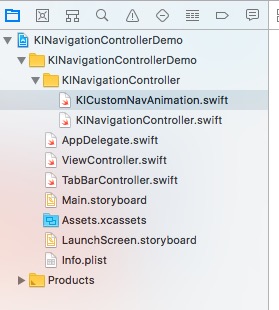
项目结构图
 KINavigationController使用演示例子
注:本文著作权归作者,由demo大师代发,拒绝转载,转载需要作者授权
KINavigationController使用演示例子的更多相关文章
- 三层架构的OPP实现的演示例子
例子:演示会员添加与删除 说明:因为是简单的例子,我们用在屏幕上打印"添加成功"和"删除成功"这几个字表示会员的添加与删除,仅仅为了演示如何实现三层的分离: 1 ...
- 百度webuploader 上传演示例子
前端代码 <%@ Page Language="C#" AutoEventWireup="true" CodeBehind="baiduWebU ...
- 实例演示Android异步加载图片
本文给大家演示异步加载图片的分析过程.让大家了解异步加载图片的好处,以及如何更新UI.首先给出main.xml布局文件:简单来说就是 LinearLayout 布局,其下放了2个TextView和5个 ...
- 实例演示Android异步加载图片(转)
本文给大家演示异步加载图片的分析过程.让大家了解异步加载图片的好处,以及如何更新UI.首先给出main.xml布局文件:简单来说就是 LinearLayout 布局,其下放了2个TextView和5个 ...
- Web三维技术:Flash Builder+away3d平台搭建(含演示视频)
转自:http://www.cnblogs.com/beer/archive/2011/07/08/2101492.html 前言:作为页面中实验设备的显示层,需要一个swf作为显示的UI.虽然可以用 ...
- 5、Cocos2dx 3.0小游戏开发的例子寻找测试三个简单的介绍和总结
繁重的劳动开发商,当转载请注明出处:http://blog.csdn.net/haomengzhu/article/details/27186557 測试例子简单介绍 Cocos2d-x 为我们提供了 ...
- 转 UNIGUI安装教程、使用例子
转 UNIGUI安装教程.使用例子 http://my.oschina.net/u/582827/blog/203429?p={{currentPage-1}} 转 uniGui安装教程.使用例子 发 ...
- 5、Cocos2dx 3.0游戏开发找小三之測试例子简单介绍及小结
重开发人员的劳动成果.转载的时候请务必注明出处:http://blog.csdn.net/haomengzhu/article/details/27186557 測试例子简单介绍 Cocos2d-x ...
- 微服务+DDD代码结构例子
这是一个基本的微服务+DDD演示例子: 基于 Spring Boot 1.5.6 , Spring Cloud Edgware.SR4 Version 微服务 + DDD,个人觉得应该是首先是从微服务 ...
随机推荐
- Android 网络url设置View背景图
imgstr为url网络图片地址,topllay是要设置背景的控件: 方法1.Android Glide设置View背景图 Glide.with(this).load(imgStr).asBitmap ...
- svn泄漏敏感信息利用方式
之前仅知道svn权限配置不当,会导致敏感信息泄漏,但是一直不知道具体利用方式. 今天测试svn dig时抓包分析才知道: http://www.xxx.com/路径/.svn/text-base/文件 ...
- 漫谈网络通信——从OSI网络模型到TCP/IP协议族
OSI七层模型 OSI(Open System Interconnection,开放系统互联)七层网络模型成为开放式系统互联参考模型,是一个把网络通信在逻辑上的定义,也可以理解成为定义了通用的网络通信 ...
- Codeforces #430 Div2 D
#430 Div2 D 题意 给出一些数,每次操作先将所有数异或一个值,再求这些数中没有出现过的最小的非负整数. 分析 对于更新操作,对于 \(x\) 所有为 \(1\) 的位给相应层添加一个标记,当 ...
- 洛谷——P1405 苦恼的小明
P1405 苦恼的小明 题目描述 黄小明和他的合伙人想要创办一所英语培训机构,注册的时候要填一张个人情况的表格,在身高一栏小明犯了愁. 身高要求精确到厘米,但小明实在太高了,无法在纸上填下这么长的数字 ...
- [SourceTree]--记录Win10 安装SourceTree免注册登陆
记录SourceTree一次安装不成功的过程及解决办法 SourceTree简介 按照官网介绍:SourceTree是一款用于Windows和Mac的免费Git客户端.简化了用户与Git存储(仓)库的 ...
- Scala实战高手****第1课:大数据时代的“黄金”语言Scala
共计28课,每节课程在1个小时左右. 每天至少2个课程.预计在11.30号完成. ——————————————————
- Android Studio 下使用git -- 个人,本地版本控制
第一步:下载安装git 下载地址 : https://git-scm.com/downloads 第二步:Android Studio 下配置git路径. 配置之后,Test弹出如下成功的提示即可. ...
- PHP empty()函数:Can't use method return value in write context
<?php if (!empty (get_gpc('userId'))) { $userId = get_gpc('userId'); } else { $error = "ID d ...
- Android Facebook和Twitter登录和分享完整版
最近公司的软件需要改国际版,需要Facebook和Twitter的登录和分享. 本人先用Umeng的第三方社会化分享实现了该功能,但是后来一想问题来了,经过查证.Umeng只在中国和美国有服务器,那也 ...