
在Dynamis CRM中打造一键保存关闭刷新案例的功能
关注本人微信和易信公众号: 微软动态CRM专家罗勇 ,回复172或者20151114可方便获取本文,同时可以在第一时间得到我发布的最新的博文信息,follow me!

function CloseCaseAsResolved(CaseId, FormOrList) {

    if (FormOrList == "Form" && Xrm.Page.data.entity.getIsDirty()) {

        Xrm.Page.data.save(true).then(function () {

            ExecuteCloseIncidentRequestRequest(CaseId, FormOrList, true);

        }, function (errorCode, message) {

            Xrm.Utility.alertDialog("Save record error." + message);

        });

    }

    else {

        ExecuteCloseIncidentRequestRequest(CaseId, FormOrList, false);

    }

}

function ExecuteCloseIncidentRequestRequest(CaseId, FormOrList, IsDirty) {

    var requestMain = ""

    requestMain += "<s:Envelope xmlns:s=\"http://schemas.xmlsoap.org/soap/envelope/\">";

    requestMain += " <s:Body>";

    requestMain += " <Execute xmlns=\"http://schemas.microsoft.com/xrm/2011/Contracts/Services\" xmlns:i=\"http://www.w3.org/2001/XMLSchema-instance\">";

    requestMain += " <request i:type=\"b:CloseIncidentRequest\" xmlns:a=\"http://schemas.microsoft.com/xrm/2011/Contracts\" xmlns:b=\"http://schemas.microsoft.com/crm/2011/Contracts\">";

    requestMain += " <a:Parameters xmlns:c=\"http://schemas.datacontract.org/2004/07/System.Collections.Generic\">";

    requestMain += " <a:KeyValuePairOfstringanyType>";

    requestMain += " <c:key>IncidentResolution</c:key>";

    requestMain += " <c:value i:type=\"a:Entity\">";

    requestMain += " <a:Attributes>";

    requestMain += " <a:KeyValuePairOfstringanyType>";

    requestMain += " <c:key>subject</c:key>";

    requestMain += " <c:value i:type=\"d:string\" xmlns:d=\"http://www.w3.org/2001/XMLSchema\">";

    requestMain += "已解决";

    requestMain += " </c:value>";

    requestMain += " </a:KeyValuePairOfstringanyType>";

    requestMain += " <a:KeyValuePairOfstringanyType>";

    requestMain += " <c:key>incidentid</c:key>";

    requestMain += " <c:value i:type=\"a:EntityReference\">";

    requestMain += " <a:Id>";

    requestMain += CaseId;

    requestMain += " </a:Id>";

    requestMain += " <a:LogicalName>incident</a:LogicalName>";

    requestMain += " <a:Name i:nil=\"true\" />";

    requestMain += " </c:value>";

    requestMain += " </a:KeyValuePairOfstringanyType>";

    requestMain += " </a:Attributes>";

    requestMain += " <a:EntityState i:nil=\"true\" />";

    requestMain += " <a:FormattedValues />";

    requestMain += " <a:Id>00000000-0000-0000-0000-000000000000</a:Id>";

    requestMain += " <a:LogicalName>incidentresolution</a:LogicalName>";

    requestMain += " <a:RelatedEntities />";

    requestMain += " </c:value>";

    requestMain += " </a:KeyValuePairOfstringanyType>";

    requestMain += " <a:KeyValuePairOfstringanyType>";

    requestMain += " <c:key>Status</c:key>";

    requestMain += " <c:value i:type=\"a:OptionSetValue\">";

    requestMain += " <a:Value>5</a:Value>";

    requestMain += " </c:value>";

    requestMain += " </a:KeyValuePairOfstringanyType>";

    requestMain += " </a:Parameters>";

    requestMain += " <a:RequestId i:nil=\"true\" />";

    requestMain += " <a:RequestName>CloseIncident</a:RequestName>";

    requestMain += " </request>";

    requestMain += " </Execute>";

    requestMain += " </s:Body>";

    requestMain += "</s:Envelope>";

    var req = new XMLHttpRequest();

    req.open("POST", Xrm.Page.context.getClientUrl() + "/XRMServices/2011/Organization.svc/web", false);

    req.setRequestHeader("Accept", "application/xml, text/xml, */*");

    req.setRequestHeader("Content-Type", "text/xml; charset=utf-8");

    req.setRequestHeader("SOAPAction", "http://schemas.microsoft.com/xrm/2011/Contracts/Services/IOrganizationService/Execute");

    req.send(requestMain);

    var strResponse = req.responseText;

    var reg = /\<faultstring[\s\S]*\<\/faultstring\>/im;

    var faultmsg = reg.exec(strResponse);

    if (faultmsg != null) {

        reg = /\>[\s\S]*\<\//im;

        faultmsg = reg.exec(faultmsg.toString());

        if (faultmsg != null) {

            Xrm.Utility.alertDialog("解决案例出现错误. " + faultmsg.toString().substring(1, faultmsg.toString().length - 2), function () { });

        }

    }

    else {

        if (FormOrList == "Form") {

            if (IsDirty) {

                Xrm.Page.data.entity.attributes.forEach(

                    function (attribute, index) {

                        if (attribute.getIsDirty()) {

                            attribute.setSubmitMode("never");

                        }

                    }

                );

            }

            Xrm.Utility.openEntityForm("incident", CaseId);

        }

        else {

            location.reload();

        }

    }

}
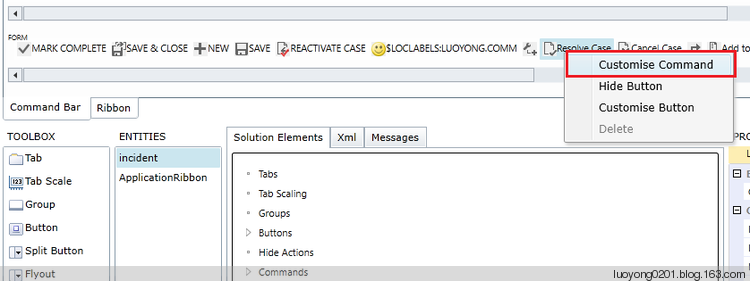
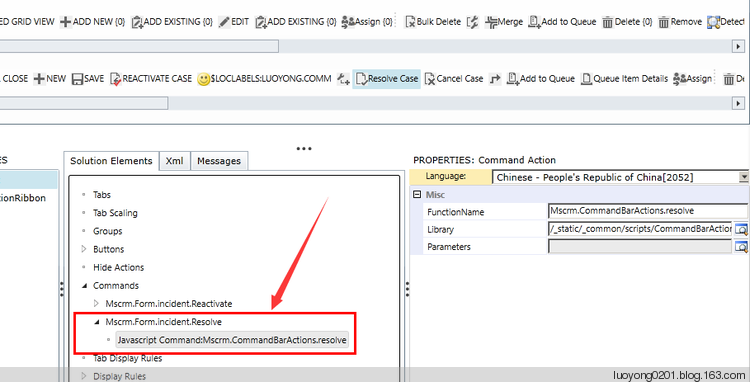
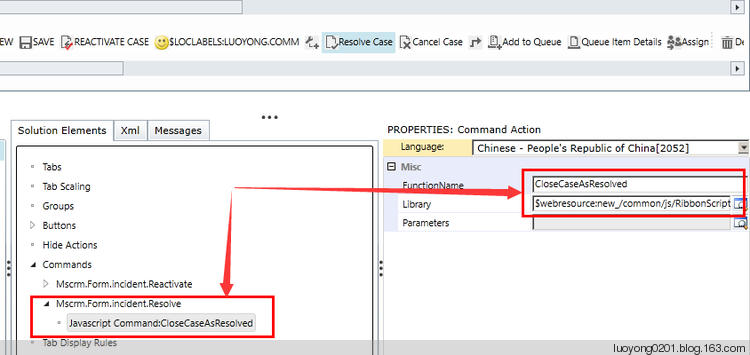

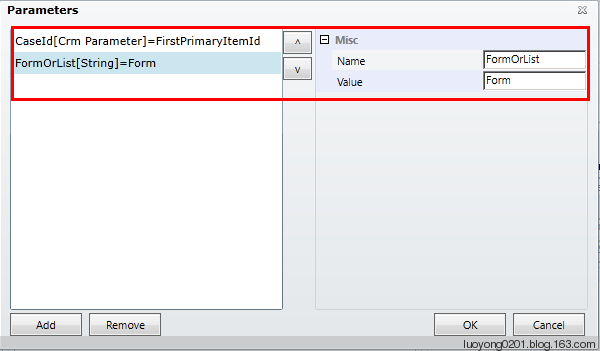
众所周知,Ribbon Workbench 发布解决方案非常慢,很容易导致SQL Server timeout,所以我这里用另外的方法来发布,我是我首次想到并分享给大家的,我觉得还不错。转到 Xml 这个Tabpage,点击刷新图标(切记要点击刷新,不然你的更改不会反应出来),然后将其中的XML内容复制下来,当然最好还是稍微检查下这个xml。
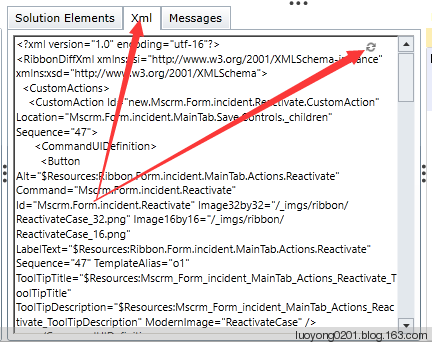
我这里复制出来的内容如下,我这里还包括了以前我自己客制化的东西,你的可能不一样,仅供参考:
<?xml version="1.0" encoding="utf-16"?>

<RibbonDiffXml xmlns:xsi="http://www.w3.org/2001/XMLSchema-instance" xmlns:xsd="http://www.w3.org/2001/XMLSchema">

  <CustomActions>

    <CustomAction Id="new.Mscrm.Form.incident.Reactivate.CustomAction" Location="Mscrm.Form.incident.MainTab.Save.Controls._children" Sequence="47">

      <CommandUIDefinition>

        <Button Alt="$Resources:Ribbon.Form.incident.MainTab.Actions.Reactivate" Command="Mscrm.Form.incident.Reactivate" Id="Mscrm.Form.incident.Reactivate" Image32by32="/_imgs/ribbon/ReactivateCase_32.png" Image16by16="/_imgs/ribbon/ReactivateCase_16.png" LabelText="$Resources:Ribbon.Form.incident.MainTab.Actions.Reactivate" Sequence="47" TemplateAlias="o1" ToolTipTitle="$Resources:Mscrm_Form_incident_MainTab_Actions_Reactivate_ToolTipTitle" ToolTipDescription="$Resources:Mscrm_Form_incident_MainTab_Actions_Reactivate_ToolTipDescription" ModernImage="ReactivateCase" />

      </CommandUIDefinition>

    </CustomAction>

  </CustomActions>

  <Templates>

    <RibbonTemplates Id="Mscrm.Templates" />

  </Templates>

  <CommandDefinitions>

    <CommandDefinition Id="Mscrm.Form.incident.Reactivate">

      <EnableRules>

        <EnableRule Id="Mscrm.CanChangeIncidentForm" />

        <EnableRule Id="new.incident.EnableRule1.ReactivateEnableRule" />

      </EnableRules>

      <DisplayRules>

        <DisplayRule Id="Mscrm.CanChangeIncidentForm" />

        <DisplayRule Id="Mscrm.IncidentIsInactive" />

      </DisplayRules>

      <Actions>

        <JavaScriptFunction FunctionName="Mscrm.CommandBarActions.reactivate" Library="/_static/_common/scripts/CommandBarActions.js" />

      </Actions>

    </CommandDefinition>

    <CommandDefinition Id="Mscrm.Form.incident.Resolve">

      <EnableRules>

        <EnableRule Id="Mscrm.CanChangeIncidentForm" />

        <EnableRule Id="Mscrm.IncidentIsActive" />

      </EnableRules>

      <DisplayRules>

        <DisplayRule Id="Mscrm.CanChangeIncidentForm" />

        <DisplayRule Id="Mscrm.IncidentIsActive" />

      </DisplayRules>

      <Actions>

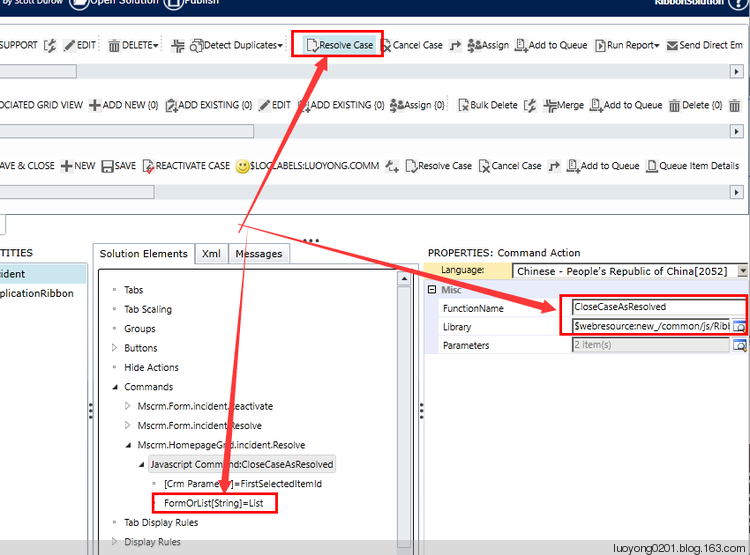
        <JavaScriptFunction FunctionName="CloseCaseAsResolved" Library="$webresource:new_/common/js/RibbonScript.js">

          <CrmParameter Value="FirstPrimaryItemId" />

          <StringParameter Value="Form" />

        </JavaScriptFunction>

      </Actions>

    </CommandDefinition>

  </CommandDefinitions>

  <RuleDefinitions>

    <TabDisplayRules />

    <DisplayRules>

      <DisplayRule Id="Mscrm.CanChangeIncidentForm">

        <EntityPrivilegeRule PrivilegeType="Write" PrivilegeDepth="Basic" EntityName="incident" />

        <EntityPrivilegeRule PrivilegeType="AppendTo" PrivilegeDepth="Basic" EntityName="incident" />

        <EntityPrivilegeRule PrivilegeType="Create" PrivilegeDepth="Basic" EntityName="activitypointer" />

        <EntityPrivilegeRule PrivilegeType="Append" PrivilegeDepth="Basic" EntityName="activitypointer" />

      </DisplayRule>

      <DisplayRule Id="Mscrm.IncidentIsInactive">

        <FormStateRule State="Disabled" />

      </DisplayRule>

      <DisplayRule Id="Mscrm.IncidentIsActive">

        <FormStateRule State="Existing" />

      </DisplayRule>

    </DisplayRules>

    <EnableRules>

      <EnableRule Id="Mscrm.CanChangeIncidentForm">

        <FormStateRule State="Create" InvertResult="true" />

        <RecordPrivilegeRule PrivilegeType="Write" AppliesTo="PrimaryEntity" />

        <RecordPrivilegeRule PrivilegeType="AppendTo" AppliesTo="PrimaryEntity" />

      </EnableRule>

      <EnableRule Id="new.incident.EnableRule1.ReactivateEnableRule">

        <OrRule>

          <Or>

            <CustomRule FunctionName="CheckOwnerEqualsCurrentUser" Library="$webresource:new_/common/RibbonScript.js" />

          </Or>

          <Or>

            <CustomRule FunctionName="CheckCurrentUserInTeam" Library="$webresource:new_/common/RibbonScript.js">

              <StringParameter Value="MyTeam" />

            </CustomRule>

          </Or>

        </OrRule>

      </EnableRule>

      <EnableRule Id="Mscrm.IncidentIsActive">

        <FormStateRule State="Existing" />

      </EnableRule>

    </EnableRules>

  </RuleDefinitions>

  <LocLabels />

</RibbonDiffXml>
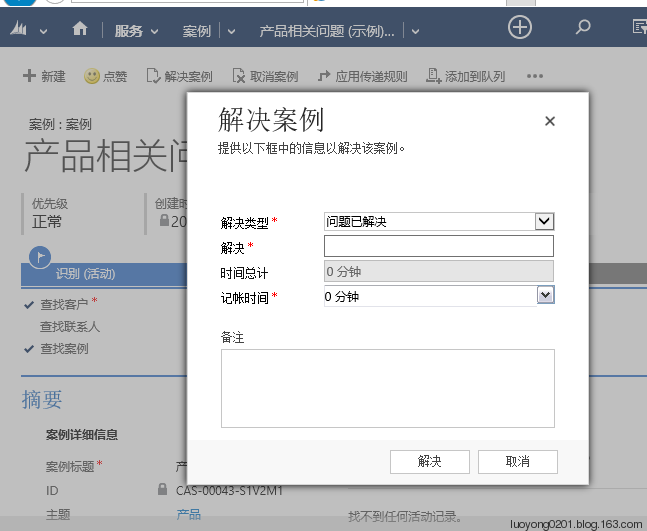
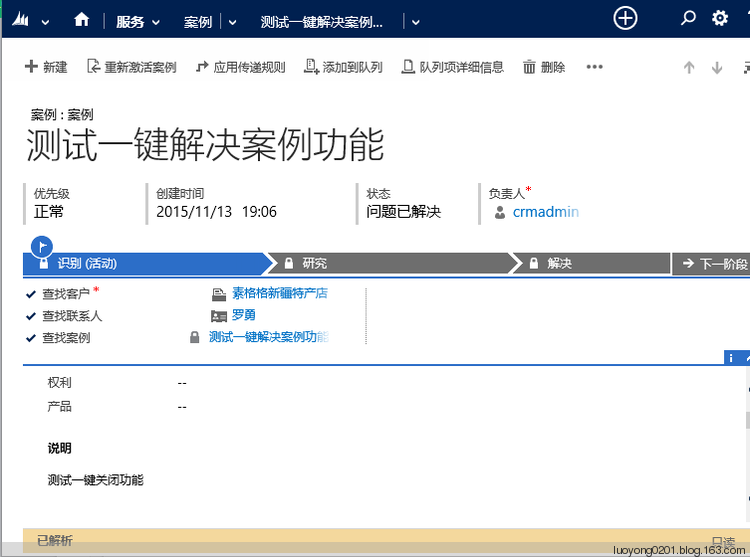
然后参考我的这篇博客:Dynamics CRM命令栏定制基础知识及手动编辑customization.xml实例 ,将之前的Ribbon解决方案作为非托管解决方案导出,然后将复制好的内容去掉<?xml version="1.0" encoding="utf-16"?> 这行,还去掉 RibbonDiffXml 的所有属性及其值,然后替换掉 customizations.xml 文件中的第一个 RibbonDiffXml 的值,然后将这个解决方案导入CRM,发布它就可以测试了。我这里录入一个简单的案例如下:

在Dynamis CRM中打造一键保存关闭刷新案例的功能的更多相关文章
- Dynamics CRM中的地址知多D?
关注本人微信和易信公众号: 微软动态CRM专家罗勇 ,回复169或者20151105可方便获取本文,同时可以在第一时间得到我发布的最新的博文信息,follow me! CRM中的地址以前不是很了解,定 ...
- 【matlab】将matlab中数据输出保存为txt或dat格式
将matlab中数据输出保存为txt或dat格式 总结网上各大论坛,主要有三种方法. 第一种方法:save(最简单基本的) 具体的命令是:用save *.txt -ascii x x为变量 *.txt ...
- Android菜鸟的成长笔记(14)—— Android中的状态保存探究(上)
原文:[置顶] Android菜鸟的成长笔记(14)—— Android中的状态保存探究(上) 我们在用手机的时候可能会发现,即使应用被放到后台再返回到前台数据依然保留(比如说我们正在玩游戏,突然电话 ...
- 如何:使用 Visual Studio 中的一键式发布来部署 Web 应用程序项目
原文: 如何:使用 Visual Studio 中的一键式发布来部署 Web 应用程序项目 本主题介绍如何在以下产品中使用 一键式发布 发布(部署)Web 应用程序项目: Visual Studio ...
- Dynamics CRM中一个查找字段引发的【血案】
摘要: 本人微信和易信公众号: 微软动态CRM专家罗勇 ,回复267或者20180311可方便获取本文,同时可以在第一间得到我发布的最新的博文信息,follow me!我的网站是 www.luoyon ...
- 如何批量修改网页 更新网站 一键保存 windows查看和排序
批量打开需要修改的网页,一键保存:一个网站会由很多网页组成,当需要大量更新的时候,如果一个个进行打开修改,效率会很低,内容修改不多,且容易修改的时候,可以用editplus这种小编辑软件批量打开,批量 ...
- H+ 编辑tab页 保存后 刷新列表tab页 并关闭自已。tabA页调用tabB页的方法
//注:在contabs.js文件中 $(function () { }); 方法外 加入 //注: data-name="' + menuName + '" 这句是加入的自定义属 ...
- 在Dynamics CRM中使用Bootstrap
我是微软Dynamics 365 & Power Platform方面的工程师罗勇,也是2015年7月到2018年6月连续三年Dynamics CRM/Business Solutions方面 ...
- 在Dynamics CRM中自定义一个通用的查看编辑注释页面
关注本人微信和易信公众号: 微软动态CRM专家罗勇 ,回复162或者20151016可方便获取本文,同时可以在第一时间得到我发布的最新的博文信息,follow me! 注释在CRM中的显示是比较特别, ...
随机推荐
- In .net 4.8,calculate the time cost of serialization in BinaryFormatter,NewtonSoft.json,and System.Text.Json.JsonSerializer.Serialize
using ConsoleApp390.Model; using Newtonsoft.Json; using System; using System.Collections.Generic; us ...
- Vue结合后台导入导出Excel问题详解
话不多说,直接上前端代码 axios({ method: 'post', url: 'http://localhost:19090/exportUser',//这个是请求的地址 params: {// ...
- cell右侧的状态(accessoryType)
Cell.accessoryType = UITableViewCellAccessoryDisclosureIndicator; Cell.accessoryType = UITableViewCe ...
- webpack打包 The 'mode' option has not been set, webpack will fallback to
webpack 打包报错 The 'mode' option has not been set, webpack will fallback to 'production' for,Module no ...
- JUC-8-lock和Condition使用
aaarticlea/png;base64,iVBORw0KGgoAAAANSUhEUgAAANwAAADHCAYAAABySz3ZAAAAAXNSR0IArs4c6QAAAARnQU1BAACxjw ...
- AtCoder Regular Contest 103
传送门 C - /\/\/\/ 题意: 给出一个序列\(\{a_i\}\),先要求其满足以下条件: \(a_i=a_{i+2}\) 共有两个不同的数 你现在可以修改任意个数,现问最少修改个数为多少. ...
- java给图片写正反字体,并将二维码写到图片上,代码实现
/** * @param filePath * 源图片路径 * @param markContent * 图片中添加内容 * @param outPath * 输出图片路径 字体颜色等在函数内部实现的 ...
- GNS3 2.18 + ASA(IOU)
使用软件及版本 地址:https://www.gns3.com/ gns3: 2.1.18 ASA:asa842-initrd asa842-vmlinuz 一.gns3 vm安装 1.安装 注意:启 ...
- 机器学习--K近邻 (KNN)算法的原理及优缺点
一.KNN算法原理 K近邻法(k-nearst neighbors,KNN)是一种很基本的机器学习方法. 它的基本思想是: 在训练集中数据和标签已知的情况下,输入测试数据,将测试数据的特征与训练集中对 ...
- AcWing 21. 斐波那契数列
题目地址 https://www.acwing.com/solution/acwing/content/2896/ 题目描述输入一个整数 n ,求斐波那契数列的第 n 项. 假定从0开始,第0项为0. ...