
Flume(一) —— 启动与基本使用
基础架构
Flume is a distributed, reliable(可靠地), and available service for efficiently(高效地) collecting, aggregating, and moving large amounts of log data. It has a simple and flexible architecture based on streaming data flows. It is robust and fault tolerant with tunable reliability mechanisms and many failover and recovery mechanisms. It uses a simple extensible data model that allows for online analytic application.
Flume是一个分布式、高可靠、高可用的服务,用来高效地采集、聚合和传输海量日志数据。它有一个基于流式数据流的简单、灵活的架构。
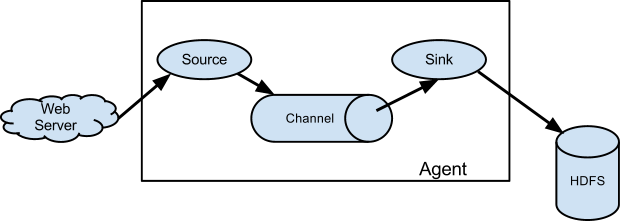
A Flume source consumes events delivered to it by an external source like a web server. The external source sends events to Flume in a format that is recognized by the target Flume source. For example, an Avro Flume source can be used to receive Avro events from Avro clients or other Flume agents in the flow that send events from an Avro sink. A similar flow can be defined using a Thrift Flume Source to receive events from a Thrift Sink or a Flume Thrift Rpc Client or Thrift clients written in any language generated from the Flume thrift protocol.When a Flume source receives an event, it stores it into one or more channels. The channel is a passive store that keeps the event until it’s consumed by a Flume sink. The file channel is one example – it is backed by the local filesystem. The sink removes the event from the channel and puts it into an external repository like HDFS (via Flume HDFS sink) or forwards it to the Flume source of the next Flume agent (next hop) in the flow. The source and sink within the given agent run asynchronously with the events staged in the channel.
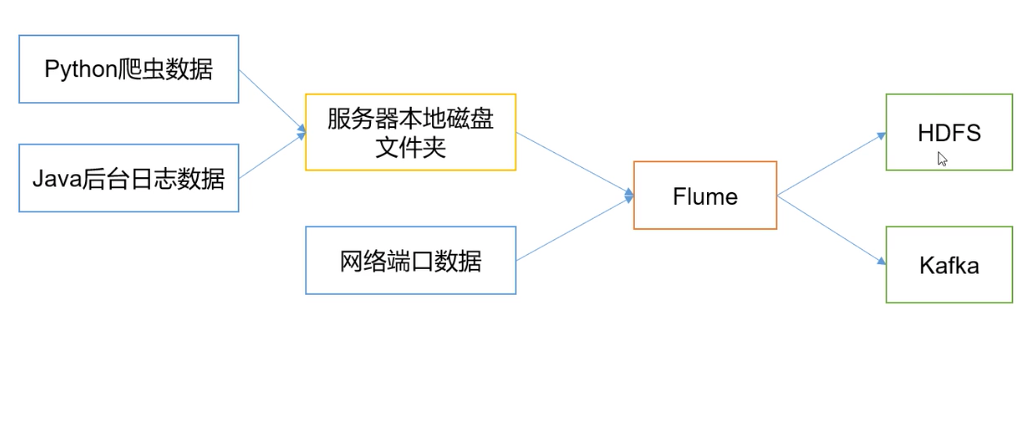
Flume在下图中的作用是,实时读取服务器本地磁盘的数据,将数据写入到HDFS中。
Agent
是一个JVM进程,以事件的形式将数据从源头送至目的地。
Agent的3个主要组成部分:Source、Channel、Sink。
Source
负责接收数据到Agent。
Sink
不断轮询Channel,将Channel中的数据移到存储系统、索引系统、另一个Flume Agent。
Channel
Channel是Source和Sink之间的缓冲区,可以解决Source和Sink处理数据速率不匹配的问题。
Channel是线程安全的。
Flume自带的Channel:Memory Channel、File Channel、Kafka Channel。
Event
Flume数据传输的基本单元。
安装&部署
下载
下载1.7.0安装包
修改配置
修改flume-env.sh配置中的JDK路径
创建 job/flume-netcat-logger.conf,文件内容如下:
# example.conf: A single-node Flume configuration

# Name the components on this agent

a1.sources = r1

a1.sinks = k1

a1.channels = c1

# Describe/configure the source

a1.sources.r1.type = netcat

a1.sources.r1.bind = localhost

a1.sources.r1.port = 44444

# Describe the sink

a1.sinks.k1.type = logger

# Use a channel which buffers events in memory

a1.channels.c1.type = memory

## 事件容量

a1.channels.c1.capacity = 1000

a1.channels.c1.transactionCapacity = 100

# Bind the source and sink to the channel

a1.sources.r1.channels = c1

## channel 与 sink 的关系是 1对多 的关系。1个sink只可以绑定1个channel,1个channel可以绑定多个sink。

a1.sinks.k1.channel = c1
启动、运行
启动flume
bin/flume-ng agent --conf conf --conf-file job/flume-netcat-logger.conf --name a1 -Dflume.root.logger=INFO,console
使用natcat监听端口
nc localhost 44444
运行结果

监控Hive日志上传到HDFS
# Name the components on this agent

a1.sources = r1

a1.sinks = k1

a1.channels = c1

# Describe / configure the source

a1.sources.r1.type = exec

a1.sources.r1.command = tail -F /usr/local/logs/hive/hive.log

a1.sources.r1.shell = /bin/bash -c

# Describe the sink

a1.sinks.k1.type = hdfs

a1.sinks.k1.hdfs.path = hdfs://localhost:9000/flume/%Y%m%d/%H

a1.sinks.k1.hdfs.filePrefix = logs-

a1.sinks.k1.hdfs.round = true

a1.sinks.k1.hdfs.roundValue = 1

a1.sinks.k1.hdfs.roundUnit = hour

a1.sinks.k1.hdfs.useLocalTimeStamp = true

a1.sinks.k1.hdfs.batchSize = 1000

a1.sinks.k1.hdfs.fileType = DataStream

a1.sinks.k1.hdfs.rollInterval = 30

a1.sinks.k1.hdfs.rollSize = 13417700

a1.sinks.k1.hdfs.rollCount = 0

# Use a channel which buffers events in memory

a1.channels.c1.type = memory

a1.channels.c1.capacity = 1000

a1.channels.c1.transactionCapacity = 100

# Bind the source and sink to the channel

a1.sources.r1.channels = c1

a1.sinks.k1.channel = c1
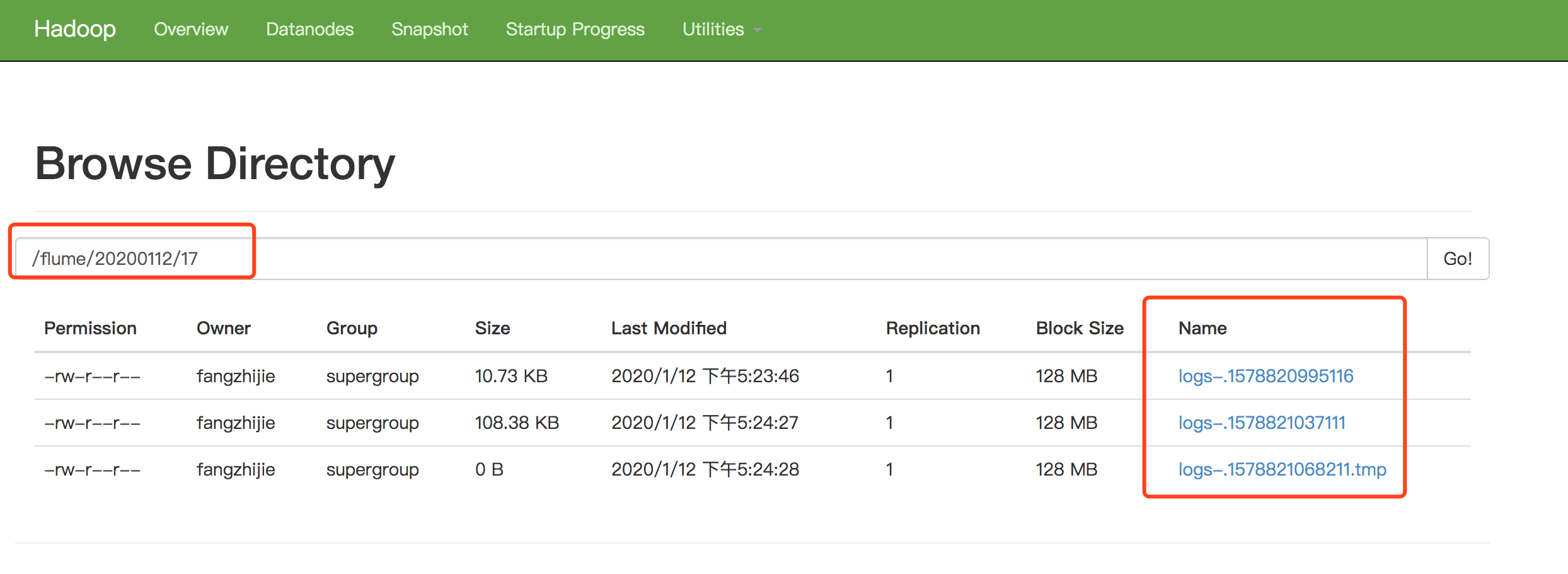
执行命令bin/flume-ng agent -c conf/ -f job/file-flume-logger.conf -n a1
数据通过Flume传到Kafka
使用natcat监听端口数据通过Flume传到Kafka
# Name the components on this agent

a1.sources = r1

a1.sinks = k1

a1.channels = c1

# Describe / configure the source

a1.sources.r1.type = netcat

a1.sources.r1.bind = localhost

a1.sources.r1.port = 44444

# Describe the sink

a1.sinks.k1.type = org.apache.flume.sink.kafka.KafkaSink

a1.sinks.k1.kafka.topic = payTopic

a1.sinks.k1.kafka.bootstrap.servers = 127.0.0.1:9092

a1.sinks.k1.kafka.flumeBatchSize = 20

a1.sinks.k1.kafka.producer.acks = 1

a1.sinks.k1.kafka.producer.linger.ms = 1

a1.sinks.k1.kafka.producer.compression.type = snappy

# Use a channel which buffers events in memory

a1.channels.c1.type = memory

a1.channels.c1.capacity = 1000

a1.channels.c1.transactionCapacity = 100

# Bind the source and sink to the channel

a1.sources.r1.channels = c1

a1.sinks.k1.channel = c1
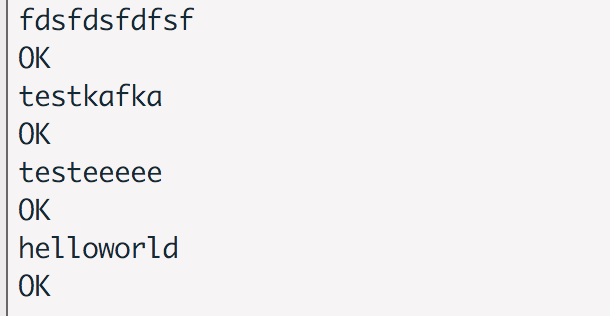
运行结果

参考文档
Flume官网
Flume 官网开发者文档
Flume 官网使用者文档
尚硅谷大数据课程之Flume
FlumeUserGuide
Flume(一) —— 启动与基本使用的更多相关文章
- flume【源码分析】分析Flume的启动过程
h2 { color: #fff; background-color: #7CCD7C; padding: 3px; margin: 10px 0px } h3 { color: #fff; back ...
- Flume定时启动任务 防止挂掉
一,查看Flume条数:ps -ef|grep java|grep flume|wc -l ==>15 检查进程:给sh脚本添加权限,chmod 777 xx.sh #!/bin/s ...
- flume采集启动报错,权限不够
18/04/18 16:47:12 WARN source.EventReader: Could not find file: /home/hadoop/king/flume/103104/data/ ...
- [转] flume使用(六):后台启动及日志查看
[From] https://blog.csdn.net/maoyuanming0806/article/details/80807087 处理的问题flume 普通方式启动会有自己自动停掉的问题,这 ...
- Flume(3)source组件之NetcatSource使用介绍
一.概述: 本节首先提供一个基于netcat的source+channel(memory)+sink(logger)的数据传输过程.然后剖析一下NetcatSource中的代码执行逻辑. 二.flum ...
- 大数据系统之监控系统(二)Flume的扩展
一些需求是原生Flume无法满足的,因此,基于开源的Flume我们增加了许多功能. EventDeserializer的缺陷 Flume的每一个source对应的deserializer必须实现接口E ...
- flume+kafka+hbase+ELK
一.架构方案如下图: 二.各个组件的安装方案如下: 1).zookeeper+kafka http://www.cnblogs.com/super-d2/p/4534323.html 2)hbase ...
- Flume日志采集系统——初体验(Logstash对比版)
这两天看了一下Flume的开发文档,并且体验了下Flume的使用. 本文就从如下的几个方面讲述下我的使用心得: 初体验--与Logstash的对比 安装部署 启动教程 参数与实例分析 Flume初体验 ...
- 【转】Flume日志收集
from:http://www.cnblogs.com/oubo/archive/2012/05/25/2517751.html Flume日志收集 一.Flume介绍 Flume是一个分布式.可 ...
- CentOS 7部署flume
CentOS 7部署flume 准备工作: 安装java并设置java环境变量,在`/etc/profile`中加入 export JAVA_HOME=/usr/java/jdk1.8.0_65 ex ...
随机推荐
- kafka消费者问题
[] 2019-12-17 15:40:01 - [INFO] [AbstractCoordinator:542 coordinatorDead] Marking the coordinator 机器 ...
- Node.js 实现 MySQL 数据库增删改查
安装mysql $ npm isntall mysql 连接数据库 需要根据实际配置修改数据库用户名.及密码及数据库名 let mysql = require('mysql'); let connec ...
- linux中container_of
linux 驱动程序中 container_of宏解析 众所周知,linux内核的主要开发语言是C,但是现在内核的框架使用了非常多的面向对象的思想,这就面临了一个用C语言来实现面向对象编程的问题,今天 ...
- 关于ssh_config和sshd_config
转载:https://www.cnblogs.com/panda2046/p/5933498.html 在远程管理linux系统基本上都要使用到ssh,原因很简单:telnet.FTP等传输方式是 ...
- beta版本——第五次冲刺
第五次冲刺 (1)SCRUM部分☁️ 成员描述: 姓名 李星晨 完成了哪个任务 界面优化 花了多少时间 2h 还剩余多少时间 2h 遇到什么困难 没有 这两天解决的进度 2/2 后续两天的计划 完成文 ...
- 自动化测试常用断言的使用方法(python+selenium)
自动化测试常用断言的使用方法(python) 自动化测试中寻找元素并进行操作,如果在元素好找的情况下,相信大家都可以较熟练地编写用例脚本了,但光进行操作可能还不够,有时候也需要对预期结果进行判断. 这 ...
- 关于vue的v-for遍历不显示问题
实属不才,因为好久没看vue导致忘光了,然后发生了这么小的一个问题,惭愧. 注:vue的注册的el一定要放嘴最外层,不要和v-for放在一起,否则不会显示,因为可以这样讲,el包含的是一个容器,而v- ...
- Spring Security 3多用户登录实现之二 多登录界面展示
作者 接前讲,首先针对一个多种用户类型的登录需求,需要先实现多种用户类型的登录界面的展示,Spring Security提供了这样一个接口来帮助我们实现多种用户类型的登录界面的展示,这个接口就是Aut ...
- Permission denied (publickey,gssapi-keyex,gssapi-with-mic).错误的解决
SSH登录提示 Permission denied (publickey,gssapi-keyex,gssapi-with-mic). 修改被登录的SSH服务器ssh配置,/etc/ssh/sshd_ ...
- 关于原生js的节点兼容性
关于节点的兼容性: 1:获取元素的子节点 a: childNodes:获取元素的子节点,空文本,非空文本,注释,获取的比较全面, 如果只是想获取元素的子节点,请用(children) b: c ...