
Spring Boot项目Circular view path问题解决
使用Spring Boot创建Spring MVC项目,访问url请求出现问题:Circular view path
1、问题描述
控制台打印:
javax.servlet.ServletException: Circular view path [greeting]: would dispatch back to the current handler URL [/greeting] again. Check your ViewResolver setup! (Hint: This may be the result of an unspecified view, due to default view name generation.)

浏览器访问:

2、项目代码
(1)Spring MVC的controller
 package com.hello.web;

 import org.springframework.stereotype.Controller;

 import org.springframework.ui.Model;

 import org.springframework.web.bind.annotation.RequestMapping;

 import org.springframework.web.bind.annotation.RequestParam;

 @Controller

 public class GreetingController {

     @RequestMapping("/greeting")

     public String greeting(@RequestParam(value="name",required=false,defaultValue="World")String name, Model model) {

         model.addAttribute("name", name);

         return "greeting";

     }

 }
(2)页面代码
使用 thymeleaf模板框架,负责服务端渲染html页面
 <!DOCTYPE html>

 <html xmlns:th="http://www.thymeleaf.org">

 <head>

 <title>Spring Boot thymeleaf 应用</title>

 <meta http-equiv="Content-Type" content="text/html;charset=UTF-8">

 </head>

 <body>

     <p th:text="'hello, '+${name}+'!'" />

 </body>

 </html>
3、解决方法
在 项目的 pom.xml中添加 thymeleaf 的 spring boot starter
 <dependency>

     <groupId>org.springframework.boot</groupId>

     <artifactId>spring-boot-starter-thymeleaf</artifactId>

 </dependency>
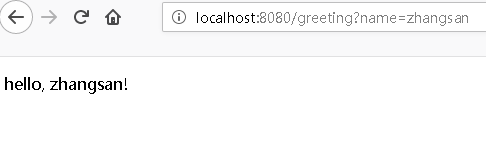
4、问题解决
再次通过浏览器地址栏,访问: http://localhost:8080/greeting?name=zhangsan
Donate捐赠
如果我的文章帮助了你,可以赞赏我 1 元,让我继续写出更好的内容)


(微信) (支付宝)
微信/支付宝 扫一扫
Spring Boot项目Circular view path问题解决的更多相关文章
- Spring boot项目maven的profile多环境配置不自动替换变量的问题解决
Spring boot项目maven的profile多环境配置不自动替换变量的问题解决 在网上找了好久,配置都很简单,可是我的程序就是不能自动替换变量,最终单独测试,发现原来是引用spring b ...
- 如何在Spring MVC Test中避免”Circular view path” 异常
1. 问题的现象 比如在webConfig中定义了一个viewResolver public class WebConfig extends WebMvcConfigurerAdapter { //配 ...
- 如何在Spring MVC Test中避免”Circular view path” 异常(转)
文章转自http://www.cnblogs.com/chry/p/6240965.html 1. 问题的现象 比如在webConfig中定义了一个viewResolver public class ...
- web项目——javax.servlet.ServletException: Circular view path [registerForm]
报错: 控制台输出: 三月 21, 2019 10:12:32 上午 org.springframework.web.servlet.PageNotFound noHandlerFound 警告: N ...
- Circular view path [mydemo]: would dispatch back to the current handler URL [/mydemo] again. Check your ViewResolver setup!
简单创建一个springboot工程 pom.xml <?xml version="1.0" encoding="UTF-8"?><proje ...
- 【docker】docker部署spring boot项目在服务器上
IDE:idea 工具:docker spring boot:2.0.1 ======================================== 简单记录一下流程,以供参考: 第一步:首先得 ...
- Myeclipse下使用Maven搭建spring boot项目
开发环境:Myeclipse2017.JDK1.6.Tomcat 8.0.Myeclipse下使用Maven搭建spring boot项目,详细过程如下: 1. New -> Project.. ...
- docker部署spring boot项目在服务器上
IDE:idea 工具:docker spring boot:2.0.1 ======================================== 简单记录一下流程,以供参考: 第一步:首先得 ...
- SpringBoot 报错: Circular view path [readingList] 解决办法
spring boot报错: Circular view path [readingList]: would dispatch back to the current handler URL [/re ...
随机推荐
- 利用zookeeper生成唯一id
package com.cxy.com.cxy.curator; import java.util.concurrent.ExecutorService; import java.util.concu ...
- Python: 安装 sklearn 包出现错误的解决方法
今天在安装 Python 的 sklearn 包时出现了 Cannot uninstall 'numpy' 和 Cannot uninstall 'scipy' 错误,下面记录了我尝试了很多网上的方法 ...
- C++_引用变量探究
什么是引用 引用变量是已定义变量的别名. 如何定义引用变量: int rats; int & rodents = rats; 其中&不失地址运算符,而是类型标识符的一部分.就行声明ch ...
- P2906 [USACO08OPEN]牛的街区Cow Neighborhoods
传送门 曼哈顿距离好像不好直接算,我们可以把牛的坐标转化一下以方便计算距离 (x,y) --> (x+y,x-y) 那么距离就可以表示成 $max(\left |x_1-x_2 \right ...
- DJ 算法的队列优先优化
DJ算法就是求单源最短路的算法,但是时间复杂度不太理想,所以在此献上用最小堆来优化的算法. 如果不懂优先队列可以先去看STL分类关于优先队列的介绍: ///POJ 2387为例 #include< ...
- 江西财经大学第一届程序设计竞赛 F
链接:https://www.nowcoder.com/acm/contest/115/F来源:牛客网 题目描述 对于方程 2018 * x ^ 4 + 21 * x + 5 * x ^ 3 + 5 ...
- 2015苏州大学ACM-ICPC集训队选拔赛(1) 1006
取金币 Time Limit : 3000/1000ms (Java/Other) Memory Limit : 65535/32768K (Java/Other) Total Submissio ...
- IP地址概念
1.1 IP地址概念 什么是IP地址:由32位二进制数组成,划分成4组,每组八位: 为了便于人类识别记忆,IP地址表现形式为 "点分十进制" 二进制数与十进制数的转换关系:00 ...
- RequireJS -Javascript模块化(二、模块依赖)
上一篇文章中简单介绍了RequireJs的写法和使用,这节试着写下依赖关系 需求描述:我们经常写自己的js,在元素选择器这方面,我们可能会用jquery的$("#id")id选择器 ...
- Linux环境常用命令
bash host #查看IP对应机器名 hostname #查看本机名 hostname –i #查看本机IP mssh ...