
Spring MVC-视图解析器(View Resolverr)-XML视图解析器(Xml View Resolver)示例(转载实践)
以下内容翻译自:https://www.tutorialspoint.com/springmvc/springmvc_xmlviewresolver.htm
说明:示例基于Spring MVC 4.1.6。
XmlViewResolver用于使用在xml文件中定义的视图bean来解析视图名称。以下示例显示如何使用Spring Web MVC框架使用XmlViewResolver。
TestWeb-servlet.xml
<bean class="org.springframework.web.servlet.view.XmlViewResolver">

   <property name="location">

      <value>/WEB-INF/views.xml</value>

   </property>

</bean>
views.xml
<bean id="hello" class="org.springframework.web.servlet.view.JstlView">

   <property name="url" value="/WEB-INF/jsp/hello.jsp" />

</bean>
例如,使用上面的配置,如果是URI
/hello被请求,DispatcherServlet将请求转发到在view.xml中由bean hello定义的hello.jsp。
首先,让我们使用Eclipse IDE,并按照以下步骤使用Spring Web Framework开发基于动态窗体的Web应用程序:
| 步骤 | 描述 |
|---|---|
| 1 | 创建一个名为TestWeb的项目,在一个包com.tutorialspoint下,如Spring MVC - Hello World Example章节所述。 |
| 2 | 在com.tutorialspoint包下创建一个Java类HelloController。 |
| 3 | 在jsp子文件夹下创建一个视图文件hello.jsp。 |
| 4 | 下载JSTL库jstl.jar。把它放在你的CLASSPATH中。 |
| 5 | 最后一步是创建所有源和配置文件的内容并导出应用程序,如下所述。 |
HelloController.java
package com.tutorialspoint;

import org.springframework.stereotype.Controller;

import org.springframework.web.bind.annotation.RequestMapping;

import org.springframework.web.bind.annotation.RequestMethod;

import org.springframework.ui.ModelMap;

@Controller

@RequestMapping("/hello")

public class HelloController{

   @RequestMapping(method = RequestMethod.GET)

   public String printHello(ModelMap model) {

      model.addAttribute("message", "Hello Spring MVC Framework!");

      return "hello";

   }

}
TestWeb-servlet.xml
<beans xmlns="http://www.springframework.org/schema/beans"

   xmlns:context="http://www.springframework.org/schema/context"

   xmlns:xsi="http://www.w3.org/2001/XMLSchema-instance"

   xsi:schemaLocation="

   http://www.springframework.org/schema/beans

   http://www.springframework.org/schema/beans/spring-beans-3.0.xsd

   http://www.springframework.org/schema/context

   http://www.springframework.org/schema/context/spring-context-3.0.xsd">

   <context:component-scan base-package="com.tutorialspoint" />

   <bean class="org.springframework.web.servlet.view.XmlViewResolver">

      <property name="location">

         <value>/WEB-INF/views.xml</value>

      </property>

   </bean>

</beans>
views.xml
<beans xmlns="http://www.springframework.org/schema/beans"

   xmlns:context="http://www.springframework.org/schema/context"

   xmlns:xsi="http://www.w3.org/2001/XMLSchema-instance"

   xsi:schemaLocation="

   http://www.springframework.org/schema/beans

   http://www.springframework.org/schema/beans/spring-beans-3.0.xsd

   http://www.springframework.org/schema/context

   http://www.springframework.org/schema/context/spring-context-3.0.xsd">

   <bean id="hello"

      class="org.springframework.web.servlet.view.JstlView">

      <property name="url" value="/WEB-INF/jsp/hello.jsp" />

   </bean>

</beans>
hello.jsp
<%@ page contentType="text/html; charset=UTF-8" %>

<html>

<head>

<title>Hello World</title>

</head>

<body>

   <h2>${message}</h2>

</body>

</html>
完成创建源文件和配置文件后,导出应用程序。右键单击应用程序,然后使用Export > WAR File选项,并将您的HelloWeb.war文件保存在Tomcat的webapps文件夹中。
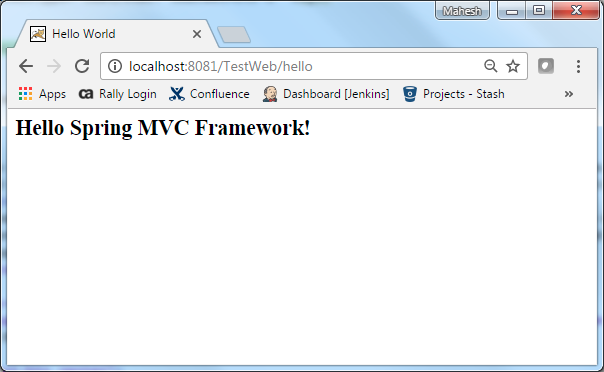
现在启动您的Tomcat服务器,并确保您可以使用标准浏览器从webapps文件夹访问其他网页。现在尝试访问URL http://localhost:8080/HelloWeb/hello,如果您的Spring Web应用程序一切正常,您应该看到以下结果:
Maven示例:
https://github.com/easonjim/5_java_example/tree/master/springmvc/tutorialspoint/test23
Spring MVC-视图解析器(View Resolverr)-XML视图解析器(Xml View Resolver)示例(转载实践)的更多相关文章
- Spring MVC-视图解析器(View Resolverr)-多重解析器(Multiple Resolver)示例(转载实践)
以下内容翻译自:https://www.tutorialspoint.com/springmvc/springmvc_multiple_resolver_mapping.htm 说明:示例基于Spri ...
- Spring MVC的WebMvcConfigurerAdapter用法收集(零配置,无XML配置)
原理先不了解,只记录常用方法 用法: @EnableWebMvc 开启MVC配置,相当于 <?xml version="1.0" encoding="UTF-8&q ...
- Spring MVC-学习笔记(5)spring MVC的文件上传、下载、拦截器
1.文件上传. spring MVC为文件上传提供了直接的支持,这种支持是即插即用的MultipartResolver(多部分解析器)实现的.spring MVC使用Apache Commo ...
- (转载)spring mvc DispatcherServlet详解之一---处理请求深入解析
要深入理解spring mvc的工作流程,就需要先了解spring mvc的架构: 从上图可以看到 前端控制器DispatcherServlet在其中起着主导作用,理解了DispatcherServl ...
- spring mvc DispatcherServlet详解之一---处理请求深入解析
要深入理解spring mvc的工作流程,就需要先了解spring mvc的架构: 从上图可以看到 前端控制器DispatcherServlet在其中起着主导作用,理解了DispatcherServl ...
- Spring MVC源码(三) ----- @RequestBody和@ResponseBody原理解析
概述 在SpringMVC的使用时,往往会用到@RequestBody和@ResponseBody两个注解,尤其是处理ajax请求必然要使用@ResponseBody注解.这两个注解对应着Contro ...
- Spring Mvc如何通过注解的方式设置视图解析器的优先级
<bean id="jspViewResolver" class="org.springframework.web.servlet.view.InternalRes ...
- spring mvc DispatcherServlet详解之一---处理请求深入解析(续)
上文中,我们知道分发过程有以下步骤: 分发过程如下: 1. 判断是否设置了multipart resolver,设置的话转换为multipart request,没有的话则继续下面的步骤. 2. 根据 ...
- Spring MVC多解析器映射
如果想在spring mvc应用程序中使用多个视图解析器,那么可以使用order属性设置优先级顺序. 以下示例显示如何在Spring Web MVC框架中使用ResourceBundleViewRes ...
- 内容协商在视图View上的应用【享学Spring MVC】
每篇一句 人生很有意思:首先就得活得长.活得长才能够见自己,再长就可以见众生 前言 在经过 前两篇 文章了解了Spring MVC的内容协商机制之后,相信你已经能够熟练的运用Spring MVC提供的 ...
随机推荐
- [Swift通天遁地]六、智能布局-(4)给视图添加锚点约束
★★★★★★★★★★★★★★★★★★★★★★★★★★★★★★★★★★★★★★★★➤微信公众号:山青咏芝(shanqingyongzhi)➤博客园地址:山青咏芝(https://www.cnblogs. ...
- js 调用微信浏览器内置方法,启动支付
$.post("{php echo app_url('pay/cash')}",{orderno:orderno,paytype:paytype},function(m){ //t ...
- 【洛谷3467/BZOJ1113】[POI2008]海报PLA-Postering(单调栈)
题目: 洛谷3467 分析: (ti jie shuo)这题是个单调栈经典题. 单调栈就是栈元素递增或递减的栈,这里只考虑递增.新元素入递增栈时,先将所有比它大的元素弹出,然后让新元素入栈,这样保证栈 ...
- System.Data.SqlClient.SqlException: 在向服务器发送请求时发生传输级错误。 (provider: TCP 提供程序, error: 0 - 远程主机强迫关闭了一个现有的连接。) .
今天使用sql server 2008 R2管理器,进行SQL查询时,频率非常高的报错: System.Data.SqlClient.SqlException: 在向服务器发送请求时发生传输级错误. ...
- EF 批量插入,sqlhelper 批量插入
需添加一个using System.Linq; 引用 public void BulkInsert<T>(string connection, string tableName, ILis ...
- cplusplus系列>utility>pair
http://www.cplusplus.com/reference/utility/pair/ 用于存储一对异构对象 // Compile: g++ -std=c++11 pair.cpp #inc ...
- SV creation order
SystemVerilog Instance Worlds When generating an UVM testbench and in particular the DUT - testbench ...
- CommandBehavior.CloseConnection使用
其用在ExecuteReader(c)中,返回对象前不能关闭数据库连接,须用CommandBehavior.CloseConnection: 这是一个关于实际知识点的问题,面试官考查的是应聘者数据库访 ...
- 移动web——bootstrap媒体对象
基本模板 1.这些组件都具有在文本内容的左或右侧对齐的图片(就像博客评论或 Twitter 消息等) <div class="media"> <div class ...
- servlet得到web应用路径
package context; import java.io.IOException; import javax.servlet.ServletContext; import javax.servl ...