
SMBMS项目-准备工作
项目搭建准备工作
1、基础准备工作
- 搭建一-个maven web项目
- 配置Tomcat
- 测试项目是否能够跑起来
- 导入项目中会遇到的jar包
- jsp,Servlet,mysq|驱动, jstl, stand..
2、创建项目结构
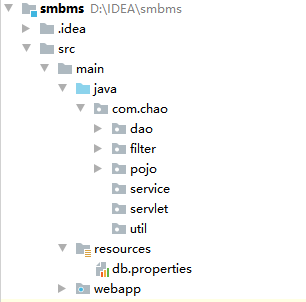
3、编写实体类;
- ORM映射:表-类映射,pojo类
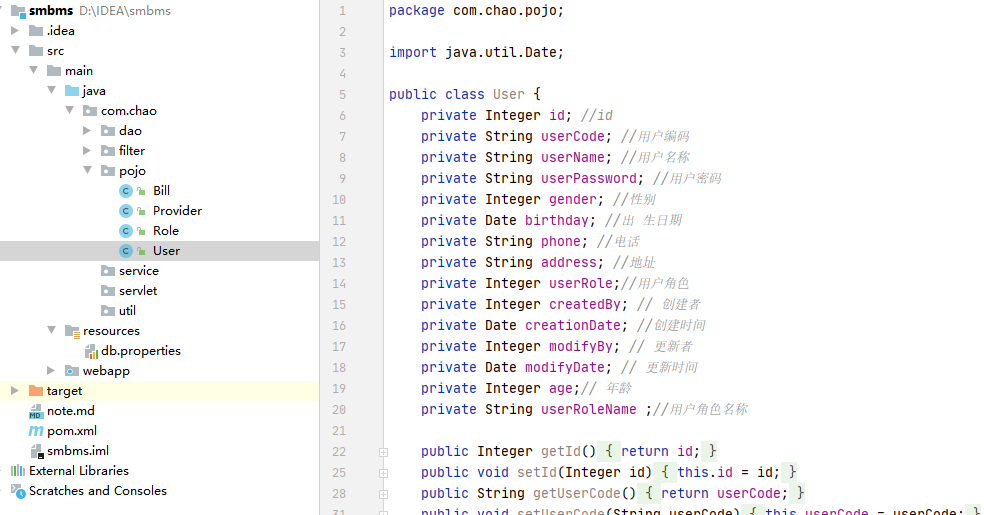
4、编写基础公共类
4.1数据库配置文件db.properties
driver=com.mysql.jdbc.Driver
url=jdbc:mysql://localhost:3306?/smbms?useUnicode=true&characterEncoding=utf-8&serverTimeZone=GMT
user=root
password=123456
4.2编写数据库的公共类
public class BaseDao {
    private static String driver;
    private static String url;
    private static String username;
    private static String password;

    static{
        Properties properties=new Properties();
        //通过类加载器加载资源
        InputStream is = BaseDao.class.getClassLoader().getResourceAsStream("db.properties");
        try {
            properties.load(is);
        } catch (IOException e) {
            e.printStackTrace();
        }
        driver = properties.getProperty(driver);
        url = properties.getProperty(url);
        username = properties.getProperty(username);
        password = properties.getProperty(password);
    }

    //获取数据库的连接
    public static Connection getConnection(){
        Connection connection=null;
        try {
            Class.forName(driver);
            connection = DriverManager.getConnection(url, username, password);
        } catch (Exception e) {
            e.printStackTrace();
        }
        return connection;
    }

    //编写查询公共类
    public static ResultSet execute(Connection connection,String sql,Object[] params,ResultSet resultSet,PreparedStatement preparedStatement) throws SQLException {
        preparedStatement = connection.prepareStatement(sql);
        for (int i = 0; i <params.length ; i++) {
            preparedStatement.setObject(i+1,params[i]);
        }
        resultSet = preparedStatement.executeQuery();
        return resultSet;
    }
    //编写增删改的公共方法
    public static int execute(Connection connection,String sql,Object[] params,PreparedStatement preparedStatement) throws SQLException {
        preparedStatement = connection.prepareStatement(sql);
        for (int i = 0; i <params.length ; i++) {
            preparedStatement.setObject(i+1,params[i]);
        }
        int updateRows = preparedStatement.executeUpdate();
        return updateRows;
    }

    //释放资源类
    public static boolean closeResource(Connection connection,PreparedStatement preparedStatement,ResultSet resultSet){
        boolean flag=true;
        if (resultSet!=null){
            try {
                resultSet.close();
                resultSet=null;
            } catch (SQLException throwables) {
                throwables.printStackTrace();
                flag=false;
            }
        }
        if (preparedStatement!=null){
            try {
                preparedStatement.close();
                preparedStatement=null;
            } catch (SQLException throwables) {
                throwables.printStackTrace();
                flag=false;
            }
        }
        if (connection!=null){
            try {
                connection.close();
                connection=null;
            } catch (SQLException throwables) {
                throwables.printStackTrace();
                flag=false;
            }
        }
        return false;
    }
}
4.3编写字符编码过滤器,并在web.xml中注册
public class CharacterEncodingFilter implements Filter {
    public void init(FilterConfig filterConfig) throws ServletException {

    }

    public void doFilter(ServletRequest req, ServletResponse resp, FilterChain chain) throws IOException, ServletException {
        req.setCharacterEncoding("utf-8");
        resp.setCharacterEncoding("utf-8");
        chain.doFilter(req,resp);
    }

    public void destroy() {

    }
}
    <filter>
        <filter-name>CharacterEncodingFilter</filter-name>
        <filter-class>com.chao.filter.CharacterEncodingFilter</filter-class>
    </filter>
    <filter-mapping>
        <filter-name>CharacterEncodingFilter</filter-name>
        <url-pattern>/*</url-pattern>
    </filter-mapping>
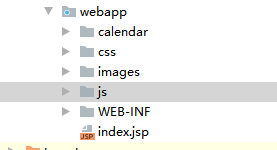
5、导入静态资源
后续正在学习中。。。
if(随笔.hasnext()){
    response.sendRedirect("/下一篇随笔");
}else{
    Systom.out.println("菜鸡儿作者正在努力学习中,请稍后");
    reader.wait();
}

SMBMS项目-准备工作的更多相关文章
- [2017BUAA软工助教]个人项目准备工作
BUAA软工个人项目准备工作 零.注册Github个人账号(你不会没有吧..) 这是Git的使用教程: http://www.cnblogs.com/schaepher/p/5561193.html ...
- Django商城项目笔记No.2项目准备工作
Django商城项目笔记No.2项目准备工作 接着上篇开始,创建好工程之后,随之而来的是怎么配置工程,这篇文章记录如何进行相关的配置 1.pycharm打开工程,进行相关的配置 通过pycharm打开 ...
- Django商城项目笔记No.1项目准备工作
Django商城项目笔记No.1项目准备工作 一.本项目商城属于B2C商业模式 二.项目采用前后端分离的应用模式 前端使用Vue.js 后端使用Django REST framework 1.创建gi ...
- smbms项目核心功能实现
SMBMS 数据库: 项目如何搭建? 考虑使用不使用Maven?依赖,Jar 1.项目搭建准备工作 搭建一个maven web项目 配置Tomcat 测试项目是否能够跑起来 导入项目中会遇到的jar包 ...
- ExtJS 项目准备工作(一)
首先,需要从网上下载两个文件,一个是SenchaCmd-6.2.0-windows-64bit(我的电脑是window 10 64位) 另一个是ExtJs6的源码包(ext-6.0.0.415). 源 ...
- 环境配置——tornado项目准备工作
新建tornado项目后,采用Pycharm作为开发工具,采用Xshell链接Ubuntu模拟服务端方便方便测试.项目编码前进行以下几个方面的配置. 1.Ubuntu配置 1.1安装ssh服务 sud ...
- vue项目准备工作
1.写文档: 产品说明.工作日志.接口说明文档.数据库说明文档.项目架构说明文档等···· 例如:后台管理系统:商品的管理.店铺的管理.店铺类别管理.管理员的管理.用户管理等····· 前端渲染 ...
- 基于SSM框架的简易的分页功能——包含maven项目的搭建
新人第一次发帖,有什么不对的地方请多多指教~~ 分页这个功能经常会被使用到,我之前学习的时候找了很多资源,可都看不懂(笨死算了),最后还是在朋友帮助下做出了这个分页.我现在把我所能想到的知识 做了一个 ...
- Mac下Intellij IDea发布Java Web项目详解四 为所有Module配置Tomcat Deployment
准备工作1:新建第一个JavaWeb项目 准备工作2:新建Module step5 为所有项目配置Deployment 5.1 如图 5.2 [+][Artifact] 5.3 将这里列出的所有内容选 ...
随机推荐
- 吕建文 20199303《Linux内核原理与分析》第十二周作业
ShellShock攻击实验 2014年9月24日,Bash中发现了一个严重漏洞shellshock,该漏洞可用于许多系统,并且既可以远程也可以在本地触发.在本实验中,学生需要亲手重现攻击来理解该漏洞 ...
- 表达式求值--数据结构C语言算法实现
这篇博客介绍的表达式求值是用C语言实现的,只使用了c++里面的引用. 数据结构课本上的一个例题,但是看起来很简单,实现却遇到了很多问题. 这个题需要构建两个栈,一个用来存储运算符OPTR, 一个用来存 ...
- JavaScript HTMlL DOM对象(下)
DOM:document operation model 文档操作模型 每个标签都是一个对象. 一.查找元素 DOM 回顾 直接查找 var obj = document.getElementById ...
- js中的this指针的用法
首先看下面代码: function funcA() { this.name = "hello"; console.log(this.name); this.show = funct ...
- 命令替换、权限、chmod、特殊权限
命令替换 把字符串里面的命令先执行再把该字符串输出,与PHP的""里面的变量被执行一样. $(COMMAND) `COMMAND` [root@jiakang ~]# echo & ...
- bdc抢夺域控
1.运行CMD2.在 ntdsutil :提示符下输入 ntdsutil3.在 ntdsutil :提示符下输入 roles4.在 fsmo maintenance:提示符下输入 connection ...
- spring-boot下mybatis的配置
问题描述:spring boot项目想添加mybatis的配置,在src/main/resources目录下新建了mybatis-config.xml文件,在application.propertie ...
- windows下安装Pycham2020软件
1.在pycham官网下载安装软件https://www.jetbrains.com/pycharm/download/#section=windows 2.我下载的是64位的安装包,现在开始安装 3 ...
- codeforce 227D Naughty Stone Piles (贪心+递归+递推)
Description There are n piles of stones of sizes a1, a2, -, an lying on the table in front of you. D ...
- python3yupython2的差别
1.长整型 # python2中才有长整型概念,python3中只有整形一说 # 定义方法:变量名=整数+l (小写L) #python2环境下 >>> a=123456789123 ...