
《DSP using MATLAB》Problem 7.12

阻带衰减50dB,我们选Hamming窗
代码:
%% ++++++++++++++++++++++++++++++++++++++++++++++++++++++++++++++++++++++++++++++++

%%            Output Info about this m-file

fprintf('\n***********************************************************\n');

fprintf('        <DSP using MATLAB> Problem 7.12 \n\n');

banner();

%% ++++++++++++++++++++++++++++++++++++++++++++++++++++++++++++++++++++++++++++++++

% highpass

ws1 = 0.4*pi; wp1 = 0.6*pi; As = 50; Rp = 0.004;

tr_width = (wp1-ws1);

M = ceil(6.6*pi/tr_width) + 1;                 % Hamming Window

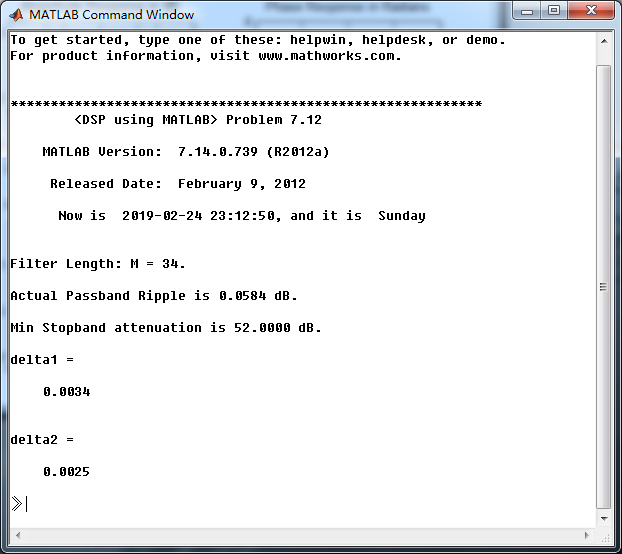
fprintf('\nFilter Length: M = %d.\n', M);

n = [0:1:M-1]; wc1 = (ws1+wp1)/2;

%wc = (ws + wp)/2,                    % ideal LPF cutoff frequency

hd = ideal_lp(pi, M) - ideal_lp(wc1, M);

w_hamm = (hamming(M))';  h = hd .* w_hamm;

[db, mag, pha, grd, w] = freqz_m(h, [1]);  delta_w = 2*pi/1000;

[Hr,ww,P,L] = ampl_res(h);

Rp = -(min(db(wp1/delta_w+1 :1: 0.9*pi/delta_w)));              % Actual Passband Ripple

fprintf('\nActual Passband Ripple is %.4f dB.\n', Rp);

As = -round(max(db(1 :1: ws1/delta_w+1 )));          % Min Stopband attenuation

fprintf('\nMin Stopband attenuation is %.4f dB.\n', As);

[delta1, delta2] = db2delta(Rp, As)

% Plot

figure('NumberTitle', 'off', 'Name', 'Problem 7.12 ideal_lp Method')

set(gcf,'Color','white');

subplot(2,2,1); stem(n, hd); axis([0 M-1 -0.4 0.3]); grid on;

xlabel('n'); ylabel('hd(n)'); title('Ideal Impulse Response');

subplot(2,2,2); stem(n, w_hamm); axis([0 M-1 0 1.1]); grid on;

xlabel('n'); ylabel('w(n)'); title('Hamming Window');

subplot(2,2,3); stem(n, h); axis([0 M-1 -0.4 0.3]); grid on;

xlabel('n'); ylabel('h(n)'); title('Actual Impulse Response');

subplot(2,2,4); plot(w/pi, db); axis([0 1 -100 10]); grid on;

set(gca,'YTickMode','manual','YTick',[-90,-52,0]);

set(gca,'YTickLabelMode','manual','YTickLabel',['90';'52';' 0']);

set(gca,'XTickMode','manual','XTick',[0,0.4,0.6,1]);

xlabel('frequency in \pi units'); ylabel('Decibels'); title('Magnitude Response in dB');

figure('NumberTitle', 'off', 'Name', 'Problem 7.12 h(n) ideal_lp Method')

set(gcf,'Color','white');

subplot(2,2,1); plot(w/pi, db); grid on; axis([0 2 -100 10]);

xlabel('frequency in \pi units'); ylabel('Decibels'); title('Magnitude Response in dB');

set(gca,'YTickMode','manual','YTick',[-90,-52,0])

set(gca,'YTickLabelMode','manual','YTickLabel',['90';'52';' 0']);

set(gca,'XTickMode','manual','XTick',[0,0.4,0.6,1,1.4,1.6,2]);

subplot(2,2,3); plot(w/pi, mag); grid on; %axis([0 2 -100 10]);

xlabel('frequency in \pi units'); ylabel('Absolute'); title('Magnitude Response in absolute');

set(gca,'XTickMode','manual','XTick',[0,0.4,0.6,1,1.4,1.6,2]);

set(gca,'YTickMode','manual','YTick',[0.0,0.5,1.0])

subplot(2,2,2); plot(w/pi, pha); grid on; %axis([0 1 -100 10]);

xlabel('frequency in \pi units'); ylabel('Rad'); title('Phase Response in Radians');

subplot(2,2,4); plot(w/pi, grd*pi/180);  grid on; %axis([0 1 -100 10]);

xlabel('frequency in \pi units'); ylabel('Rad'); title('Group Delay');

figure('NumberTitle', 'off', 'Name', 'Problem 7.12 h(n)')

set(gcf,'Color','white');

plot(ww/pi, Hr); grid on; %axis([0 1 -100 10]);

xlabel('frequency in \pi units'); ylabel('Hr'); title('Amplitude Response');

set(gca,'YTickMode','manual','YTick',[-delta2,0,delta2,1 - delta1,1, 1 + delta1])

%set(gca,'YTickLabelMode','manual','YTickLabel',['90';'45';' 0']);

%set(gca,'XTickMode','manual','XTick',[0,0.4,0.6,1,1.4,1.6,2]);

h_check = fir1(M, wc1/pi, 'high');

[db, mag, pha, grd, w] = freqz_m(h_check, [1]);

[Hr,ww,P,L] = ampl_res(h_check);

figure('NumberTitle', 'off', 'Name', 'Problem 7.12 fir1 Method')

set(gcf,'Color','white');

subplot(2,2,1); stem(n, hd); axis([0 M-1 -0.4 0.3]); grid on;

xlabel('n'); ylabel('hd(n)'); title('Ideal Impulse Response');

subplot(2,2,2); stem(n, w_hamm); axis([0 M-1 0 1.1]); grid on;

xlabel('n'); ylabel('w(n)'); title('Hanning Window');

subplot(2,2,3); stem([0:M], h_check); axis([0 M -0.4 0.5]); grid on;

xlabel('n'); ylabel('h\_check(n)'); title('Actual Impulse Response');

subplot(2,2,4); plot(w/pi, db); axis([0 1 -100 10]); grid on;

set(gca,'YTickMode','manual','YTick',[-90,-52,0])

set(gca,'YTickLabelMode','manual','YTickLabel',['90';'52';' 0']);

set(gca,'XTickMode','manual','XTick',[0,0.4,0.6,1]);

xlabel('frequency in \pi units'); ylabel('Decibels'); title('Magnitude Response in dB');

figure('NumberTitle', 'off', 'Name', 'Problem 7.12 h(n) fir1 Method')

set(gcf,'Color','white');

subplot(2,2,1); plot(w/pi, db); grid on; axis([0 2 -100 10]);

xlabel('frequency in \pi units'); ylabel('Decibels'); title('Magnitude Response in dB');

set(gca,'YTickMode','manual','YTick',[-90,-52,0])

set(gca,'YTickLabelMode','manual','YTickLabel',['90';'52';' 0']);

set(gca,'XTickMode','manual','XTick',[0,0.4,0.6,1,1.4,1.6,2]);

subplot(2,2,3); plot(w/pi, mag); grid on; %axis([0 1 -100 10]);

xlabel('frequency in \pi units'); ylabel('Absolute'); title('Magnitude Response in absolute');

set(gca,'XTickMode','manual','XTick',[0,0.4,0.6,1,1.4,1.6,2]);

set(gca,'YTickMode','manual','YTick',[0.0,0.5,1.0])

subplot(2,2,2); plot(w/pi, pha); grid on; %axis([0 1 -100 10]);

xlabel('frequency in \pi units'); ylabel('Rad'); title('Phase Response in Radians');

subplot(2,2,4); plot(w/pi, grd*pi/180);  grid on; %axis([0 1 -100 10]);

xlabel('frequency in \pi units'); ylabel('Rad'); title('Group Delay');
运行结果:
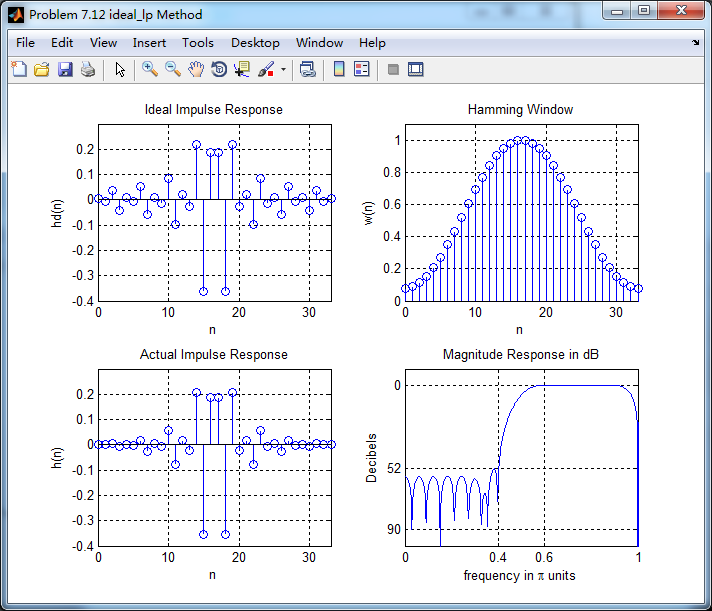
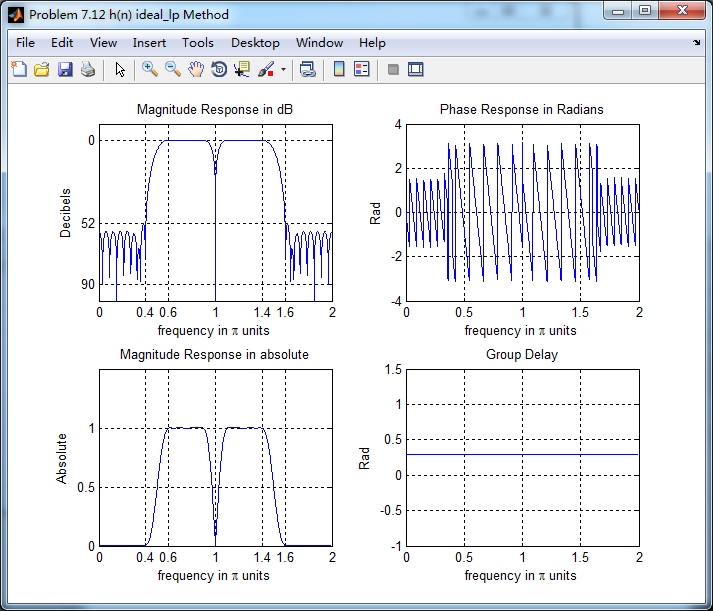
Hamming窗长度为M=34,实际最小阻带衰减为52dB,满足设计要求。
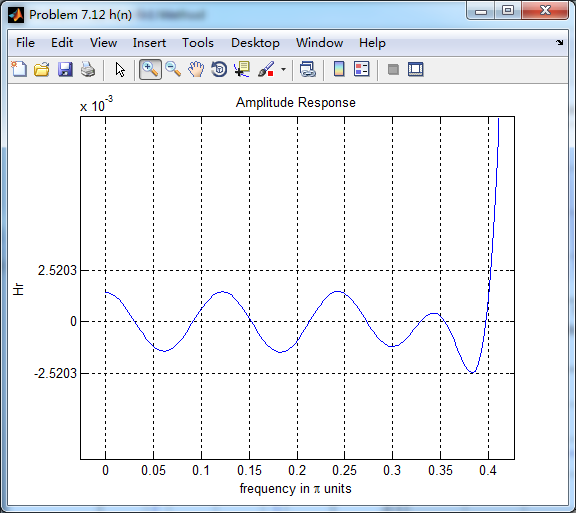
振幅响应的高通部分

低阻部分
下面是用fir1函数(默认Hamming窗)来求得脉冲响应,再计算其幅度响应(dB和Absolute单位)、相位响应和群延迟响应,

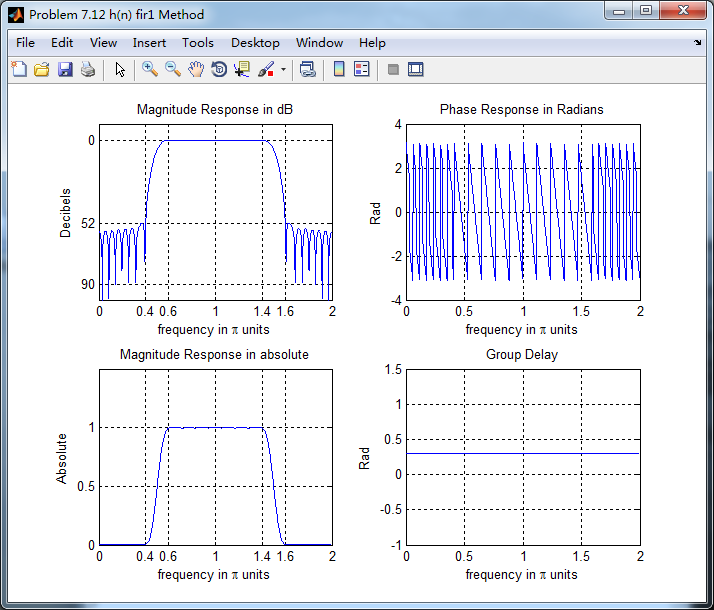
可以看出,两种方法得到的幅度响应和相位响应在接近π的较高频率部分,还是有差别的。
《DSP using MATLAB》Problem 7.12的更多相关文章
- 《DSP using MATLAB》Problem 6.12
代码: %% ++++++++++++++++++++++++++++++++++++++++++++++++++++++++++++++++++++++++++++++++ %% Output In ...
- 《DSP using MATLAB》Problem 5.12
1.从别的地方找的证明过程: 2.代码 function x2 = circfold(x1, N) %% Circular folding using DFT %% ----------------- ...
- 《DSP using MATLAB》Problem 8.12
代码: %% ------------------------------------------------------------------------ %% Output Info about ...
- 《DSP using MATLAB》Problem 4.12
代码: function [As, Ac, r, v0] = invCCPP(b0, b1, a1, a2) % Determine the signal parameters Ac, As, r, ...
- 《DSP using MATLAB》Problem 3.12
- 《DSP using MATLAB》Problem 7.6
代码: 子函数ampl_res function [Hr,w,P,L] = ampl_res(h); % % function [Hr,w,P,L] = Ampl_res(h) % Computes ...
- 《DSP using MATLAB》Problem 6.22
代码: %% ++++++++++++++++++++++++++++++++++++++++++++++++++++++++++++++++++++++++++++++++ %% Output In ...
- 《DSP using MATLAB》Problem 6.8
代码: %% ++++++++++++++++++++++++++++++++++++++++++++++++++++++++++++++++++++++++++++++++ %% Output In ...
- 《DSP using MATLAB》Problem 5.21
证明: 代码: %% ++++++++++++++++++++++++++++++++++++++++++++++++++++++++++++++++++++++++++++++++++++++++ ...
随机推荐
- Learning-Python【12】:装饰器
一.什么是装饰器 器:工具 装饰:为被装饰对象添加新功能 装饰器本身可以是任意可调用的对象,即函数 被装饰的对象也可以是任意可调用的对象,也是函数 目标:写一个函数来为另外一个函数添加新功能 二.为何 ...
- Linux Sphinx 安装与使用
一.什么是 Sphinx? Sphinx 是一个基于SQL的全文检索引擎,可以结合 MySQL,PostgreSQL 做全文搜索,它可以提供比数据库本身更专业的搜索功能,使得应用程序 更容易实现专业化 ...
- node:express:error---填坑之路
express版本4.0之后需要安装的东西 npm install -g express npm install -g express-generator jade转换成ejs(修改为html引擎,打 ...
- 利用python操作excel
https://zhuanlan.zhihu.com/p/51292549 打开程序:https://segmentfault.com/q/1010000002441500
- IDEA复制某个类的包名路径
在对应的类中右键: 然后看图:
- es6学习---.babelrc文件
babel是用来进行转码的,在不支持es6的环境下,需要将es6的语法转码成es5的语法格式,就用到了babel. .babelrc 文件的配置 在项目的根目录下创建 .babelrc 文件 文件包括 ...
- 【C/C++】小坑们
1.printf("%03d", a); // 输出 a,占 3 位,不够则左边用 0 填充 2.memcpy 所在头文件为 <string.h> 3.string s ...
- centos7 安装MySQL7 并更改初始化密码
1.官方安装文档 http://dev.mysql.com/doc/mysql-yum-repo-quick-guide/en/ 2.下载 Mysql yum包 http://dev.mysql.co ...
- python dpkt SSL 流tcp payload(从三次握手开始到application data)和证书提取
# coding: utf-8 #!/usr/bin/env python from __future__ import absolute_import from __future__ import ...
- Python3+PyCharm+Django+Django REST framework开发教程
一.说明 自己一是想跟上潮流二是习惯于直接干三是没有人可以请教,由于这三点经常搞得要死要活.之前只简单看过没写过Diango,没看过Django REST framework,今天一步到位直接上又撞上 ...