
发布本地项目和源码到maven私服中
有时候我们会使用第三方包到我们的项目中,但是想看源码的时候,需要下载源码查看,十分麻烦。
不如把源码上传到maven私服中,这样查看源码的时候就可以直接从mvaen nexus下载直接查看了。
方法如下:
1、在setting.xml文件中增加用户名和密码配置(特别注意这里的ID)
    <servers>

        <!-- 用于发布正式版本 -->

        <server>

            <id>maven-repository-releases</id>

            <username>admin</username>

            <password>admin123</password>

        </server>

        <!-- 用于发布快照版本 -->

        <server>

            <id>maven-repository-snapshots</id>

            <username>admin</username>

            <password>admin123</password>

        </server>

    </servers>
2、在项目的pom.xml中增加以下内容
    <build>

        <plugins>

            <!-- 要将源码放上去,需要加入这个插件 -->

            <plugin>

                <artifactId>maven-source-plugin</artifactId>

                <version>2.1</version>

                <configuration>

                    <attach>true</attach>

                </configuration>

                <executions>

                    <execution>

                        <phase>compile</phase>

                        <goals>

                            <goal>jar</goal>

                        </goals>

                    </execution>

                </executions>

            </plugin>

        </plugins>

    </build>

    <distributionManagement>

        <repository>

            <!-- 这里的ID要和setting的id一致 -->

            <id>maven-repository-releases</id>

            <url>http://ip:8081/nexus/content/repositories/thirdparty/</url>

        </repository>

        <!--这是打成快照版本的配置,如果不用这个snapshotRepository标签,打包失败,会报权限问题 -->

        <snapshotRepository>

            <id>maven-repository-snapshots</id>

            <url>http://ip:8081/nexus/content/repositories/thirdparty</url>

        </snapshotRepository>

    </distributionManagement>
3.执行Maven build的deploy命令
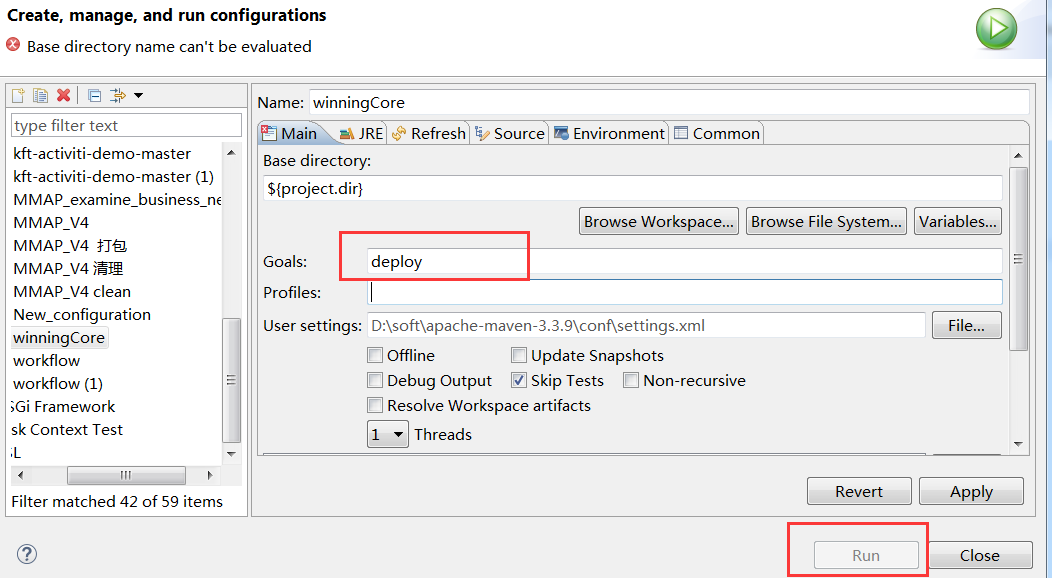
正常情况下,如果是发布新版本的话,一切是ok的。
4.如果是替换老版本,可能会出现如下错误
[ERROR] Failed to execute goal org.apache.maven.plugins:maven-deploy-plugin:2.7:deploy (default-deploy) on project YourProject: Failed to deploy artifacts: Could not transfer artifact YourProject:jar:3.0.1 from/to maven-repository-releases (http://ip:8081/nexus/content/repositories/thirdparty/): Failed to transfer file: http://192.168.16.204:8081/nexus/content/repositories/thirdparty/../../YourProject.jar. Return code is: 400, ReasonPhrase: Bad Request. -> [Help 1]
[ERROR]
[ERROR] To see the full stack trace of the errors, re-run Maven with the -e switch.
[ERROR] Re-run Maven using the -X switch to enable full debug logging.
[ERROR]
[ERROR] For more information about the errors and possible solutions, please read the following articles:
[ERROR] [Help 1] http://cwiki.apache.org/confluence/display/MAVEN/MojoExecutionException
这是maven deploy 已存在的包的时候出现400错误,原因是 release 默认库是不允许重复部署的。
解决: 修改maven 私服配置.
修改图中配置就可以重复部署了:Deployment Policy:Allow Redeploy
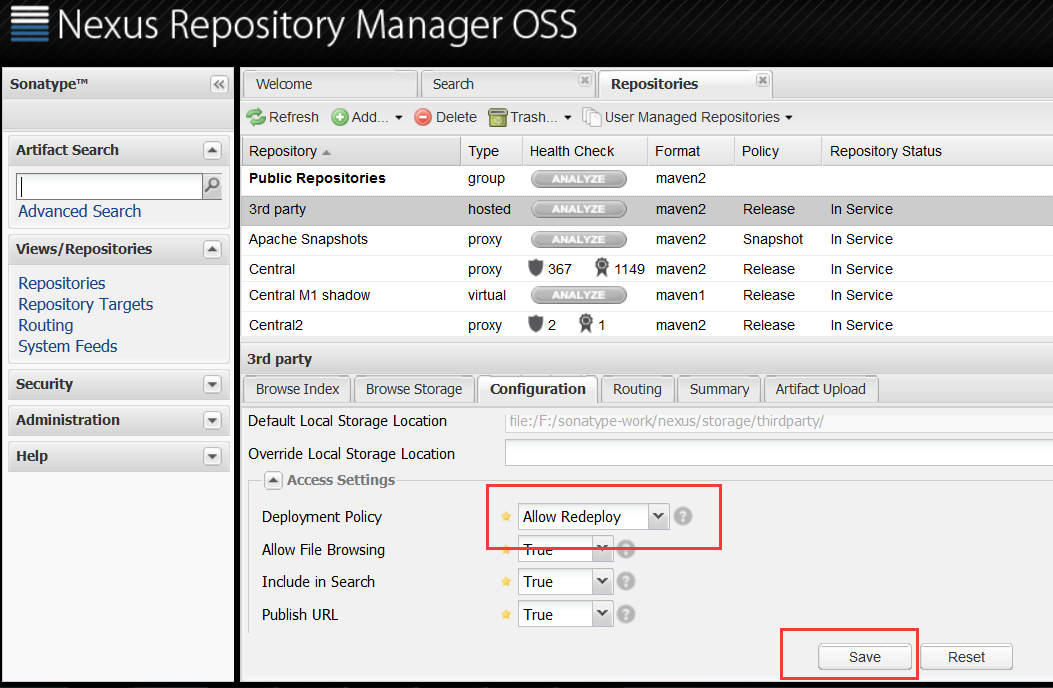
然后,重新deploy,既可以将源码和jar包一并上传到maven私服了。
5.其他可能遇到的问题
用户权限问题,可能导致发布失败。
本文参考:http://blog.csdn.net/lzzyok/article/details/25626583f
http://blog.csdn.net/lulongzhou_llz/article/details/42869785
发布本地项目和源码到maven私服中的更多相关文章
- maven项目的运行方式,maven私服的上传下载
一.maven项目父子工程的运行方式 1.通过父项目的plugin下集成的tomacat run启动 2.通过自身项目的tomcat plugin启动,但前提是所依赖的项目必须全部都install(将 ...
- 怎么将本地项目放到码云(gitee)上面?图文详解
git的好处什么的,在此就不多赘述.现在很多公司都在用git了. 那么怎么将本地已经有的项目放到码云(gitee)上呢? 前置条件说明: 1:原来项目所在位置:D:\workspace01\class ...
- Git上传本地项目到码云
前提:本地安装git.注册码云 1.进入本地项目文件夹,鼠标右键代开 Git Bash Here 2.输入命令 初始化库管理文件 git init 3.输入命名 修改Git的全局配置 git conf ...
- 将github上的项目源码导入到eclipse中
1.注册github帐号 在github上注册一个自己的帐号. 2.安装git插件egit 在eclipse中安装git插件egit,安装方法可以参考这篇文章: http://www.cnblogs. ...
- 利用git把本地项目传到github+将github中已有项目从本地上传更新
利用git把本地项目传到github中 1.打开git bash命令行,进入到要上传的项目中,比如Spring项目,在此目录下执行git init 的命令,会发下在当前目录中多了一个.git的文件夹( ...
- PM2自动发布本地项目到服务器
(一)开发环境 本地服务器 Ubunt14.04 远程服务器Ubuntu16.04 发布软件PM 2 (二)发布介绍 本地和我们的远程服务器,必须都安装有git,pm2,以及nodejs环境.实际上配 ...
- 码云git使用一(上传本地项目到码云git服务器上)
主要讲下如果将项目部署到码云git服务器上,然后使用studio导入git项目,修改本地代码后,并同步到码云git上面. 首先:我们在码云上注册账号并登陆.官网(https://git.oschina ...
- Git发布本地项目至仓库命令行操作流程
1.初始化项目 git init 2.创建名称为 gh-pages 新分支(若直接发布至master分支,忽略此步) git checkout --orphan gh-pages 3.把所有内容加入本 ...
- 上传本地项目到码云(gitee)
1.码云上创建一个项目比如zhirong 2.本地创建一个文件夹F:\workspace\zhirong-items,进入zhirong-items打开git bash 3.执行git init ,这 ...
随机推荐
- SQL Server事务
事务全部是关于原子性的.原子性的概念是指可以把一些事情当做一个单元来看待.从数据库的角度看,它是指应全部执行或全部都不执行的一条或多条语句的最小组合.为了理解事务的概念,需要能够定义非常明确的边界.事 ...
- SecureCR 改变背景色和文字颜色
1.打开SecureCR链接Linux服务器,Options->Session Options->Emulation->Terminal 选择Linux (相应的服务器系统)ANSI ...
- QTP 学习 - 对象库
QTP的关键字视图和专家视图 1.Keyword view(关键字视图) 在录制脚本的过程中,用户执行的每一个步骤,在关键字视图中记录为一行. 关键字视图直观有效,用户可以很清楚的看到被录制对象的录制 ...
- leetcode239
class Solution: def maxSlidingWindow(self, nums: 'List[int]', k: int) -> 'List[int]': n = len(num ...
- linux中open函数使用
open函数用来打开一个设备,他返回的是一个整型变量,如果这个值等于-1,说明打开文件出现错误,如果为大于0的值 参考格式 if(fd=open("/dev/ttys0",O_RD ...
- ps命令详解
1.简介: ps 命令有两种不同的语法风格 —— BSD 与 UNIX 两种风格.新手常常对这两种形式产生误解,因此我们有必要在这里作一个简单的说明: ps aux 与 ps -aux 是不同的,例如 ...
- mysql win10x64 免安装版 安装配置
安装包下载或者 gaobo百度云/工具/开发工具/mysql-5.7.23-winx64.zip 第一步, 解压MySQL压缩包 将以下载的MySQL压缩包解压到自定义目录下,我的解压目录是: ...
- cdnbest如何查看节点和站点的流量,负载和连接信息
1. 通过查看top信息,查看该区域下所有节点和有访问量的站点的负载情况 点节点列表==>top图标 2. 查看单台节点的负载和连接信息 点节点列表==>管理 点击下图中三个红框可以查看单 ...
- OpenStack 安装:基本环境准备
刚刚学完openstack,这几篇文章就算对过去课程的一个总结吧. 首先说说基本的结构:在一台Dell的workstation上面安装了VMware,在VMware上面安装两台CentOS,现在给每台 ...
- 计算macd与ma技术指标
MACD部分 转载自云金杞:https://blog.csdn.net/qq_26948675/article/details/72636590 数据获取于聚宽平台 import pandas as ...