
airflow当触发具有多层subDAG的任务的时候,出现[Duplicate entry ‘xxxx’ for key dag_id]的错误的问题处理
当触发一个具有多层subDAG的任务时,会发现执行触发的task任务运行失败,但是需要触发的目标DAG已经在运行了,dag log 错误内容:
[2019-11-21 17:47:56,825] {base_task_runner.py:115} INFO - Job 2: Subtask peak_agg.daily_device_app_tx sqlalchemy.exc.IntegrityError: (_mysql_exceptions.IntegrityError) (1062, "Duplicate entry 'pcdn_export_agg_peak.split_to_agg_9.pcdn_agg-2019-11-21 09:47:00' for key 'dag_id'")

[2019-11-21 17:47:56,825] {base_task_runner.py:115} INFO - Job 2: Subtask peak_agg.daily_device_app_tx [SQL: INSERT INTO dag_run (dag_id, execution_date, start_date, end_date, state, run_id, external_trigger, conf) VALUES (%s, %s, %s, %s, %s, %s, %s, %s)]

[2019-11-21 17:47:56,825] {base_task_runner.py:115} INFO - Job 2: Subtask peak_agg.daily_device_app_tx [parameters: ('pcdn_export_agg_peak.split_to_agg_9.pcdn_agg', <Pendulum [2019-11-21T09:47:00+00:00]>, datetime.datetime(2019, 11, 21, 9, 47, 56, 409081, tzinfo=<Timezone [UTC]>), None, 'running', 'tri_peak_agg-daily_device_app_tx-for:2019-11-20-on:20191120013000.000000', 1, b'\x80\x04\x95&\x01\x00\x00\x00\x00\x00\x00}\x94(\x8c\x03env\x94\x8c\x03dev\x94\x8c\x08start_ts\x94J\x80=\xd5]\x8c\x06end_ts\x94J\xa4K\xd5]\x8c\tstat_ ... (275 characters truncated) ... \x8c\x06device\x94as\x8c\tlog_level\x94\x8c\x04INFO\x94\x8c\rseries_chunks\x94Kd\x8c\tsp_chunks\x94J@B\x0f\x00\x8c\nsp_schunks\x94J\xa0\x86\x01\x00u.')]

[2019-11-21 17:47:56,825] {base_task_runner.py:115} INFO - Job 2: Subtask peak_agg.daily_device_app_tx (Background on this error at: http://sqlalche.me/e/gkpj)

[2019-11-21 17:47:57,393] {logging_mixin.py:95} INFO - [[34m2019-11-21 17:47:57,392[0m] {[34mlocal_task_job.py:[0m105} INFO[0m - Task exited with return code 1[0m
经过分析,触发bug的代码块在airflow/api/common/experimental/trigger_dag.py的 def _trigger_dag 函数中,最后在进行dag触发的时候。
    triggers = list()

    dags_to_trigger = list()

    dags_to_trigger.append(dag)

    while dags_to_trigger:

        dag = dags_to_trigger.pop()

        trigger = dag.create_dagrun(

            run_id=run_id,

            execution_date=execution_date,

            state=State.RUNNING,

            conf=run_conf,

            external_trigger=True,

        )

        triggers.append(trigger)

        if dag.subdags:

            dags_to_trigger.extend(dag.subdags) # 在这里产生了重复触发的BUG

    return triggers
原因为,,dag.subdags 中包含了该DAG下所有subDAG,包含subDAG下的subDAG。因此在一个有多层嵌套的DAG中,第二层subDAG一下的subDAG,均会被重复追加到dags_to_trigger,从而在数据库的dag_runtable中,产生两条相同的记录。但是因为dag_runtable在创建的时候,具有两个UNIQUE KEY(如下),因此重复记录写入则会触发sql的写入错误。
| dag_run | CREATE TABLE `dag_run` (

  `id` int(11) NOT NULL AUTO_INCREMENT,

  `dag_id` varchar(250) DEFAULT NULL,

  `execution_date` timestamp(6) NULL DEFAULT NULL,

  `state` varchar(50) DEFAULT NULL,

  `run_id` varchar(250) DEFAULT NULL,

  `external_trigger` tinyint(1) DEFAULT NULL,

  `conf` blob,

  `end_date` timestamp(6) NULL DEFAULT NULL,

  `start_date` timestamp(6) NULL DEFAULT NULL,

  PRIMARY KEY (`id`),

  UNIQUE KEY `dag_id` (`dag_id`,`execution_date`),

  UNIQUE KEY `dag_id_2` (`dag_id`,`run_id`),

  KEY `dag_id_state` (`dag_id`,`state`)

) ENGINE=InnoDB DEFAULT CHARSET=latin1 |
解决方案:
修改源码,记录以触发的dag,每次从dags_to_trigger中取出dag之后,先判断该dag是否已经被触发,只有未被触发的dag才进行触发。
    triggers = list()

    dags_to_trigger = list()

    dags_to_trigger.append(dag)

    is_triggered = dict()

    while dags_to_trigger:

        dag = dags_to_trigger.pop()

        if is_triggered.get(dag.dag_id):

            continue

        is_triggered[dag.dag_id] = True

        trigger = dag.create_dagrun(

            run_id=run_id,

            execution_date=execution_date,

            state=State.RUNNING,

            conf=run_conf,

            external_trigger=True,

        )

        triggers.append(trigger)

        if dag.subdags:

            dags_to_trigger.extend(dag.subdags)

    return triggers
多层subDAG嵌套任务的触发测试。
如下是通过修改官方example example_trigger_controller_dag 和 example_trigger_target_dag,为了方便测试,将两个DAG代码合并在一个文件中。
下面的例子使用了2个DAG,分别是:
my_trigger_target_dag,修改自example_trigger_target_dag;在这个DAG中,实现了2层subDAG嵌套。my_trigger_controller_dag,修改自example_trigger_controller_dag;在这个DAG中,可以通过for循环控制,连续调用指定次数的my_trigger_target_dag。在连续需触发其他DAG过程中,要注意的是:
- 需要为每次触发设置不同的
run_id,如果没有手动设置那么系统会自动设置,但是为了方便查看触发任务和目标DAG的运行,最好手动标志一下run_id。 - 同一个DAG每次在触发
execute_date的时候,要设置不同的execute_date,否则会触发Duplicate entry ‘xxxx’ for key dag_id的错误,原因和如上分析一样。 execute_date一定要是UTC格式,否则目标DAG执行时间会和你希望的时间不一致。
- 需要为每次触发设置不同的
import pprint

from datetime import datetime, timedelta

from airflow.utils import timezone

import airflow

from airflow.models import DAG

from airflow.operators.bash_operator import BashOperator

from airflow.operators.python_operator import PythonOperator

from airflow.operators.subdag_operator import SubDagOperator

from airflow.operators.dagrun_operator import TriggerDagRunOperator

pp = pprint.PrettyPrinter(indent=4)

# This example illustrates the use of the TriggerDagRunOperator. There are 2

# entities at work in this scenario:

# 1. The Controller DAG - the DAG that conditionally executes the trigger

#    (in example_trigger_controller.py)

# 2. The Target DAG - DAG being triggered

#

# This example illustrates the following features :

# 1. A TriggerDagRunOperator that takes:

#   a. A python callable that decides whether or not to trigger the Target DAG

#   b. An optional params dict passed to the python callable to help in

#      evaluating whether or not to trigger the Target DAG

#   c. The id (name) of the Target DAG

#   d. The python callable can add contextual info to the DagRun created by

#      way of adding a Pickleable payload (e.g. dictionary of primitives). This

#      state is then made available to the TargetDag

# 2. A Target DAG : c.f. example_trigger_target_dag.py

args = {

    'start_date': airflow.utils.dates.days_ago(2),

    'owner': 'airflow',

}

TARGET_DAG = "my_trigger_target_dag"

TRIGGER_CONTROLLER_DAG = "my_trigger_controller_dag"

target_dag = DAG(

    dag_id=TARGET_DAG,

    default_args=args,

    schedule_interval=None,

)

def run_this_func(ds, **kwargs):

    print("Remotely received value of {} for key=message".format(kwargs['dag_run'].conf['message']))

def sub_run_this_func(ds, **kwargs):

    dag_run_conf = kwargs['dag_run'].conf or {}

    print("Sub dag remotely received value of {} for key=message".format(dag_run_conf.get('message')))

def sub2_run_this_func(ds, **kwargs):

    dag_run_conf = kwargs['dag_run'].conf or {}

    print("Sub2 dag remotely received value of {} for key=message".format(dag_run_conf.get('message')))

def get_sub_dag(main_dag, sub_dag_prefix, schedule_interval, default_args):

    parent_dag_name = main_dag.dag_id

    sub_dag = DAG(

        dag_id="%s.%s" % (parent_dag_name, sub_dag_prefix),

        schedule_interval=schedule_interval,

        default_args=default_args,

    )

    task1 = PythonOperator(

        task_id="sub_task1",

        provide_context=True,

        python_callable=sub_run_this_func,

        dag=sub_dag,

    )

    def create_subdag_for_action2(parent_dag, dag_name):

        sub2_dag = DAG(

            dag_id="%s.%s" % (parent_dag.dag_id, dag_name),

            default_args=default_args.copy(),

            schedule_interval=schedule_interval,

        )

        sub2_task1 = PythonOperator(

            task_id="sub2_task1",

            provide_context=True,

            python_callable=sub2_run_this_func,

            dag=sub2_dag

        )

        return sub2_dag

    task2 = SubDagOperator(

        task_id="sub_dag2",

        subdag=create_subdag_for_action2(sub_dag, "sub_dag2"),

        dag=sub_dag,

    )

    task1 >> task2

    return sub_dag

run_this = PythonOperator(

    task_id='run_this',

    provide_context=True,

    python_callable=run_this_func,

    dag=target_dag,

)

sub_task = SubDagOperator(

    task_id="sub_run",

    subdag=get_sub_dag(target_dag, "sub_run", None, args),

    dag=target_dag,

)

# You can also access the DagRun object in templates

bash_task = BashOperator(

    task_id="bash_task",

    bash_command='echo "Here is the message: '

                 '{{ dag_run.conf["message"] if dag_run else "" }}" ',

    dag=target_dag,

)

run_this >> sub_task >> bash_task

"""

This example illustrates the use of the TriggerDagRunOperator. There are 2

entities at work in this scenario:

1. The Controller DAG - the DAG that conditionally executes the trigger

2. The Target DAG - DAG being triggered (in example_trigger_target_dag.py)

This example illustrates the following features :

1. A TriggerDagRunOperator that takes:

  a. A python callable that decides whether or not to trigger the Target DAG

  b. An optional params dict passed to the python callable to help in

     evaluating whether or not to trigger the Target DAG

  c. The id (name) of the Target DAG

  d. The python callable can add contextual info to the DagRun created by

     way of adding a Pickleable payload (e.g. dictionary of primitives). This

     state is then made available to the TargetDag

2. A Target DAG : c.f. example_trigger_target_dag.py

"""

def conditionally_trigger(context, dag_run_obj):

    """This function decides whether or not to Trigger the remote DAG"""

    c_p = context['params']['condition_param']

    print("Controller DAG : conditionally_trigger = {}".format(c_p))

    if context['params']['condition_param']:

        dag_run_obj.payload = {'message': context['params']['message']}

        pp.pprint(dag_run_obj.payload)

        return dag_run_obj

# Define the DAG

trigger_dag = DAG(

    dag_id=TRIGGER_CONTROLLER_DAG,

    default_args={

        "owner": "airflow",

        "start_date": airflow.utils.dates.days_ago(2),

    },

    schedule_interval=None,

)

# Define the single task in this controller example DAG

execute_date = timezone.utcnow()

for idx in range(1):

    trigger = TriggerDagRunOperator(

        task_id='test_trigger_dagrun_%d' % idx,

        trigger_dag_id=TARGET_DAG,

        python_callable=conditionally_trigger,

        params={

            'condition_param': True,

            'message': 'Hello World, exec idx is %d. -- datetime.utcnow: %s; timezone.utcnow:%s' % (

                idx, datetime.utcnow(), timezone.utcnow()

            )

        },

        dag=trigger_dag,

        execution_date=execute_date,

    )

    execute_date = execute_date + timedelta(seconds=10)
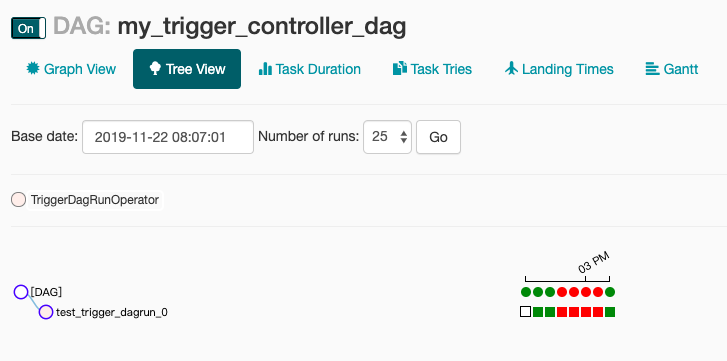
- 代码准备完毕之后,就可以从UI中看到已经准备好的DAG。

将左侧开关打开,进入触发的DAG,点击触发运行,就可以看到触发测试的结果了。
其中前3次运行时是未启用多层subDAG时的触发测试,测试是通过的。
中间3次是启用多层subDAG嵌套之后进行的触发测试,测试结果未通过。
最后一次是修复代码中触发部分的bug之后,再次触发测试。测试结果通过。
airflow当触发具有多层subDAG的任务的时候,出现[Duplicate entry ‘xxxx’ for key dag_id]的错误的问题处理的更多相关文章
- 4-MySQL DBA笔记-开发进阶
第4章 开发进阶 本章将介绍一些重中之重的数据库开发知识.在数据库表设计中,范式设计是非常重要的基础理论,因此本章把它放在最前面进行讲解,而这其中又会涉及另一个重要的概念——反范式设计.接下来会讲述M ...
- 13、mysql/触发器
1. mysql mysql基础 1)mysql存储结构: 数据库 -> 表 -> 数据 sql语句 2)管理数据库: 增加: create database 数据库 default ...
- MySQL强化
大纲: 数据约束 数据库设计(表设计) 关联查询(多表查询) 存储过程 触发器 mysql权限问题 1 数据约束 1.1 什么是数据约束 对用户操作表的数据进行约束. 1.2 约束种类 1.2.1 默 ...
- mysql简单练习
数据库入门 2.1 引入 数据保存到内存: 优点: 1)读写非常快 缺点: 1)程序关闭导致数据丢失 数据保存到文件: 优点: 1)数据可以永久保存 缺点: 1)频繁地IO操作,效率不高! 2)数据管 ...
- mysql save or update
原文:http://www.bitscn.com/pdb/mysql/201503/473268.html 背景 在平常的开发中,经常碰到这种更新数据的场景:先判断某一数据在库表中是否存在,存在则 ...
- MySQL入门(下)
1. 课程回顾(很清晰明了) mysql基础 1)mysql存储结构: 数据库 -> 表 -> 数据 sql语句 2)管理数据库: 增加: create database 数据库 de ...
- (MariaDB/MySQL)之DML(2):数据更新、删除
本文目录:1.update语句2.delete语句 2.1 单表删除 2.2 多表删除3.truncate table 1.update语句 update用于修改表中记录. # 单表更新语法: UPD ...
- MySQL-02-进阶
大纲 1)数据约束 2)数据库设计(表设计) 3)存储过程 4)触发器 5)mysql权限问题 数据约束 2.1什么数据约束 对用户操作表的数据进行约束 2.2 默认值 作用: 当用户对使用默认值的字 ...
- MySQL--REPLACE INTO与自增
##=====================================================================##测试环境:MySQL版本:MySQL 5.7.19复制 ...
随机推荐
- idea 党用快捷键
实用快捷键: Ctrl+/ 或 Ctrl+Shift+/ 注释(// 或者/*...*/ )Ctrl+D 复制行Ctrl+X 删除行快速修复 alt+enter (modify/cast)代码提示 a ...
- shell中sed的简单使用
sed命令行格式为: sed [-nefri] ‘command’ 输入文本/文件 常用选项: -n∶取消默认的输出,使用安静(silent)模式.在一 ...
- 查询表中列转换为json
DECLARE @sql VARCHAR(MAX) SET @sql= (SELECT (select '+'',"'+column_name+'":"''+CAST(' ...
- 4.3. Scrapy Shell
Scrapy Shell:模拟scrapy去发送请求 Scrapy终端是一个交互终端,我们可以在未启动spider的情况下尝试及调试代码,也可以用来测试XPath或CSS表达式,查看他们的工作方式,方 ...
- AD软件中可视栅格 捕捉栅格 电气栅格的功能和设置详解
AD16的栅格设置 AD16系统共有3种栅格:可视栅格.电气栅格.捕捉栅格. Snap:捕获栅格,如果设定值是10mil,鼠标的光标拖动零件引脚,距离可视栅格在10mil范围之内时,零件引脚自动的准确 ...
- 内核模式构造-Semaphore构造(WaitLock)
internal sealed class SimpleWaitLock : IDisposable { //(信号量)允许多个线程并发访问一个资源 //如果所有线程以只读方式访问资源则是安全的 pr ...
- linux TAILQ_ENTRY
#include <sys/queue.h> TAILQ_ENTRY 队列 http://www.360doc.com/content/15/1222/14/29292169_522271 ...
- 浏览器内核与BOM对象介绍
BOM(Browser Object Model)对象介绍 我们都知道js有三部分组成,ECMAScript.DOM和BOM,根据宿主(浏览器)的不同,具体的表现形式也不尽相同,ie和其它浏览器也是风 ...
- 喜大普奔!.NET界面控件DevExpress v19.2发布,快来下载体验
DevExpress Universal Subscription(又名DevExpress宇宙版或DXperience Universal Suite)是全球使用广泛的.NET用户界面控件套包,De ...
- k8s认证与授权
认证用于身份鉴别,而授权则实现权限分派.k8s以插件化的方式实现了这两种功能,且分别存在多种可用的插件.另外,它还支持准入控制机制,用于补充授权机制以实现更精细的访问控制功能. 一.访问控制概述 ap ...