
c++opencv中线条细化算法
要达到的效果就是将线条尽量细化成单像素,按照论文上的Hilditch算法试了一下,发现效果不好,于是自己尝试着写了一下细化的算法,基本原理就是从上下左右四个方向向内收缩。
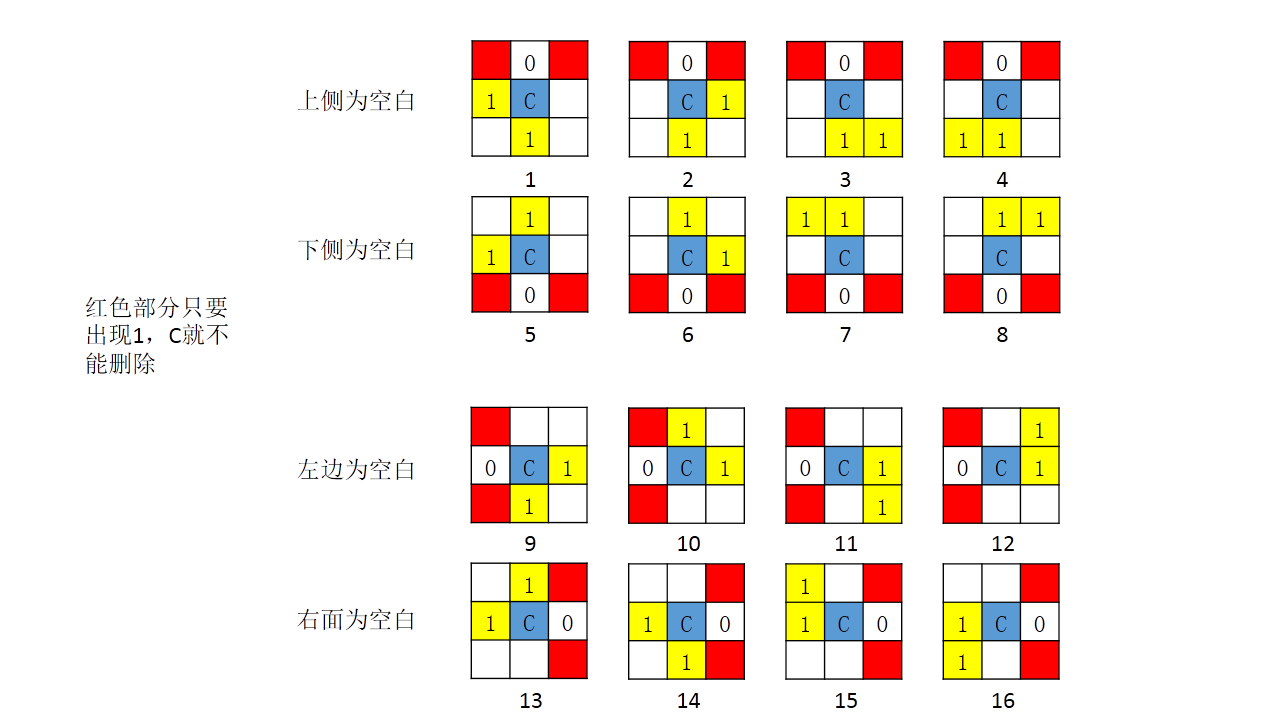
1.先是根据图片中的原则确定了以下16种情况
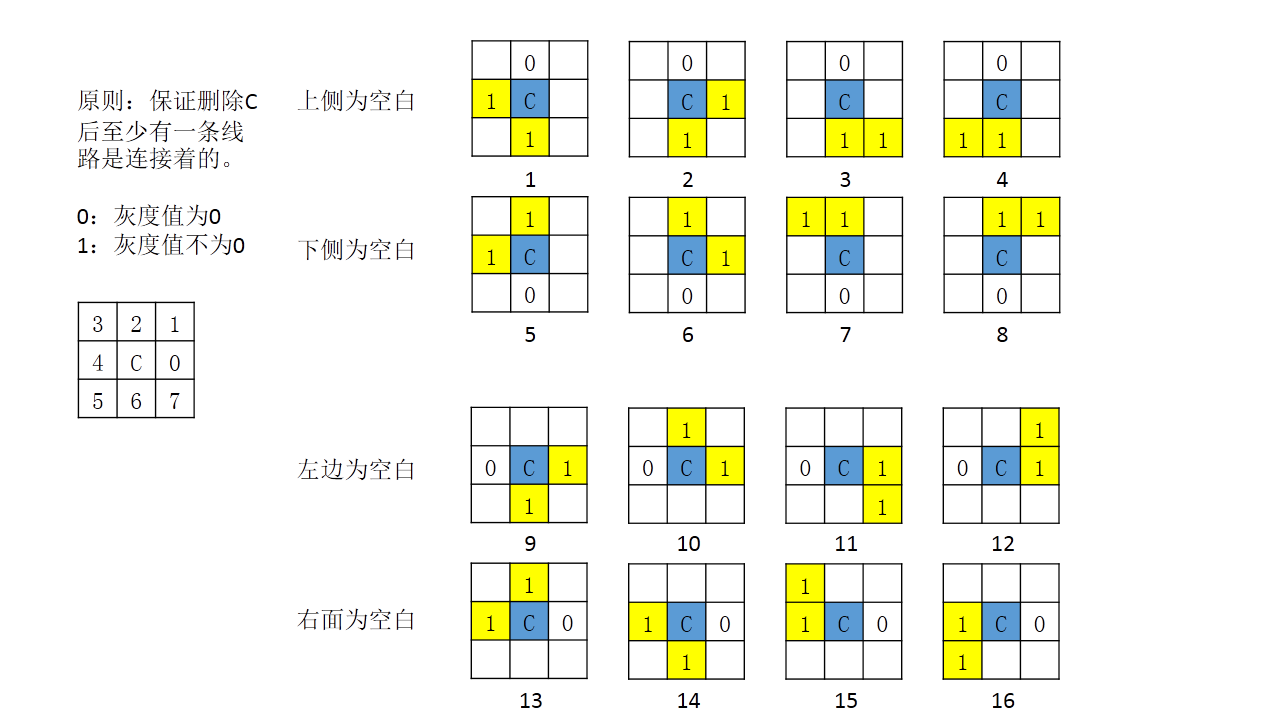
2.调试过后发现,迭代次数多了之后,原来连接着的线条会断开,分析原因如下图
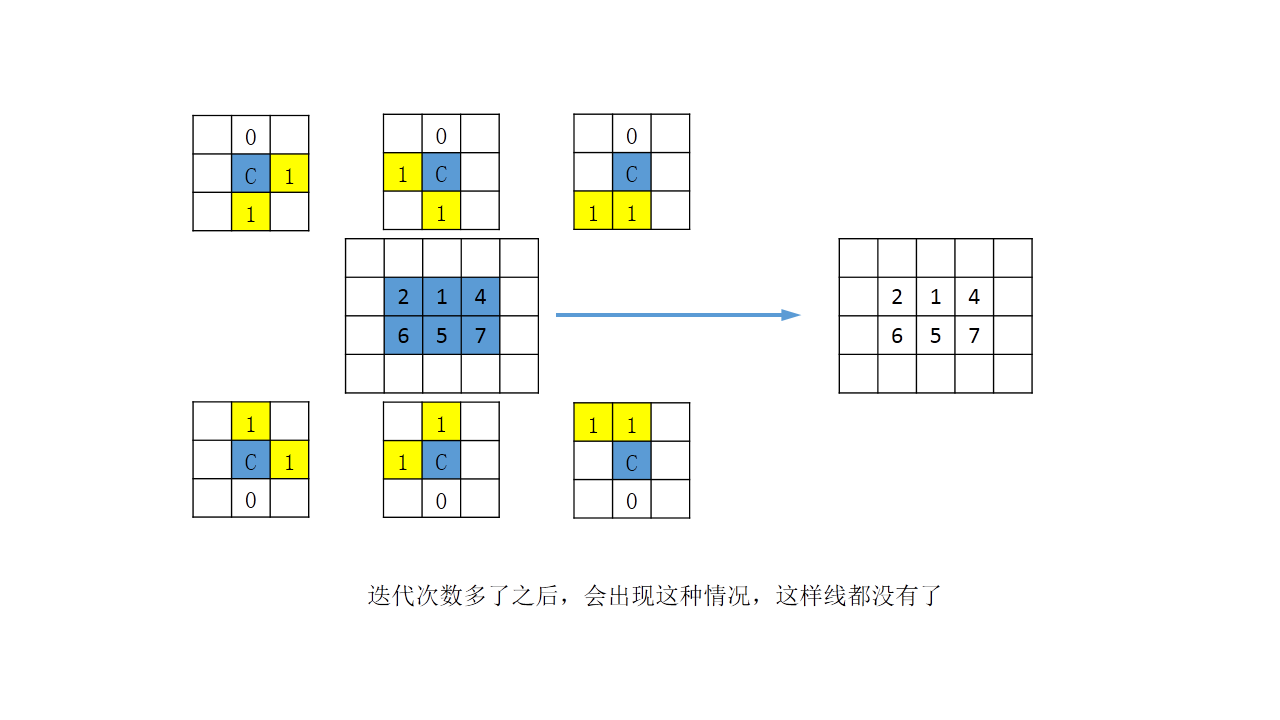
3.修改了一下判断条件
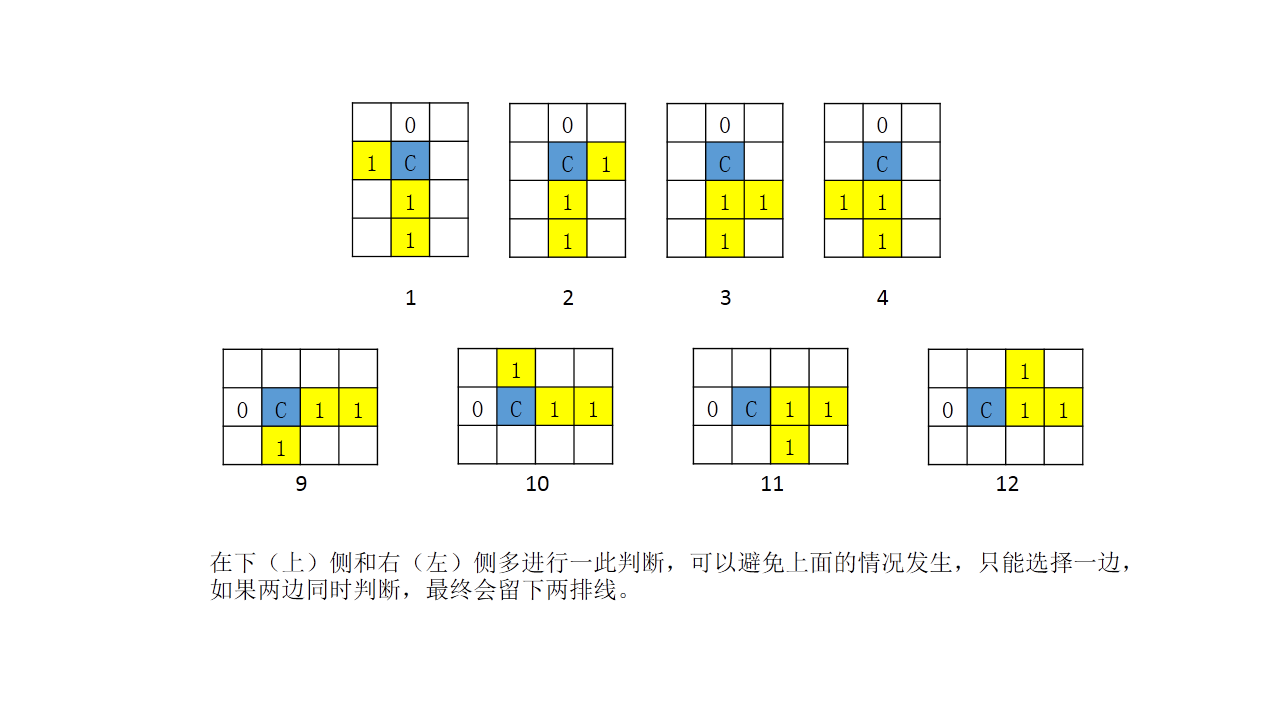
4.调试过后发现还是会出现断的地方,再次分析原因如下图
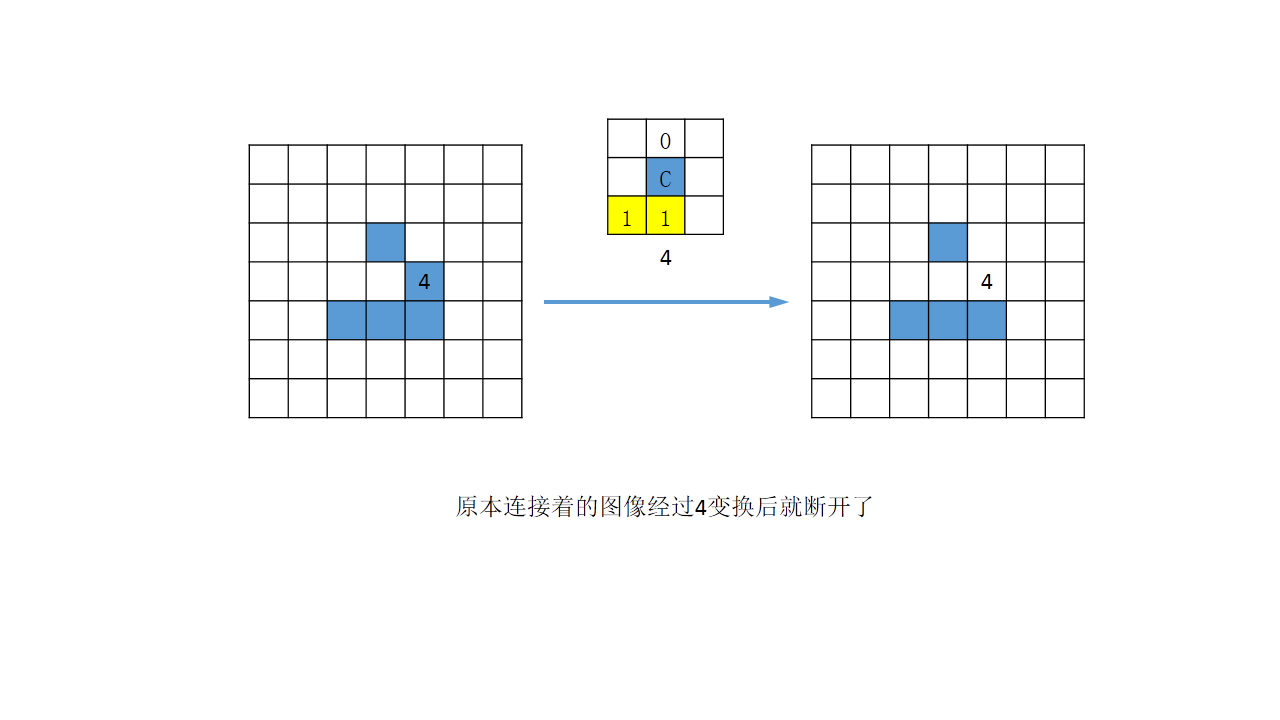
5.又加了判断条件,如下图
最终实现的效果如下
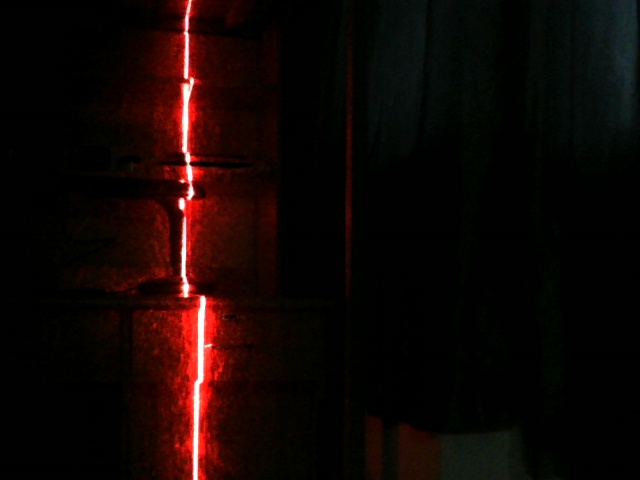
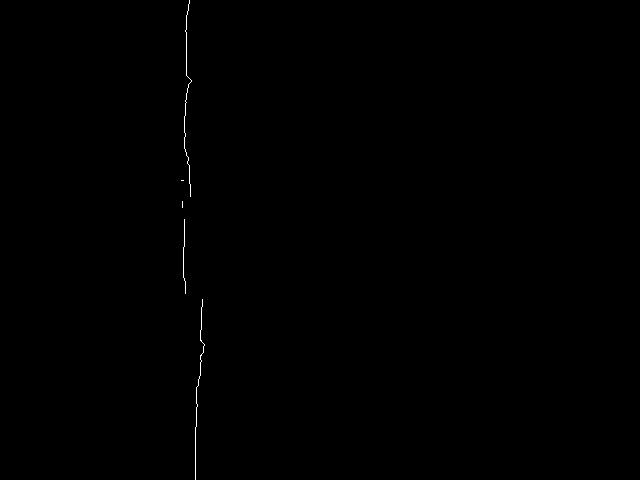
对比图
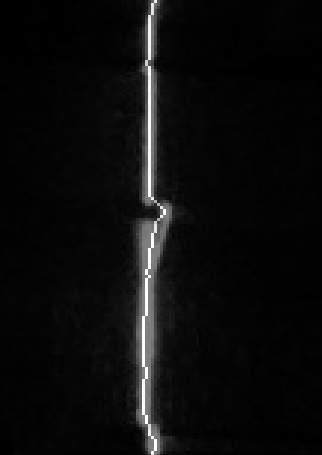
对规则曲线的效果比较好
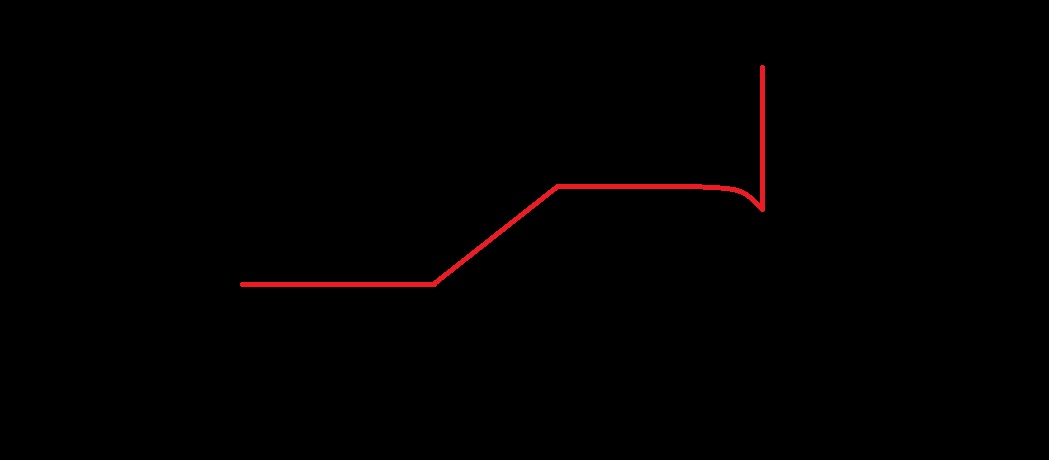
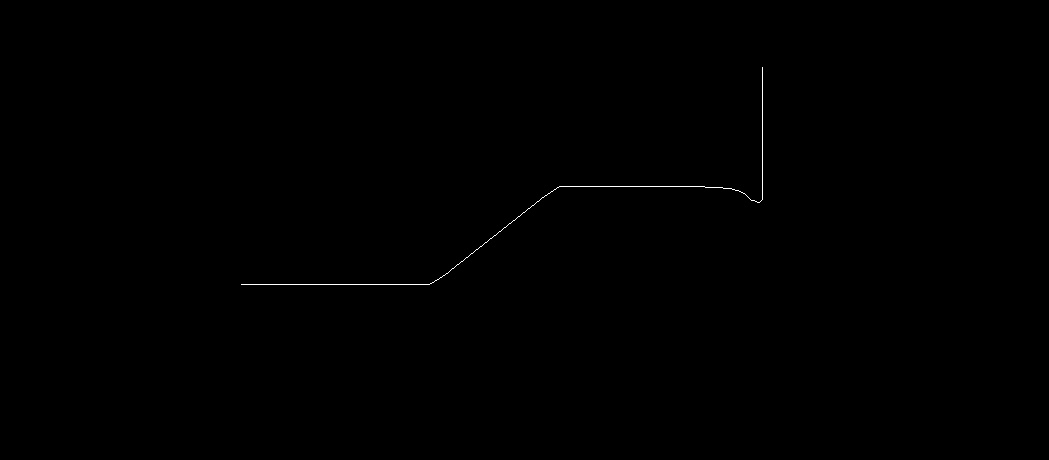
但是圆的效果不太好,有待改进
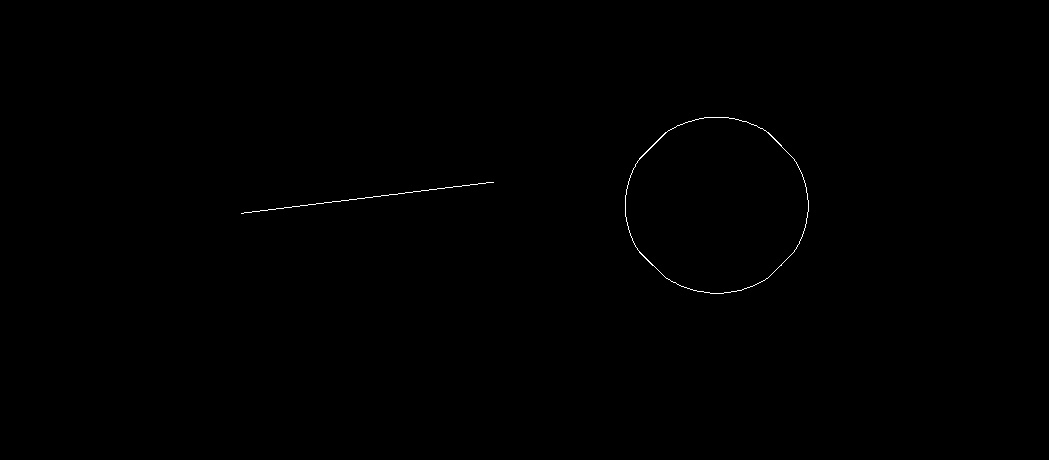
附上代码,测试了一天,终于弄完了,啊哈哈哈!然而后面还有更艰苦的路要走。加油!!!
 //四周细化算法

 void Refine(Mat& image)

 {

     int p[];

     int top=, down=, right=, left=;

     vector<Point> del;

     int grayvalue = ;

     int height = image.rows;   //获取图像高度

     int width = image.cols;       //获取图像宽度

     Mat *im = reinterpret_cast<Mat*>((void*)&image);    //获取像素点信息

     //上下收缩

     for (int i = ; i < height-; i++)

     {

         for (int j = ; j < width-; j++)

         {

             grayvalue = Get_gray(im, j, i);  //获取指定点灰度值

             if (grayvalue != )   //判断中心点是否为前景

             {

                 p[] = (Get_gray(im, j + , i) == ) ?  : ;

                 p[] = (Get_gray(im, j + , i - ) == ) ?  : ;

                 p[] = (Get_gray(im, j, i - ) == ) ?  : ;

                 p[] = (Get_gray(im, j - , i - ) == ) ?  : ;

                 p[] = (Get_gray(im, j - , i) == ) ?  : ;

                 p[] = (Get_gray(im, j - , i + ) == ) ?  : ;

                 p[] = (Get_gray(im, j, i + ) == ) ?  : ;

                 p[] = (Get_gray(im, j + , i + ) == ) ?  : ;

                 if (i < height - )

                     down = (Get_gray(im, j, i + ) == ) ?  : ;

                 else

                     down = ;

                 //  横向直线

                 if (p[] && (p[] || p[] || p[] || p[]) && !(p[] || p[]) && p[] ==  && down)

                 {

                     del.push_back(Point(j, i));

                 }

                 if (p[] && (p[] || p[] || p[] || p[]) && !( p[] || p[]) && p[] == )

                 {

                     del.push_back(Point(j, i));

                 }

             }

         }

     }

     for (int i = ; i < height - ; i++)

     {

         grayvalue = Get_gray(im, , i);

         if (grayvalue != )

         {

             if ( Get_gray(im, , i - ) && Get_gray(im, , i - ) && Get_gray(im, , i + )== && Get_gray(im, , i)==) //上2,上1,右上1,下1=0,右1=0

             {

                 del.push_back(Point(, i));

             }

             if (Get_gray(im, , i - ) ==  && Get_gray(im, , i + ) && Get_gray(im, , i) ==  && Get_gray(im, , i+))//上1=0,下1,右下1,右1=0,下2

             {

                 del.push_back(Point(, i));

             }

         }

         if (grayvalue != )

         {

             if (Get_gray(im, width - , i - ) && Get_gray(im, width - , i - ) && Get_gray(im, width - , i + ) ==  && Get_gray(im, width - , i) == ) //上2,上1,左上1,下1=0,左1=0

             {

                 del.push_back(Point(width - , i));

             }

             if (Get_gray(im, width - , i - ) ==  && Get_gray(im, width - , i + ) && Get_gray(im, width - , i) ==  && Get_gray(im, width - , i + ))//上1=0,下1,左下1,左1=0,下2

             {

                 del.push_back(Point(width - , i));

             }

         }

     }

     for (int i = ; i < del.size();i++)

     {

         uchar* data = image.ptr<uchar>(del[i].y);

         data[del[i].x]=;

     }

     //左右收缩

     for (int i = ; i < height - ; i++)

     {

         for (int j = ; j < width - ; j++)

         {

             grayvalue = Get_gray(im, j, i);  //获取指定点灰度值

             if (grayvalue != )   //判断中心点是否为前景

             {

                 p[] = (Get_gray(im, j + , i) == ) ?  : ;

                 p[] = (Get_gray(im, j + , i - ) == ) ?  : ;

                 p[] = (Get_gray(im, j, i - ) == ) ?  : ;

                 p[] = (Get_gray(im, j - , i - ) == ) ?  : ;

                 p[] = (Get_gray(im, j - , i) == ) ?  : ;

                 p[] = (Get_gray(im, j - , i + ) == ) ?  : ;

                 p[] = (Get_gray(im, j, i + ) == ) ?  : ;

                 p[] = (Get_gray(im, j + , i + ) == ) ?  : ;

                 if (j < width - )

                     right = (Get_gray(im, j + , i) == ) ?  : ;

                 else

                     right = ;

                 //竖直线

                 if (p[] && (p[] || p[] || p[] || p[]) && !(p[] || p[]) && p[] ==  && right)

                 {

                     del.push_back(Point(j, i));

                 }

                 if (p[] && (p[] || p[] || p[] || p[]) && !(p[] || p[]) && p[] == )

                 {

                     del.push_back(Point(j, i));

                 }

             }

         }

     }

     for (int j = ; j < width - ; j++)

     {

         grayvalue = Get_gray(im, j, );

         if (grayvalue != )

         {

             if (Get_gray(im, j - , ) ==  && Get_gray(im, j + , ) && Get_gray(im, j + , ) && Get_gray(im, j, ) ==  && Get_gray(im, j+, )) //左1=0,右1,右2,下1=0,右下1

             {

                 del.push_back(Point(j, ));

             }

             if (Get_gray(im, j - , ) && Get_gray(im, j+, )== && Get_gray(im, j, ) ==  && Get_gray(im, j-, ))//左1,右1=0,下1=0,左下1

             {

                 del.push_back(Point(j, ));

             }

         }

     }

     for (int j = ; j < width - ; j++)

     {

         grayvalue = Get_gray(im, j, height-);

         if (grayvalue != )

         {

             if (Get_gray(im, j - , height - ) ==  && Get_gray(im, j + , height - ) && Get_gray(im, j + , height - ) && Get_gray(im, j, height - ) ==  && Get_gray(im, j + , height - )) //左1=0,右1,右2,下1=0,右下1

             {

                 del.push_back(Point(j, height - ));

             }

             if (Get_gray(im, j - , height - ) && Get_gray(im, j + , height - ) ==  && Get_gray(im, j, height - ) ==  && Get_gray(im, j - , height - ))//左1,右1=0,下1=0,左下1

             {

                 del.push_back(Point(j, height - ));

             }

         }

     }

     for (int i = ; i < del.size(); i++)

     {

         uchar* data = image.ptr<uchar>(del[i].y);

         data[del[i].x] = ;

     }

 }
c++opencv中线条细化算法的更多相关文章
- OpenCV学习(22) opencv中使用kmeans算法
kmeans算法的原理参考:http://www.cnblogs.com/mikewolf2002/p/3368118.html 下面学习一下opencv中kmeans函数的使用. 首先我们 ...
- OpenCV学习(18) 细化算法(6)
本章我们在学习一下基于索引表的细化算法. 假设要处理的图像为二值图,前景值为1,背景值为0. 索引表细化算法使用下面的8邻域表示法: 一个像素的8邻域,我们可以用8位二进制表示,比如下面的8邻域,表示 ...
- OpenCV学习(17) 细化算法(5)
本章我们看下Pavlidis细化算法,参考资料http://www.imageprocessingplace.com/downloads_V3/root_downloads/tutorials/con ...
- OpenCV学习(16) 细化算法(4)
本章我们学习Rosenfeld细化算法,参考资料:http://yunpan.cn/QGRjHbkLBzCrn 在开始学习算法之前,我们先看下连通分量,以及4连通性,8连通性的概念: http://w ...
- OpenCV学习(14) 细化算法(2)
前面一篇教程中,我们实现了Zhang的快速并行细化算法,从算法原理上,我们可以知道,算法是基于像素8邻域的形状来决定是否删除当前像素.还有很多与此算法相似的细化算法,只是判断的条件不一样. ...
- OpenCV学习(13) 细化算法(1)
程序编码参考经典的细化或者骨架算法文章: T. Y. Zhang and C. Y. Suen, "A fast parallel algorithm for thinning digita ...
- OpenCV中的SURF算法介绍
SURF:speed up robust feature,翻译为快速鲁棒特征.首先就其中涉及到的特征点和描述符做一些简单的介绍: 特征点和描述符 特征点分为两类:狭义特征点和广义特征点.狭义特征点的位 ...
- OpenCV学习(35) OpenCV中的PCA算法
PCA算法的基本原理可以参考:http://www.cnblogs.com/mikewolf2002/p/3429711.html 对一副宽p.高q的二维灰度图,要完整表示该图像,需要m = ...
- OpenCV学习(15) 细化算法(3)
本章我们学习一下Hilditch算法的基本原理,从网上找资料的时候,竟然发现两个有很大差别的算法描述,而且都叫Hilditch算法.不知道那一个才是正宗的,两个算法实现的效果接近,第一种算 ...
随机推荐
- SWT界面刷新
参考文章: https://segmentfault.com/q/1010000002956350 在UI线程sleep等待,是不会刷新界面的. outPrint.setText("其他 ...
- Web前端接入人机识别验证码---腾讯防水墙
Web前端接入 1. 准备AppID 验证码接入需要先在管理后台中注册获取APPID和APPSECRET,注册步骤请参考 快速开始 2. 快速接入步骤 1.在Head的标签内最后加入以下代码引入验证J ...
- 最简单的freemarker用法实例
1.下载freemarker-2.3.19.jar到web项目的lib下. 2.新建freemarker引擎协助类 package com.bxsurvey.sys.process.uti ...
- java springmvc 前端 跨域问题
有个朋友在写扇贝插件的时候遇到了跨域问题.于是我对解决跨域问题的方式进行了一番探讨. 问题 API:查询单词URL: https://api.shanbay.com/bdc/search/?word= ...
- python调用shell命令
1.subprocess介绍 官方推荐 subprocess模块,os.system(command) 这个废弃了 亲测 os.system 使用sed需要进行字符转义,非常麻烦 python3 su ...
- easyui datagrid设置一开始不加载数据
解决办法就是:一开始的url属性设置为空,例如: <table id="dg" title="用户管理" class="easyui-datag ...
- Docker 镜像小结---操作指令介绍(七)
目录 一.搜索镜像 二.下载镜像 三.查看本地镜像 四.显示镜像构建历史 五.删除镜像 六.镜像创建 七.上传镜像 八.给镜像打 tag 九.存出和载入镜像 一.搜索镜像 很多情况下我们可能需要下载某 ...
- (转)华为 安卓手机在MAC系统下 ADB 识别
使用MACOS发现在Android开发环境完整的情况下,接入小米,SAMSUNG,HTC,ZTE等手机都可以自动识别,如果暂时不能识别,只需要在 adb_usb.ini 中设置之后也可以识别,并可以在 ...
- Go之gob包的使用
gob包("encoding/gob")管理gob流——在encoder(编码器,也就是发送器)和decoder(解码器,也就是接受器)之间交换的字节流数据(gob 就是 go b ...
- selenium3.0不兼容火狐的解决方案
当直接调用火狐出现不兼容错误时,如何解决? 详看Message中提示:Expected browser binary location,but unable to find binary in def ...