
java调用http接口的几种方式总结
本文参考: https://blog.csdn.net/fightingXia/article/details/71775516
https://www.cnblogs.com/jeffen/p/6937788.html
随着网络上java应用越来越多,场景越来越复杂,所以应用之间经常通过HTTP接口来访问资源
首先了解了URL的最常用的两种请求方式:第一种GET,第二种POST
GET:get请求可以获取页面,也可以把参数放到URL后面以?分割传递数据,参数之间以&关联,例如 http://110.32.44.11:8086/sp-test/usertest/1.0/query?mobile=15334567890&name=zhansan
POST:post请求的参数是放在HTTP请求的正文里,请求的参数被封装起来通过流的方式传递
1.HttpURLConnection
1.1简介:
在java.net包中,已经提供访问HTTP协议的基本功能类:HttpURLConnection,可以向其他系统发送GET,POST访问请求
1.2 GET方式调用
 1     private void httpURLGETCase() {

 2         String methodUrl = "http://110.32.44.11:8086/sp-test/usertest/1.0/query";

 3         HttpURLConnection connection = null;

 4         BufferedReader reader = null;

 5         String line = null;

 6         try {

 7             URL url = new URL(methodUrl + "?mobile=15334567890&name=zhansan");

 8             connection = (HttpURLConnection) url.openConnection();// 根据URL生成HttpURLConnection

 9             connection.setRequestMethod("GET");// 默认GET请求

10             connection.connect();// 建立TCP连接

11             if (connection.getResponseCode() == HttpURLConnection.HTTP_OK) {

12                 reader = new BufferedReader(new InputStreamReader(connection.getInputStream(), "UTF-8"));// 发送http请求

13                 StringBuilder result = new StringBuilder();

14                 // 循环读取流

15                 while ((line = reader.readLine()) != null) {

16                     result.append(line).append(System.getProperty("line.separator"));// "\n"

17                 }

18                 System.out.println(result.toString());

19             }

20         } catch (IOException e) {

21             e.printStackTrace();

22         } finally {

23             try {

24                 reader.close();

25             } catch (IOException e) {

26                 e.printStackTrace();

27             }

28             connection.disconnect();

29         }

30     }
1.3 POST方式调用
1.3.1 带授权的传递json格式参数调用
 1     private static void httpURLPOSTCase() {

 2         String methodUrl = "http://xxx.xxx.xx.xx:8280/xx/adviserxx/1.0 ";

 3         HttpURLConnection connection = null;

 4         OutputStream dataout = null;

 5         BufferedReader reader = null;

 6         String line = null;

 7         try {

 8             URL url = new URL(methodUrl);

 9             connection = (HttpURLConnection) url.openConnection();// 根据URL生成HttpURLConnection

10             connection.setDoOutput(true);// 设置是否向connection输出,因为这个是post请求,参数要放在http正文内,因此需要设为true,默认情况下是false

11             connection.setDoInput(true); // 设置是否从connection读入,默认情况下是true;

12             connection.setRequestMethod("POST");// 设置请求方式为post,默认GET请求

13             connection.setUseCaches(false);// post请求不能使用缓存设为false

14             connection.setConnectTimeout(3000);// 连接主机的超时时间

15             connection.setReadTimeout(3000);// 从主机读取数据的超时时间

16             connection.setInstanceFollowRedirects(true);// 设置该HttpURLConnection实例是否自动执行重定向

17             connection.setRequestProperty("connection", "Keep-Alive");// 连接复用

18             connection.setRequestProperty("charset", "utf-8");

19

20             connection.setRequestProperty("Content-Type", "application/json");

21             connection.setRequestProperty("Authorization", "Bearer 66cb225f1c3ff0ddfdae31rae2b57488aadfb8b5e7");

22             connection.connect();// 建立TCP连接,getOutputStream会隐含的进行connect,所以此处可以不要

23

24             dataout = new DataOutputStream(connection.getOutputStream());// 创建输入输出流,用于往连接里面输出携带的参数

25             String body = "[{\"orderNo\":\"44921902\",\"adviser\":\"张怡筠\"}]";

26             dataout.write(body.getBytes());

27             dataout.flush();

28             dataout.close();

29

30             if (connection.getResponseCode() == HttpURLConnection.HTTP_OK) {

31                 reader = new BufferedReader(new InputStreamReader(connection.getInputStream(), "UTF-8"));// 发送http请求

32                 StringBuilder result = new StringBuilder();

33                 // 循环读取流

34                 while ((line = reader.readLine()) != null) {

35                     result.append(line).append(System.getProperty("line.separator"));//

36                 }

37                 System.out.println(result.toString());

38             }

39         } catch (IOException e) {

40             e.printStackTrace();

41         } finally {

42             try {

43                 reader.close();

44             } catch (IOException e) {

45                 e.printStackTrace();

46             }

47             connection.disconnect();

48         }

49     }
1.3.2 传递键值对的参数
            URL url = new URL(getUrl);

            HttpURLConnection connection = (HttpURLConnection) url.openConnection();

            connection.setRequestMethod("POST");

            connection.setDoOutput(true);

            connection.setDoInput(true);

            connection.setUseCaches(false);

            connection.connect();

            String body = "userName=zhangsan&password=123456";

            BufferedWriter writer = new BufferedWriter(new OutputStreamWriter(connection.getOutputStream(), "UTF-8"));

            writer.write(body);

            writer.close();
1.3.3 在post请求上传文件
try {

    URL url = new URL(getUrl);

    HttpURLConnection connection = (HttpURLConnection) url.openConnection();

    connection.setRequestMethod("POST");

    connection.setDoOutput(true);

    connection.setDoInput(true);

    connection.setUseCaches(false);

    connection.setRequestProperty("Content-Type", "file/*");//设置数据类型

    connection.connect();

    OutputStream outputStream = connection.getOutputStream();

    FileInputStream fileInputStream = new FileInputStream("file");//把文件封装成一个流

    int length = -1;

    byte[] bytes = new byte[1024];

    while ((length = fileInputStream.read(bytes)) != -1){

        outputStream.write(bytes,0,length);//写的具体操作

    }

    fileInputStream.close();

    outputStream.close();

    int responseCode = connection.getResponseCode();

    if(responseCode == HttpURLConnection.HTTP_OK){

        InputStream inputStream = connection.getInputStream();

        String result = is2String(inputStream);//将流转换为字符串。

        Log.d("kwwl","result============="+result);

    }

} catch (Exception e) {

    e.printStackTrace();

}
1.3.4 同时上传参数和文件
在实际应用时,上传文件的同时也常常需要上传键值对参数。比如在微信中发朋友圈时,不仅有图片,还有有文字。此时就需要同时上传参数和文件。
在httpURLconnection中并没有提供直接上传参数和文件的API,需要我们自己去探索。我们知道在Web页面上传参数和文件很简单,只需要在form标签写上contentype=”multipart/form-data”即可,剩余工作便都交给浏览器去完成数据收集并发送Http请求。但是如果没有页面的话要怎么上传文件呢?
由于脱离了浏览器的环境,我们就要自己去完成数据的封装并发送。首先我们来看web页面上传参数和文件是什么样子的?
我们写一个web表单,上传两个键值对参数和一个文件。使用抓包工具抓取的数据结果如下:
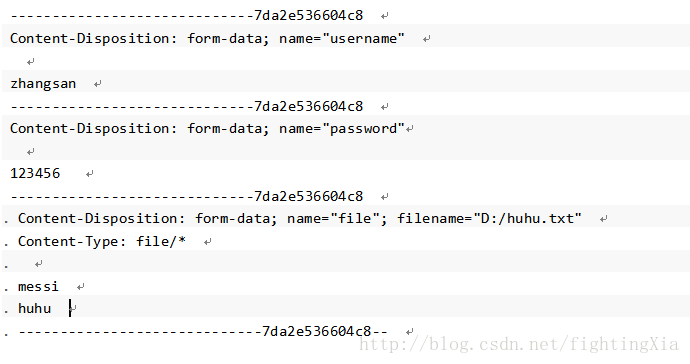
经过分析可知,上传到服务器的数据除了键值对数据和文件数据外,还有其他字符串,使用这些这些字符串来拼接一定的格式。
那么我们只要模拟这个数据,并写入到Http请求中便能实现同时传递参数和文件。
代码如下:
try {

    String BOUNDARY = java.util.UUID.randomUUID().toString();

    String TWO_HYPHENS = "--";

    String LINE_END = "\r\n";

    URL url = new URL(URLContant.CHAT_ROOM_SUBJECT_IMAGE);

    HttpURLConnection connection = (HttpURLConnection) url.openConnection();

    connection.setRequestMethod("POST");

    connection.setDoOutput(true);

    connection.setDoInput(true);

    connection.setUseCaches(false);

    //设置请求头

    connection.setRequestProperty("Connection", "Keep-Alive");

    connection.setRequestProperty("Charset", "UTF-8");

    connection.setRequestProperty("Content-Type","multipart/form-data; BOUNDARY=" + BOUNDARY);

    connection.setRequestProperty("Authorization","Bearer "+UserInfoConfigure.authToken);

    connection.connect();

    DataOutputStream outputStream = new DataOutputStream(connection.getOutputStream());

    StringBuffer strBufparam = new StringBuffer();

    //封装键值对数据一

    strBufparam.append(TWO_HYPHENS);

    strBufparam.append(BOUNDARY);

    strBufparam.append(LINE_END);

    strBufparam.append("Content-Disposition: form-data; name=\"" + "groupId" + "\"");

    strBufparam.append(LINE_END);

    strBufparam.append("Content-Type: " + "text/plain" );

    strBufparam.append(LINE_END);

    strBufparam.append("Content-Lenght: "+(""+groupId).length());

    strBufparam.append(LINE_END);

    strBufparam.append(LINE_END);

    strBufparam.append(""+groupId);

    strBufparam.append(LINE_END);

    //封装键值对数据二

    strBufparam.append(TWO_HYPHENS);

    strBufparam.append(BOUNDARY);

    strBufparam.append(LINE_END);

    strBufparam.append("Content-Disposition: form-data; name=\"" + "title" + "\"");

    strBufparam.append(LINE_END);

    strBufparam.append("Content-Type: " + "text/plain" );

    strBufparam.append(LINE_END);

    strBufparam.append("Content-Lenght: "+"kwwl".length());

    strBufparam.append(LINE_END);

    strBufparam.append(LINE_END);

    strBufparam.append("kwwl");

    strBufparam.append(LINE_END);

    //拼接完成后,一块写入

    outputStream.write(strBufparam.toString().getBytes());

    //拼接文件的参数

    StringBuffer strBufFile = new StringBuffer();

    strBufFile.append(LINE_END);

    strBufFile.append(TWO_HYPHENS);

    strBufFile.append(BOUNDARY);

    strBufFile.append(LINE_END);

    strBufFile.append("Content-Disposition: form-data; name=\"" + "image" + "\"; filename=\"" + file.getName() + "\"");

    strBufFile.append(LINE_END);

    strBufFile.append("Content-Type: " + "image/*" );

    strBufFile.append(LINE_END);

    strBufFile.append("Content-Lenght: "+file.length());

    strBufFile.append(LINE_END);

    strBufFile.append(LINE_END);

    outputStream.write(strBufFile.toString().getBytes());

    //写入文件

    FileInputStream fileInputStream = new FileInputStream(file);

    byte[] buffer = new byte[1024*2];

    int length = -1;

    while ((length = fileInputStream.read(buffer)) != -1){

        outputStream.write(buffer,0,length);

    }

    outputStream.flush();

    fileInputStream.close();

    //写入标记结束位

    byte[] endData = (LINE_END + TWO_HYPHENS + BOUNDARY + TWO_HYPHENS + LINE_END).getBytes();//写结束标记位

    outputStream.write(endData);

    outputStream.flush();

    //得到响应

    int responseCode = connection.getResponseCode();

    if(responseCode == HttpURLConnection.HTTP_OK){

        InputStream inputStream = connection.getInputStream();

        String result = is2String(inputStream);//将流转换为字符串。

        Log.d("kwwl","result============="+result);

    }

} catch (Exception e) {

    e.printStackTrace();

}
demo2
    private static String imageIdentify(String card,String methodUrl, byte[] fileBytes, String file_id) {

        HttpURLConnection connection = null;

        OutputStream dataout = null;

        BufferedReader bf = null;

        String BOUNDARY = "----WebKitFormBoundary2NYA7hQkjRHg5WJk";

        String END_DATA = ("\r\n--" + BOUNDARY + "--\r\n");

        String BOUNDARY_PREFIX = "--";

        String NEW_LINE = "\r\n";

        try {

            URL url = new URL(methodUrl+"?card="+card);

            connection = (HttpURLConnection) url.openConnection();

            connection.setConnectTimeout(3000);

            connection.setReadTimeout(3000);

            connection.setDoOutput(true);// 设置连接输出流为true,默认false

            connection.setDoInput(true);// 设置连接输入流为true

            connection.setRequestMethod("POST");// 设置请求方式为post

            connection.setUseCaches(false);// post请求缓存设为false

            connection.setInstanceFollowRedirects(true);// 设置该HttpURLConnection实例是否自动执行重定向

            connection.setRequestProperty("connection", "Keep-Alive");// 连接复用

            connection.setRequestProperty("charset", "utf-8");

            connection.setRequestProperty("Content-Type", "multipart/form-data;boundary=" + BOUNDARY);

            connection.connect();// 建立连接

            dataout = new DataOutputStream(connection.getOutputStream());// 创建输入输出流,用于往连接里面输出携带的参数

            StringBuilder sb2 = new StringBuilder();

            sb2.append(BOUNDARY_PREFIX);

            sb2.append(BOUNDARY);

            sb2.append(NEW_LINE);

            sb2.append("Content-Disposition:form-data; name=\"type\"");

            // 参数头设置完成后需要2个换行,才是内容

            sb2.append(NEW_LINE);

            sb2.append(NEW_LINE);

            sb2.append("0");

            sb2.append(NEW_LINE);

            dataout.write(sb2.toString().getBytes());

            // 读取文件上传到服务器

            StringBuilder sb1 = new StringBuilder();

            sb1.append(BOUNDARY_PREFIX);

            sb1.append(BOUNDARY);

            sb1.append(NEW_LINE);

            sb1.append("Content-Disposition:form-data; name=\"file\";filename=\"" + file_id + "\"");//文件名必须带后缀

            sb1.append(NEW_LINE);

            sb1.append("Content-Type:application/octet-stream");

            // 参数头设置完成后需要2个换行,才是内容

            sb1.append(NEW_LINE);

            sb1.append(NEW_LINE);

            dataout.write(sb1.toString().getBytes());

            dataout.write(fileBytes);// 写文件字节

            dataout.write(NEW_LINE.getBytes());

            dataout.write(END_DATA.getBytes());

            dataout.flush();

            dataout.close();

            bf = new BufferedReader(new InputStreamReader(connection.getInputStream(), "UTF-8"));// 连接发起请求,处理服务器响应

            String line;

            StringBuilder result = new StringBuilder(); // 用来存储响应数据

            // 循环读取流,若不到结尾处

            while ((line = bf.readLine()) != null) {

                result.append(line).append(System.getProperty("line.separator"));

            }

            bf.close();

            connection.disconnect(); // 销毁连接

            return result.toString();

        } catch (Exception e) {

            LOGGER.error(e.getMessage(), e);

        }

        return "";

    }
1.3.4
从服务器下载文件是比较简单的操作,只要得到输入流,就可以从流中读出数据。使用示例如下:
try {

     String urlPath = "https://www.baidu.com/";

      URL url = new URL(urlPath);

      HttpURLConnection connection = (HttpURLConnection) url.openConnection();

      connection.setRequestMethod("GET");

      connection.connect();

      int responseCode = connection.getResponseCode();

      if(responseCode == HttpURLConnection.HTTP_OK){

          InputStream inputStream = connection.getInputStream();

          File dir = new File("fileDir");

          if (!dir.exists()){

              dir.mkdirs();

          }

          File file = new File(dir, "fileName");//根据目录和文件名得到file对象

          FileOutputStream fos = new FileOutputStream(file);

          byte[] buf = new byte[1024*8];

          int len = -1;

          while ((len = inputStream.read(buf)) != -1){

              fos.write(buf, 0, len);

          }

          fos.flush();

      }

  } catch (Exception e) {

      e.printStackTrace();

  }
2.HttpClient
2.1简介:
2.2 GET方式调用
2.3 POST方式调用
3.Spring RestTemplate
3.1简介:
3.2 GET方式调用
3.3 POST方式调用
java调用http接口的几种方式总结的更多相关文章
- Python调用API接口的几种方式 数据库 脚本
Python调用API接口的几种方式 2018-01-08 gaoeb97nd... 转自 one_day_day... 修改 微信分享: 相信做过自动化运维的同学都用过API接口来完成某些动作.AP ...
- Python调用API接口的几种方式
Python调用API接口的几种方式 相信做过自动化运维的同学都用过API接口来完成某些动作.API是一套成熟系统所必需的接口,可以被其他系统或脚本来调用,这也是自动化运维的必修课. 本文主要介绍py ...
- C#动态调用WCF接口,两种方式任你选。
写在前面 接触WCF还是它在最初诞生之处,一个分布式应用的巨作. 从开始接触到现在断断续续,真正使用的项目少之又少,更谈不上深入WCF内部实现机制和原理去研究,最近自己做一个项目时用到了WCF. 从这 ...
- 动态调用WebService接口的几种方式
一.什么是WebService? 这里就不再赘述了,想要了解的====>传送门 二.为什么要动态调用WebService接口? 一般在C#开发中调用webService服务中的接口都是通过引用过 ...
- Java 调用Restful API接口的几种方式--HTTPS
摘要:最近有一个需求,为客户提供一些Restful API 接口,QA使用postman进行测试,但是postman的测试接口与java调用的相似但并不相同,于是想自己写一个程序去测试Restful ...
- Java异步调用转同步的5种方式
1.异步和同步的概念 同步调用:调用方在调用过程中,持续等待返回结果. 异步调用:调用方在调用过程中,不直接等待返回结果,而是执行其他任务,结果返回形式通常为回调函数. 2 .异步转为同步的概率 需要 ...
- Java 调用http接口(基于OkHttp的Http工具类方法示例)
目录 Java 调用http接口(基于OkHttp的Http工具类方法示例) OkHttp3 MAVEN依赖 Http get操作示例 Http Post操作示例 Http 超时控制 工具类示例 Ja ...
- Java调用RestFul接口
使用Java调用RestFul接口,以POST请求为例,以下提供几种方法: 一.通过HttpURLConnection调用 1 public String postRequest(String url ...
- JAVA - 启动线程有哪几种方式
JAVA - 启动线程有哪几种方式 一.继承Thread类创建线程类 (1)定义Thread类的子类,并重写该类的run方法,该run方法的方法体就代表了线程要完成的任务.因此把run()方法称为执行 ...
随机推荐
- 【Linux】Linux下如何分区及如何格式化
环境:CentOS7.1 磁盘大小是1.8T 将磁盘/dev/sda分一个分区,分区类型为xfs fdisk /dev/sda n --创建新分区 p --创建分区类型为主分区 1 --主分 ...
- logging模块简单用法
logging模块功能比较多,但一般情况下使用其简单功能就已经足够了. 最简单的用法如下: import logging logging.baiscConfig(level=logging.DEBUG ...
- wmic process进程管理
process 进程管理工具 示例:1.列举当前的进程.进程路径.命令行.进程ID.父进程ID.线程数,内存使用::wmic process get name,executablepath,co ...
- SpringBoot快速掌握(1):核心技术
SpringBoot快速掌握(1):核心技术 SpringBoot快速掌握(1):核心技术 SpringBoot快速掌握(1):核心技术 SpringBoot快速掌握(1):核心技术 SpringBo ...
- mastercam2018安装教程
安装前先关闭杀毒软件和360卫士,注意安装路径不能有中文,安装包路径也不要有中文. [安装环境]:Win7/Win8/Win10 1.选中[Mastercam2018]压缩包,鼠标右击选择[解压到Ma ...
- Redis 实战 —— 04. Redis 数据结构常用命令简介
字符串 P39 Redis 的字符串是一个有字节组成的序列,可以存储以下 3 种类型的值:字节串(byte string).整数.浮点数. 在需要的时候, Redis 会将整数转换成浮点数.整数的取值 ...
- 干电池升压5V,功耗10uA
PW5100干电池升压5V芯片 输出电容: 所以为了减小输出的纹波,需要比较大的输出电容值.但是输出电容过大,就会使得系统的 反应时间过慢,成本也会增加.所以建议使用一个 22uF 的电容,或者两个 ...
- LOJ10019生日蛋糕
Mr.W 要制作一个体积为 N*π 的 M 层生日蛋糕,每层都是一个圆柱体. 设从下往上数第 i 蛋糕是半径为 R_i,高度为 H_i 的圆柱.当 i<M 时,要求 R_i>R_{i+1} ...
- Prometheus为你的SpringBoot应用保驾护航
前面我们介绍了Prometheus的作用和整体的架构,相信大家对Prometheus有了一定的了解. 具体可以查看这篇文章:https://mp.weixin.qq.com/s/QoAs0-AYy8k ...
- scala 时间,时间格式转换
scala 时间,时间格式转换 1.scala 时间格式转换(String.Long.Date) 1.1时间字符类型转Date类型 1.2Long类型转字符类型 1.3时间字符类型转Long类型 2. ...