
mybatis-plus快速入门并使用
mybatis-plus的初次使用总结
说明:官网自有黄金屋,深入学习看官网是必须的,废话不多说
环境:springboot、mysql
一、配置
pom
<!--不必多说。geter、setter-->

<dependency>

    <groupId>org.projectlombok</groupId>

    <artifactId>lombok</artifactId>

    <optional>true</optional>

</dependency>

<!--mp依赖-->

<dependency>

    <groupId>com.baomidou</groupId>

    <artifactId>mybatis-plus-boot-starter</artifactId>

    <version>3.4.0</version>

</dependency>

<!--mp的代码生成器-->

<dependency>

    <groupId>com.baomidou</groupId>

    <artifactId>mybatis-plus-generator</artifactId>

    <version>3.4.0</version>

</dependency>

<!--mp代码生成器使用模板-->

<dependency>

    <groupId>org.freemarker</groupId>

    <artifactId>freemarker</artifactId>

    <version>2.3.30</version>

</dependency>
yml配置数据库
#MP配置

#mapper的xml文件的扫描路径

mybatis-plus:

  mapper-locations: classpath:mapper/*Mapper.xml

  type-aliases-package: com.zs.demo.domain

  global-config:

    db-config:

      #配置逻辑删除字段为0是未删除

      logic-not-delete-value: 0

      #配置逻辑删除字段为1是删除

      logic-delete-value: 1

  #打印sql语句

  configuration:

    log-impl: org.apache.ibatis.logging.stdout.StdOutImpl
二、代码生成器
生成效果
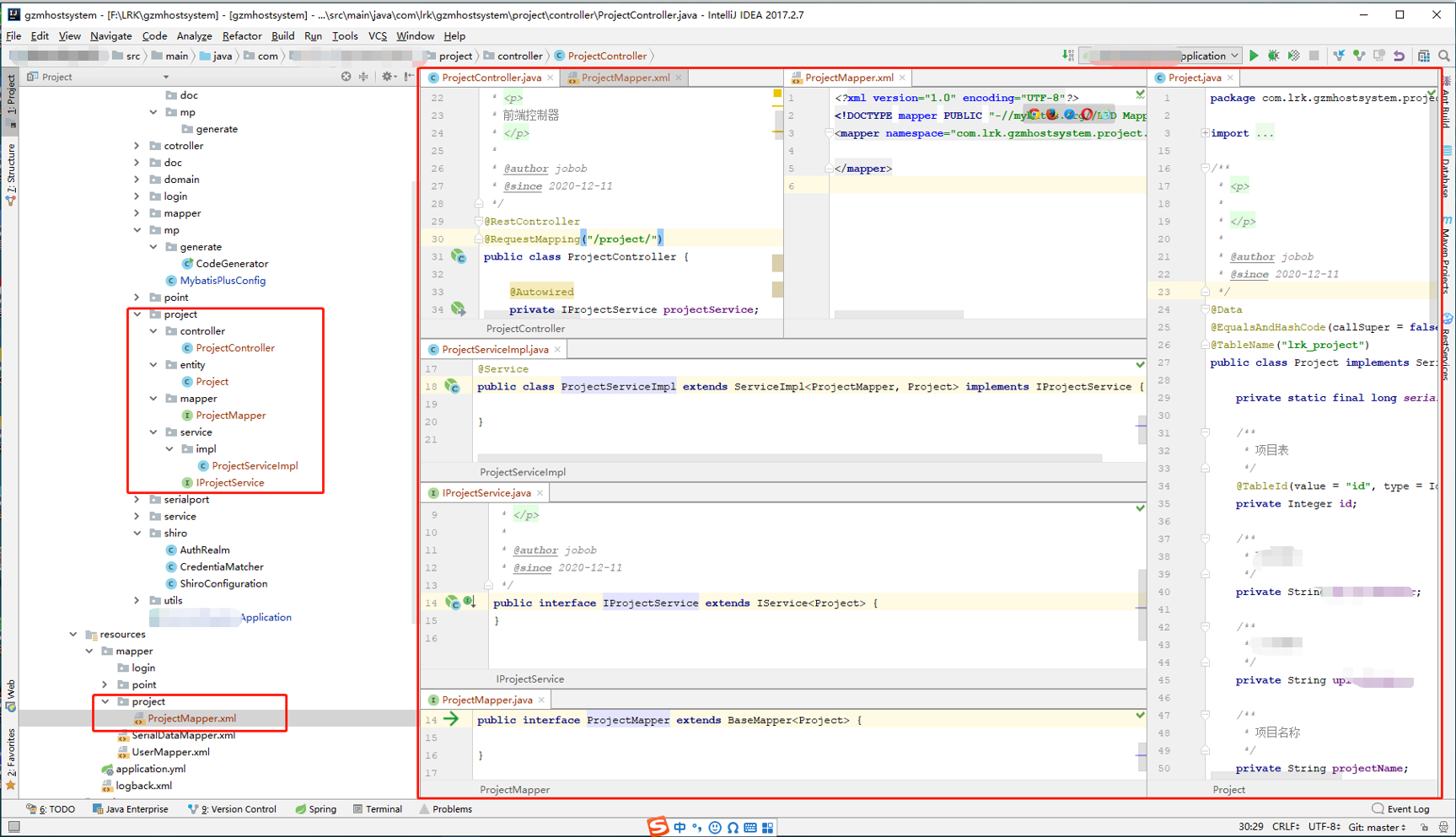
配置类,直接运行即可
import com.baomidou.mybatisplus.core.exceptions.MybatisPlusException;

import com.baomidou.mybatisplus.core.toolkit.StringPool;

import com.baomidou.mybatisplus.generator.AutoGenerator;

import com.baomidou.mybatisplus.generator.InjectionConfig;

import com.baomidou.mybatisplus.generator.config.*;

import com.baomidou.mybatisplus.generator.config.po.TableInfo;

import com.baomidou.mybatisplus.generator.config.rules.NamingStrategy;

import com.baomidou.mybatisplus.generator.engine.FreemarkerTemplateEngine;

import org.apache.commons.lang3.StringUtils;

import java.util.ArrayList;

import java.util.List;

import java.util.Scanner;

// 演示例子,执行 main 方法控制台输入模块表名回车自动生成对应项目目录中

public class CodeGenerator {

    /**

     * <p>

     * 读取控制台内容

     * </p>

     */

    public static String scanner(String tip) {

        Scanner scanner = new Scanner(System.in);

        StringBuilder help = new StringBuilder();

        help.append("请输入" + tip + ":");

        System.out.println(help.toString());

        if (scanner.hasNext()) {

            String ipt = scanner.next();

            if (StringUtils.isNotBlank(ipt)) {

                return ipt;

            }

        }

        throw new MybatisPlusException("请输入正确的" + tip + "!");

    }

    public static void main(String[] args) {

        // 代码生成器

        AutoGenerator mpg = new AutoGenerator();

        // 全局配置

        GlobalConfig gc = new GlobalConfig();

        String projectPath = System.getProperty("user.dir");

        gc.setOutputDir(projectPath + "/src/main/java");

        gc.setAuthor("jobob");

        gc.setOpen(false);

        // gc.setSwagger2(true); 实体属性 Swagger2 注解

        mpg.setGlobalConfig(gc);

        // 数据源配置

        DataSourceConfig dsc = new DataSourceConfig();

        dsc.setUrl("jdbc:mysql://localhost:3306/数据库名?useUnicode=true&characterEncoding=utf-8&useSSL=false&serverTimezone=Asia/Shanghai&allowMultiQueries=true");

        // dsc.setSchemaName("public");

        dsc.setDriverName("com.mysql.jdbc.Driver");

        dsc.setUsername("用户名");

        dsc.setPassword("密码");

        mpg.setDataSource(dsc);

        // 包配置=》生成的文件放在该路径路径

        PackageConfig pc = new PackageConfig();

        pc.setModuleName(scanner("模块名"));

        pc.setParent("com.lrk.gzmhostsystem");

        mpg.setPackageInfo(pc);

        // 自定义配置

        InjectionConfig cfg = new InjectionConfig() {

            @Override

            public void initMap() {

                // to do nothing

            }

        };

        // 如果模板引擎是 freemarker

        String templatePath = "/templates/mapper.xml.ftl";

        // 如果模板引擎是 velocity

        // String templatePath = "/templates/mapper.xml.vm";

        // 自定义输出配置

        List<FileOutConfig> focList = new ArrayList<>();

        // 自定义配置会被优先输出

        focList.add(new FileOutConfig(templatePath) {

            @Override

            public String outputFile(TableInfo tableInfo) {

                // 自定义输出文件名 , 如果你 Entity 设置了前后缀、此处注意 xml 的名称会跟着发生变化!!

                return projectPath + "/src/main/resources/mapper/" + pc.getModuleName()

                        + "/" + tableInfo.getEntityName() + "Mapper" + StringPool.DOT_XML;

            }

        });

        /*

        cfg.setFileCreate(new IFileCreate() {

            @Override

            public boolean isCreate(ConfigBuilder configBuilder, FileType fileType, String filePath) {

                // 判断自定义文件夹是否需要创建

                checkDir("调用默认方法创建的目录,自定义目录用");

                if (fileType == FileType.MAPPER) {

                    // 已经生成 mapper 文件判断存在,不想重新生成返回 false

                    return !new File(filePath).exists();

                }

                // 允许生成模板文件

                return true;

            }

        });

        */

        cfg.setFileOutConfigList(focList);

        mpg.setCfg(cfg);

        // 配置模板

        TemplateConfig templateConfig = new TemplateConfig();

        // 配置自定义输出模板

        //指定自定义模板路径,注意不要带上.ftl/.vm, 会根据使用的模板引擎自动识别

        // templateConfig.setEntity("templates/entity2.java");

        // templateConfig.setService();

        // templateConfig.setController();

        templateConfig.setXml(null);

        mpg.setTemplate(templateConfig);

        // 策略配置

        StrategyConfig strategy = new StrategyConfig();

        strategy.setNaming(NamingStrategy.underline_to_camel);

        strategy.setColumnNaming(NamingStrategy.underline_to_camel);

//        strategy.setSuperEntityClass("你自己的父类实体,没有就不用设置!");

        strategy.setEntityLombokModel(true);

        strategy.setRestControllerStyle(true);

        // 公共父类

//        strategy.setSuperControllerClass("你自己的父类控制器,没有就不用设置!");

        // 写于父类中的公共字段

//        strategy.setSuperEntityColumns("id");

        strategy.setInclude(scanner("表名,多个英文逗号分割").split(","));

        strategy.setControllerMappingHyphenStyle(true);

//        strategy.setTablePrefix(pc.getModuleName() + "_");

//      忽略数据库表前缀

        strategy.setTablePrefix("前缀_");

        mpg.setStrategy(strategy);

        mpg.setTemplateEngine(new FreemarkerTemplateEngine());

        mpg.execute();

    }

}
三、CRUD
 @Autowired

    private IProjectService projectService;

    //查留在下边分页位置

    //新增或修改

     boolean flag = projectService.saveOrUpdate(record);

    //boolean flag = projectService.saveOrUpdateBatch(Arrays.asList(record)); 批量操作

    //删除

     boolean flag = projectService.removeById(record.getId());
四、分页插件
官网案例
//Spring boot方式

@Configuration

@MapperScan("com.baomidou.cloud.service.*.mapper*")

public class MybatisPlusConfig {

    @Bean

    public PaginationInterceptor paginationInterceptor() {

        PaginationInterceptor paginationInterceptor = new PaginationInterceptor();

        // 设置请求的页面大于最大页后操作, true调回到首页,false 继续请求  默认false

        // paginationInterceptor.setOverflow(false);

        // 设置最大单页限制数量,默认 500 条,-1 不受限制

        // paginationInterceptor.setLimit(500);

        // 开启 count 的 join 优化,只针对部分 left join

        paginationInterceptor.setCountSqlParser(new JsqlParserCountOptimize(true));

        return paginationInterceptor;

    }

}
然后发现发现并不好使,PaginationInterceptor 不再被支持。所以改为如下
但是setUseDeprecatedExecutor也只是临时支持,下一版本会去掉。。。那就再说吧,反正会多表查,不一定会大面积使用mp分页插件
import com.baomidou.mybatisplus.annotation.DbType;

import com.baomidou.mybatisplus.autoconfigure.ConfigurationCustomizer;

import com.baomidou.mybatisplus.extension.plugins.MybatisPlusInterceptor;

import com.baomidou.mybatisplus.extension.plugins.inner.PaginationInnerInterceptor;

import org.mybatis.spring.annotation.MapperScan;

import org.springframework.context.annotation.Bean;

import org.springframework.context.annotation.Configuration;

//Spring boot方式

@Configuration

@MapperScan("com.lrk.gzmhostsystem.*.mapper*")

public class MybatisPlusConfig {

   /*  旧版本配置

   @Bean

   public PaginationInterceptor paginationInterceptor(){

      return new PaginationInterceptor();

   }*/

    /**

     * 新的分页插件,一缓和二缓遵循mybatis的规则,需要设置 MybatisConfiguration#useDeprecatedExecutor = false 避免缓存出现问题

     */

    @Bean

    public MybatisPlusInterceptor mybatisPlusInterceptor() {

        MybatisPlusInterceptor interceptor = new MybatisPlusInterceptor();

        interceptor.addInnerInterceptor(new PaginationInnerInterceptor(DbType.MYSQL));

        return interceptor;

    }

    @Bean

    public ConfigurationCustomizer configurationCustomizer() {

        return configuration -> configuration.setUseDeprecatedExecutor(false);

    }

}
使用分页插件
  QueryWrapper<Project> queryWrapper = new QueryWrapper<>();

            queryWrapper.like(StringUtils.isNotEmpty(record.getProjectNumber()),"project_number", record.getProjectNumber());

            queryWrapper.orderByDesc("id");

            //分页查询

            Page<Project> page = new Page<>(pageNumber, pageSize);

            IPage<Project> iPage = projectService.page(page, queryWrapper);

           System.out.println("当前页码:" + iPage.getCurrent());

            System.out.println("每页显示数量:" + iPage.getSize());

            System.out.println("总记录数:" + iPage.getTotal());

            System.out.println("总页数:" + iPage.getPages());

            List<Project> employeeList = iPage.getRecords();//员工数据集合

            for (Project employee : employeeList) {

                System.out.println(employee);

            }
五、逻辑删除
步骤1: 配置application.yml
mybatis-plus:

  global-config:

    db-config:

      logic-delete-field: flag  # 全局逻辑删除的实体字段名(since 3.3.0,配置后可以忽略不配置步骤2)

      logic-delete-value: 1 # 逻辑已删除值(默认为 1)

      logic-not-delete-value: 0 # 逻辑未删除值(默认为 0)
步骤2: 实体类字段上加上@TableLogic注解
@TableLogic

private Integer deleted;
六、自动插入创建时间修改时间 即自动填充功能
在实体类中配置属性创建时间和更新时间,属性上加入@TableField注解
/**

 * 创建时间

 */

@TableField(fill = FieldFill.INSERT)

private LocalDateTime createTime;

/**

 * 修改时间

 */

@TableField(fill = FieldFill.INSERT_UPDATE)

private LocalDateTime updateTime;
注解@TableField中fill详细介绍
public enum FieldFill {

    /**

     * 默认不处理

     */

    DEFAULT,

    /**

     * 插入填充字段

     */

    INSERT,

    /**

     * 更新填充字段

     */

    UPDATE,

    /**

     * 插入和更新填充字段

     */

    INSERT_UPDATE

}
增加配置文件:编写处理器Handler来进行自动填充
import com.baomidou.mybatisplus.core.handlers.MetaObjectHandler;

import org.apache.ibatis.reflection.MetaObject;

import org.springframework.stereotype.Component;

import java.time.LocalDateTime;

import java.util.Date;

/**

 * @program: our-task

 * @description: 对数据库每条记录的创建时间和更新时间自动进行填充

 * @author: water76016

 * @create: 2020-11-24 10:53

 **/

@Component

public class MyMetaObjectHandler implements MetaObjectHandler {

    /**

     * 插入时的填充策略

     * @param metaObject

     */

    @Override

    public void insertFill(MetaObject metaObject) {

        this.strictInsertFill(metaObject, "createTime", LocalDateTime.class, LocalDateTime.now()); // 起始版本 3.3.0(推荐使用)

    }

    /**

     * 更新时的填充策略

     * @param metaObject

     */

    @Override

    public void updateFill(MetaObject metaObject) {

        this.strictUpdateFill(metaObject, "updateTime", LocalDateTime.class, LocalDateTime.now()); // 起始版本 3.3.0(推荐)

    }

}
注意事项:
填充原理是直接给entity的属性设置值!!!
注解则是指定该属性在对应情况下必有值,如果无值则入库会是null
MetaObjectHandler提供的默认方法的策略均为:如果属性有值则不覆盖,如果填充值为null则不填充
字段必须声明TableField注解,属性fill选择对应策略,该声明告知Mybatis-Plus需要预留注入SQL字段
填充处理器MyMetaObjectHandler在 Spring Boot 中需要声明@Component或@Bean注入
要想根据注解FieldFill.xxx和字段名以及字段类型来区分必须使用父类的strictInsertFill或者strictUpdateFill方法
不需要根据任何来区分可以使用父类的fillStrategy方法
七、关于时间Date,格式后端与前端保持一致
/**

 * 开始时间

 */

@DateTimeFormat(pattern="yyyy-MM-dd")

@JsonFormat(pattern = "yyyy-MM-dd")

private Date startTime;

/**

 * 结束时间

 */

@DateTimeFormat(pattern="yyyy-MM-dd")

@JsonFormat(pattern = "yyyy-MM-dd")

private Date endTime;
data向后端传输是字符串年月日格式
<div class="form-group">

    <label for="startTime">开始时间</label>

    <input type="date" class="form-control" id="startTime" name="startTime">

</div>

<div class="form-group">

    <label for="endTime">结束时间</label>

    <input type="date" class="form-control" id="endTime" name="endTime">

</div>
附上经常使用的js工具类(根据input的name数据回显)
Date.prototype.format = function(fmt)

{

    var o = {

        "M+" : this.getMonth()+1, //月份

        "d+" : this.getDate(), //日

        "h+" : this.getHours()%12 == 0 ? 12 : this.getHours()%12, //小时

        "H+" : this.getHours(), //小时

        "m+" : this.getMinutes(), //分

        "s+" : this.getSeconds(), //秒

        "q+" : Math.floor((this.getMonth()+3)/3), //季度

        "S" : this.getMilliseconds() //毫秒

    };

    if(/(y+)/.test(fmt))

        fmt=fmt.replace(RegExp.$1, (this.getFullYear()+"").substr(4 - RegExp.$1.length));

    for(var k in o)

        if(new RegExp("("+ k +")").test(fmt))

            fmt = fmt.replace(RegExp.$1, (RegExp.$1.length==1) ? (o[k]) : (("00"+ o[k]).substr((""+ o[k]).length)));

    return fmt;

}

function setFormJsonData(obj) {

    var key, value, tagName, type, arr, clas;

    for (x in obj) {

        key = x;

        value = obj[x];

        $("[name='" + key + "'],[name='" + key + "[]']").each(function () {

            tagName = $(this)[0].tagName;

            type = $(this).attr('type');

            clas = $(this).attr('class');

            if (clas != undefined && clas.indexOf("selectpicker") != -1) {

                return;

            }

            if (tagName == 'INPUT') {

                if (type == 'radio') {

                    $(this).attr('checked', $(this).val() == value);

                } else if (type == 'checkbox') {

                    arr = value.split(',');

                    for (var i = 0; i < arr.length; i++) {

                        if ($(this).val() == arr[i]) {

                            $(this).attr('checked', true);

                            break;

                        }

                    }

                } else if (type == 'date') {

                    $(this).val(new Date(value).format("yyyy-MM-dd"));

                } else {

                    $(this).val(value);

                }

            } else if (tagName == 'SELECT' || tagName == 'TEXTAREA') {

                $(this).val(value);

            }

        });

    }

}

<!--调用-->

new Date(value).format("yyyy-MM-dd");

setFormJsonData(row);
官网demo集合,可自行去码云查阅,如下
MyBatis-Plus Samples
Build Status codecov本工程为 MyBatis-Plus 的官方示例,项目结构如下:
mybatis-plus-sample-quickstart: 快速开始示例
mybatis-plus-sample-quickstart-springmvc: 快速开始示例(Spring MVC版本)
mybatis-plus-sample-reduce-springmvc: 简化掉默认mapper类示例(Spring MVC版本)
mybatis-plus-sample-generator: 代码生成器示例
mybatis-plus-sample-crud: 完整 CRUD 示例
mybatis-plus-sample-wrapper: 条件构造器示例
mybatis-plus-sample-pagination: 分页功能示例
mybatis-plus-sample-active-record: ActiveRecord示例
mybatis-plus-sample-sequence: Sequence示例
mybatis-plus-sample-execution-analysis: Sql执行分析示例
mybatis-plus-sample-performance-analysis: 性能分析示例
mybatis-plus-sample-optimistic-locker: 乐观锁示例
mybatis-plus-sample-sql-injector: 自定义全局操作示例
mybatis-plus-sample-auto-fill-metainfo: 公共字段填充示例
mybatis-plus-sample-logic-delete: 逻辑删除示例
mybatis-plus-sample-multi-datasource: 多数据源示例
mybatis-plus-sample-enum: 枚举注入示例
mybatis-plus-sample-dynamic-tablename: 动态表名示例
mybatis-plus-sample-tenant: 多租户示例
mybatis-plus-sample-typehandler: 类型处理器示例,例如 json 字段对象转换
mybatis-plus-sample-deluxe:完整示例(包含分页、逻辑删除、自定义全局操作等绝大部分常用功能的使用示例,相当于大整合的完整示例)
mybatis-plus-sample-assembly: 分离打包示例
mybatis-plus-sample-resultmap: 使用 resultMap 示例
mybatis-plus-sample-id-generator: 自定义ID生成示例
mybatis-plus-sample-no-spring: 不使用spring下的示例
mybatis-plus-sample-pagehelper: 使用pagehelper进行分页
喜欢就关注我吧,我会努力更新的!
mybatis-plus快速入门并使用的更多相关文章
- mybatis框架快速入门
通过快速入门示例,我们发现使用mybatis 是非常容易的一件事情,因为只需要编写 Dao 接口并且按照 mybatis要求编写两个配置文件,就可以实现功能.远比我们之前的jdbc方便多了.(我们使用 ...
- MyBatis(1)——快速入门
MyBatis 简介 MyBatis 本是apache的一个开源项目iBatis, 2010年这个项目由apache software foundation 迁移到了google code,并且改名为 ...
- (转) MyBatis(1)——快速入门
MyBatis 简介 MyBatis 本是apache的一个开源项目iBatis, 2010年这个项目由apache software foundation 迁移到了google code,并且改名为 ...
- mybatis的快速入门
说明: 在这个部分,会写个简单的入门案例. 然后,会重新写一个,更加严格的程序案例. 一:案例一 1.最终的目录结构 2.新建一个普通的Java项目,并新建lib 在项目名上右键,不是src. 3.导 ...
- spring3.0+mybatis+spring快速入门
一.首先奉上项目目录结构: 说明: dao,mapping,model包下的所有内容可以使用Generator工具自助生成. 具体用法,可以网上学习一下,比较简单,主要做以下工作: 1.提供相关的数据 ...
- MyBatis框架——快速入门
主流的ORM框架(帮助开发者实现数据持久化工作的框架): 1.MyBatis: 半自动化ORM框架,半自动:指框架只完成一部分功能,剩下的工作仍需开发者手动完成. MyBatis 框架没有实现 POJ ...
- Mybatis框架 的快速入门
MyBatis 简介 什么是 MyBatis? MyBatis 是支持普通 SQL 查询,存储过程和高级映射的优秀持久层框架.MyBatis 消除 了几乎所有的 JDBC 代码和参数的手工设置以及结果 ...
- MyBatis学习总结(一)——MyBatis快速入门
一.Mybatis介绍 MyBatis是一个支持普通SQL查询,存储过程和高级映射的优秀持久层框架.MyBatis消除了几乎所有的JDBC代码和参数的手工设置以及对结果集的检索封装.MyBatis可以 ...
- MyBatis快速入门
一.Mybatis介绍 MyBatis是一个支持普通SQL查询,存储过程和高级映射的优秀持久层框架.MyBatis消除了几乎所有的JDBC代码和参数的手工设置以及对结果集的检索封装.MyBatis可以 ...
- MyBatis学习总结(一)——MyBatis快速入门(转载)
本文转载自http://www.cnblogs.com/jpf-java/p/6013537.html MyBatis是一个支持普通SQL查询,存储过程和高级映射的优秀持久层框架.MyBatis消除了 ...
随机推荐
- 卷积神经网络图像纹理合成 Texture Synthesis Using Convolutional Neural Networks
代码实现 概述 这是关于Texture Synthesis Using Convolutional Neural Networks论文的tensorflow2.0代码实现,使用keras预训练的VGG ...
- 【网鼎杯2020朱雀组】Web WriteUp
nmap nmap语法,很简单. 127.0.0.1' -iL /flag -oN vege.txt ' phpweb 打开,抓包,发现可以传递函数和其参数 试了一下很多函数都被过滤了,不能执行系统命 ...
- sqlilab less28 less28a
less-28 less-28a 二者相差不大 单引号小括号包裹,黑名单过滤--,#,空格,union空格select(不区分大小写) less-28的黑名单 less-28a的黑名单 %a0,不被 ...
- 微信公众号获取openid(php实例)
微信公众号获取openid 公众号获取openid的方法跟小程序获取openid其实是一样的,只是code获取的方式不一样 小程序获取code: 用户授权登录时调用wx.login即可获取到code ...
- less和more的区别
more: 顾名思义显示更多less: 由于more不能后退,就取more的反义词less加上后退功能所以Linux里流传着这样一句话:"less is more". 总结下mor ...
- distinct关键字
对于distinct关键字,distinct关键字应用于所有列而不仅是前置它的列,如果给出多个列,将会比较两个列. 这是完整表, 首先是select distinct username from us ...
- linux命令 ——netstat
作用: 能查到与客户端链接状态和数量 netstat各选项参数说明: -a : 列出所有连接,服务监听,Socket信息 -c : 持续列出网络状态 #每隔一秒输出网络信息 -t : 显示TCP端口 ...
- Java蓝桥杯——排列组合
排列组合介绍 排列,就是指从给定n个数的元素中取出指定m个数的元素,进行排序. 组合,则是指从给定n个数的元素中仅仅取出指定m个数的元素,不考虑排序. 全排列(permutation) 以数字为例,全 ...
- [GIT]获取git最新的tag
背景 公司前端项目在Jenkins中打包,每次打包需要将新tag回推到仓库中.但是打包失败后如果不删除tag的话下次打包就会失败,需要手动删除,所以在Jenkinsfile中就需要在打包失败时自动删除 ...
- 想了解表格问答,我们先看看TA的前世
摘要:表格问答是一种针对自然语言问题,根据表格内容给出答案的任务. 一.什么是表格问答 表1是一张综艺节目收视率报表,假如你需要了解市场份额在3%以上的综艺节目,你会选择采用什么样的方法? 首先,用肉 ...