
转-Fragment+FragmentTabHost组件(实现新浪微博底部菜单)
http://www.cnblogs.com/lichenwei/p/3985121.html
记得之前写过2篇关于底部菜单的实现,由于使用的是过时的TabHost类,虽然一样可以实现我们想要的效果,但作为学习,还是需要来了解下这个新引入类FragmentTabHost
之前2篇文章的链接:
安卓开发复习笔记——TabHost组件(一)(实现底部菜单导航)
安卓开发复习笔记——TabHost组件(二)(实现底部菜单导航)
关于Fragment类在之前的安卓开发复习笔记——Fragment+ViewPager组件(高仿微信界面)也介绍过,这里就不再重复阐述了。
国际惯例,先来张效果图:
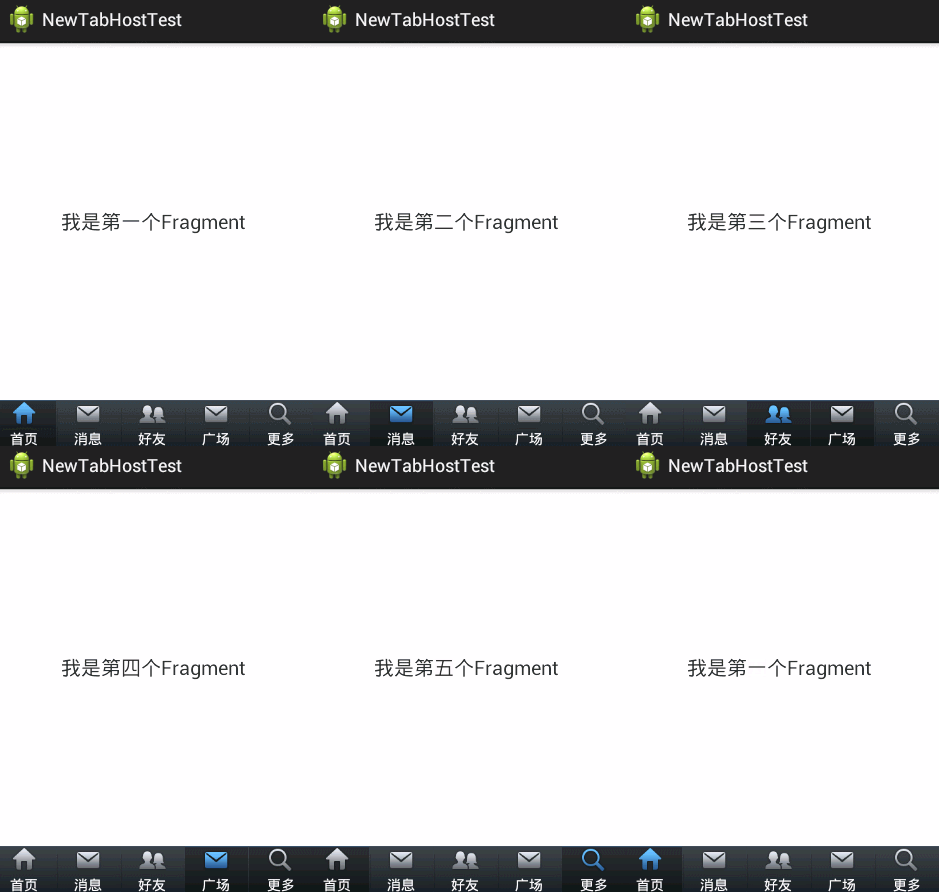
下面直接上代码了,注释很全,看过我前2篇文章的朋友,肯定秒懂的,哈哈~
activity_main.xml(主布局文件)

 1 <LinearLayout xmlns:android="http://schemas.android.com/apk/res/android"

 2     xmlns:tools="http://schemas.android.com/tools"

 3     android:layout_width="fill_parent"

 4     android:layout_height="fill_parent"

 5     android:orientation="vertical" >

 6

 7     <!-- 存放主要页面内容 -->

 8

 9     <FrameLayout

10         android:id="@+id/maincontent"

11         android:layout_width="fill_parent"

12         android:layout_height="0dp"

13         android:layout_weight="1" >

14     </FrameLayout>

15

16     <!-- 底层菜单 -->

17

18     <android.support.v4.app.FragmentTabHost

19         android:id="@android:id/tabhost"

20         android:layout_width="fill_parent"

21         android:layout_height="wrap_content"

22         android:background="@drawable/maintab_toolbar_bg" >

23

24         <FrameLayout

25             android:id="@android:id/tabcontent"

26             android:layout_width="0dp"

27             android:layout_height="0dp"

28             android:layout_weight="0" >

29         </FrameLayout>

30     </android.support.v4.app.FragmentTabHost>

31

32 </LinearLayout>
fragment.xml(由于只有文字不同,这里只给出一个)
 1 <RelativeLayout xmlns:android="http://schemas.android.com/apk/res/android"

 2     xmlns:tools="http://schemas.android.com/tools"

 3     android:layout_width="fill_parent"

 4     android:layout_height="fill_parent"

 5  >

 6

 7

 8     <TextView

 9         android:id="@+id/text"

10         android:layout_width="wrap_content"

11         android:layout_height="wrap_content"

12         android:layout_centerInParent="true"

13         android:text="我是第一个Fragment"

14         android:textSize="20dp"

15         />

16

17

18 </RelativeLayout>
tabcontent.xml(具体底部菜单详细布局)
 1 <LinearLayout xmlns:android="http://schemas.android.com/apk/res/android"

 2     xmlns:tools="http://schemas.android.com/tools"

 3     android:layout_width="wrap_content"

 4     android:layout_height="wrap_content"

 5     android:gravity="center_horizontal"

 6     android:orientation="vertical" >

 7

 8     <ImageView

 9         android:id="@+id/image"

10         android:layout_height="wrap_content"

11         android:layout_width="wrap_content"

12         />

13     <TextView

14         android:id="@+id/text"

15         android:padding="2dp"

16         android:layout_width="wrap_content"

17         android:layout_height="wrap_content"

18         android:textColor="@android:color/white"

19         />

20

21

22 </LinearLayout>
bt_selector.xml(底部菜单点击背景)
1 <?xml version="1.0" encoding="utf-8"?>

2 <selector xmlns:android="http://schemas.android.com/apk/res/android">

3

4     <item android:drawable="@drawable/home_btn_bg" android:state_pressed="true"></item>

5     <item android:drawable="@drawable/home_btn_bg" android:state_selected="true"></item>

6

7 </selector>
bt_home_selector.xml(底部菜单按钮效果)
1 <?xml version="1.0" encoding="utf-8"?>

2 <selector xmlns:android="http://schemas.android.com/apk/res/android">

3

4     <item android:drawable="@drawable/icon_home_sel" android:state_selected="true"></item>

5     <item android:drawable="@drawable/icon_home_nor"></item>

6

7 </selector>
FragmentPage1-FragmentPage5.java
 1 package com.example.newtabhosttest;

 2

 3 import android.os.Bundle;

 4 import android.support.annotation.Nullable;

 5 import android.support.v4.app.Fragment;

 6 import android.view.LayoutInflater;

 7 import android.view.View;

 8 import android.view.ViewGroup;

 9

10 public class FragmentPage1 extends Fragment{

11         @Override

12         public View onCreateView(LayoutInflater inflater,

13                 @Nullable ViewGroup container, @Nullable Bundle savedInstanceState) {

14             return inflater.inflate(R.layout.fragment1, null);

15         }

16

17 }
MainActivity.java(主代码)
 1 package com.example.newtabhosttest;

 2

 3 import android.os.Bundle;

 4 import android.support.v4.app.FragmentActivity;

 5 import android.support.v4.app.FragmentTabHost;

 6 import android.view.View;

 7 import android.widget.ImageView;

 8 import android.widget.TabHost.TabSpec;

 9 import android.widget.TextView;

10

11 public class MainActivity extends FragmentActivity {

12

13     private FragmentTabHost fragmentTabHost;

14     private String texts[] = { "首页", "消息", "好友", "广场", "更多" };

15     private int imageButton[] = { R.drawable.bt_home_selector,

16             R.drawable.bt_message_selector, R.drawable.bt_selfinfo_selector,R.drawable.bt_square_selector ,R.drawable.bt_more_selector};

17      private Class fragmentArray[] = {FragmentPage1.class,FragmentPage2.class,FragmentPage3.class,FragmentPage4.class,FragmentPage5.class};

18

19     @Override

20     protected void onCreate(Bundle savedInstanceState) {

21         super.onCreate(savedInstanceState);

22         setContentView(R.layout.activity_main);

23

24         // 实例化tabhost

25         fragmentTabHost = (FragmentTabHost) findViewById(android.R.id.tabhost);

26         fragmentTabHost.setup(this, getSupportFragmentManager(),

27                 R.id.maincontent);

28

29         for (int i = 0; i < texts.length; i++) {

30             TabSpec spec=fragmentTabHost.newTabSpec(texts[i]).setIndicator(getView(i));

31

32             fragmentTabHost.addTab(spec, fragmentArray[i], null);

33

34             //设置背景(必须在addTab之后,由于需要子节点(底部菜单按钮)否则会出现空指针异常)

35             fragmentTabHost.getTabWidget().getChildAt(i).setBackgroundResource(R.drawable.bt_selector);

36         }

37

38     }

39

40     private View getView(int i) {

41         //取得布局实例

42         View view=View.inflate(MainActivity.this, R.layout.tabcontent, null);

43

44         //取得布局对象

45         ImageView imageView=(ImageView) view.findViewById(R.id.image);

46         TextView textView=(TextView) view.findViewById(R.id.text);

47

48         //设置图标

49         imageView.setImageResource(imageButton[i]);

50         //设置标题

51         textView.setText(texts[i]);

52         return view;

53     }

54

55 }
到这里代码就结束了,要是有哪里疑惑的朋友可以给我留言,如果觉得文章对您有用的话,请给个赞,谢谢支持!^_^
转-Fragment+FragmentTabHost组件(实现新浪微博底部菜单)的更多相关文章
- 安卓开发笔记——Fragment+FragmentTabHost组件(实现新浪微博底部菜单)
记得之前写过2篇关于底部菜单的实现,由于使用的是过时的TabHost类,虽然一样可以实现我们想要的效果,但作为学习,还是需要来了解下这个新引入类FragmentTabHost 之前2篇文章的链接: 安 ...
- 底部菜单栏(三)Fragment+FragmentTabHost实现仿新浪微博底部菜单栏
一.实现效果图 二.项目工程结构 三.详细代码编写 1.主tab布局界面,main_tab_layout: 双击代码全选 1 2 3 4 5 6 7 8 9 10 11 12 13 14 15 16 ...
- Fragment+FragmentTabHost组件实现常见主页面(仿微信新浪)
采取的方法是Fragment+FragmentTabHost组件来实现这种常见的app主页面的效果 首先给出main.xml文件 <?xml version="1.0" en ...
- Android自己定义TabActivity(实现仿新浪微博底部菜单更新UI)
现在Android上非常多应用都採用底部菜单控制更新的UI这样的框架,比如新浪微博 点击底部菜单的选项能够更新界面.底部菜单能够使用TabHost来实现,只是用过TabHost的人都知道自己定义Tab ...
- [Android] Android 使用 FragmentTabHost + Fragment 实现 微信 底部菜单
Android 使用 FragmentTabHost + Fragment 实现 微信 底部菜单 利用FragmentTabHost实现底部菜单,在该底部菜单中,包括了4个TabSpec,每个TabS ...
- 用Fragment实现如新浪微博一样的底部菜单的切换
像我这个有强迫症的人来说,自从TabActivity抛弃之后,再使用看到一个个警告和一条条划着的横线,心里很不舒服,现在终于下定决心用Fragment来替换掉TabActivity了!我的研究成果如下 ...
- 转-TabHost组件(一)(实现底部菜单导航)
http://www.cnblogs.com/lichenwei/p/3974009.html 什么是TabHost? TabHost组件的主要功能是可以进行应用程序分类管理,例如:在用户使用wind ...
- Xamarin.Android 利用Fragment实现底部菜单
效果图: 第一步:添加引用 引用 Crosslight.Xamarin.Android.Support.v7.AppCompat 这个包. 第二步:绘制Main和Fragment界面 fg_home. ...
- 安卓开发笔记——TabHost组件(一)(实现底部菜单导航)
什么是TabHost? TabHost组件的主要功能是可以进行应用程序分类管理,例如:在用户使用windows操作系统的时候,经常见到如图所示的图形界面. TabHost选项卡,说到这个组件, ...
随机推荐
- 【转】修改 shellstyle.dll 权限
原文网址:http://bbs.zol.com.cn/nbbbs/d160_147794.html 对于经常使用电脑的人来说,比如像最近的我,在晚上总觉得电脑资源管理器屏幕显示得太亮,即使我把电脑的亮 ...
- HttpWebRequest's Timeout and ReadWriteTimeout — What do these mean for the underlying TCP connection?
http://stackoverflow.com/questions/7250983/httpwebrequests-timeout-and-readwritetimeout-what-do-thes ...
- 动态链接库中函数的地址确定---PLT和GOT [转]
前面写过动态链接库 延迟绑定的一篇博文,那篇文章我非常喜欢,但是当时刚搞清楚,自己写的比较凌乱,我最近学习了Ulrich Drepper的How to write share library,学习了几 ...
- Ueditor 标签被过滤
1:将allowDivTransToP设置为false 2:将root.traversal方法中的switch注释
- ExtJs学习笔记之Button组件
按钮Button组件 可以使用该组件的创建简单的按钮. 可以自定义属性包括 aligned icons, dropdown menus, tooltips 和 sizing options. 当出发点 ...
- ASP.NET SignalR 与 LayIM2.0 配合轻松实现Web聊天室 实战系列。开源啦!!!
自此系列博客开写以来,好多同学关心开源问题,之前由于网络问题,发布到Github上老是失败,今天终于在精简了好多无用的文件之后发布上去了. 注意:layim源代码并不开源,由于版权问题,请大家去官网了 ...
- tengine安装
下载地址: http://tengine.taobao.org/download_cn.html $tar -xvzf tengine-2.1.2.tar.gz $./configure$ make$ ...
- nginx 一般网站部署常用参数设置
#user nobody;worker_processes 2; #error_log logs/error.log;#error_log logs/error.log notice;#error_l ...
- C#的浅拷贝和深拷贝
C#中有两种类型变量,一种 是值类型变量,一种是引用类型变量 对于值类型变量,深拷贝和前拷贝都是通过赋值操作符号(=)实现,其效果一致,将对象中的值类型的字段拷贝到新的对象中.这个很容易理解. 本文重 ...
- spring配置中,properties文件以及xml文件配置问题
spring方便我们的项目快速搭建,功能强大,自然也会是体系复杂! 这里说下配置文件properties管理的问题. 一些不涉及到代码逻辑,仅仅只是配置数据,可以放在xxxx.properties文件 ...