
Command mvn jetty:run
How to use the command mav jetty:run?
There is a simple display as below:
Step 1:
You should generate a web project with maven first.
you could go to "Using Maven to generate a Java Project or Web project" to know how to generate a Web project with maven in Windows 7.
Step 2:
Change the pom.xml in as bellow in the web project you have generated just now.
<project xmlns="http://maven.apache.org/POM/4.0.0" xmlns:xsi="http://www.w3.org/2001/XMLSchema-instance"

  xsi:schemaLocation="http://maven.apache.org/POM/4.0.0 http://maven.apache.org/maven-v4_0_0.xsd">

  <modelVersion>4.0.0</modelVersion>

  <groupId>com.b510.shopping</groupId>

  <artifactId>shopping-core</artifactId>

  <packaging>war</packaging>

  <version>1.0-SNAPSHOT</version>

  <name>shopping-core Maven Webapp</name>

  <url>http://maven.apache.org</url>

  <dependencies>

    <dependency>

      <groupId>junit</groupId>

      <artifactId>junit</artifactId>

      <version>3.8.1</version>

      <scope>test</scope>

    </dependency>

  </dependencies>

  <build>

    <finalName>shopping-core</finalName>

    <pluginManagement>

    <!--Configuration for Jetty-->

      <plugins>

        <plugin>

         <groupId>org.mortbay.jetty</groupId>

         <artifactId>maven-jetty-plugin</artifactId>

        </plugin>

      </plugins>

    </pluginManagement>

  </build>

</project>
Step 3:
Type the command mvn jetty:run
NOTE: You shoud go to the "F:/maven/shopping-core" directory to execute above command.
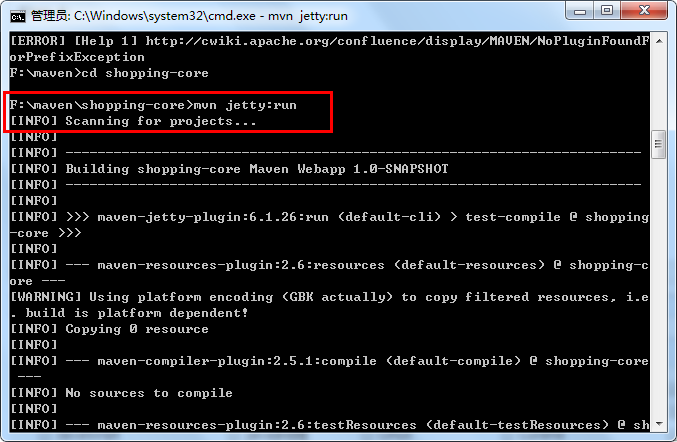
Step 4:
Open a broswer and type "http://localhost:8080/shopping-core"
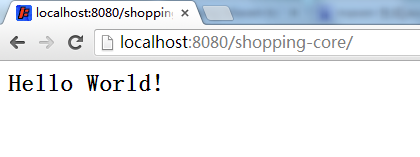
========================================================
More reading,and english is important.
I'm Hongten
大哥哥大姐姐,觉得有用打赏点哦!多多少少没关系,一分也是对我的支持和鼓励。谢谢。
Hongten博客排名在100名以内。粉丝过千。
Hongten出品,必是精品。
E | hongtenzone@foxmail.com B | http://www.cnblogs.com/hongten
========================================================
Command mvn jetty:run的更多相关文章
- (转)利用eclipse external tool 执行mvn jetty:run
一.如果这个工程是标准的maven-webapp那么基本上不用修改,直接运行jetty:run就可以执行. 但是有时候会报错说 [ERROR] No plugin found for prefix ' ...
- spring3-mvc-maven-hello-world-master mvn jetty:run 及 mvn war:war 指令
spring3-mvc-maven-annotation-hello-world-master mvn jetty:run Run this project locally Terminal $ m ...
- mvn jetty:run 出现PermGen space outofmemeryerror
使用mvn jetty:run跑别人的项目时出现了PermGen space outofmemeryerror异常 http://stackoverflow.com/questions/1451648 ...
- mvn jetty debug
使用mvn jetty:run很爽吧,但是怎么debug了,找了Google的N多老外文章,终于可以了,文章链接:http://gaertig.pl/blog/en/2009/03/debug-jet ...
- Mvn+Jetty启动项目
这里要注意,Mvn加jetty启动项目,主要用到的是Maven的jetty插件,和你下的Jetty服务器没什么关系. 我的运行环境是jdk1.7,Eclipse-mars,Maven是Eclipse自 ...
- idea jetty:run 启动
1.首先pom 文件 <!-- jetty插件 --> <plugin> <groupId>org.mortbay.jetty</groupId> ...
- mvn详解
1.前言 Maven,发音是[`meivin],"专家"的意思.它是一个很好的项目管理工具,很早就进入了我的必备工具行列,但是这次为了把project1项目完全迁移并应用maven ...
- 图文详解 IntelliJ IDEA 15 创建 Maven 构建的 Java Web 项目(使用 Jetty 容器)
图文详解 IntelliJ IDEA 15 创建 maven 的 Web 项目 搭建 maven 项目结构 1.使用 IntelliJ IDEA 15 新建一个项目. 2.设置 GAV 坐标 3. ...
- IDEA下使用Jetty进行Debug模式调试
过程例如以下: (1)找到选项卡中的 –Run– 然后找到 –Edit Configurations (2)点击下图中绿色的plus–找到Maven点进去 (3)依照下边的方式在Command lin ...
随机推荐
- AngularJS 之 Factory、Service、Provider
当你初试 Angular 时,很自然地就会往 controller 和 scope 里堆满不必要的逻辑.一定要早点意识到,controller 这一层应该很薄:也就是说,应用里大部分的业务逻辑和持久化 ...
- Introduction to replication 翻译
翻译自用,还有很多谬误之处,敬请甄别,转载请注明出处 Introduction to replication (replication介绍) Replication is one of the m ...
- Oracle性能优化之SQL语句
1.SQL语句执行过程 1.1 SQL语句的执行步骤 1)语法分析,分析语句的语法是否符合规范,衡量语句中各表达式的意义. 2)语义分析,检查语句中涉及的所有数据库对象是否存在,且用户有相应的权限. ...
- js onclick="return test()"事件返回值,对有些事件,会影响默认动作的执行。如:onclick和onsubmit
onclick="return test()"事件返回值,对有些事件,会影响默认动作的执行.如:onclick和onsubmit <body> <!--事件返回值 ...
- 配置ogg异构oracle-mysql(2)源端配置
源端配置大致分为如下三个步骤:配置mgr,配置抽取进程,配置投递进程 在源端先创建一张表,记得带主键: SQL> create table ah4(id int ,name varchar(10 ...
- C++读取文件夹中所有的文件或者是特定后缀的文件
由于经常有读取一个文件夹中的很多随机编号的文件,很多时候需要读取某些特定格式的所有文件. 下面的代码可以读取指定文件家中的所有文件和文件夹中格式为jpg的文件 参考: http://www.2cto. ...
- service里面弹出对话框
如何在service里面弹出对话框先给一个需求:需要在service里面监听短信的接收,如果接收到短信了,弹出一个dialog来提示用户打开. 看看效果图:(直接在主桌面上弹出) service中弹出 ...
- Linux学习笔记(15)shell基础之Bash基本功能
1 shell概述 shell是一个命令解释器,为用户提供了一个向Linux内核发送请求以便运行程序的界面系统级程序.用户可以用shell启动.挂起.停止甚至是编写一些程序. shell是一个功能强大 ...
- Blog Starting...
30出头,开始Blog记录学习生活的点滴,待40时再回来一看.
- JSTL标签详解以及应用实例
JSTL Apache提供的标签库,jar包:jstl-1.2.jar,如果用MyEclipse,它会自动导入,无需自己导入,如果没有使用MyEclipse那么需要自行导入. ------------ ...