
Maven Build Profiles--reference
What is Build Profile?
A Build profile is a set of configuration values which can be used to set or override default values of Maven build. Using a build profile, you can customize build for different environments such asProduction v/s Development environments.
Profiles are specified in pom.xml file using its activeProfiles / profiles elements and are triggered in variety of ways. Profiles modify the POM at build time, and are used to give parameters different target environments (for example, the path of the database server in the development, testing, and production environments).
Types of Build Profile
Build profiles are majorly of three types
| Type | Where it is defined |
|---|---|
| Per Project | Defined in the project POM file, pom.xml |
| Per User | Defined in Maven settings xml file (%USER_HOME%/.m2/settings.xml) |
| Global | Defined in Maven global settings xml file (%M2_HOME%/conf/settings.xml) |
Profile Activation
A Maven Build Profile can be activated in various ways.
Explicitly using command console input.
Through maven settings.
Based on environment variables (User/System variables).
OS Settings (for example, Windows family).
Present/missing files.
Profile Activation Examples
Let us assume following directory structure of your project:
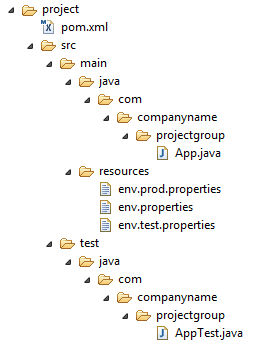
Now, under src/main/resources there are three environment specific files:
| File Name | Description |
|---|---|
| env.properties | default configuration used if no profile is mentioned. |
| env.test.properties | test configuration when test profile is used. |
| env.prod.properties | production configuration when prod profile is used. |
Explicit Profile Activation
In the following example, We'll attach maven-antrun-plugin:run goal to test phase. This will allow us to echo text messages for different profiles. We will be using pom.xml to define different profiles and will activate profile at command console using maven command.
Assume, we've created following pom.xml in C:\MVN\project folder.
<projectxmlns="http://maven.apache.org/POM/4.0.0"xmlns:xsi="http://www.w3.org/2001/XMLSchema-instance"xsi:schemaLocation="http://maven.apache.org/POM/4.0.0

   http://maven.apache.org/xsd/maven-4.0.0.xsd"><modelVersion>4.0.0</modelVersion><groupId>com.companyname.projectgroup</groupId><artifactId>project</artifactId><version>1.0</version><profiles><profile><id>test</id><build><plugins><plugin><groupId>org.apache.maven.plugins</groupId><artifactId>maven-antrun-plugin</artifactId><version>1.1</version><executions><execution><phase>test</phase><goals><goal>run</goal></goals><configuration><tasks><echo>Using env.test.properties</echo><copyfile="src/main/resources/env.test.properties"tofile="${project.build.outputDirectory}/env.properties"/></tasks></configuration></execution></executions></plugin></plugins></build></profile></profiles></project>
Now open command console, go to the folder containing pom.xml and execute the following mvncommand. Pass the profile name as argument using -P option.
C:\MVN\project>mvn test -Ptest
Maven will start processing and display the result of test build profile.
[INFO] Scanning for projects...

[INFO] ------------------------------------------------------------------

[INFO] Building Unnamed - com.companyname.projectgroup:project:jar:1.0

[INFO]    task-segment: [test]

[INFO] ------------------------------------------------------------------

[INFO] [resources:resources {execution: default-resources}]

[WARNING] Using platform encoding (Cp1252 actually) to copy filtered resources,

i.e. build is platform dependent!

[INFO] Copying 3 resources

[INFO] [compiler:compile {execution: default-compile}]

[INFO] Nothing to compile - all classes are up to date

[INFO] [resources:testResources {execution: default-testResources}]

[WARNING] Using platform encoding (Cp1252 actually) to copy filtered resources,

i.e. build is platform dependent!

[INFO] skip non existing resourceDirectory C:\MVN\project\src\test\resources

[INFO] [compiler:testCompile {execution: default-testCompile}]

[INFO] Nothing to compile - all classes are up to date

[INFO] [surefire:test {execution: default-test}]

[INFO] Surefire report directory: C:\MVN\project\target\surefire-reports

-------------------------------------------------------

 T E S T S

-------------------------------------------------------

There are no tests to run.

Results :

Tests run: 0, Failures: 0, Errors: 0, Skipped: 0

[INFO] [antrun:run {execution: default}]

[INFO] Executing tasks

     [echo] Using env.test.properties

[INFO] Executed tasks

[INFO] ------------------------------------------------------------------

[INFO] BUILD SUCCESSFUL

[INFO] ------------------------------------------------------------------

[INFO] Total time: 1 second

[INFO] Finished at: Sun Jul 08 14:55:41 IST 2012

[INFO] Final Memory: 8M/64M

[INFO] ------------------------------------------------------------------
Now as an exercise, you can do the following steps
Add another profile element to profiles element of pom.xml (copy existing profile element and paste it where profile elements ends).
Update id of this profile element from test to normal.
Update task section to echo env.properties and copy env.properties to target directory
Again repeat above three steps, update id to prod and task section for env.prod.properties
That's all. Now you've three build profiles ready (normal / test / prod).
Now open command console, go to the folder containing pom.xml and execute the following mvncommands. Pass the profile names as argument using -P option.
C:\MVN\project>mvn test -Pnormal
C:\MVN\project>mvn test -Pprod
Check the output of build to see the difference.
Profile Activation via Maven Settings
Open Maven settings.xml file available in %USER_HOME%/.m2 directory where %USER_HOME%represents user home directory. If settings.xml file is not there then create a new one.
Add test profile as an active profile using activeProfiles node as shown below in example
<settingsxmlns="http://maven.apache.org/POM/4.0.0"xmlns:xsi="http://www.w3.org/2001/XMLSchema-instance"xsi:schemaLocation="http://maven.apache.org/POM/4.0.0

   http://maven.apache.org/xsd/settings-1.0.0.xsd"><mirrors><mirror><id>maven.dev.snaponglobal.com</id><name>Internal Artifactory Maven repository</name><url>http://repo1.maven.org/maven2/</url><mirrorOf>*</mirrorOf></mirror></mirrors><activeProfiles><activeProfile>test</activeProfile></activeProfiles></settings>
Now open command console, go to the folder containing pom.xml and execute the following mvncommand. Do not pass the profile name using -P option.Maven will display result of test profile being an active profile.
C:\MVN\project>mvn test
Profile Activation via Environment Variables
Now remove active profile from maven settings.xml and update the test profile mentioned in pom.xml. Add activation element to profile element as shown below.
The test profile will trigger when the system property "env" is specified with the value "test". Create a environment variable "env" and set its value as "test".
<profile><id>test</id><activation><property><name>env</name><value>test</value></property></activation></profile>
Let's open command console, go to the folder containing pom.xml and execute the following mvncommand.
C:\MVN\project>mvn test
Profile Activation via Operating System
Activation element to include os detail as shown below. This test profile will trigger when the system is windows XP.
<profile><id>test</id><activation><os><name>Windows XP</name><family>Windows</family><arch>x86</arch><version>5.1.2600</version></os></activation></profile>
Now open command console, go to the folder containing pom.xml and execute the following mvncommands. Do not pass the profile name using -P option.Maven will display result of test profile being an active profile.
C:\MVN\project>mvn test
Profile Activation via Present/Missing File
Now activation element to include os detail as shown below. The test profile will trigger whentarget/generated-sources/axistools/wsdl2java/com/companyname/group is missing.
<profile><id>test</id><activation><file><missing>target/generated-sources/axistools/wsdl2java/com/companyname/group</missing></file></activation></profile>
Now open command console, go to the folder containing pom.xml and execute the following mvncommands. Do not pass the profile name using -P option.Maven will display result of test profile being an active profile.
C:\MVN\project>mvn test

reference from :http://www.tutorialspoint.com/maven/maven_build_profiles.htm
Maven Build Profiles--reference的更多相关文章
- Maven Build profiles
They modify the POM at build time, and are meant to be used in complementary sets to give equivalent ...
- Spring Boot-右键maven build成功但是直接运行main方法出错的解决方案
1.代码就一个Controller,从官网复制过来的,如下 package com.springboot.controller; import org.springframework.boot.Spr ...
- Maven build标签
前言: <build >设置,主要用于编译设置 1.分类 在Maven的pom.xml文件中,存在如下两种<build>: (1)全局配置(project build) 针对整 ...
- maven中profiles使用详解
使用的场景 常常遇到一些项目中多环境切换的问题.比如在开发过程中用到开发环境,在测试中使用测试环境,在生产中用生产环境的情况.springboot中提供了 spring.profile.active的 ...
- maven:log4j:WARN No appenders could be found for logger (loggerInfo).或者maven build error:org.apache.maven.lifecycle.LifecycleExecutionExceptio
maven在build构建时,加载资源文件时需要配置资源文件插件: 1,在pom.xml文件中加入 <build> <finalName>${project.build.tar ...
- 在eclipse如何删除无效的maven build
在Eclipse的maven项目中,点击一次“maven build...”明明没有配置,它也就会产生一个maven build,那么如何删除这些无效的配置呢?
- Maven Build Life Cycle--reference
What is Build Lifecycle? A Build Lifecycle is a well defined sequence of phases which define the ord ...
- No compiler is provided in this environment. --Maven build失败
今天,maven build 失败了, 遇到下面的问题 经过查找,通过这个大佬的blog( https://blog.csdn.net/lslk9898/article/details/738367 ...
- 转:eclipse maven build、maven install 等区别
原文地址:eclipse maven build.maven install 等区别
随机推荐
- 167. Two Sum II - Input array is sorted
题目: Given an array of integers that is already sorted in ascending order, find two numbers such that ...
- Android开发规范
一.Android编码规范 1.java代码中不出现中文,最多注释中可以出现中文 2.局部变量命名.静态成员变量命名 只能包含字母,单词首字母出第一个外,都为大写,其他字母都为小写 3.常量命名 只能 ...
- 在eclipse里卸载已安装的插件[例如Android Development Tools ADT]
在eclipse里卸载已安装的插件 有四种方法: 1.到plugins和features目录中找到你要卸载的插件的文件夹, ...
- nginx 健康检查和负载均衡机制分析
nginx 是优秀的反向代理服务器,这里主要讲它的健康检查和负载均衡机制,以及这种机制带来的问题.所谓健康检查,就是当后端出现问题(具体什么叫出现问题,依赖 于具体实现,各个实现定义不一样),不再往这 ...
- UVA 11916 Emoogle Grid 离散对数 大步小步算法
LRJ白书上的题 #include <stdio.h> #include <iostream> #include <vector> #include <mat ...
- 启动Selenium RC —— 我的第一个shell
打开终端 1. 新建一个sh文件 $ vim a.sh 2. 写入以下内容 #! /bin/bash cd Desktop/selenium/jar java -jar selenium-server ...
- domReady source code, domready源码
domready源码,domready实现代码,js实现domready的源代码. jquery的domready源码,require.js的domready源代码 . [domReady sourc ...
- NOIP2000 进制转换
题一 进制转换 (18分) 问题描述 我们可以用这样的方式来表示一个十进制数: 将每个阿拉伯数字乘以一个以该数字所处位置的(值减1)为指数,以10为底数的幂之 ...
- iOS真机调试——申请开发者证书
申请开发者证书 知道了什么是证书,我们现在就开始申请证书了 1. 找到KeyChain钥匙串,在Mac应用里可以找到 2. 在钥匙串的菜单中选择从证书颁发机构请求证书,填写邮件地址,选择储存到磁盘,放 ...
- Weka 入门1
本人也是借鉴网上他人资料.主要介绍使用java调用Weka库. 首先介绍weka,Weka的全名是怀卡托智能分析环境,是基于开源环境的机器学习和数据挖掘软件.我们可以去weka官网下载最新的Weka软 ...