
Google Go Programming In Eclipse
http://www.tutorialsavvy.com/2013/04/google-go-programming-in-eclipse.html/
Google Go Programming In Eclipse
- The new “Go” programming language is from Google co.It has many features better then other languages.
- Go language features are:-
– High Speed Compilation – Type and Memory safety – Concurrency – Efficient Garbage Collection
- The Windows MSI Installer can be downloaded from the link:-
http://code.google.com/p/go/downloads/list?q=OpSys-Windows+Type%3DInstaller
- The Eclipse Plugin Update for Go programming Languages are downloaded from link:-
http://goclipse.googlecode.com/svn/trunk/goclipse-update-site/
- In this Demo , “We will see a Go programming in Eclipse Environment”.
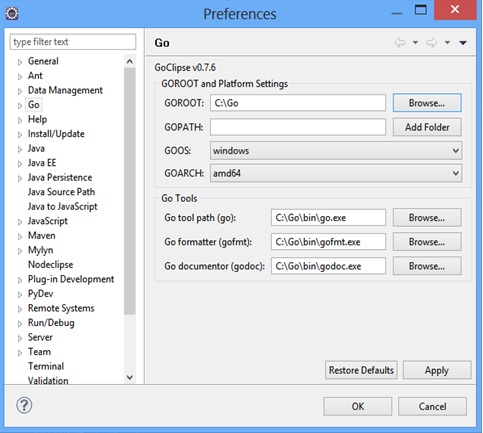
- After Updating Go plugin in Eclipse, we can set Go Configuration in Eclipse,
 <img border="0" src="http://i0.wp.com/www.tutorialsavvy.com/wp-content/uploads/2013/04/go-setting-eclipse.jpg?w=667" data-recalc-dims="1" />
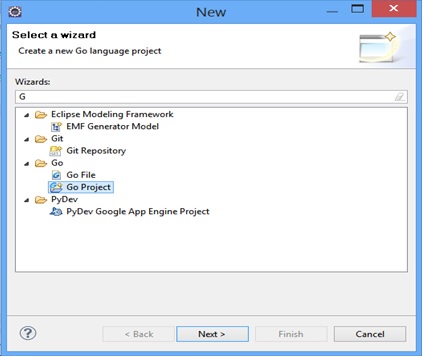
- Create a new Go Project “GoLanguageDemo” in Eclipse.
 <img border="0" src="http://i0.wp.com/www.tutorialsavvy.com/wp-content/uploads/2013/04/go-project-eclipse.jpg?w=667" data-recalc-dims="1" />
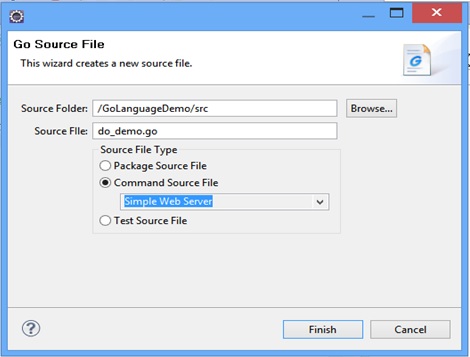
- A Google Go project has these options,
 <img border="0" src="http://i1.wp.com/www.tutorialsavvy.com/wp-content/uploads/2013/04/do_demo_web_server.jpg?w=667" data-recalc-dims="1" />
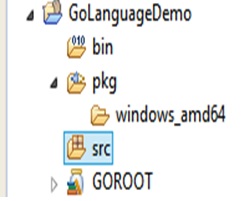
- The Go project structure in Eclipse,
 <img border="0" src="http://i1.wp.com/www.tutorialsavvy.com/wp-content/uploads/2013/04/go-project-structure-eclipse.jpg?w=667" data-recalc-dims="1" />
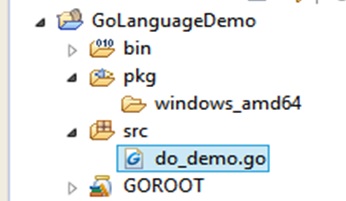
- Lets Create a Go Program Listening to PORT no “9090”.Let the file name is do_demo.go file.Now The project Will look like,
 <img border="0" src="http://i0.wp.com/www.tutorialsavvy.com/wp-content/uploads/2013/04/go-prject-main-struct.jpg?w=667" data-recalc-dims="1" />
 - The do_demo.go file,
package main
import (     "net/http"     "fmt" )
/* Default Request Handler*/ func defaultHandler(w http.ResponseWriter, r *http.Request) {     fmt.Fprintf(w, "<h1>Hello This is Sandeep.Testing Go Programming Language %s!</h1>", r.URL.Path[1:]) }
func main() {     http.HandleFunc("/", defaultHandler)     http.ListenAndServe(":9090", nil) }
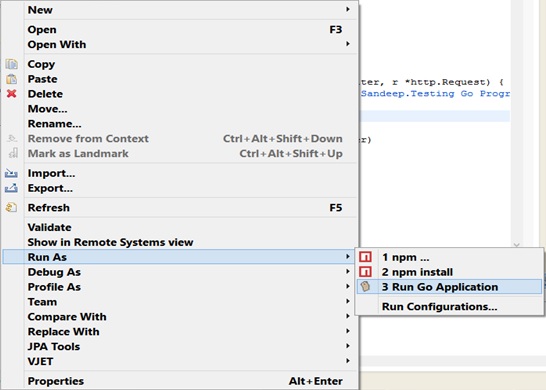
- The Run As option for go file is,
 &amp;lt;img border="0" src="http://i2.wp.com/www.tutorialsavvy.com/wp-content/uploads/2013/04/go-run-as-option.jpg?w=667" data-recalc-dims="1" /&amp;gt;
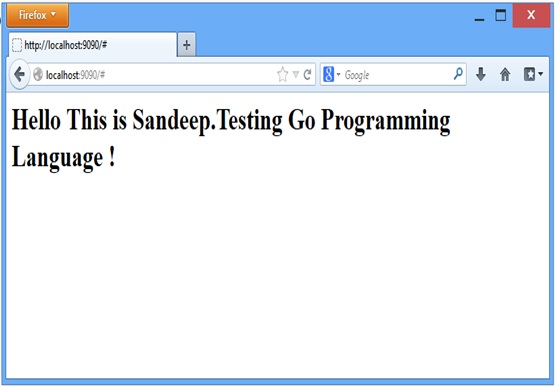
- Now open up a browser and call the localhost for PORT 9090.
 &amp;lt;img border="0" src="http://i0.wp.com/www.tutorialsavvy.com/wp-content/uploads/2013/04/go-output.jpg?w=667" data-recalc-dims="1" /&amp;gt;
 &amp;lt;img src="http://i2.wp.com/www.tutorialsavvy.com/wp-content/uploads/2016/04/quickbookshighres-e1459968126629.jpg?w=667" alt="Javascript books" data-recalc-dims="1"&amp;gt;These books are included in this bundle… Quick Start Handlebar Templating, Quick JavaScript Interview Questions, Quick CSS Authoring In SASS Way, Quick Desktop Application Development Using Electron, Quick Web Worker With JavaScript, Quick Build System with Gulp,
Google Go Programming In Eclipse的更多相关文章
- google test框架与eclipse插件
1. https://github.com/google/googletest (google的测试框架) 2. eclipse测试框架插件 https://github.com/xgsa/cd ...
- GWT(Google Web Tookit) Eclipse Plugin的zip下载地址(同时提供GWT Designer下载地址)
按照Eclipse Help->Install new software->....(这里是官方安装文档:http://code.google.com/intl/zh-CN/eclipse ...
- [Java] - Google API调用
由于Google已经完成被墙,要上Google必需使用代理或VPN. 这里使用的是Google的GoAgent代理做开发.(如何使用GoAgent,这里不写了,忽略500字.....) 本地测试的Go ...
- Eclipse常用开发插件
以下是我整理的自己开发过程中的常用Eclipse插件,按字母排序: (1) AmaterasUML 介绍:Eclipse的UML插件,支持UML活动图,class图,sequen ...
- 转:Eclipse常用开发插件
以下是我整理的自己开发过程中的常用Eclipse插件,按字母排序: (1) AmaterasUML 介绍:Eclipse的UML插件,支持UML活动图,class图,sequen ...
- Eclipse常用的插件安装
嫌公司用的eclipse不爽,准备自己弄一个,diy的,没想到装插得烦死人. 诱惑人的“常用插件”: (1) AmaterasUML 介绍:Eclipse的UML插件,支持UML活 ...
- 在fedora20下配置hadoop2.5.1的eclipse插件
(博客园-番茄酱原创) 在我的系统中,hadoop-2.5.1的安装路径是/opt/lib64/hadoop-2.5.1下面,然后hadoop-2.2.0的路径是/home/hadoop/下载/had ...
- Eclipse(Myeclipse)安装GoogleGWT
1,下载gpe http://code.google.com/p/googleappengine/并安装. 2,下载gwt http://code.google.com/intl/zh-CN/webt ...
- Eclipse用法和技巧二十八:Eclipse插件Easy Explore的今世
先说明一下easyexplore插件的功能,easyexplore是一个类似于 Windows Explorer的Eclipse插件,它可以帮助你在不退出Eclipse的环境下迅速浏览本地文件系统. ...
随机推荐
- java基础之集合框架
6.集合框架: (1)为什么出现集合类? 面向对象对事物的体现都是以对象的形式,为了方便对多个对象的操作,就对对象进行存储. 集合就是存储对象最常用的一种方式. (2)数组和集合都是容器,两者有何不同 ...
- Java基础之多线程
1.进程和线程: 进程:正在进行的程序.每一个进程执行都有一个执行顺序,该顺序是一个执行路径,或者叫一个控制单元. 线程:进程内部的一条执行路径或者一个控制单元. 两者的区别: 一个进程至少有一个线程 ...
- Elasticsearch推荐插件篇(head,sense,marvel)
安装head head插件可以用来快速查看elasticsearch中的数据概况以及非全量的数据,也支持控件化查询和rest请求,但是体验都不是很好. 一般就用它来看各个索引的数据量以及分片的状态. ...
- fir.im Weekly - 从零开始,搭建理想的直播平台
2016年苹果发布会如期而至,新一代的 iPhone 7, Apple Watch 同时亮相,可惜大家期待的 MacBookPro.AR.VR产品并未出现.不论大家对新产品是"买买买&quo ...
- python学习 数据类型之序列
一.序列(本文使用python3.5)############################################################# 列表.元组 字符窜都是序列#特点:#1 ...
- try-catch和throw,throws的区别
java里的异常多种多样,这是一种非常有用的机制,它能帮助我们处理那些我们未知的错误,在java里,关于异常的有throw throws,还有一个try catch 程序块.接下来我们挨个看看这几个的 ...
- nodejs常用组件
mssql 用途:连接SqlServer数据库 excel 用途:操作excel文档 nodegrass 用途:模拟用户进行get/post请求,下载文件等
- c#字符串操作方法实例
# 字符串是使用 string 关键字声明的一个字符数组.字符串是使用引号声明的,如下例所示: string s = "Hello, World!"; 字符串对象是“不可变的”,即 ...
- 在ASPNET中使用JS集锦
(一).确认删除用法: 1. BtnDel.Attributes.Add("onclick","return confirm('"+"确认删除?&qu ...
- Android聚合广告AFP的对接系统设计
工作需要,要对接阿里妈妈的广告聚合平台,简称AFP.对于一般的应用而言,想要流量变现,广告是显而易见的手段,尤其是在中国,打开一个千万级别的用户,肯定有某个地方是有对接广告的,只不过明不明显而已. 阿 ...