
【代码笔记】iOS-iCarouselDemo
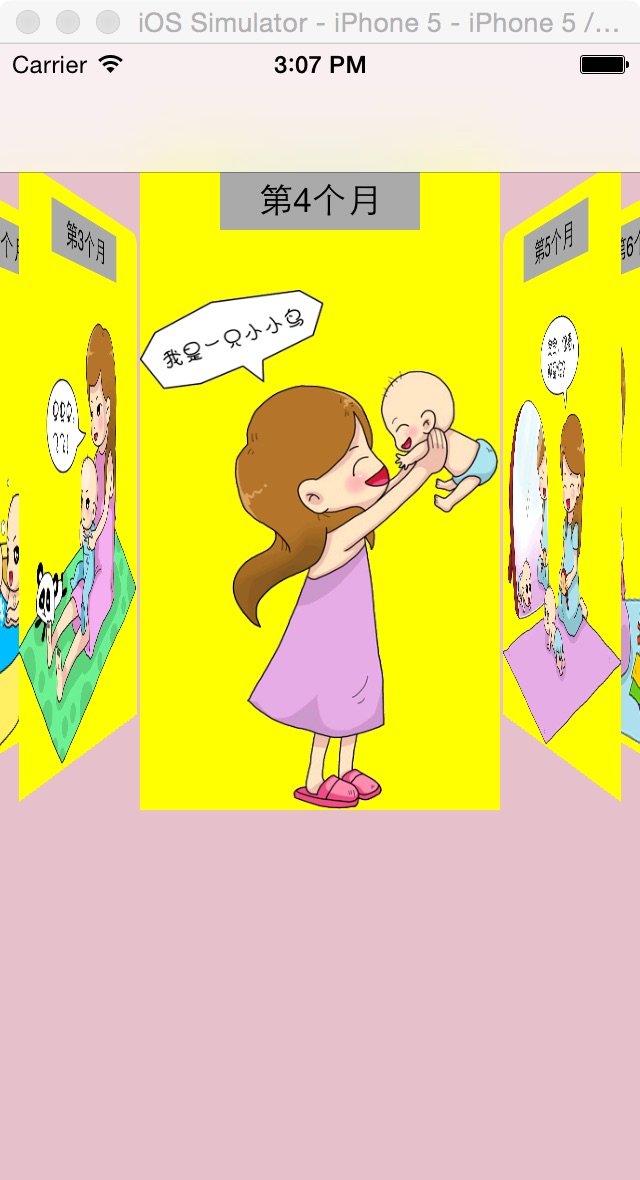
一,效果图。
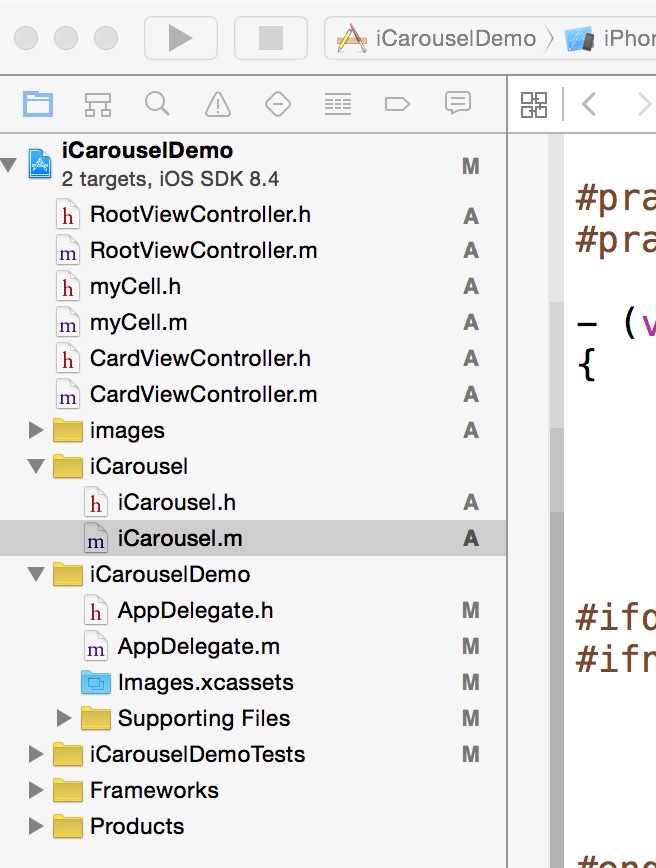
二,工程图。
三,代码。
RootViewController.h
RootViewController.m
myCell.h

#import <UIKit/UIKit.h>

#import <QuartzCore/QuartzCore.h>

@interface myCell : UITableViewCell

{

    UILabel * myLable;

    UIImageView * myImageView;

    UILabel * title;

}

@property (strong,nonatomic) UILabel * myLabel;

@property (strong,nonatomic) UIImageView * myImageView;

@property (strong,nonatomic) UILabel * title;

@end
myCell.m
#import "myCell.h"

@implementation myCell

@synthesize myLabel;

@synthesize myImageView;

@synthesize title;

- (id)initWithStyle:(UITableViewCellStyle)style reuseIdentifier:(NSString *)reuseIdentifier

{

    self = [super initWithStyle:style reuseIdentifier:reuseIdentifier];

    if (self) {

        myLabel = [[UILabel alloc] init];

        myLabel.lineBreakMode=NSLineBreakByCharWrapping;

        myLabel.numberOfLines = 0;

        myLabel.font = [UIFont fontWithName:@"MicrosoftYaHei" size:20.0];

        [self addSubview:myLabel];

        myImageView = [[UIImageView alloc] init];

        [self addSubview:myImageView];

        title = [[UILabel alloc] init];

        title.frame = CGRectMake(10, 10, 50, 30);

        title.backgroundColor = [UIColor colorWithRed:230/255.0 green:192/255.0 blue:203/255.0 alpha:1.0];

        title.layer.cornerRadius = 10.0;

        [self addSubview:title];

       ;

    }

    return self;

}

- (void)setSelected:(BOOL)selected animated:(BOOL)animated

{

    [super setSelected:selected animated:animated];

    // Configure the view for the selected state

}

@end
CardViewController.h
#import <UIKit/UIKit.h>

@interface CardViewController : UIViewController

<UITableViewDataSource,UITableViewDelegate>

{

    NSMutableArray *array ;

    NSMutableArray * titleArray;

}

@property (strong ,nonatomic) NSMutableArray *array;

@property (strong,nonatomic) NSString * month;

@property (strong,nonatomic) NSString * imageName;

@property (strong,nonatomic) NSString * title;

@end
CardViewController.m
#import "CardViewController.h"

#import "myCell.h"

@interface CardViewController ()

@end

@implementation CardViewController

@synthesize array;

@synthesize month;

@synthesize imageName;

@synthesize title;

- (id)initWithNibName:(NSString *)nibNameOrNil bundle:(NSBundle *)nibBundleOrNil

{

    self = [super initWithNibName:nibNameOrNil bundle:nibBundleOrNil];

    if (self) {

        // Custom initialization

    }

    return self;

}

-(void)viewDidLoad

{

    [super viewDidLoad];

    NSDictionary * dic1 = [[NSDictionary alloc] initWithContentsOfFile:[[NSBundle mainBundle] pathForResource:@"BabyCard" ofType:@"plist"]];

    self.array = [dic1 objectForKey:month];

    NSDictionary * dic2 = [[NSDictionary alloc] initWithContentsOfFile:[[NSBundle mainBundle] pathForResource:@"Title" ofType:@"plist"]];

    titleArray = [[NSMutableArray alloc] init];

    titleArray = [dic2 objectForKey:title];

    UITableView * tableView = [[UITableView alloc] initWithFrame:CGRectMake(0, 0, 320, 460) style:UITableViewStylePlain];

    tableView.delegate = self;

    tableView.dataSource = self;

    tableView.showsVerticalScrollIndicator = NO;

    [self.view addSubview:tableView];

    UIButton * back = [UIButton buttonWithType:UIButtonTypeCustom];

    back.frame = CGRectMake(10, 10, 25, 31);

    [back setImage:[UIImage imageNamed:@"back.png"] forState:UIControlStateNormal];

    [back addTarget:self action:@selector(back) forControlEvents:UIControlEventTouchUpInside];

    [tableView addSubview:back];

}

#pragma -mark -doClickActions

-(void)back

{

    CATransition *animation = [CATransition animation];

    animation.delegate = self;

    animation.duration = 0.7;

    animation.type = @"oglFlip";

    animation.subtype = kCATransitionFromLeft;

    [self.view.layer addAnimation:animation forKey:@"animation"];

    [self.navigationController dismissViewControllerAnimated:YES completion:nil];

}

#pragma -mark -UITableViewDelegate

-(NSInteger)tableView:(UITableView *)tableView numberOfRowsInSection:(NSInteger)section

{

    return array.count;

}

-(CGFloat)tableView:(UITableView *)tableView heightForRowAtIndexPath:(NSIndexPath *)indexPath

{

    NSString * str = [array objectAtIndex:indexPath.row];

    CGSize size=[str boundingRectWithSize:CGSizeMake(300, 1000) options:NSStringDrawingUsesLineFragmentOrigin attributes:@{NSFontAttributeName: [UIFont systemFontOfSize:20.0]} context:nil].size;

    if(indexPath.row == 0)

    {

         return size.height + 350;

    }

    else

    {

        return size.height + 60;

    }

}

-(UITableViewCell *)tableView:(UITableView *)tableView cellForRowAtIndexPath:(NSIndexPath *)indexPath

{

    myCell * cell = [tableView dequeueReusableCellWithIdentifier:@"id"];

    if(cell == nil){

        cell = [[myCell alloc] initWithStyle:UITableViewCellStyleValue1 reuseIdentifier:@"id"];

    }

    NSString * str = [array objectAtIndex:indexPath.row];

    CGSize size=[str boundingRectWithSize:CGSizeMake(300, 1000) options:NSStringDrawingUsesLineFragmentOrigin attributes:@{NSFontAttributeName: [UIFont systemFontOfSize:20.0]} context:nil].size;

    cell.selectionStyle = UITableViewCellSelectionStyleNone;

    NSString * str2 = [NSString stringWithFormat:@" %@ ",[titleArray objectAtIndex:indexPath.row]];

    CGSize size2=[str boundingRectWithSize:CGSizeMake(300, 1000) options:NSStringDrawingUsesLineFragmentOrigin attributes:@{NSFontAttributeName: [UIFont systemFontOfSize:10.0]} context:nil].size;

    cell.title.text = str2;

    if(indexPath.row == 0){

        cell.myImageView.hidden = NO;

        cell.myImageView.image = [UIImage imageNamed:imageName];

        cell.myImageView.frame = CGRectMake(0, 0, 320, 300);

        cell.myLabel.frame = CGRectMake(10, 350, 300, size.height);

        cell.title.frame = CGRectMake(10, 310, size2.width, 30);

    }else{

        cell.myImageView.hidden = YES;

        cell.myLabel.frame = CGRectMake(10, 50, 300, size.height);

        cell.title.frame = CGRectMake(10, 10,size2.width, 30);

    }

    cell.myLabel.text = str;

    return cell;

}

@end
【代码笔记】iOS-iCarouselDemo的更多相关文章
- IOS开发笔记 IOS如何访问通讯录
IOS开发笔记 IOS如何访问通讯录 其实我是反对这类的需求,你说你读我的隐私,我肯定不愿意的. 幸好ios6.0 以后给了个权限控制.当打开app的时候你可以选择拒绝. 实现方法: [plain] ...
- 【hadoop代码笔记】Mapreduce shuffle过程之Map输出过程
一.概要描述 shuffle是MapReduce的一个核心过程,因此没有在前面的MapReduce作业提交的过程中描述,而是单独拿出来比较详细的描述. 根据官方的流程图示如下: 本篇文章中只是想尝试从 ...
- 【hadoop代码笔记】hadoop作业提交之汇总
一.概述 在本篇博文中,试图通过代码了解hadoop job执行的整个流程.即用户提交的mapreduce的jar文件.输入提交到hadoop的集群,并在集群中运行.重点在代码的角度描述整个流程,有些 ...
- 【Hadoop代码笔记】目录
整理09年时候做的Hadoop的代码笔记. 开始. [Hadoop代码笔记]Hadoop作业提交之客户端作业提交 [Hadoop代码笔记]通过JobClient对Jobtracker的调用看详细了解H ...
- 笔记-iOS 视图控制器转场详解(上)
这是一篇长文,详细讲解了视图控制器转场的方方面面,配有详细的示意图和代码,为了使得文章在微信公众号中易于阅读,seedante 辛苦将大量长篇代码用截图的方式呈现,另外作者也在 Github 上附上了 ...
- <Python Text Processing with NLTK 2.0 Cookbook>代码笔记
如下是<Python Text Processing with NLTK 2.0 Cookbook>一书部分章节的代码笔记. Tokenizing text into sentences ...
- [学习笔记] SSD代码笔记 + EifficientNet backbone 练习
SSD代码笔记 + EifficientNet backbone 练习 ssd代码完全ok了,然后用最近性能和速度都非常牛的Eifficient Net做backbone设计了自己的TinySSD网络 ...
- DW网页代码笔记
DW网页代码笔记 1.样式. class 插入类样式 标签技术(html)解决页面的内容样式技术(css)解决页面的外观脚本技术 解决页面动态交互问题<form> ...
- 前端学习:JS(面向对象)代码笔记
前端学习:JS(面向对象)代码笔记 前端学习:JS面向对象知识学习(图解) 创建类和对象 创建对象方式1调用Object函数 <body> </body> <script ...
- 离屏渲染学习笔记 /iOS圆角性能问题
离屏渲染学习笔记 一.概念理解 OpenGL中,GPU屏幕渲染有以下两种方式: On-Screen Rendering 意为当前屏幕渲染,指的是GPU的渲染操作是在当前用于显示的屏幕缓冲区中进行. O ...
随机推荐
- Wamp 简单使用方法
1.在wamp的安装目录 \bin\apache\Apache2.4.4\conf 中找到 httpd.conf文件删除 Include conf/extra/httpd-vhosts.conf 这 ...
- LINQ to SQL语句(2)之Select/Distinct
适用场景:o(∩_∩)o- 查询呗. 说明:和SQL命令中的select作用相似但位置不同,查询表达式中的select及所接子句是放在表达式最后并把子句中的变量也就是结果返回回来:延迟.Select/ ...
- 注意:DateTimePicker.Text不靠谱
这鸟属性把我害苦过,特此敬告一下大家.具体表现在: 获取时:在DateTimePicker.ValueChanged事件中,获取到的Text有可能是string.Empty!!!,特别当ValueCh ...
- NoSQL数据库介绍
NoSQL在2010年风生水起,大大小小的Web站点在追求高性能高可靠性方面,不由自主都选择了NoSQL技术作为优先考虑的方面.今年伊始,InfoQ中文站有幸邀请到凤凰网的孙立先生,为大家分享他之于N ...
- mysql数据过滤
WHERE子句 在我们使用数据库时,通常只会根据特定条件提取表数据的子集.只检索所需数据需要指定搜索条件(search criteria),搜索条件也称为过滤条件(filtercondition). ...
- js的动态加载、缓存、更新以及复用(三)
总体思路 1. 建立一个js服务,该服务实现通用js文件的加载.依赖.缓存.更新以及复用. 2. 各个项目如果使用通用js,可(bi)以(xu)使用js服务实现加载. 3. Js服务只提供通用的 ...
- 用css计算选中的复选框有几个
上代码: <!DOCTYPE html> <html> <head> <meta charset='UTF-8'> <title>计数< ...
- knockout源码分析之订阅
一.主类关系图 二.类职责 2.1.observable(普通监控对象类) observable(他其是一个function)的内部实现:1.首先声明一个名为observable的fn(这个可以说是一 ...
- [js开源组件开发]tip提示组件
tip提示组件 常见的应用场景中,总是难免会遇到提示信息,比如显示不完全时需要鼠标移上去显示title,比如验证时的错误提示,比如操作按钮的辅助说明等,所以我独立出来了一个小的js组件,tip提示组件 ...
- [deviceone开发]-土地销售App开源
一.简介 这个是一个真实项目改造开源,虽然不是很花哨,但是中规中矩,小细节处理的也很好,非常值得参考和借鉴.里面的数据都缓存到本地,可以离线运行,但是调整一下代码,马上就可以和服务端完全对接.后续会有 ...