
MyBatis基础入门《二》Select查询
MyBatis基础入门《二》Select查询
使用MySQL数据库,创建表:
 SET NAMES utf8mb4;

 SET FOREIGN_KEY_CHECKS = 0;

 -- ----------------------------

 -- Table structure for tbl_client_copy1

 -- ----------------------------

 DROP TABLE IF EXISTS `tbl_client_copy1`;

 CREATE TABLE `tbl_client_copy1`  (

   `id` int(5) NOT NULL AUTO_INCREMENT,

   `client_name` varchar(255) CHARACTER SET utf8 COLLATE utf8_unicode_ci NULL DEFAULT NULL,

   `client_address` varchar(255) CHARACTER SET utf8 COLLATE utf8_unicode_ci NULL DEFAULT NULL,

   `client_birthday` datetime NULL DEFAULT NULL,

   PRIMARY KEY (`id`) USING BTREE

 ) ENGINE = InnoDB AUTO_INCREMENT = 1 CHARACTER SET = utf8 COLLATE = utf8_unicode_ci ROW_FORMAT = Compact;

 SET FOREIGN_KEY_CHECKS = 1;
项目工程:
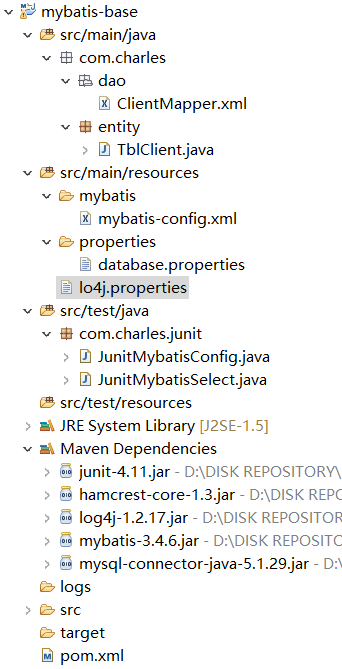
ClientMapper.xml
 <?xml version="1.0" encoding="UTF-8" ?>

 <!DOCTYPE mapper

   PUBLIC "-//mybatis.org//DTD Mapper 3.0//EN"

   "http://mybatis.org/dtd/mybatis-3-mapper.dtd">

 <mapper namespace="com.charles.dao.ClientMapper">

     <!-- 查询数据库 -->

     <select id="getCount" resultType="int">

         SELECT COUNT(*) FROM tbl_client

     </select>

 </mapper>
TblClient.java
 package com.charles.entity;

 import java.io.Serializable;

 public class TblClient implements Serializable {

     private static final long serialVersionUID = -5993993584624176849L;

     private Integer cid;

     private String cname;

     private String caddress;

     private String cbirthday;

     public TblClient() {

     }

     public Integer getCid() {

         return cid;

     }

     public void setCid(Integer cid) {

         this.cid = cid;

     }

     public String getCname() {

         return cname;

     }

     public void setCname(String cname) {

         this.cname = cname;

     }

     public String getCaddress() {

         return caddress;

     }

     public void setCaddress(String caddress) {

         this.caddress = caddress;

     }

     public String getCbirthday() {

         return cbirthday;

     }

     public void setCbirthday(String cbirthday) {

         this.cbirthday = cbirthday;

     }

 }
mybatis-config.xml
 <?xml version="1.0" encoding="UTF-8" ?>

 <!DOCTYPE configuration

   PUBLIC "-//mybatis.org//DTD Config 3.0//EN"

   "http://mybatis.org/dtd/mybatis-3-config.dtd">

 <configuration>

     <!-- 引入database.properties文件 -->

     <properties resource="properties/database.properties"></properties>

     <!-- 配置mybatis的log实现log4j -->

     <settings>

         <setting name="logImpl" value="STDOUT_LOGGING" />

     </settings>

     <!-- 配置Mybatis的环境 -->

     <environments default="development">

         <environment id="development">

             <!-- 配置事物管理 -->

             <transactionManager type="JDBC" />

             <dataSource type="POOLED">

                 <property name="driver" value="${jdbc.driver}" />

                 <property name="url" value="${jdbc.url}" />

                 <property name="username" value="${jdbc.username}" />

                 <property name="password" value="${jdbc.password}" />

             </dataSource>

         </environment>

     </environments>

     <!-- 将Mapper文件加入到mybatis的配置文件中 -->

     <mappers>

         <mapper resource="com/charles/dao/ClientMapper.xml" />

     </mappers>

 </configuration>
database.properties
这个是链接数据库的配置,未做改动,不在显示:见《Mybatis基础入门《一》环境搭建》
log4j.properties
# Global logging configuration
log4j.rootLogger=ERROR, stdout
# MyBatis logging configuration...
log4j.logger.com.charles=TRACE
# Console output...
log4j.appender.stdout=org.apache.log4j.ConsoleAppender
log4j.appender.stdout.layout=org.apache.log4j.PatternLayout
log4j.appender.stdout.layout.ConversionPattern=%5p [%t] - %m%n
JunitMybatisConfig.java
 package com.charles.junit;

 import static org.junit.Assert.fail;

 import java.io.IOException;

 import java.io.InputStream;

 import org.apache.ibatis.io.Resources;

 import org.apache.ibatis.session.SqlSession;

 import org.apache.ibatis.session.SqlSessionFactory;

 import org.apache.ibatis.session.SqlSessionFactoryBuilder;

 import org.apache.log4j.Logger;

 import org.apache.log4j.PropertyConfigurator;

 import org.junit.Test;

 public class JunitMybatisConfig {

     @Test

     public void test() {

         fail("Not yet implemented");

     }

     @Test

     public void testLog4j() {

         PropertyConfigurator.configure("D:/DISK WORKSPACE/STS MAVEN/mybatis-base/src/main/resources/lo4j.properties");

         Logger logger = Logger.getLogger(JunitMybatisConfig.class);

         logger.debug(" debug ");

         logger.error(" error ");

     }

     @Test

     public void testMybaits() {

         try {

             /** 1.获取mybatis-config.xml文件 **/

             String resource = "mybatis/mybatis-config.xml";

             InputStream is = Resources.getResourceAsStream(resource);

             /** 2.创建SQLSessionFactory对象 **/

             SqlSessionFactory sqlSessionFactory = new SqlSessionFactoryBuilder().build(is);

             /** 3.创建SQLSession **/

             SqlSession session = sqlSessionFactory.openSession();

             /** 4.输出SQLSession对象 **/

             System.out.println(session);

         } catch (IOException e) {

             e.printStackTrace();

         }

     }

 }
注意:
sqlSessionFactory.openSession(boolean autoCommit); 这里的openSession的方法中有一个boolean类型的参数。
true:关闭事物控制(默认)
false:开启事物控制
JunitMybatisSelect.java
 package com.charles.junit;

 import java.io.IOException;

 import java.io.InputStream;

 import org.apache.ibatis.io.Resources;

 import org.apache.ibatis.session.SqlSession;

 import org.apache.ibatis.session.SqlSessionFactory;

 import org.apache.ibatis.session.SqlSessionFactoryBuilder;

 import org.junit.Test;

 public class JunitMybatisSelect {

     @Test

     public void junitSelect() {

         SqlSession session = null;

         try {

             /** 1.获取mybatis-config.xml文件 **/

             String resource = "mybatis/mybatis-config.xml";

             InputStream is = Resources.getResourceAsStream(resource);

             /** 2.创建SQLSessionFactory对象 **/

             SqlSessionFactory sqlSessionFactory = new SqlSessionFactoryBuilder().build(is);

             /** 3.创建SQLSession **/

             session = sqlSessionFactory.openSession();

             /** 4.输出SQLSession对象 **/

             System.out.println(session);

             String resoruce = "com.charles.dao.ClientMapper.getCount";

             int count = session.selectOne(resoruce);

             System.out.println(count);

         } catch (IOException e) {

             e.printStackTrace();

         } finally {

             if(null != session) {

                 session.close();

             }

         }

     }

 }
注意:
String resource = "com.charles.dao.ClientMapper.getCount", 这个不是随便写的,这是由:ClientMapper.xml 文件中的namespace + select标签ID的值 组成。
SQLSession的使用方式有两种:
1. 通过SQLSession的实例直接运行映射的SQL语句。
2. 基于Mapper接口方式操作数据。
由于是初步搭建学习MyBatis,这里我使用的是第一种。一步一步的深入,后面会改成第二种方式。
pom.xml
 <project xmlns="http://maven.apache.org/POM/4.0.0" xmlns:xsi="http://www.w3.org/2001/XMLSchema-instance"

     xsi:schemaLocation="http://maven.apache.org/POM/4.0.0 http://maven.apache.org/xsd/maven-4.0.0.xsd">

     <modelVersion>4.0.0</modelVersion>

     <groupId>com.charles.mybatis</groupId>

     <artifactId>mybatis-base</artifactId>

     <version>0.0.1-SNAPSHOT</version>

     <dependencies>

         <dependency>

             <groupId>junit</groupId>

             <artifactId>junit</artifactId>

             <version>4.11</version>

         </dependency>

         <dependency>

             <groupId>log4j</groupId>

             <artifactId>log4j</artifactId>

             <version>1.2.17</version>

         </dependency>

 <!--         <dependency> -->

 <!--             <groupId>org.slf4j</groupId> -->

 <!--             <artifactId>slf4j-api</artifactId> -->

 <!--             <version>1.7.7</version> -->

 <!--         </dependency> -->

 <!--         <dependency> -->

 <!--             <groupId>org.slf4j</groupId> -->

 <!--             <artifactId>slf4j-log4j12</artifactId> -->

 <!--             <version>1.7.7</version> -->

 <!--         </dependency> -->

         <dependency>

             <groupId>org.mybatis</groupId>

             <artifactId>mybatis</artifactId>

             <version>3.4.6</version>

         </dependency>

         <dependency>

             <groupId>mysql</groupId>

             <artifactId>mysql-connector-java</artifactId>

             <version>5.1.29</version>

         </dependency>

     </dependencies>

 </project>
如有问题,欢迎纠正!!!
如有转载,请标明源处:https://www.cnblogs.com/Charles-Yuan/p/9861099.html
MyBatis基础入门《二》Select查询的更多相关文章
- MYSQL—— 基础入门,select 查询涉及到的关键字组合详解(进阶篇)
SELECT查询组合使用的关键字很多,首先将最简单常用的关键字进行区分及使用,后续再继续补充............ 以下所有的关键字组合使用,主要以两个表students与students_scor ...
- JAVA之Mybatis基础入门二 -- 新增、更新、删除
上一节说了Mybatis的框架搭建和简单查询,这次我们来说一说用Mybatis进行基本的增删改操作: 一. 插入一条数据 1.首先编写USER.XML(表的xml)使用insert元素,元素写在map ...
- MyBatis基础入门《四》接口方式.Select查询集合
MyBatis基础入门<四>接口方式.Select查询集合 描述: 在<MyBatis基础入门<二>Select查询>中有说过,SQLSession有两种用法,这里 ...
- MyBatis基础入门《三》Select查询集合
MyBatis基础入门<三>Select查询集合 描述: 代码新增了一个MybatisUtil工具类,查询数据库返回集合的时候,接收数据的三种方式.由于代码会渐渐增多,未涉及改动过的文件不 ...
- MyBatis基础入门《六》Like模糊查询
MyBatis基础入门<六>Like模糊查询 描述: 未改动的文件,不再粘贴出来.项目中SQL的xml映射文件重要标签如下: mapper namespace cache 配置给定命令空间 ...
- MyBatis基础入门《八》查询参数传入Map
MyBatis基础入门<八>查询参数传入Map 描述: 在执行select查询数据的时候,方法传入的参数是java.util.Map类型. 接口方法: xml文件 注意: 书写SQL语句的 ...
- MyBatis基础入门《二十》动态SQL(foreach)
MyBatis基础入门<二十>动态SQL(foreach) 1. 迭代一个集合,通常用于in条件 2. 属性 > item > index > collection : ...
- MyBatis基础入门《十二》删除数据 - @Param参数
MyBatis基础入门<十二>删除数据 - @Param参数 描述: 删除数据,这里使用了@Param这个注解,其实在代码中,不使用这个注解也可以的.只是为了学习这个@Param注解,为此 ...
- MyBatis基础入门《七》查询参数传入对象
MyBatis基础入门<七>查询参数传入对象 描述: 在执行查询语句的时候,传入的参数是一个对象,依据对象的属性,进行检索数据.此时,书写SQL语句中的条件时,其参数需要和对象中的属性保持 ...
随机推荐
- MySql数据库笔试题总结
数据库面试题94577265 1,设有关系EMP(ENO,ENAME,SALARY,DNO),其中各属性的含义依次为职工号.姓名.工资和所在部门号,以及关系DEPT(DNO,DNAME,MANAGER ...
- hbase运行mapreduce设置及基本数据加载方法
hbase与mapreduce集成后,运行mapreduce程序,同时需要mapreduce jar和hbase jar文件的支持,这时我们需要通过特殊设置使任务可以同时读取到hadoop jar和h ...
- C和C指针小记(五)-指针类型
1.指针常量(pointer constant) 一般是没有这个概念的,指针类型的常量理解起来可以看着指针类型的常量,常用 0xff123456 表示,我们一般不会这么做.因为程序员一般无法事先知道计 ...
- influxdb服务器 relay
https://www.influxdata.com/time-series-platform/influxdb/ https://www.xusheng.org/blog/2016/07/30/pe ...
- Runloop的再学习之浅析(一)
一,认识RunLoop 我的理解: 1. 在编程的世界里,万物皆对象.所以RunLoop 实际上也是一个对象,这个对象管理了其需要 处理的事件和消息,并提供了一个入口函数来执行上面 Event Loo ...
- [development][C] linux 设置线程名称
两个API, 都是linux的. 不是POSIX, 是GNU? 傻傻搞不清楚. 1. pthread_setname_np / pthread_setname_np 2. ptctl 带 PR_GE ...
- LeetCode 917 Reverse Only Letters 解题报告
题目要求 Given a string S, return the "reversed" string where all characters that are not a le ...
- LeetCode 868 Binary Gap 解题报告
题目要求 Given a positive integer N, find and return the longest distance between two consecutive 1's in ...
- Qt::带返回值的信号发射方式
一般来说,我们发出信号使用emit这个关键字来操作,但是会发现,emit并不算一个调用,所以它没有返回值.那么如果我们发出这个信号想获取一个返回值怎么办呢? 两个办法:1.通过出参形式返回,引用或者指 ...
- python摸爬滚打之day010----函数进阶
1.函数动态传参 *args : 将所有的位置参数打包成一个元组的形式. **kwargs : 将所有的关键字参数打包成一个字典的形式. 形参的接收顺序: 位置参数 > *args > ...