
GUI相应鼠标事件
 function varargout = GUI18(varargin)

 % GUI18 MATLAB code for GUI18.fig

 %      GUI18, by itself, creates a new GUI18 or raises the existing

 %      singleton*.

 %

 %      H = GUI18 returns the handle to a new GUI18 or the handle to

 %      the existing singleton*.

 %

 %      GUI18('CALLBACK',hObject,eventData,handles,...) calls the local

 %      function named CALLBACK in GUI18.M with the given input arguments.

 %

 %      GUI18('Property','Value',...) creates a new GUI18 or raises the

 %      existing singleton*.  Starting from the left, property value pairs are

 %      applied to the GUI before GUI18_OpeningFcn gets called.  An

 %      unrecognized property name or invalid value makes property application

 %      stop.  All inputs are passed to GUI18_OpeningFcn via varargin.

 %

 %      *See GUI Options on GUIDE's Tools menu.  Choose "GUI allows only one

 %      instance to run (singleton)".

 %

 % See also: GUIDE, GUIDATA, GUIHANDLES

 % Edit the above text to modify the response to help GUI18

 % Last Modified by GUIDE v2. -Jan- ::

 % Begin initialization code - DO NOT EDIT

 gui_Singleton = ;

 gui_State = struct('gui_Name',       mfilename, ...

                    'gui_Singleton',  gui_Singleton, ...

                    'gui_OpeningFcn', @GUI18_OpeningFcn, ...

                    'gui_OutputFcn',  @GUI18_OutputFcn, ...

                    'gui_LayoutFcn',  [] , ...

                    'gui_Callback',   []);

 if nargin && ischar(varargin{})

     gui_State.gui_Callback = str2func(varargin{});

 end

 if nargout

     [varargout{:nargout}] = gui_mainfcn(gui_State, varargin{:});

 else

     gui_mainfcn(gui_State, varargin{:});

 end

 % End initialization code - DO NOT EDIT

 % --- Executes just before GUI18 is made visible.

 function GUI18_OpeningFcn(hObject, eventdata, handles, varargin)

 % This function has no output args, see OutputFcn.

 % hObject    handle to figure

 % eventdata  reserved - to be defined in a future version of MATLAB

 % handles    structure with handles and user data (see GUIDATA)

 % varargin   command line arguments to GUI18 (see VARARGIN)

 % Choose default command line output for GUI18

 handles.output = hObject;

 global ButtonDown pos1;

 ButtonDown = [];

 pos1 = [];

 % Update handles structure

 guidata(hObject, handles);

 % UIWAIT makes GUI18 wait for user response (see UIRESUME)

 % uiwait(handles.figure1);

 % --- Outputs from this function are returned to the command line.

 function varargout = GUI18_OutputFcn(hObject, eventdata, handles)

 % varargout  cell array for returning output args (see VARARGOUT);

 % hObject    handle to figure

 % eventdata  reserved - to be defined in a future version of MATLAB

 % handles    structure with handles and user data (see GUIDATA)

 global ButtonDown pos1;

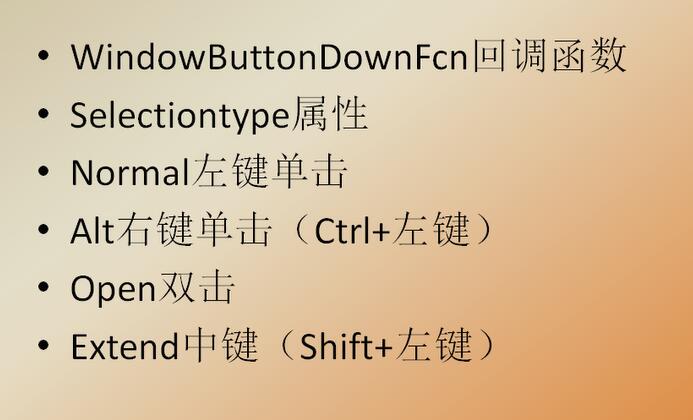
 if strcmp(get(gcf,'SelectionType'),'normal')

     ButtonDown = ;

     pos1 = get (handles.axes1,'CurrentPoint');

 end

 % Get default command line output from handles structure

 varargout{} = handles.output;

 % --- Executes on mouse motion over figure - except title and menu.

 function figure1_WindowButtonMotionFcn(hObject, eventdata, handles)

 % hObject    handle to figure1 (see GCBO)

 % eventdata  reserved - to be defined in a future version of MATLAB

 % handles    structure with handles and user data (see GUIDATA)

 global ButtonDown pos1

 if ButtonDown ==

     pos = get (handles.axes1,'CurrentPoint');

     line([pos1(,) pos(,)],[pos1(,) pos(,)],'LineWidth',);

     pos1=pos;

 end

 % --- Executes on key release with focus on figure1 or any of its controls.

 function figure1_WindowKeyReleaseFcn(hObject, eventdata, handles)

 % hObject    handle to figure1 (see GCBO)

 % eventdata  structure with the following fields (see MATLAB.UI.FIGURE)

 %    Key: name of the key that was released, in lower case

 %    Character: character interpretation of the key(s) that was released

 %    Modifier: name(s) of the modifier key(s) (i.e., control, shift) released

 % handles    structure with handles and user data (see GUIDATA)

 % --- Executes on mouse press over figure background, over a disabled or

 % --- inactive control, or over an axes background.

 function figure1_WindowButtonUpFcn(hObject, eventdata, handles)

 % hObject    handle to figure1 (see GCBO)

 % eventdata  reserved - to be defined in a future version of MATLAB

 % handles    structure with handles and user data (see GUIDATA)

 global ButtonDown

 ButtonDown =  ;
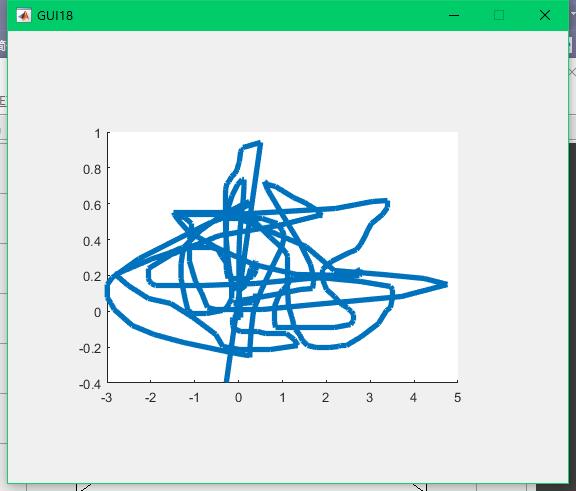
画线:
GUI相应鼠标事件的更多相关文章
- 7.JAVA之GUI编程鼠标事件
鼠标事件: 功能: 1.基本窗体功能实现 2.鼠标移动监听,当鼠标移动到按钮上时,触发打印事件. 3.按钮活动监听,当按钮活动时,触发打印事件. 4.按钮被单击时触发打印事件. 源码如下: impor ...
- [javaSE] GUI(鼠标事件)
调用Button对象的addMouseListener方法,参数:MouseListener对象,这个类是个接口,需要实现以下方法 mouseClicked mousePressed mouseRel ...
- 6.JAVA之GUI编程Action事件
功能:单击一个按钮实现关闭窗口: import java.awt.*; import java.awt.event.*; public class StudyAction { // 定义该图形所需的组 ...
- JAVA之旅(三十一)——JAVA的图形化界面,GUI布局,Frame,GUI事件监听机制,Action事件,鼠标事件
JAVA之旅(三十一)--JAVA的图形化界面,GUI布局,Frame,GUI事件监听机制,Action事件,鼠标事件 有段时间没有更新JAVA了,我们今天来说一下JAVA中的图形化界面,也就是GUI ...
- 十. 图形界面(GUI)设计13.鼠标事件
鼠标事件的事件源往往与容器相关,当鼠标进入容器.离开容器,或者在容器中单击鼠标.拖动鼠标时都会发生鼠标事件.java语言为处理鼠标事件提供两个接口:MouseListener,MouseMotionL ...
- Java GUI 鼠标事件
import java.awt.Button; import java.awt.FlowLayout; import java.awt.Frame; import java.awt.event.Mou ...
- Unity3D笔记十六 输入输出-键盘事件、鼠标事件
输入与控制操作Unity为开发者提供了Input类库,其中包括键盘事件.鼠标事件和触摸事件等一切跨平台所需要的控制事件. 一.键盘事件 1.按下事件 Input.GetKeyDown():如果按键被按 ...
- MATLAB鼠标事件
来源:https://blog.csdn.net/weixin_39090239/article/details/80586930 前记: 人机交互的方式--键盘开关.鼠标.触摸屏.体感传感器(Kin ...
- 5.JAVA之GUI编程窗体事件
我们回顾下第三篇时的内容: 在3.JAVA之GUI编程Frame窗口中窗体是无法直接关闭的,想要关闭须进程管理器结束进程方式关掉. 现在我们就来解决下这个问题. ******************* ...
随机推荐
- passwd 修改密码
[root@localhost ~]# passwd # 修改 root 用户的密码 [root@localhost ~]# passwd test # 修改指定用户的密码
- 前端 HTML body标签相关内容 常用标签 表单标签 form 表单控件分类
表单控件分类 input标签: input标签 type属性的text,password,button按钮,submit按钮 input标签placeholder属性 标签上显示内容 input标签 ...
- Python--共享变量
- 共享变量: 当多个线程同时访问一个变量的时候,会产生共享变量的问题 - 案例11 - 解决变量:锁.信号灯 - 锁(Lock): - 是一个标志,表示一个线程在占用一些资源 - 使用方法 - 上锁 ...
- one order 处理流程
- jenkins 新增用户和修改用户名密码
在某些条件下,jenkins是不允许注册用户的,这是,你可以采用如下的方式来新增用户,对于老的用户,忘记密码了,使用如下方式来重置密码. 1.系统管理-->管理用户 ----> 新建用户 ...
- python接口测试-充值
import requests import json import unittest import HTMLTestRunner telphone =18200717087 #参数化手机号码 ur1 ...
- HTML5特效收录-不定时更新
在工作中,我们可能会用到各种交互效果.而这些效果在平常翻看文章的时候碰到很多,但是一时半会又想不起来在哪,所以养成知识整理的习惯是很有必要的.希望能给大大家启发,并且学习. HTML5 Canvas粒 ...
- 关于Python veriable scope 的一点疑问
在写程序中遇到了类似于以下代码的问题: #不会报错 a=1 def f(): print(a) f() #会报错 a=1 def f(): a+=1 f()
- ECC
素数 prime,又称为质数,是指,除了1和它本身,没有其他因数的数. 素数的定理: 1)在一个大于1的数a和它的2倍之间必定存在至少一个素数: 素数的性质: 1)在所有的大于10的质数中,个位数,只 ...
- DX9 DirectX键盘控制程序 代码
// @time: 2012.3.26 // @author: jadeshu // des: DirectX键盘控制程序 #include <Windows.h> #include &l ...