
angular4 富文本编辑器
使用quill富文本编辑器实现,angular项目中用到了ngx-quill插件。
quill的GitHub地址:https://github.com/quilljs/quill
ngx-quill的GitHub地址:https://github.com/KillerCodeMonkey/ngx-quill
ngx-quill适用于版本号在2以及以上的angular。
具体操作如下:
1、ngx-quill的安装
angular >= 5时ngx-quill的安装
npm install ngx-quill
angular < 5时
npm install ngx-quill@1.6.0
2、quill的配置
引入(ngx-quill的)QuillModule :
import { QuillModule } from 'ngx-quill'
在你的NgModule中添加 QuillModule :
@NgModule({
imports: [
...,
QuillModule
],
...
})
在index.html中添加quill的样式 :
<link href="https://cdn.quilljs.com/1.0.0/quill.snow.css" rel="stylesheet">
3、使用
在页面使用标签<quill-editor></quill-editor>进行使用,效果如下:
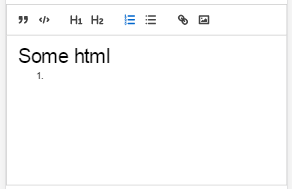
上图中的工具类是配置后的工具类,代码如下:
<quill-editor [modules]="config" [style]="{height: '200px'}" [(ngModel)]="data.content"></quill-editor>


config的内容如下:

{

  toolbar: [

    //['bold', 'italic', 'underline', 'strike'],        // toggled buttons

    ['blockquote', 'code-block'],

    [{ 'header': 1 }, { 'header': 2 }],               // custom button values

    [{ 'list': 'ordered'}, { 'list': 'bullet' }],

    //[{ 'script': 'sub'}, { 'script': 'super' }],      // superscript/subscript

    //[{ 'indent': '-1'}, { 'indent': '+1' }],          // outdent/indent

    //[{ 'direction': 'rtl' }],                         // text direction

    //[{ 'size': ['small', false, 'large', 'huge'] }],  // custom dropdown

    //[{ 'header': [1, 2, 3, 4, 5, 6, false] }],

    //[{ 'color': [] }, { 'background': [] }],          // dropdown with defaults from theme

    //[{ 'font': [] }],

    //[{ 'align': [] }],

    //['clean'],                                         // remove formatting button

    ['link', 'image', 'video']                         // link and image, video

  ]

};
-------------------------------------------------
2018-05-13 16:13:20
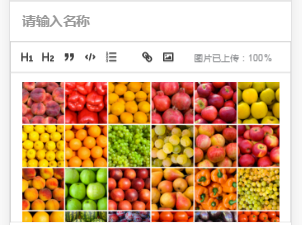
自定义工具栏
<quill-editor [style]="{height: '200px'}" [(ngModel)]="data.content" placeholder="在这里详细描述一个推荐原因,\n">

            <div quill-editor-toolbar>

              <span class="ql-formats">

                <button type="button" class="ql-header" value=""></button>

                <button type="button" class="ql-header" value=""></button>

                <button type="button" class="ql-blockquote"></button>

                <button type="button" class="ql-code-block ql-active"></button>

                <button type="button" class="ql-list" value="ordered"></button>

              </span>

              <span class="ql-formats">

                  <button type="button" class="ql-link"></button>

                  <button type="button" style="outline:none">

                    <div class="upload_img">

                        <svg class="camera" viewBox="0 0 18 18"> <rect class="ql-stroke" height="" width="" x="" y=""></rect> <circle class="ql-fill" cx="" cy="" r=""></circle> <polyline class="ql-even ql-fill" points="5 12 5 11 7 9 8 10 11 7 13 9 13 12 5 12"></polyline> </svg>

                        <input type="file" class="file_input" ng2FileSelect [uploader]="uploader2" />

                    </div>

                </button>

              </span>

              <span class="ql-formats">

                  <p style="font-size: 9px;" *ngIf="uploader2?.queue.length > 0">图片已上传:{{ uploader2?.queue.length >  ? uploader2?.queue[uploader2?.queue.length-]?.progress :  }}%</p>

              </span>

            </div>

          </quill-editor>
上传图片代码(使用了ng2-file-upload插件)
public uploader2: FileUploader;

this.uploader2 = new FileUploader({

      url: this.URL

      , method: "POST"

      , itemAlias: "upfile"

      , autoUpload: true

    });

    this.uploader2.onSuccessItem = function (item, response, status, headers) {

      if(status == ){

        let rsp = JSON.parse(response);

        let img = '<img class="camera" src="'+"http://您的域名"+  rsp.url+'" alt="">';

        that.data.content += img;

      }

    };
angular4 富文本编辑器的更多相关文章
- 富文本编辑器Simditor的简易使用
最近打算自己做一个博客系统,并不打算使用帝国cms或者wordpress之类的做后台管理!自己处于学习阶段也就想把从前台到后台一起谢了.好了,废话不多说了,先来看看富文本编辑器SimDitor,这里是 ...
- 个人网站对xss跨站脚本攻击(重点是富文本编辑器情况)和sql注入攻击的防范
昨天本博客受到了xss跨站脚本注入攻击,3分钟攻陷--其实攻击者进攻的手法很简单,没啥技术含量.只能感叹自己之前竟然完全没防范. 这是数据库里留下的一些记录.最后那人弄了一个无限循环弹出框的脚本,估计 ...
- UEditor百度富文本编辑器--让编辑器自适应宽度的解决方案
UEditor百度富文本编辑器的initialFrameWidth属性,默认值是1000. 不能够自适应屏幕宽度.如图1: 刚开始的时候,我是直接设置initialFrameWidth=null的.效 ...
- PHP Ueditor 富文本编辑器
2016年12月11日 08:46:59 星期日 百度的简版富文本编辑器umeditor很久没更新了 全功能版本的配置项跟umeditor还是有区别的, 这里说下ueditor怎么对接到项目中去, 主 ...
- JavaScript 富文本编辑器
WEB项目中使用UEditor(富文本编辑器) UEditor - 完整示例 http://ueditor.baidu.com/website/onlinedemo.html UEditor注意事项: ...
- MVC 使用 Ueditor富文本编辑器
一.Ueditor 1.下载Ueditor富文本编辑器 官方下载地址: http://ueditor.baidu.com/website/download.html 建议下载开发版,此处我下载的是 . ...
- 富文本编辑器kindeditor配置
<!--富文本编辑器kindeditor配置↓ --> <link type="text/css" rel="stylesheet" href ...
- web开发实战--弹出式富文本编辑器的实现思路和踩过的坑
前言: 和弟弟合作, 一起整了个智慧屋的小web站点, 里面包含了很多经典的智力和推理题. 其实该站点从技术层面来分析的话, 也算一个信息发布站点. 因此在该网站的后台运营中, 富文本的编辑器显得尤为 ...
- 富文本编辑器防止xss注入javascript版
富文本编辑器:ueditor 其实富文本编辑器已经有防止xss注入功能,但是你服务端程序在接收的时候在做一次转义,否则有可能然后前端验证直接提交数据导致被xss攻击. 为了节省后端程序开销则在前端 显 ...
随机推荐
- dp入门之01背包问题
...通过暴力手推得到的一点点感觉 动态规划是相对于贪心算法的一种取得最优解的算法,通过对每一步的取舍判断从 0 推到所拥有的第 n 件物品,每次判断可以列写出状态转移方程,通过记忆化相对暴力地取得最 ...
- 从Scratch到Python——Python生成二维码
# Python利用pyqrcode模块生成二维码 import pyqrcode import sys number = pyqrcode.create('从Scratch到Python--Pyth ...
- 关于python中loc和iloc方法
pandas以类似字典的方式来获取某一列的值 import pandas as pd import numpy as np table = pd.DataFrame(np.zeros((4,2)), ...
- springboot与Mybatis结合
一:使用generator,关联上数据库生成相关文件, 如 mapping/UserMapper.xml,mapper/UserMapper.java,model/User.java; generat ...
- 导航栏中各按钮在点击当前按钮变色其他按钮恢复为原有色的实现方法(vue、jq、原生js)
一.vue如何实现? 代码: <!DOCTYPE html> <html lang="en"> <head> <meta charset= ...
- mvc5之文件上传
在写这篇博客之前,被网上的博客坑了一个遍. 浪费了很多的时间 最后还是靠一位兄弟解决的问题,不得不说,虽然网上资源多.但是大多数都是水货.如果那些人可以解决你的问题,那我这里明显就没用了,除非你和我一 ...
- 【IDEA填坑】springboot整合ssm框架
遇到俩问题:一个是mybatis生疏 在EmpMapper.xml中定义resultMap <resultMap id="EmpWithDept" type="c ...
- springcloud-feign组件实现声明式的调用
11.使用feign实现声明式的调用 使用RestTemplate+ribbon已经可以完成对服务端负载均衡的调用,为什么还要使用feign? @RequestMapping("/hi&qu ...
- C#异步(下)
上篇主要分析了async\await之前的一些异步模式,今天说异步的主要是指C#5的async\await异步.在此为了方便的表述,我们称async\await之前的异步为“旧异步”,async\aw ...
- Tensorflow常用的函数:tf.cast
1.tf.cast(x,dtype,name) 此函数的目的是为了将x数据,准换为dtype所表示的类型,例如tf.float32,tf.bool,tf.uint8等 example: import ...