
HUE配置文件hue.ini 的hbase模块详解(图文详解)(分HA集群和非HA集群)
不多说,直接上干货!
我的集群机器情况是 bigdatamaster(192.168.80.10)、bigdataslave1(192.168.80.11)和bigdataslave2(192.168.80.12)
然后,安装目录是在/home/hadoop/app下。
官方建议在master机器上安装Hue,我这里也不例外。安装在bigdatamaster机器上。
Hue版本:hue-3.9.0-cdh5.5.4
 需要编译才能使用(联网)

 说给大家的话:大家电脑的配置好的话,一定要安装cloudera manager。毕竟是一家人的。
同时,我也亲身经历过,会有部分组件版本出现问题安装起来要个大半天时间去排除,做好心里准备。废话不多说,因为我目前读研,自己笔记本电脑最大8G,只能玩手动来练手。
纯粹是为了给身边没高配且条件有限的学生党看的! 但我已经在实验室机器群里搭建好cloudera manager 以及 ambari都有。
大数据领域两大最主流集群管理工具Ambari和Cloudera Manger
Cloudera安装搭建部署大数据集群(图文分五大步详解)(博主强烈推荐)
Ambari安装搭建部署大数据集群(图文分五大步详解)(博主强烈推荐)
https://www.cloudera.com/documentation/enterprise/latest/topics/cdh_ig_hue_config.html#concept_ezg_b2s_hl
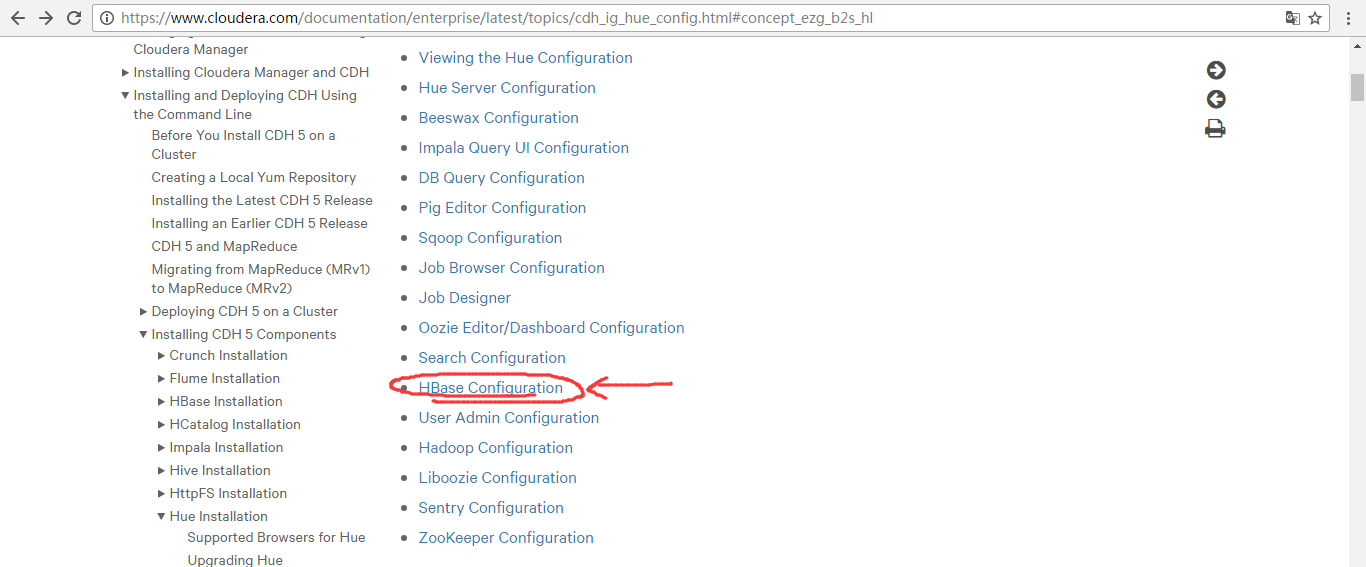
在hbase模块里,一定要重视这三步:

首先,来看看官网的参考步骤
一、以下是默认的配置文件
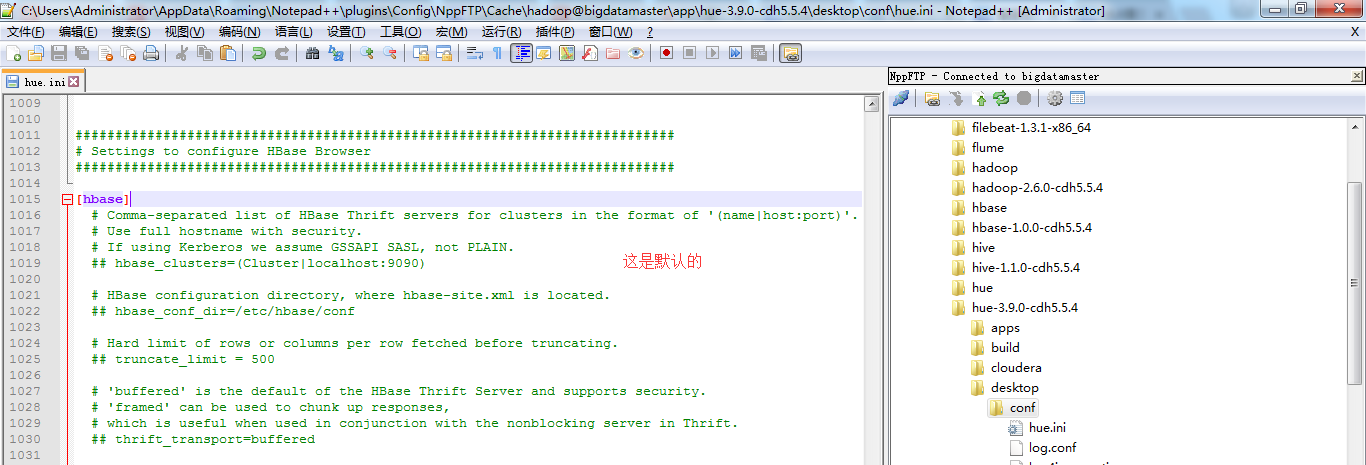
###########################################################################

# Settings to configure HBase Browser

###########################################################################

[hbase]

  # Comma-separated list of HBase Thrift servers for clusters in the format of '(name|host:port)'.

  # Use full hostname with security.

  # If using Kerberos we assume GSSAPI SASL, not PLAIN.

  ## hbase_clusters=(Cluster|localhost:)

  # HBase configuration directory, where hbase-site.xml is located.

  ## hbase_conf_dir=/etc/hbase/conf

  # Hard limit of rows or columns per row fetched before truncating.

  ## truncate_limit =

  # 'buffered' is the default of the HBase Thrift Server and supports security.

  # 'framed' can be used to chunk up responses,

  # which is useful when used in conjunction with the nonblocking server in Thrift.

  ## thrift_transport=buffered
二、以下是跟我机器集群匹配的配置文件(非HA集群下怎么配置Hue的hbase模块)
HBase配置文件修改,需要在hbase-site.xml中增加如下东西。
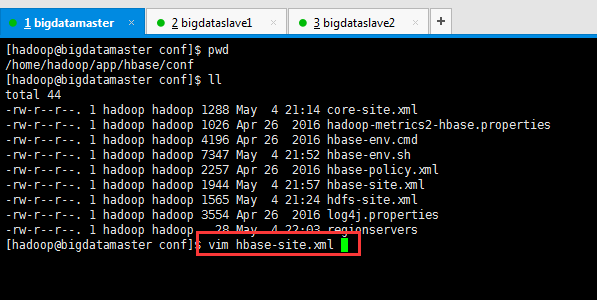
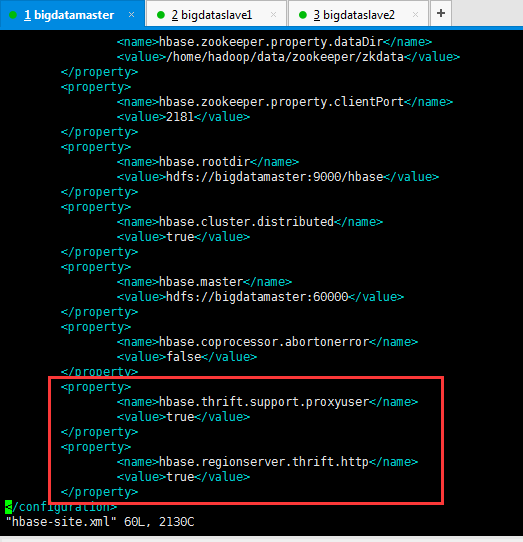
        <property>

                <name>hbase.thrift.support.proxyuser</name>

                <value>true</value>

        </property>

        <property>

                <name>hbase.regionserver.thrift.http</name>

                <value>true</value>

        </property>
这里bigdatamaster、bigdataslave1和bigdataslave2都操作。
同时,前提是这些机器,都要已经安装过hbase-thrift。
yum install hbase-thrift -y

这里bigdatamaster、bigdataslave1和bigdataslave2都操作。(有些资料说,是这样安装。其实,现在HBase里都可以自带集成好了,没必要这么安装了)
大家,学东西时,一定不要似懂非懂,明白个之所以然。
为什么要添加这些东西,因为HUE要访问HBase的thrift服务。
参见:http://gethue.com/hbase-browsing-with-doas-impersonation-and-kerberos/
这边的 (Cluster|bigdatamaster:9090) 里面的 Cluster并不是你的HDFS集群名字,只是一个显示在HUE界面上的文字,所以可以随便写,我这边保留 Cluster字样,后面的bigdatamaster:9090是thrift的访问地址,如果有多个用逗号分隔。如下:
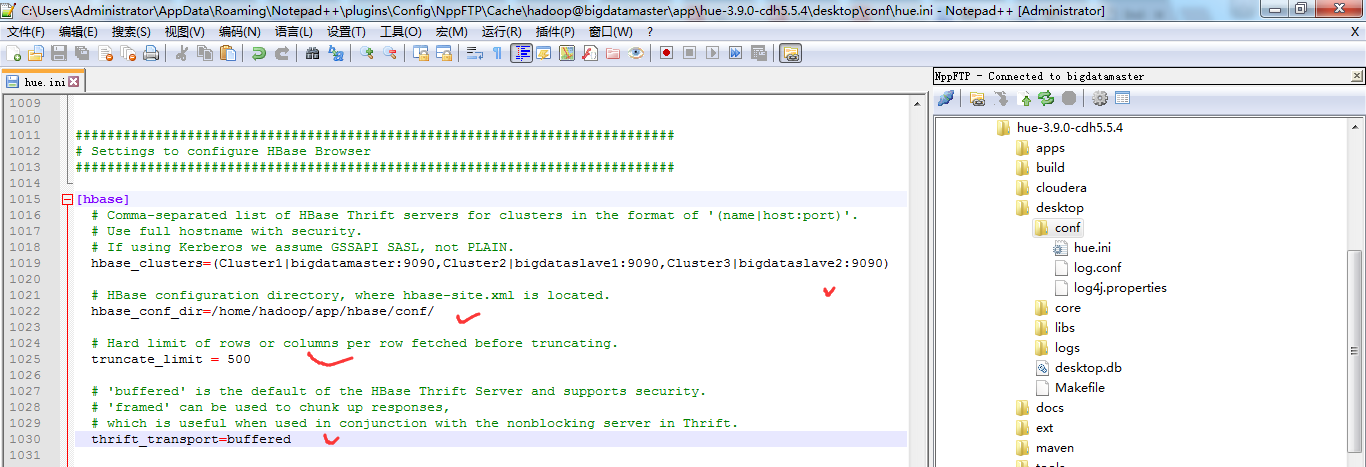
###########################################################################

# Settings to configure HBase Browser

###########################################################################

[hbase]

  # Comma-separated list of HBase Thrift servers for clusters in the format of '(name|host:port)'.

  # Use full hostname with security.

  # If using Kerberos we assume GSSAPI SASL, not PLAIN.

  hbase_clusters=(Cluster1|bigdatamaster:9090,Cluster2|bigdataslave1:9090,Cluster3|bigdataslave2:9090)

  # HBase configuration directory, where hbase-site.xml is located.

  hbase_conf_dir=/home/hadoop/app/hbase/conf/

  # Hard limit of rows or columns per row fetched before truncating.

  truncate_limit = 500

  # 'buffered' is the default of the HBase Thrift Server and supports security.

  # 'framed' can be used to chunk up responses,

  # which is useful when used in conjunction with the nonblocking server in Thrift.

  thrift_transport=buffered
或者
当然咯,大家也可以仅仅只在bigdatamaster上安装hbase-thrift,然后在Hue里配置时,如下即可。
HBase配置文件修改,需要在hbase-site.xml中增加如下东西。
        <property>

                <name>hbase.thrift.support.proxyuser</name>

                <value>true</value>

        </property>

        <property>

                <name>hbase.regionserver.thrift.http</name>

                <value>true</value>

        </property>
这里只在bigdatamaster操作。
同时,前提是只要这台机器,已经安装过hbase-thrift。
yum install hbase-thrift -y

这里仅仅bigdatamaster操作。(有些资料说,是这样安装。其实,现在HBase里都可以自带集成好了,没必要这么安装了)
修改【HUE_HOME/desktop/conf/】目录下的hue.ini文件中[hbase]中的配置
HUE 配置文件设置,找到hbase标签,配置如下
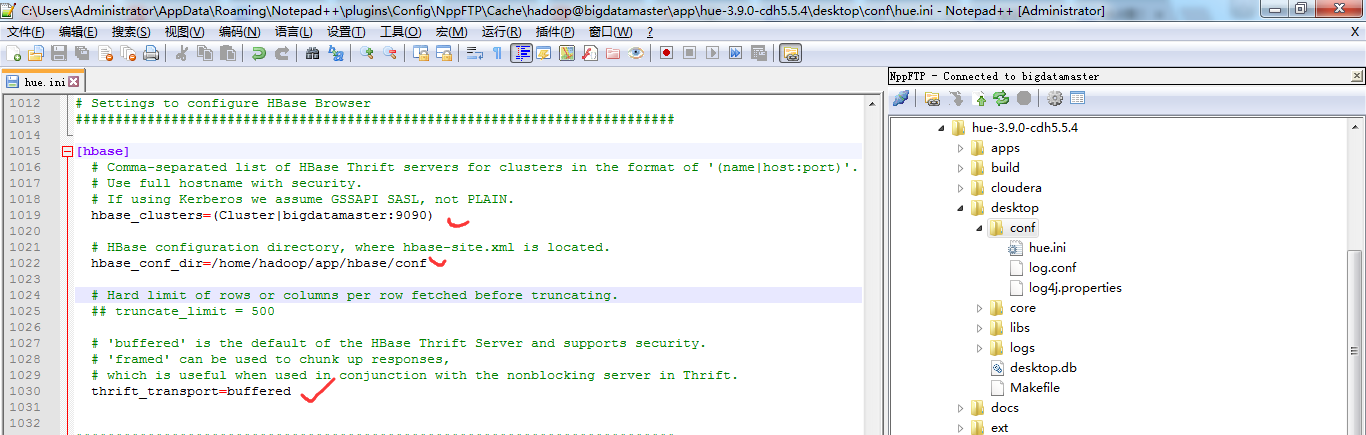
###########################################################################

# Settings to configure HBase Browser

###########################################################################

[hbase]

  # Comma-separated list of HBase Thrift servers for clusters in the format of '(name|host:port)'.

  # Use full hostname with security.

  # If using Kerberos we assume GSSAPI SASL, not PLAIN.

  hbase_clusters=(Cluster|bigdatamaster:)

  # HBase configuration directory, where hbase-site.xml is located.

  hbase_conf_dir=/home/hadoop/app/hbase/conf

  # Hard limit of rows or columns per row fetched before truncating.

  ## truncate_limit =

  # 'buffered' is the default of the HBase Thrift Server and supports security.

  # 'framed' can be used to chunk up responses,

  # which is useful when used in conjunction with the nonblocking server in Thrift.

  thrift_transport=buffered
注意:hbase_clusters参数值中的Cluster只是在Hue的界面中显示的集群名称而已,可以修改成自己需要的。
也就是说,一般保持默认Cluster。即我这里是,Cluster包括bigdatamaster、bigdataslave1和bigdataslave2。
而,我的hbase是安装在bigdatamaster、bigdataslave1和bigdataslave2上。
需要启动HBase的进程服务

[hadoop@bigdatamaster hbase]$ pwd

/home/hadoop/app/hbase

[hadoop@bigdatamaster hbase]$ bin/start-hbase.sh

starting master, logging to /home/hadoop/app/hbase/logs/hbase-hadoop-master-bigdatamaster.out

bigdataslave1: starting regionserver, logging to /home/hadoop/app/hbase/bin/../logs/hbase-hadoop-regionserver-bigdataslave1.out

bigdataslave2: starting regionserver, logging to /home/hadoop/app/hbase/bin/../logs/hbase-hadoop-regionserver-bigdataslave2.out

[hadoop@bigdatamaster hbase]$
只需bigdatamaster操作就好。
因为,是需要在hbase集群已经启动的基础上,再启动thrift,默认端口为9090。
还需要启动HBase的thrift服务
$HBASE_HOME/bin/hbase-daemon.sh start thrift

[hadoop@bigdatamaster hbase]$ pwd

/home/hadoop/app/hbase

[hadoop@bigdatamaster hbase]$ $HBASE_HOME/bin/hbase-daemon.sh start thrift

starting thrift, logging to /home/hadoop/app/hbase/logs/hbase-hadoop-thrift-bigdatamaster.out

[hadoop@bigdatamaster hbase]$
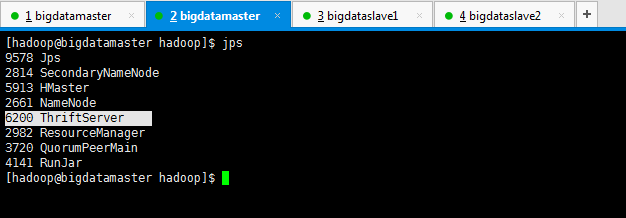
这个操作,bigdatamaster、bigdataslave1和bigdataslave2都操作。(如果只安装在bigdatamaster的话,就只需要启动这台即可。)
对于上述做个总结
一般在Hue里配置hbase模块,无论是我这篇博客,还是网上其他相当的博客都是只配置到此为止,可以把HBase配置成功了。
但是呢,我这里,带大家进一步从官网深入来配置。
https://www.cloudera.com/documentation/enterprise/latest/topics/cdh_ig_hue_config.html#concept_ezg_b2s_hl
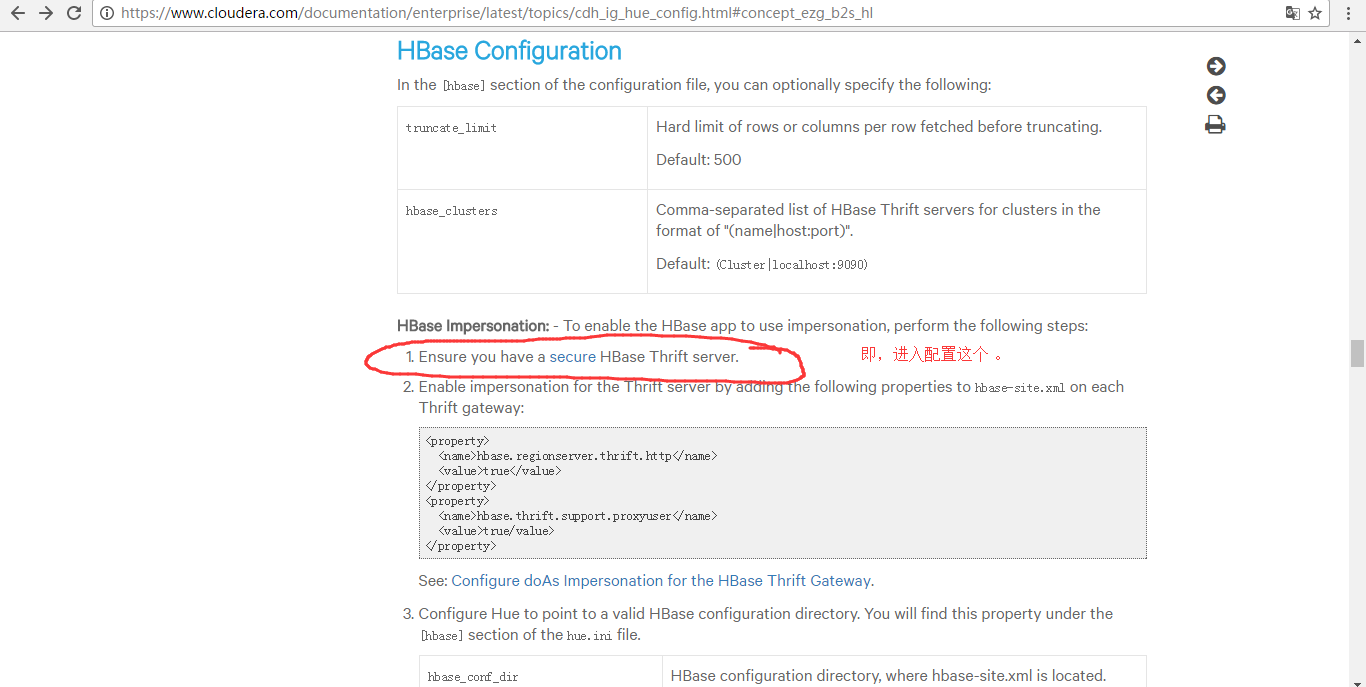
配置到hbase-site.xml里
<property>

    <name>hbase.security.authentication</name>

    <value>kerberos</value>

</property>

<property>

    <name>hbase.regionserver.kerberos.principal</name>

    <value>hbase/_HOST@HADOOP.COM</value>

</property>

<property>

    <name>hbase.regionserver.keytab.file</name>

    <value>/home/hadoop/app/hbase/conf/hbase.keytab</value>

</property>

<property>

    <name>hbase.master.kerberos.principal</name>

    <value>hbase/_HOST@HADOOP.COM</value>

</property>

<property>

    <name>hbase.master.keytab.file</name>

    <value>/home/hadoop/app/hbase/conf/hbase.keytab</value>

</property>
这一步,是有点难度,要开启kerberos。我这里暂时还没搞定这点。
http://www.tuicool.com/articles/YVbmIzm
因为,要牵扯到,Kerberos server的安装等,
https://yq.aliyun.com/articles/25542
三、以下是跟我机器集群匹配的配置文件(HA集群下怎么配置Hue的hbase模块)
跟非HA配置是一样的。
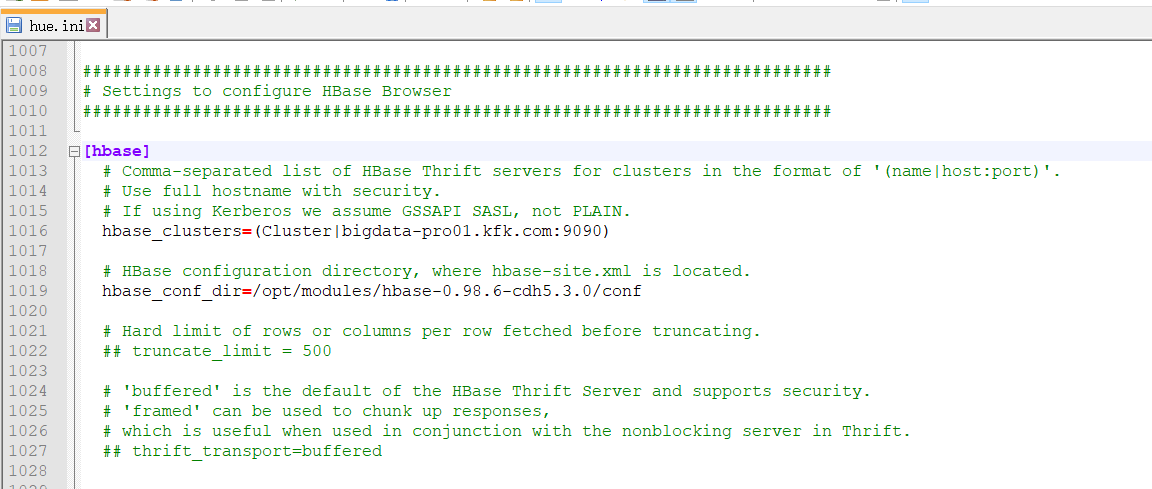
###########################################################################

# Settings to configure HBase Browser

###########################################################################

[hbase]

  # Comma-separated list of HBase Thrift servers for clusters in the format of '(name|host:port)'.

  # Use full hostname with security.

  # If using Kerberos we assume GSSAPI SASL, not PLAIN.

  hbase_clusters=(Cluster|bigdata-pro01.kfk.com:)

  # HBase configuration directory, where hbase-site.xml is located.

  hbase_conf_dir=/opt/modules/hbase-0.98.-cdh5.3.0/conf

  # Hard limit of rows or columns per row fetched before truncating.

  ## truncate_limit =

  # 'buffered' is the default of the HBase Thrift Server and supports security.

  # 'framed' can be used to chunk up responses,

  # which is useful when used in conjunction with the nonblocking server in Thrift.

  ## thrift_transport=buffered
然后,停掉hbase进程,再开启hbase进程。
因为,我的HBase是HA集群。
所以先在主节点1上,启动hbase

然后,再在主节点2上启动hbase
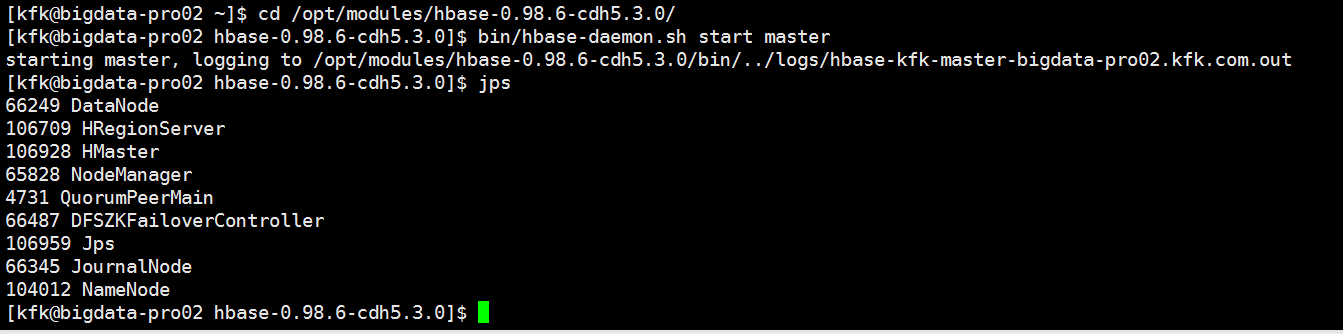
具体,启动,见
Apache版本的Hadoop HA集群启动详细步骤【包括Zookeeper、HDFS HA、YARN HA、HBase HA】(图文详解)
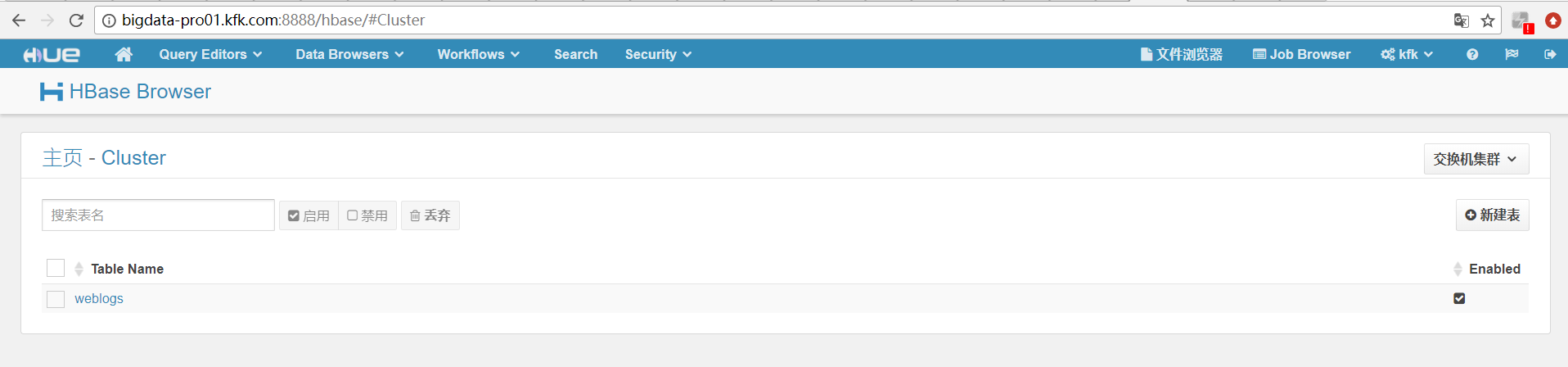
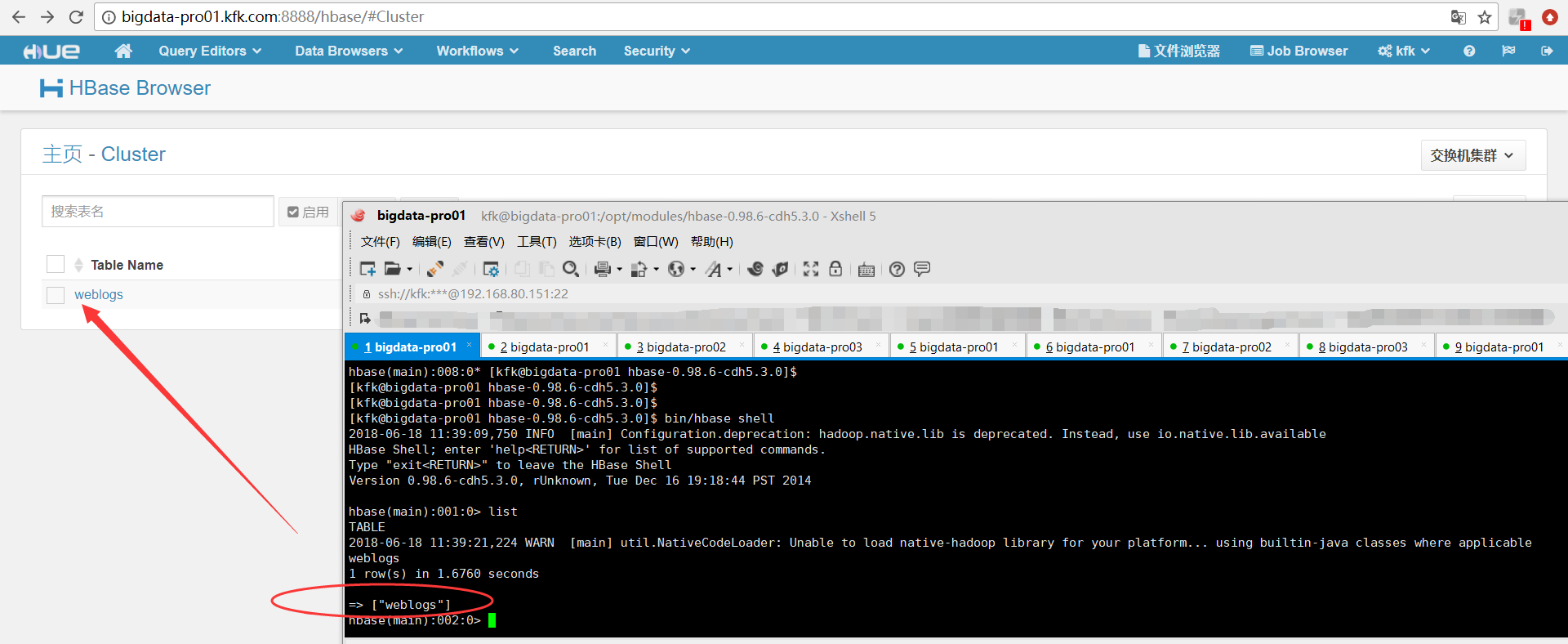
再开启hbase的thrift服务
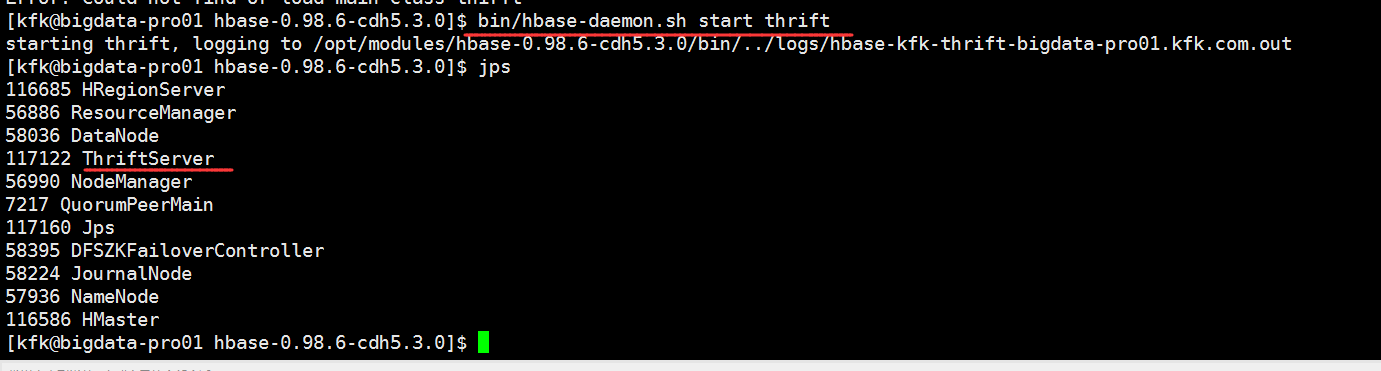
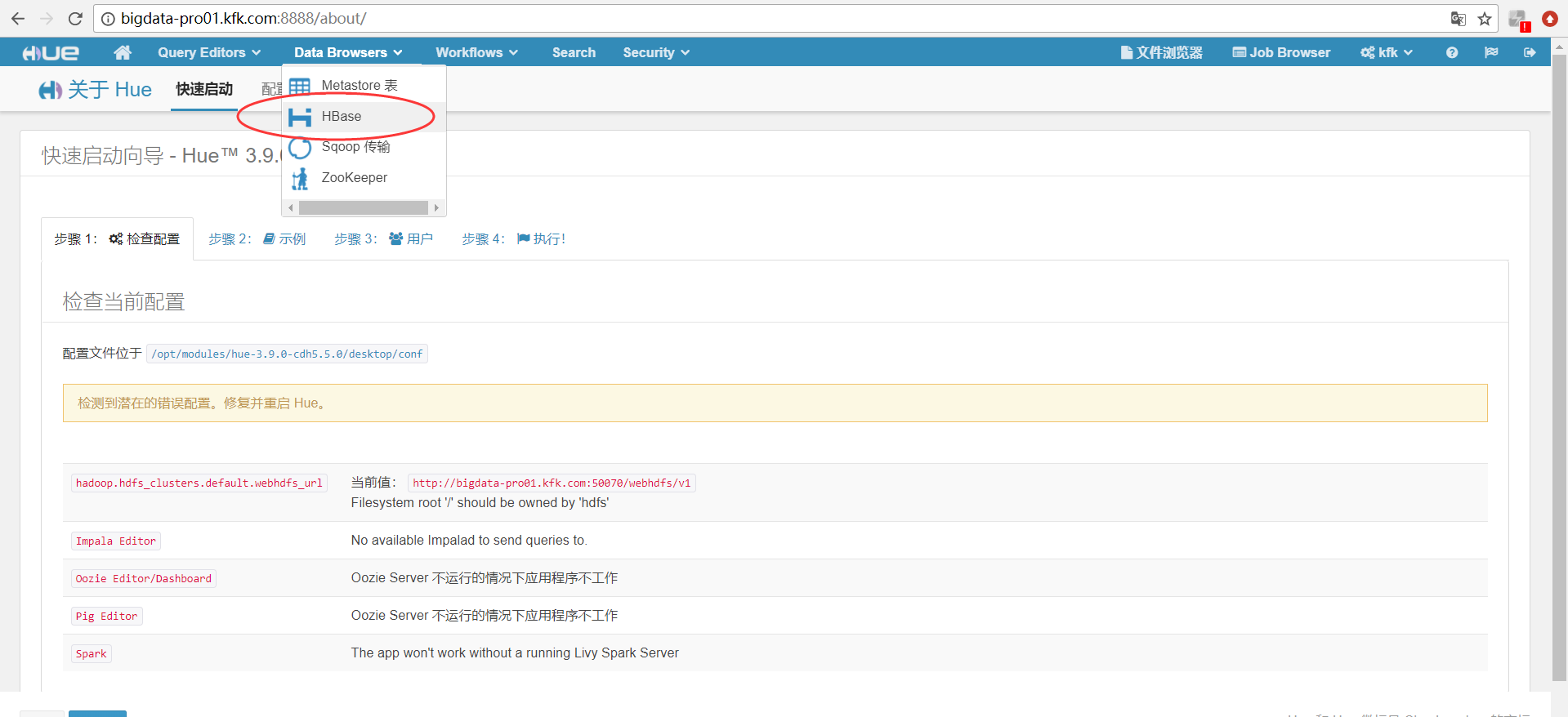
同时,大家可以关注我的个人博客:
http://www.cnblogs.com/zlslch/ 和 http://www.cnblogs.com/lchzls/ http://www.cnblogs.com/sunnyDream/
详情请见:http://www.cnblogs.com/zlslch/p/7473861.html
人生苦短,我愿分享。本公众号将秉持活到老学到老学习无休止的交流分享开源精神,汇聚于互联网和个人学习工作的精华干货知识,一切来于互联网,反馈回互联网。
目前研究领域:大数据、机器学习、深度学习、人工智能、数据挖掘、数据分析。 语言涉及:Java、Scala、Python、Shell、Linux等 。同时还涉及平常所使用的手机、电脑和互联网上的使用技巧、问题和实用软件。 只要你一直关注和呆在群里,每天必须有收获
对应本平台的讨论和答疑QQ群:大数据和人工智能躺过的坑(总群)(161156071)



HUE配置文件hue.ini 的hbase模块详解(图文详解)(分HA集群和非HA集群)的更多相关文章
- HUE配置文件hue.ini 的hdfs_clusters模块详解(图文详解)(分HA集群和非HA集群)
不多说,直接上干货! 我的集群机器情况是 bigdatamaster(192.168.80.10).bigdataslave1(192.168.80.11)和bigdataslave2(192.168 ...
- HUE配置文件hue.ini 的yarn_clusters模块详解(图文详解)(分HA集群和非HA集群)
不多说,直接上干货! 我的集群机器情况是 bigdatamaster(192.168.80.10).bigdataslave1(192.168.80.11)和bigdataslave2(192.168 ...
- HUE配置文件hue.ini 的Spark模块详解(图文详解)(分HA集群和HA集群)
不多说,直接上干货! 我的集群机器情况是 bigdatamaster(192.168.80.10).bigdataslave1(192.168.80.11)和bigdataslave2(192.168 ...
- HUE配置文件hue.ini 的impala模块详解(图文详解)(分HA集群)
不多说,直接上干货! 我的集群机器情况是 bigdatamaster(192.168.80.10).bigdataslave1(192.168.80.11)和bigdataslave2(192.168 ...
- HUE配置文件hue.ini 的filebrowser模块详解(图文详解)(分HA集群和非HA集群)
不多说,直接上干货! 我的集群机器情况是 bigdatamaster(192.168.80.10).bigdataslave1(192.168.80.11)和bigdataslave2(192.168 ...
- HUE配置文件hue.ini 的hive和beeswax模块详解(图文详解)(分HA集群和非HA集群)
不多说,直接上干货! 我的集群机器情况是 bigdatamaster(192.168.80.10).bigdataslave1(192.168.80.11)和bigdataslave2(192.168 ...
- HUE配置文件hue.ini 的database模块详解(包含qlite、mysql、 psql、和oracle)(图文详解)(分HA集群和非HA集群)
不多说,直接上干货! Hue配置文件里,提及到,提供有postgresql_psycopg2, mysql, sqlite3 or oracle. 注意:Hue本身用到的是sqlite3. 在哪里呢, ...
- HUE配置文件hue.ini 的zookeeper模块详解(图文详解)(分HA集群)
不多说,直接上干货! 我的集群机器情况是 bigdatamaster(192.168.80.10).bigdataslave1(192.168.80.11)和bigdataslave2(192.168 ...
- HUE配置文件hue.ini 的pig模块详解(图文详解)(分HA集群和非HA集群)
不多说,直接上干货! 一.默认的pig配置文件 ########################################################################### ...
随机推荐
- hdu 5003 模拟水题
http://acm.hdu.edu.cn/showproblem.php?pid=5003 记得排序后输出 #include <cstdio> #include <cstring& ...
- 一个简单 Go Web MVC 框架实现思路
需要的知识点 为了防止你的心里不适,需要以下知识点: Go 基本知识 Go 反射的深入理解 使用过框架 Go Web 服务器搭建 package main import ( "fmt&quo ...
- 简便方法搞定第三方SDK的Jar包在DelphiXE5中的引入
简便方法搞定第三方SDK的Jar包在DelphiXE5中的引入 (2014-02-21 17:30:17) 转载▼ 标签: android delphi xe5 jar sdk 分类: 编程杂集 折腾 ...
- 动态类型和匿名类型在asp.net webapi中的应用
1. 动态类型用于webapi调用 假设需要调用一个webapi,webapi返回了一个json字符串.字符串如下: {"ProductId":"AN002501&qu ...
- 在Azure DevOps Server (TFS) 中修改团队项目名称
概述 [团队项目]: 在Azure DevOps Server (原名TFS)中,团队项目(Team Project)是一个最基本的数据组织容器,包含了一个团队或者信息系统中的所有信息,包括源代码.文 ...
- cmd命令使用笔记
使用资源管理器打开当前路径 explorer %cd%
- Net Core SignalR 测试,可以用于unity、Layair、白鹭引擎、大数据分析平台等高可用消息实时通信器。
SignalR介绍 SignalR介绍来源于微软文档,不过多解释.https://docs.microsoft.com/zh-cn/aspnet/core/signalr/introduction?v ...
- C# GDI绘制仪表盘(纯代码实现)
纯代码实现GDI绘制仪表盘,效果在代码下面. public partial class HalfDashboardUc : UserControl { /// <summary> /// ...
- AI贪吃蛇前瞻——基于Dijkstra算法的最短路径问题
在贪吃蛇流程结构优化之后,我又不满足于亲自操刀控制这条蠢蠢的蛇,干脆就让它升级成AI,我来看程序自己玩,哈哈. 一.Dijkstra算法原理 作为一种广为人知的单源最短路径算法,Dijkstra用于求 ...
- github本地分支合并到线上主分支
如果是在本地index-swiper分支上,已经写好了那么: 1,git add . //提交到本地缓冲区 2,git commit -m "project init ...