
WPF中自动增加行(动画)的TextBox
WPF中自动增加行(动画)的TextBox
WPF中的Textbox控件是可以自动换行的,只要设置TextWrapping属性为”Wrap”即可,但是存在一个问题:Textbox的高度是固定的,当输入文本过多时就会出现如下情况。

Textbox虽然没有自动增加高度的属性,但是我们可以通过设置来实现这一个功能。相关xaml代码如下
 <Grid VerticalAlignment="Top" HorizontalAlignment="Left" Width="36" Height="100">

     <TextBox x:Name="textBox" TextWrapping="Wrap" VerticalAlignment="Top" />

 </Grid>
效果如下
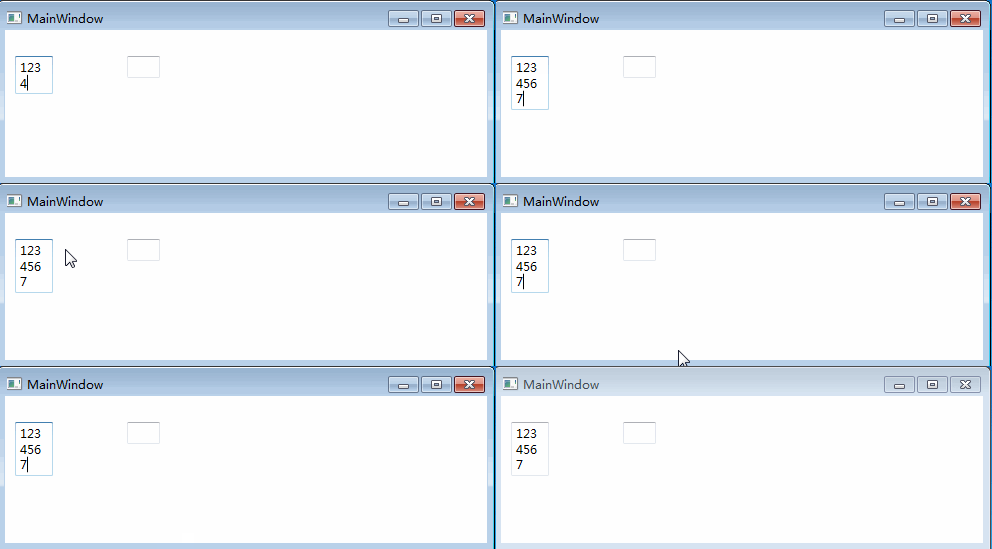
这里需要注意的是
- 如果设置了textBox的Width、Height或者Margin属性,那么此textBox的大小就已经限制死了,不会自动增加,会出现上图中的情况。
- 如果想设置textBox的大小和位置,需要把textBox放在一个Grid中,通过Grid的属性来控制textBox(上文中xaml文件中的方法)
其实到此为止所需要的功能已经实现了,但是为了让让textbox更美观,我加了一个动画
效果如下:

表面上看是一个textbox,其实是一个Grid加上2个textBox(一个显示,一个隐藏),xaml代码如下
<Grid>

    <TextBox x:Name="txtVisible" TextWrapping="Wrap"/>

    <TextBox x:Name="txtHidden" TextWrapping="Wrap" Visibility="Hidden" VerticalAlignment="Top"/>

</Grid>
Grid是用来控制textbox的大小的,两个textbox中,显示的那个用于输入文字,隐藏的用于触发动画。原理如下
在txtVisible中输入文字的同时,txtVisible把text传递给txtHidden,当txtHidden中的内容已经满一行时,会触发SizeChange事件,这个事件再触发txtVisible高度变化动画。代码如下
public partial class txt : UserControl

{

    private HeightAnimation anim;

    private double _animationDuration;

    public txt()

    {

        InitializeComponent();

        // Initialize the animation

        anim = new HeightAnimation(this);

        AnimationDuration = 500; //default value

        // Add the handlers to the required events

        txtHidden.SizeChanged += TxtHidden_SizeChanged;

        txtVisible.TextChanged += TxtVisible_TextChanged;

    }

    /// <summary>

    /// Gets or sets a value indicating whether the control is animated on loaded.

    /// </summary>

    public bool AnimateOnLoaded { get; set; } = false;

    /// <summary>

    /// Gets or sets a value indicating whether the control is animated.

    /// </summary>

    public bool IsAnimated { get; set; } = true;

    /// <summary>

    /// Gets or sets the duration of the animation.

    /// </summary>

    public double AnimationDuration

    {

        get { return _animationDuration; }

        set

        {

            _animationDuration = value;

            anim.Duration = new Duration(TimeSpan.FromMilliseconds(value));

        }

    }

    /// <summary>

    /// Gets or sets the text contents of the AnimatedTextBox.

    /// </summary>

    public string Text

    {

        get { return txtHidden.Text; }

        set

        {

            txtHidden.Text = value;

            txtVisible.Text = value;

        }

    }

    private void TxtVisible_TextChanged(object sender, TextChangedEventArgs e)

    {

        // When the user's writing in txtVisible, we copy the text to txtHidden

        txtHidden.Text = txtVisible.Text;

    }

    private void TxtHidden_SizeChanged(object sender, SizeChangedEventArgs e)

    {

        OnHeightChanged(e.PreviousSize.Height, e.NewSize.Height);

    }

    /// <summary>

    /// To execute when the txtHidden's Height has changed.

    /// </summary>

    private void OnHeightChanged(double previousHeight, double newHeight)

    {

        //Animation type, increase txtVisible's height or decrease

        anim.ChangeType = (newHeight > previousHeight) ? HeightAnimation.ChangeTypes.Increased : HeightAnimation.ChangeTypes.Decreased;

        // Animate the Height from the txtHidden's previousHeight to its newHeight

        anim.From = previousHeight;

        anim.To = newHeight;

        // Start the animation

        anim.BeginAnimation();

    }

    /// <summary>

    /// Manages the AnimatedTextBox Height's animation.

    /// </summary>

    private class HeightAnimation

    {

        private Storyboard sb;

        private DoubleAnimation anim;

        private double _from;

        private double _to;

        private Duration _duration;

        private FrameworkElement _fe;

        private ChangeTypes _changeType;

        /// <summary>

        /// The possible types of the Height change.

        /// </summary>

        public enum ChangeTypes

        {

            Increased,

            Decreased

        }

        /// <summary>

        /// Constructor of the class.

        /// </summary>

        public HeightAnimation(FrameworkElement fe)

        {

            // Set the FrameworkElement which manages the animation

            _fe = fe;

            // Initialize the Storyboard

            sb = new Storyboard();

            sb.AutoReverse = false;

            // Initialize the animation

            anim = new DoubleAnimation();

            anim.Name = "anim";

            // Set the EasingFunction on a new instance of CubicEase whose EasingMode is EaseInOut

            anim.EasingFunction = new CubicEase() { EasingMode = EasingMode.EaseInOut };

            // Bind the Animation with the txtVisible TextBox

            Storyboard.SetTargetName(anim, "txtVisible");

            // Add the animation to the Storyboard's children

            sb.Children.Add(anim);

        }

        /// <summary>

        /// Gets or sets the type of the Height change.

        /// </summary>

        public ChangeTypes ChangeType

        {

            get { return _changeType; }

            set

            {

                _changeType = value;

                /* If the Height has inreased, set the target property to MaxHeight, else to MinHeight

                 * (instead of animating directly the Height, we animate MaxHeight/MinHeight to prevent the AnimatedTextBox

                 * from growing/shrinking suddenly) */

                Storyboard.SetTargetProperty(anim, new PropertyPath(string.Format("(TextBox.{0})", (value == ChangeTypes.Increased) ? "MaxHeight" : "MinHeight")));

            }

        }

        /// <summary>

        /// Gets or sets the animation's starting Height.

        /// </summary>

        public double From

        {

            get { return _from; }

            set

            {

                _from = value;

                anim.From = value;

            }

        }

        /// <summary>

        /// Gets or sets the animation's ending Height.

        /// </summary>

        public double To

        {

            get { return _to; }

            set

            {

                _to = value;

                anim.To = value;

            }

        }

        /// <summary>

        /// Gets or sets the animation's duration.

        /// </summary>

        public Duration Duration

        {

            get { return _duration; }

            set

            {

                _duration = value;

                anim.Duration = value;

            }

        }

        /// <summary>

        /// Begins the animation.

        /// </summary>

        public void BeginAnimation()

        {

            _fe.BeginStoryboard(sb);

        }

    }

}
WPF中自动增加行(动画)的TextBox的更多相关文章
- JQuery实现表格自动增加行,对新行添加事件
实现功能: 通常在编辑表格时表格的行数是不确定的,如果一次增加太多行可能导致页面内容太多,反应变慢:通过此程序实现表格动态增加行,一直保持最下面有多个空白行. 效果: 一:原始页面 二:表1增加新行并 ...
- WPF中的简单水动画
原文 https://stuff.seans.com/2008/08/21/simple-water-animation-in-wpf/ 很多年前(80年代中期),我在一家拥有Silicon Grap ...
- wpf 中 Ellipse 对象对动画性能的影响
vs2019 .NetFramework 4.8 win10-64 1909 接手一个wpf项目,某窗口中包含大量的 Shape 对象(线,矩形,圆形等). 这些内容要匀速的向左平移,类似于游戏&qu ...
- datagridview自动增加行高度和显示全部内容
this.dataGridView1.AutoSizeRowsMode = DataGridViewAutoSizeRowsMode.AllCellsExceptHeaders; //自动调动dat ...
- 关于datagridview自动增加行高度和显示全部内容的设置
this.dataGridView1.AutoSizeRowsMode = DataGridViewAutoSizeRowsMode.AllCellsExceptHeaders; //自动调动dat ...
- C# datagridview、datagrid、GridControl增加行号
01 - WinForm中datagridview增加行号 在界面上拖一个控件dataGridView1,在datagridview添加行事件中添加如下代码: private void dataGri ...
- WPF中TextBox文件拖放问题
在WPF中,当我们尝试向TextBox中拖放文件,从而获取其路径时,往往无法成功(拖放文字可以成功).造成这种原因关键是WPF的TextBox对拖放事件处理机制的不同,具体可参考这篇文章Textbox ...
- 解决WPF中TextBox文件拖放问题
在WPF中,当我们尝试向TextBox中拖放文件,从而获取其路径时,往往无法成功(拖放文字可以成功).造成这种原因关键是WPF的TextBox对拖放事件处理机制的不同,具体可参考这篇文章Textbox ...
- 示例:WPF中自定义StoryBoarService在代码中封装StoryBoard、Animation用于简化动画编写
原文:示例:WPF中自定义StoryBoarService在代码中封装StoryBoard.Animation用于简化动画编写 一.目的:通过对StoryBoard和Animation的封装来简化动画 ...
随机推荐
- 数据类型的提升(promotion)
假如参与运算的数据类型不同或者取值范围过小,编译器会自动将其转换为相同的类型,这个类型就叫数据类型的提升(promotion). 1. C++ 语言环境的规定 unsigned char a = 17 ...
- 82.管道实现cgi内存多线程查询
总体思路就是客户端写入要查询的数据到管道中,服务器端从管道读取,然后写入随机文件,再把文件名写入管道,然后客户端再读取文件 服务器端 设置缓冲区大写,设置管道名字,以及标识有多少个线程等 //设置缓存 ...
- 移动开发js库Zepto.js使用中的一些注意点
来自http://chaoskeh.com/blog/some-experience-of-using-zepto.html的参考. 前段时间完成了公司一个产品的 HTML5 触屏版,开发中使用了 Z ...
- python内存增长问题
如果你的程序没有调用什么特殊的库, 只是用了很平常的库, 而且使再循环很多的情况下, 那么建议你把循环里的程序拆出来,写成一子函数,循环子函数. 如下面格式: for (循环) 子函数 这样程序每 ...
- 无法解决 React 启动的报错
E:\React\react_blank>npm start > react_blank@0.1.0 start E:\React\react_blank > react-scrip ...
- 页面事件(Init,Load,PreRender)执行顺序
简介 对由 Microsoft® Internet 信息服务 (IIS) 处理的 Microsoft® ASP.NET 页面的每个请求都会被移交到 ASP.NET HTTP 管道.HTTP 管道由一系 ...
- jquery的滚动事件
$(selector).scroll(function);当滚动到合适的条件下,就触发某个函数. 现在基本就是前端利用AJAX对数据进行拼接操作,渲染进html的DOM结构中.
- Day2:数据运算
一.算数运算 如: #!/usr/bin/env python # -*- coding:utf-8 -*- # Author:Hiuhung Wan print(10%2) #求模(取模) # 0 ...
- Android JavaMail介绍及发送一封简单邮件
本文来自:高爽|Coder,原文地址:http://blog.csdn.net/ghsau/article/details/17839983,转载请注明. JavaMail是SUN提供给开 ...
- 开发板 视频04_05 ubuntu的联网及基本设置
4g内存 如果电脑有两g,只能给1.5g 处理器可以根据实际选 usb3.0 或者 2.0 联网模式:: 桥接模式 启动式连接,,,,网是不固定的 仅主机模式,主机和虚拟机在一个网络 第三种联网,自定 ...